Zavedení
Děkuji za nákupasing the OontZ Angle 3 Ultra Portable Bluetooth Speaker by Cambridge Soundworks. This manual provides essential information for setting up, operating, maintaining, and troubleshooting your speaker. Designed for superior sound quality and durability, the OontZ Angle 3 Ultra features a 14-watt output, rich bass, IPX7 waterproofing, and an impressive 30-meter Bluetooth range. Enjoy up to 20 hours of playtime on a single charge.

Image: The OontZ Angle 3 Ultra Portable Bluetooth Speaker, showcasing its sleek black, triangular design with control buttons on one end.
Nastavení
1. Zahrnuté položky
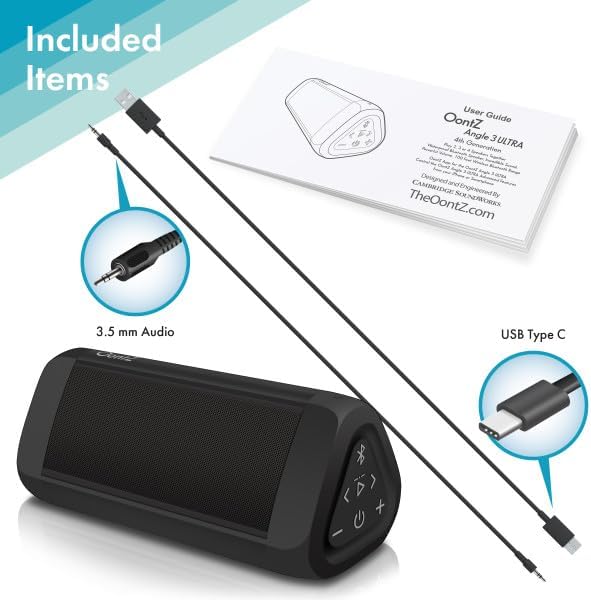
Image: The OontZ Angle 3 Ultra speaker along with its accessories: a Quick Start Guide, a 3.5mm audio cable, and a USB Type-C charging cable.
Před prvním použitím se ujistěte, že jsou přítomny všechny součásti:
- OontZ Angle 3 Ultra Bluetooth Speaker
- Quick Start Guide (Full manual available online)
- 3.5mm audio kabel
- Nabíjecí kabel USB typu C.
2. Nabíjení reproduktoru
The speaker comes with a built-in rechargeable Lithium-ion battery. For optimal performance, fully charge the speaker before first use.
- Locate the charging port on the side of the speaker, protected by a rubber flap.
- Připojte dodaný nabíjecí kabel USB typu C k nabíjecímu portu reproduktoru.
- Connect the other end of the USB cable to a USB wall charger (not included) or a computer USB port.
- The charging indicator light will illuminate. A full charge takes approximately 20 hours for the first charge, and subsequent charges will be faster.

Obrázek: Detailní záběr view of the speaker's side, showing the 3.5mm AUX input and the USB-C charging port, typically protected by a waterproof flap.
3. Párování Bluetooth
Pair your OontZ Angle 3 Ultra with your Bluetooth-enabled device (smartphone, tablet, laptop).
- Zapněte reproduktor stisknutím a podržením tlačítka napájení (⏻) until the indicator light flashes blue.
- V zařízení přejděte do nastavení Bluetooth a ujistěte se, že je Bluetooth povoleno.
- Look for "OontZ Angle 3 Ultra" in the list of available devices and select it.
- Once paired, the speaker will emit a confirmation tone, and the indicator light will turn solid blue.
4. Připojení přes AUX vstup
You can connect non-Bluetooth devices using the 3.5mm audio cable.
- Connect one end of the 3.5mm audio cable to the AUX IN port on the speaker.
- Druhý konec připojte ke konektoru pro sluchátka nebo audio výstupu vašeho zařízení.
- Reproduktor se automaticky přepne do režimu AUX.
5. Pairing Two Speakers for Stereo Sound (OontZ Dual Wireless Stereo)
Enhance your audio experience by wirelessly connecting two OontZ Angle 3 Ultra speakers for impressive stereo separation.

Image: Two OontZ Angle 3 Ultra speakers positioned to provide stereo sound, with two individuals enjoying music in an outdoor setting.
- Ensure both OontZ Angle 3 Ultra speakers are charged and powered on.
- Odpojte oba reproduktory od všech dříve spárovaných zařízení Bluetooth.
- On one speaker (this will be the Left Channel), press and hold the Bluetooth button (Ⓑ) po dobu 3 sekund, dokud neuslyšíte tón.
- On the second speaker (this will be the Right Channel), press and hold the Bluetooth button (Ⓑ) po dobu 3 sekund, dokud neuslyšíte tón.
- The speakers will automatically connect to each other. Once connected, you will hear a confirmation tone, and the indicator lights on both speakers will turn solid blue.
- Now, connect your audio device to the Left Channel speaker via Bluetooth as described in "Bluetooth Pairing" above.
- For video audio, connect your device or TV to the Left Channel speaker using the 3.5mm audio cable.
Návod k obsluze
1. Ovládací prvky Overview
| Tlačítko/Indikátor | Funkce |
|---|---|
| ⏻ (Moc) | Stisknutím a podržením zapnete/vypnete napájení. |
| + (Zvýšit hlasitost) | Stisknutím zvýšíte hlasitost. |
| - (Snížit hlasitost) | Stisknutím snížíte hlasitost. |
| ▷ (Přehrát/Pozastavit) | Stiskněte pro přehrávání/pozastavení hudby. |
| < (Previous Track) | Stisknutím přejdete na předchozí skladbu. |
| > (Next Track) | Stisknutím přejdete na další skladbu. |
| Ⓑ (Bluetooth) | Press to disconnect current Bluetooth device and enter pairing mode. Press and hold for 3 seconds to initiate OontZ Dual Wireless Stereo pairing. |
| Kontrolka | Flashes blue for pairing, solid blue for connected, red for charging. |
2. Hands-free volání
The OontZ Angle 3 Ultra has a built-in microphone for hands-free calls.
- When a call comes in, the music will pause. Press the ▷ tlačítko pro přijetí hovoru.
- Chcete-li hovor ukončit, stiskněte tlačítko ▷ znovu tlačítko.
- Chcete-li hovor odmítnout, stiskněte a podržte ikonu ▷ tlačítko na 2 sekund.
- To activate Siri or Google Assistant, press and hold the ▷ button for 2 seconds when not on a call.
3. Waterproof Features (IPX7)
The OontZ Angle 3 Ultra is IPX7 certified, meaning it is fully waterproof and can be immersed in water up to 1 meter (3.3 feet) for up to 30 minutes.
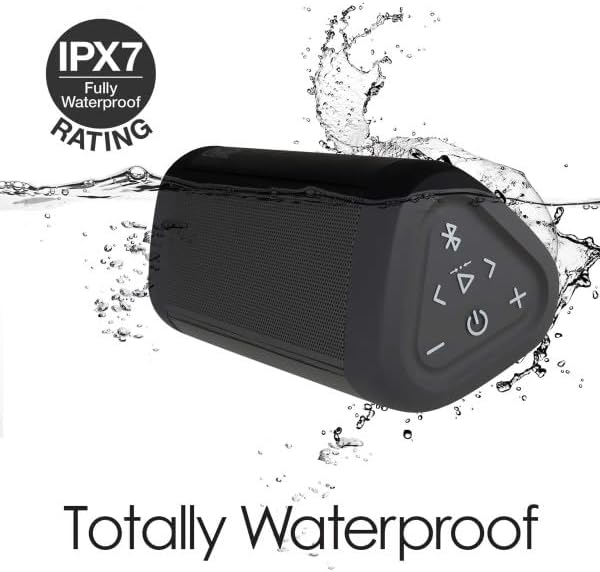
Image: The OontZ Angle 3 Ultra speaker shown partially submerged in water, illustrating its IPX7 waterproof capability.
- Ensure the rubber flap covering the charging and AUX ports is securely closed before exposing the speaker to water.
- Ideal for use by the pool, at the beach, or in the shower.
- Do not expose to salt water or chemicals. Rinse with fresh water after exposure to chlorinated water.
Údržba
1. Čištění
K čištění reproduktoru použijte měkký,amp tkanina. Nepoužívejte abrazivní čisticí prostředky nebo rozpouštědla.
2. Skladování
Reproduktor skladujte na chladném a suchém místě mimo dosah přímého slunečního záření a extrémních teplot.
3. Péče o baterie
Chcete -li prodloužit životnost baterie:
- Vyhněte se častému úplnému vybíjení baterie.
- Reproduktor pravidelně nabíjejte, i když jej nepoužíváte, aby se zachovala jeho životnost.
- Nevystavujte reproduktor teplotám nad 60 °C (140 °F).
Odstraňování problémů
| Problém | Řešení |
|---|---|
| Reproduktor se nezapne. | Ujistěte se, že je baterie nabitá. Připojte reproduktor ke zdroji napájení pomocí kabelu USB-C. |
| Žádný zvuk nebo nízká hlasitost. | Check the volume level on both the speaker and your connected device. Ensure the speaker is properly paired via Bluetooth or connected via AUX. |
| Nelze spárovat přes Bluetooth. | Ensure the speaker is in pairing mode (flashing blue light). Turn off and on Bluetooth on your device. Move the speaker closer to your device. Disconnect from other Bluetooth devices. |
| Zkreslení zvuku při vysoké hlasitosti. | Reduce the volume on the speaker or your connected device. Ensure the audio source is not distorted. |
| OontZ Dual Wireless Stereo not connecting. | Ensure both speakers are disconnected from other Bluetooth devices. Follow the pairing steps carefully, ensuring both speakers are in pairing mode for stereo connection. |
Specifikace
Key technical specifications for the OontZ Angle 3 Ultra Portable Bluetooth Speaker:
- Číslo modelu: SWOA3UBLK
- Rozměry (D x Š x V): 16.26 x 7.11 x 7.11 cm (6.4 x 2.8 x 2.8 palce)
- Hmotnost: 480 gramů (1.06 lb)
- Výstupní výkon reproduktoru: 14 wattů
- Verze Bluetooth: 4.2
- Bezdrátový dosah: Up to 30 meters (100 feet) unobstructed
- Životnost baterie: Až 20 hodin (při 2/3 hlasitosti)
- Hodnocení voděodolnosti: IPX7 (ponořitelný do hloubky 1 metru po dobu 30 minut)
- Konektivita: Bluetooth, 3.5mm AUX Input, USB-C Charging
- Zahrnuté komponenty: Speaker, 3.5mm Audio Cable, USB-C Charging Cable, Quick Start Guide

Image: Diagram showing the dimensions of the OontZ Angle 3 Ultra speaker: 6.5 inches in length, 3 inches in width, and 2.75 inches in height.
Záruka a podpora
For detailed warranty information and customer support, please visit the official OontZ website. The full localized manual is also available there.
Oficiální Webmísto: www.theoontz.com
Cambridge Soundworks is committed to providing high-quality audio products and customer satisfaction.