Zavedení
Thank you for choosing the Dörr 204473 8 MP Snapshot IR TFT Trail Camera. This camera is designed for versatile surveillance, offering high-quality images and videos both day and night. Its robust, weatherproof design makes it ideal for outdoor use, capturing wildlife or monitoring property with its motion detection capabilities. Please read this manual carefully before operating the camera to ensure proper use and to maximize its performance.
Bezpečnostní informace
- Nevystavujte fotoaparát extrémním teplotám ani přímému slunečnímu záření po delší dobu.
- Ujistěte se, že je přihrádka na baterie bezpečně uzavřena, aby byla zachována vodotěsnost.
- Use only recommended battery types (AA batteries). Do not mix old and new batteries, or different types of batteries.
- Uchovávejte fotoaparát mimo dosah silných magnetických polí.
- Nepokoušejte se kameru rozebírat ani upravovat. Ztratíte tak záruku.
- Baterie a elektronické součástky zlikvidujte zodpovědně v souladu s místními předpisy.
Konec produktuview
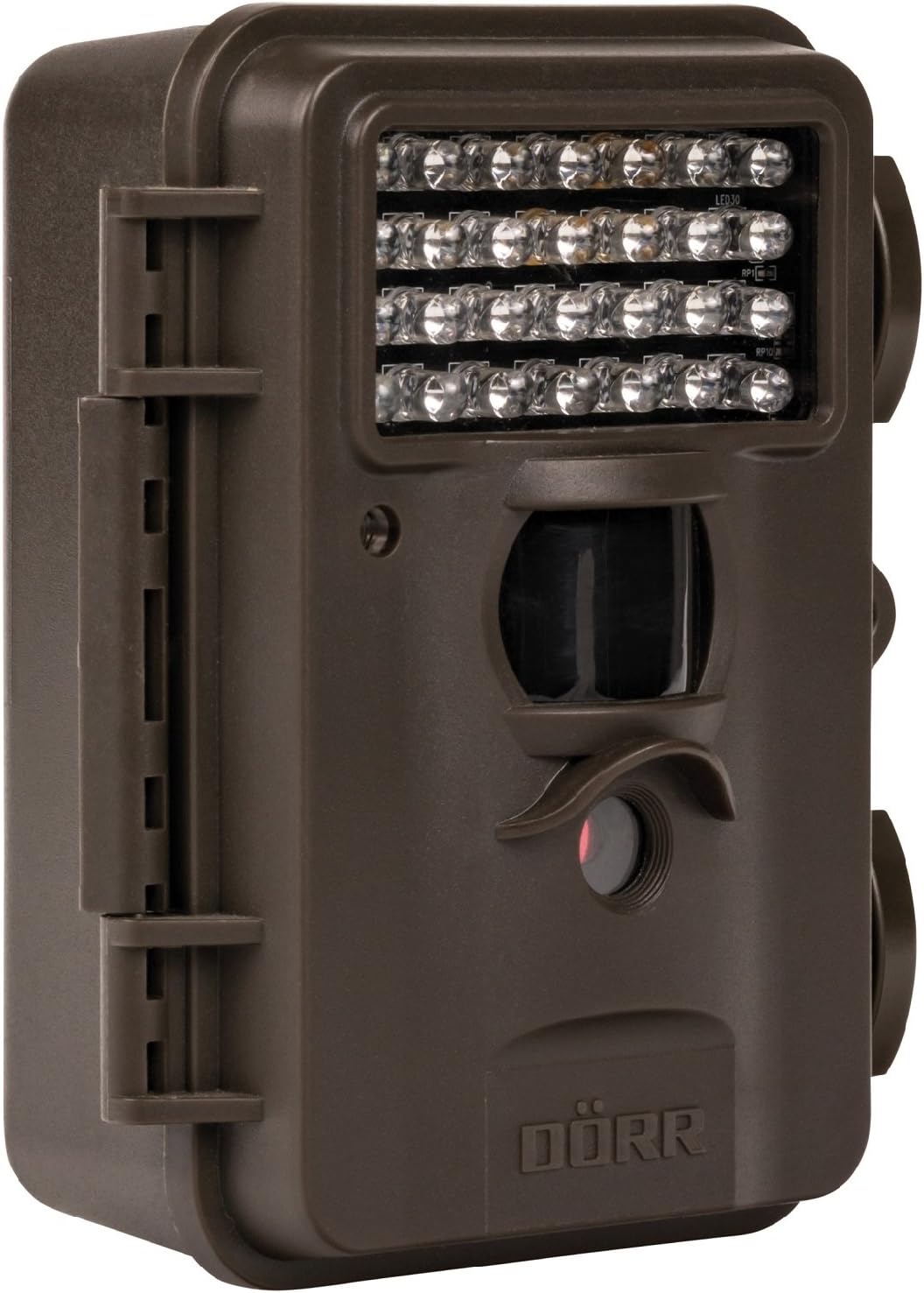
This image displays the front of the Dörr 204473 Trail Camera. Visible features include the array of 28 infrared LEDs at the top, the passive infrared (PIR) motion sensor below the LEDs, and the camera lens at the bottom. The camera has a rugged, dark brown, weatherproof casing with a latch on the left side.
The Dörr 204473 camera features a compact and durable design. Key components include:
- Infračervené LED diody: 28 nearly invisible LEDs for night illumination up to 15 meters.
- PIR Motion Sensor: Detects movement to trigger photo or video capture.
- Objektiv fotoaparátu: Captures 8MP still images and video.
- TFT displej: For menu navigation and viewing captured media (located inside the camera).
- Control Keypad: For setting up and operating the camera.
- Voděodolné pouzdro: Protects the camera from environmental elements.
Nastavení
1. Instalace baterie
- Open the camera housing latch on the side.
- Najděte přihrádku na baterie.
- Insert 4 or 8 AA batteries, ensuring correct polarity (+/-).
- Bezpečně zavřete kryt bateriového prostoru.
2. Instalace SD karty
- With the camera housing open, locate the SD/SDHC card slot.
- Insert an SD/SDHC memory card (up to 32 GB) into the slot until it clicks into place. Ensure the card is inserted in the correct orientation.
- Chcete-li kartu vyjmout, jemně ji zatlačte, dokud nevyskočí.
3. Montáž kamery
The camera can be mounted using a strap or a wall mount. Ensure the camera is positioned to capture the desired area without obstructions. The mounting type is wall mount.
- Montáž popruhu: Thread the provided strap through the slots on the back of the camera and secure it around a tree or pole.
- Montáž na stěnu: Use appropriate screws and anchors (not included) to secure the camera to a wall or flat surface.
Návod k obsluze
1. Zapnutí/vypnutí
- Pro zapnutí přepněte vypínač do polohy „ON“.
- Chcete-li přístroj vypnout, přepněte vypínač do polohy „VYPNUTO“.
2. Navigace v menu
Once powered on, the TFT display will activate. Use the keypad buttons (UP, DOWN, LEFT, RIGHT, OK, MENU) to navigate through the settings menu. The menu is available in English and German.
3. Nastavení data a času
- Enter the menu and navigate to 'Date/Time' settings.
- Use the navigation buttons to set the current date and time.
- Confirm with 'OK'. Each captured image will display the time, date, and temperature in °C.
4. Photo/Video Modes and Settings
The camera supports both still image and video capture. Adjust settings such as resolution, trigger interval, and burst mode via the menu.
- Rezoluce: Set to 8MP for still images.
- Čas spuštění: The camera has a fast trigger time of 1.3 seconds.
- Detekce pohybu: Configure the sensitivity of the PIR sensor.
- Noční vidění: The 28 IR LEDs automatically activate in low light conditions for night vision up to 15 meters.
5. ViewIng Files
Můžete view captured photos and videos directly on the camera's TFT display or by connecting the camera to a computer via USB (cable not included) or by inserting the SD card into a card reader.
Údržba
- Čištění: K čištění objektivu a krytu fotoaparátu používejte měkký, suchý hadřík. Nepoužívejte abrazivní čisticí prostředky ani rozpouštědla.
- Péče o baterie: Pokud fotoaparát nebudete delší dobu používat, vyjměte baterie, abyste zabránili jejich vytečení.
- Skladování: Pokud fotoaparát nepoužíváte, skladujte jej na chladném a suchém místě mimo dosah přímého slunečního záření.
Odstraňování problémů
| Problém | Možná příčina | Řešení |
|---|---|---|
| Kamera se nezapíná | Slabé nebo vybité baterie; nesprávná polarita baterií. | Vyměňte baterie; dbejte na správnou polaritu. |
| Nebyly pořízeny žádné snímky/videa | SD card full or not inserted correctly; motion sensor blocked or sensitivity too low. | Insert/replace SD card; format SD card; clear sensor path; increase sensor sensitivity. |
| Špatná kvalita obrazu v noci | Subject too far from camera; IR LEDs obstructed. | Ensure subject is within 15m range; clear any obstructions from IR LEDs. |
| Kamera nedetekuje pohyb | PIR sensor sensitivity too low; camera positioned incorrectly. | Increase PIR sensitivity; reposition camera for optimal detection angle. |
Specifikace
| Funkce | Detail |
|---|---|
| Značka | DÖRR |
| Číslo modelu | 204473 |
| Efektivní rozlišení | 8 MP |
| Efektivní rozlišení videa | 8 MP |
| Rozsah nočního vidění | 15 metrů |
| Počet IR LED | 28 |
| Spouštěcí čas | 1.3 sekund |
| Skladování | SD/SDHC Memory Card (up to 32 GB) |
| Zdroj napájení | 4x or 8x AA Batteries |
| Barva | Černý |
| Materiál | Kov |
| Rozměry položky (D x Š x V) | 10 x 7 x 12.2 cm |
| Úroveň odolnosti proti vodě | Vodotěsný |
| Typ montáže | Držák na zeď |
| Doporučené aplikace | Detekce pohybu, noční vidění |
Záruka a podpora
For warranty information and technical support, please refer to the documentation provided with your purchase or visit the official Dörr webUschovejte si doklad o koupi pro případné reklamace.


