Zavedení
Děkuji za nákupasing the Vivibright GP8S Portable Micro Projector. This manual provides essential information for setting up, operating, and maintaining your projector. Please read it thoroughly before use to ensure optimal performance and longevity of the device.
The Vivibright GP8S is a compact and portable home theater projector designed to deliver clear images and videos, supporting various input sources including USB, SD, and HDMI.
Konec produktuview
Součásti projektoru
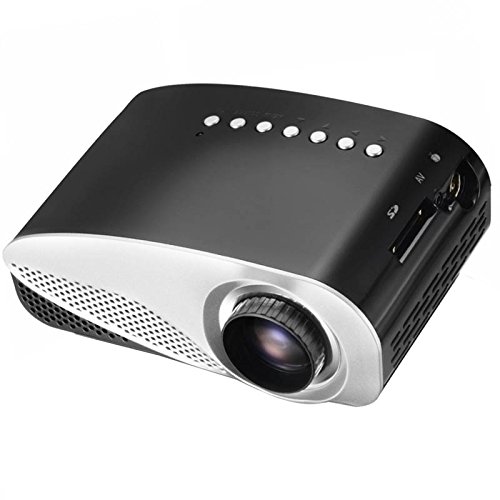
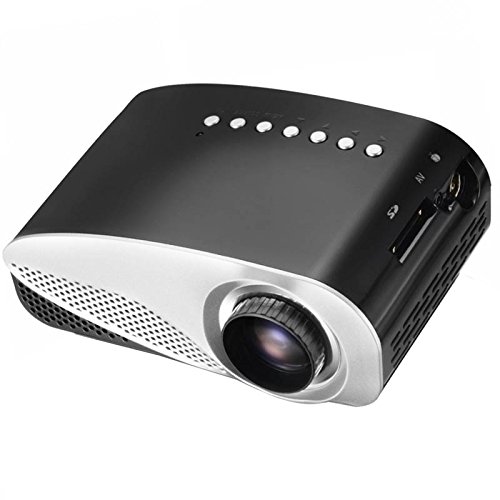
Obrázek 1: Přední a horní strana View of the Vivibright GP8S Projector. This image displays the projector from a slightly elevated front-right angle, highlighting the main lens, ventilation grilles on the front, and the control buttons located on the top panel. The device features a sleek black and silver design.
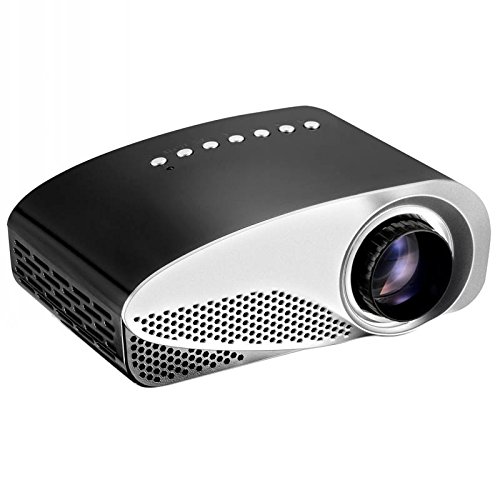
Obrázek 2: Strana View of the Vivibright GP8S Projector. This image shows the projector from a side angle, emphasizing the ventilation grilles on the left side of the device, which are crucial for heat dissipation during operation.
Obrázek 3: Úhlové View of the Vivibright GP8S Projector. This image provides another perspective of the projector, showcasing its compact form factor and the design elements from a different angle.
Zadní panel a připojení
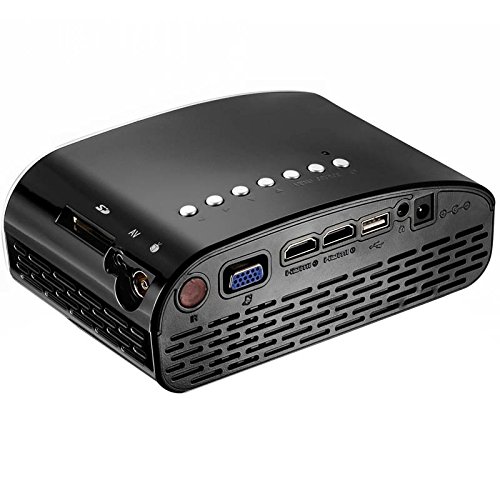
Figure 4: Rear Panel Connectivity of the Vivibright GP8S Projector. This image details the rear panel, displaying various input and output ports including HDMI, USB, SD card slot, AV input, and the power input. These ports allow for versatile connectivity with different media devices.
The Vivibright GP8S features a user-friendly interface with control buttons on the top panel and a comprehensive set of connectivity options on the rear. Key components include:
- Projekční čočka: Located at the front for image output.
- Ovládací tlačítka: Power, navigation, and source selection buttons on the top.
- Ventilační mřížky: On the sides and rear for heat dissipation.
- Vstupní porty: HDMI, USB, SD card slot, AV input.
- Příkon: Pro připojení napájecího adaptéru.
- Zaostřovací kroužek: Manual adjustment for image clarity (typically around the lens).
Průvodce nastavením
1. Umístění
Place the projector on a stable, flat surface. Ensure there is adequate space around the ventilation grilles for proper airflow. The distance from the screen or wall will determine the image size. Adjust the projector's position to achieve the desired projection size and angle.
2. Připojení napájení
- Připojte napájecí adaptér ke vstupnímu portu projektoru (viz obrázek 4).
- Zapojte napájecí adaptér do vhodné elektrické zásuvky.
- Kontrolka napájení na projektoru by se měla rozsvítit.
3. Připojení vstupních zařízení
The Vivibright GP8S supports multiple input sources:
- HDMI: Connect an HDMI cable from your device (e.g., laptop, gaming console, set-top box) to one of the HDMI ports on the projector.
- USB: Vložte USB flash disk do USB portu pro přehrávání médií files přímo.
- SD karta: Vložte SD kartu do slotu pro SD kartu pro přehrávání médií files.
- AV: Use an AV cable to connect older devices (e.g., DVD player) to the AV input port.
4. Nastavení zaostření
Once the projector is powered on and displaying an image, rotate the focus ring around the lens until the projected image appears sharp and clear.
Návod k obsluze
1. Zapnutí/vypnutí
- Zapnutí: Press the power button on the projector's top panel or on the remote control. The projector will start up, and the Vivibright logo will appear.
- Vypnutí: Press the power button again. A confirmation message may appear; select 'Yes' to shut down. Always allow the projector to cool down properly before unplugging it.
2. Výběr vstupního zdroje
After powering on, you may need to select the correct input source:
- Press the 'Source' button on the projector or remote control.
- Use the navigation arrows to highlight the desired input (e.g., HDMI1, USB, SD, AV).
- Press 'OK' or 'Enter' to confirm your selection.
3. Přehrávání médií (USB/SD)
When a USB drive or SD card is inserted and selected as the source:
- The projector's media browser will appear.
- Procházejte složky a files using the remote control's arrow keys.
- Vyberte a file (e.g., video, image, audio) and press 'OK' to play.
4. Použití dálkového ovládání
The included remote control allows for convenient operation from a distance. It typically includes buttons for power, source selection, volume control, menu navigation, and media playback controls.
Údržba
Regular maintenance ensures the longevity and optimal performance of your Vivibright GP8S projector.
1. Čištění čočky
- Používejte měkký hadřík bez žmolků, speciálně určený pro optické čočky.
- Gently wipe the lens in a circular motion. Avoid using abrasive cleaners or excessive force.
- For stubborn smudges, a small amount of lens cleaning solution can be applied to the cloth (not directly to the lens).
2. Cleaning Ventilation Grilles
- Periodically check the ventilation grilles for dust accumulation.
- Use a soft brush or a can of compressed air to gently remove dust from the grilles.
- Před čištěním se ujistěte, že je projektor vypnutý a odpojený od sítě.
3. Skladování
When not in use for extended periods, store the projector in a cool, dry, dust-free environment. Consider using the original packaging or a protective case to prevent damage.
Odstraňování problémů
| Problém | Možná příčina | Řešení |
|---|---|---|
| Žádný promítaný obraz |
|
|
| Obraz je rozmazaný |
|
|
| Žádný zvuk |
|
|
| Dálkové ovládání nefunguje |
|
|
Specifikace
| Značka | Vivibright |
| Model | GP8S |
| Technologie displeje | LCD |
| Hardwarové rozhraní | HDMI, USB |
| Technologie připojení | HDMI, USB |
| Speciální funkce | Přenosný |
| Doporučená použití | Domácí kino |
| Typ montáže | Stolní držák |
| Hmotnost položky | 870 g |
| Rozměry balení | 27.4 x 24.3 x 15.7 cm |
| Zahrnuté příslušenství | Dálkové ovládání |
Záruka a podpora
For information regarding warranty coverage, technical support, or service inquiries, please refer to the warranty card included with your product or contact your retailer. Keep your purchase receipt as proof of purchase.


