1. Bezpečnostní informace
Před instalací a použitím si prosím přečtěte a pochopte všechny pokyny. Nedodržení těchto pokynů může vést k poškození majetku, vážnému zranění nebo smrti.
- Nosnost: Do not exceed the maximum weight capacity of 17.6 lbs (8 kg) per arm. This mount is designed for monitors between 13 and 27 inches.
- Kompatibilita VESA: Ujistěte se, že vaše monitory mají montážní šablony VESA 75x75 mm nebo 100x100 mm.
- Tloušťka stolu: Verify your desk thickness is compatible with the chosen mounting method (C-clamp: 0.39-2.36 inches / 10-60mm; Grommet: 0.39-2.56 inches / 10-65mm).
- Nastavení plynové pružiny: Adjust the gas spring tension ONLY when a monitor is attached to the arm. Failure to do so may cause the arm to spring up rapidly, leading to injury.
- Shromáždění: Some steps may require two people for safe assembly.
- Údržba: Pravidelně kontrolujte všechny šrouby a spoje, abyste se ujistili, že jsou pevně utažené a bezpečné.
2. Obsah balení
Verify all parts are present and undamaged before proceeding with assembly. If any parts are missing or defective, contact HUANUO customer service.
| Část | Popis |
|---|---|
| Hlavní pól | Vertical support pole for the monitor arms. |
| Ramena pro monitory (2) | Gas spring articulating arms for monitor attachment. |
| Desky VESA (2) | Plates for attaching monitors to the arms (75x75mm/100x100mm). |
| Montážní základna | Base for attaching the stand to the desk (supports C-clamp and Grommet). |
| C-Clamp / Grommet Hardware | Components for C-clamp nebo montáž průchodky. |
| Klipy pro správu kabelů | Clips to organize cables along the arms and pole. |
| Nástroje a spojovací prvky | Hex keys, screws, and washers for assembly. |

Popis obrázku: A person unboxes the HUANUO Dual Monitor Stand, displaying various components including the VESA plates, mounting hardware, cable clips, and the main pole. This image illustrates the comprehensive set of parts included for assembly.
3. Pokyny k nastavení
Follow these steps carefully to assemble and install your HUANUO Dual Monitor Stand.
- Vyberte způsob montáže:
Decide between C-clamp or Grommet mounting based on your desk type and preference. Ensure your desk thickness is within the specified range for the chosen method.

Popis obrázku: This image shows two diagrams illustrating the C-clamp and Grommet mounting options for the monitor stand. The C-clamp is shown gripping the edge of a desk, while the Grommet mounting uses a hole in the desk surface.
- Sestavte základnu:
Attach the main pole to the chosen mounting base (C-clamp or Grommet). Secure all fasteners tightly using the provided tools.
- Připevnění desek VESA k monitorům:
Place your monitor face down on a soft, clean surface. Attach a VESA plate to the back of each monitor using the appropriate screws and washers. Ensure the plate is securely fastened.
Popis videa: This video demonstrates the process of attaching the VESA plate to the back of a monitor. It shows how to align the plate with the monitor's mounting holes and secure it with screws, ensuring a stable connection for the monitor arm.
- Attach Arms to the Pole:
Slide the monitor arms onto the main pole at your desired initial height. Secure them in place with the locking mechanisms.
- Montáž monitorů na ramena:
Carefully slide the monitors (with attached VESA plates) onto the ends of the monitor arms. Ensure they click securely into place. Tighten any safety screws if provided.
Popis videa: This video illustrates the final step of mounting the monitors onto the dual monitor stand arms. It shows how to carefully slide the VESA-mounted monitors onto the arm brackets and secure them, demonstrating the ease of installation.


4. Návod k obsluze
The HUANUO Dual Monitor Stand offers extensive adjustability for optimal viewpohodlí a produktivity.
- Nastavení výšky:
The gas spring arms allow for smooth vertical height adjustment. To adjust, gently push or pull the monitor to the desired height. If the monitor does not stay in place, the gas spring tension may need adjustment (see below).
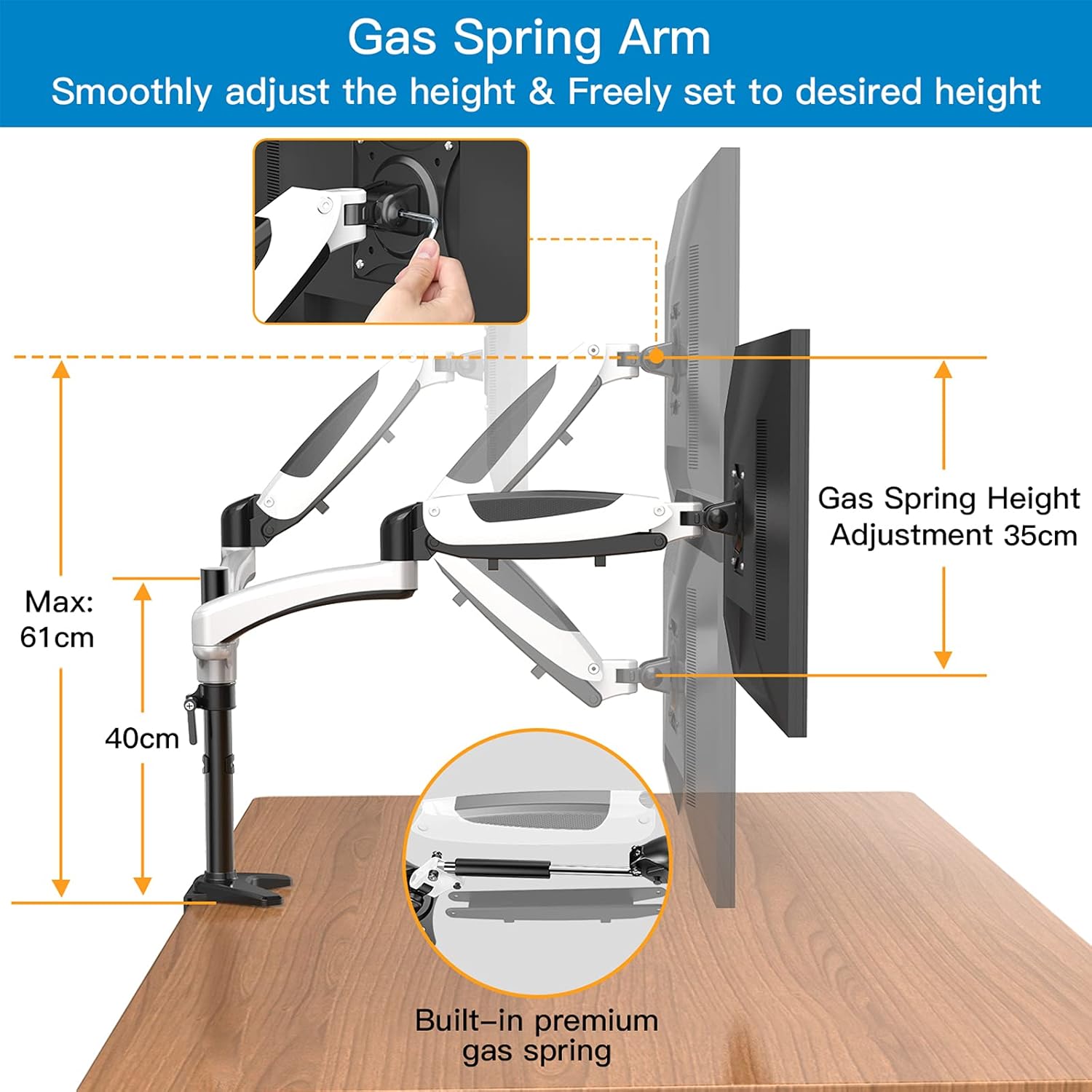
Popis obrázku: This image highlights the gas spring arm mechanism, showing how it allows for smooth and free height adjustment of the monitor. It illustrates the range of vertical movement and the internal gas spring system.
- Gas Spring Tension Adjustment:
If the monitor sags or springs up too easily, adjust the gas spring tension. Use the provided hex key to turn the adjustment screw on the arm. Turn clockwise to increase tension (for heavier monitors) or counter-clockwise to decrease tension (for lighter monitors). Adjust gradually until the monitor stays at any desired height.
Popis videa: This video demonstrates how to adjust the gas spring arm tension on the HUANUO HN-DSK1 dual monitor mount. It shows the use of a hex key to fine-tune the arm's resistance, ensuring the monitor remains stable at any height.
- Naklápění, otáčení a rotace:
Each monitor can be tilted (+85°/-90°), swiveled (±90°), and rotated (360°) to achieve the perfect viewing angle. Simply grasp the edges of the monitor and adjust as needed. The 360° rotation allows for easy switching between landscape and portrait modes.

Popis obrázku: This image illustrates the full motion capabilities of the monitor stand, including diagrams for 360° swivel, +85°/-90° tilt, and 360° rotation, allowing users to customize their screen angle for optimal viewIng.
- Flexible Arm Extension:
The articulating arms can extend up to 64cm (25.2 inches) or retract to 41cm (16.1 inches), providing flexibility for various desk depths and viewing distances. This also allows for combining arms for shallow or deep desktop configurations.

Popis obrázku: This image demonstrates the flexible arm installation, showing two different configurations: one with a maximum extension of 41cm and another with a maximum extension of 64cm, suitable for various desktop setups.
- Správa kabelů:
Utilize the integrated cable management clips along the arms and pole to route and conceal monitor cables, maintaining a tidy and organized workspace.

5. Údržba
Pravidelná údržba zajišťuje dlouhou životnost a bezpečný provoz vašeho stojanu na monitor.
- Pravidelné kontroly: Every few months, check all screws and connections to ensure they are tight. Re-tighten if necessary.
- Čištění: Otřete stojan měkkým hadříkemamp hadříkem. Nepoužívejte abrazivní čisticí prostředky nebo rozpouštědla, která by mohla poškodit povrchovou úpravu.
- Plynová pružina: The gas spring is designed for long-term use and generally does not require maintenance. If you notice a significant change in its performance, re-adjust the tension as described in the Operating Instructions.
6. Řešení problémů
Pokud narazíte na nějaké problémy, podívejte se na následující běžné problémy a jejich řešení:
| Problém | Řešení |
|---|---|
| Monitor se prohýbá nebo nedrží v požadované výšce. | Adjust the gas spring tension. Turn the adjustment screw clockwise to increase tension for heavier monitors. |
| Monitor springs up too easily. | Adjust the gas spring tension. Turn the adjustment screw counter-clockwise to decrease tension for lighter monitors. |
| Monitor is wobbly. | Ensure all mounting screws (desk clamp/grommet and VESA plate screws) are securely tightened. Check the stability of your desk surface. |
| Cannot tilt or swivel monitor. | Check if the tilt/swivel mechanism screws are too tight. Loosen them slightly to allow movement, then re-tighten to hold position. |
| Cables do not fit in management clips. | Ensure cables are routed individually or in small bundles. Some clips may be designed for specific cable sizes. |
7. Specifikace
| Funkce | Detail |
|---|---|
| Číslo modelu | HN-DSK1-1 |
| Kompatibilita velikosti monitoru | 13 - 27 inches (flat or curved) |
| Nosnost (na rameno) | 17.6 lb (8 kg) |
| Kompatibilita VESA | 75x75mm, 100x100mm |
| Možnosti montáže | C-Clamp, Průchodka |
| Tloušťka desky (C-Clamp) | 0.39 - 2.36 palce (10 - 60 mm) |
| Tloušťka desky (průchodka) | 0.39 - 2.56 palce (10 - 65 mm) |
| Rozsah náklonu | +85° až -90° |
| Otočný rozsah | ±90° |
| Otáčení | 360° (Na šířku/Na výšku) |
| Materiál | Kov Hliník |
| Barva | White (as per product title, though images show black/white) |
| Hmotnost položky | 11.68 libry |
| Rozměry produktu | 6.69 x 1.97 x 4.72 palce |
8. Záruka a podpora
HUANUO provides a limited warranty for this product. For specific warranty terms, technical support, or to report missing/defective parts, please contact HUANUO customer service directly through their official webna webu nebo u prodejce, kde byl produkt zakoupen.
Uschovejte si prosím doklad o koupi pro uplatnění záruky.


