Zavedení
This manual provides comprehensive instructions for the setup, operation, maintenance, and troubleshooting of your beats by Dr. Dre beatsX Wireless In-Ear Headphones. Please read this guide thoroughly to ensure proper use and to maximize your listening experience.

Image: The beatsX Wireless In-Ear Headphones in black, featuring the flexible neckband design and magnetic earbuds. The headphones are shown in a typical wearing position around the neck.
Co je v krabici
Verify that all the following items are included with your beatsX Wireless In-Ear Headphones:
- beatsX earphones
- Four different sized eartips (various sizes for optimal fit)
- Removable secure-fit wingtips (for added stability during activity)
- Pocket-sized carrying case
- Nabíjecí kabel Lightning na USB-A

Image: The included Lightning to USB-A charging cable and the compact, black oval carrying case for the beatsX headphones.
Nastavení
1. Nabíjení sluchátek
Before first use, fully charge your beatsX headphones. A full charge provides up to 8 hours of playback. The Fast Fuel feature allows for 2 hours of playback from a 5-minute charge when the battery is low.
- Connect the Lightning end of the charging cable to the charging port on your beatsX headphones.
- Connect the USB-A end of the charging cable to a USB power adapter or a powered USB port.
- The LED indicator light will show charging status. It will turn white when fully charged.
2. Párování s vaším zařízením
The beatsX headphones utilize Apple's W1 chip for seamless pairing with Apple devices and standard Bluetooth for other devices.
Pro zařízení Apple (iOS 10 nebo novější):
- Ensure your iPhone, iPad, or iPod touch is unlocked and near your beatsX headphones.
- Press and hold the power button on your beatsX headphones for 1 second.
- A setup animation will appear on your iOS device. Follow the on-screen instructions.
- Your beatsX headphones are now connected and set up with all Apple devices signed into iCloud.
Pro jiná zařízení Bluetooth:
- Press and hold the power button on your beatsX headphones for 5 seconds until the LED indicator light flashes white. This puts the headphones in pairing mode.
- V zařízení přejděte do nastavení Bluetooth a ujistěte se, že je Bluetooth povoleno.
- Select "beatsX" from the list of available devices.
- Once paired, the LED indicator light will stop flashing and remain solid white.
3. Finding Your Optimal Fit
Proper fit is crucial for sound quality and comfort. Experiment with the included ear tips and wingtips.
- Tipy do uší: Choose the size that creates a comfortable seal in your ear canal. This helps with sound isolation and bass response.
- Wingtips: If desired, attach the secure-fit wingtips for added stability, especially during physical activity.
Ovládání sluchátek
The RemoteTalk control on the left cable allows you to manage music, calls, and Siri.
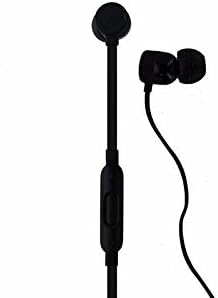
Obrázek: Podrobný view of the beatsX earbud and the in-line RemoteTalk control, which features volume buttons and a multi-function button.
RemoteTalk Controls:
| Akce | Funkce |
|---|---|
| Press center button once | Přehrát/Pozastavit zvuk, Přijmout/Ukončit hovor |
| Press center button twice | Přeskočit vpřed |
| Press center button three times | Přeskočit zpět |
| Press and hold center button | Activate Siri or voice assistant |
| Stiskněte tlačítko pro zvýšení hlasitosti | Zvyšte hlasitost |
| Stiskněte tlačítko pro snížení hlasitosti | Snížit hlasitost |
Zapnutí/vypnutí:
- To power on, press and hold the power button until the LED indicator light illuminates.
- To power off, press and hold the power button until the LED indicator light turns off.
Magnetické špunty do uší:
The earbuds are magnetic, allowing them to snap together when not in use. This helps prevent tangling and keeps them securely around your neck.
Údržba
Proper care will extend the life of your beatsX headphones.
- Čištění: Use a soft, dry, lint-free cloth to clean the headphones. Do not use abrasive cleaners or solvents.
- Tipy do uší: Pravidelně sundejte ušní nástavce a čistěte jeamp hadříkem a jemným mýdlem, poté opláchněte a před opětovným nasazením důkladně osušte.
- Skladování: When not in use, store your headphones in the provided carrying case to protect them from dust and damage. The magnetic earbuds help keep them tangle-free.
- Voděodolnost: Tato sluchátka jsou není voděodolný. Avoid exposure to excessive moisture, rain, or submersion in liquids.
- Teplota: Nevystavujte sluchátka extrémním teplotám.
Odstraňování problémů
If you encounter issues with your beatsX headphones, try the following solutions:
- Bez napájení:
- Ensure the headphones are charged. Connect them to a power source using the Lightning to USB-A cable.
- Zkontrolujte nabíjecí kabel a napájecí adaptér, zda nejsou poškozené.
- Nelze spárovat:
- Make sure the headphones are in pairing mode (LED flashing white).
- Ensure Bluetooth is enabled on your device and it is within range (typically 30 feet or 10 meters).
- Zkuste na svém zařízení vypnout a znovu zapnout Bluetooth.
- Pokud bylo zařízení dříve spárováno, zkuste jej v nastavení Bluetooth „zapomenout“ a znovu jej spárovat.
- Žádný zvuk nebo špatná kvalita zvuku:
- Zkontrolujte úroveň hlasitosti na sluchátkách i na připojeném zařízení.
- Ujistěte se, že jsou sluchátka správně spárována a připojena.
- Try different sized ear tips to ensure a proper seal in your ear canal.
- Clean any debris from the ear tips and speaker grilles.
- Přesuňte se blíže k zařízení, abyste se vyhnuli rušení.
- RemoteTalk Not Responding:
- Ujistěte se, že jsou sluchátka zapnutá a připojená k vašemu zařízení.
- Restartujte připojené zařízení.
If issues persist, you may need to reset your beatsX headphones. Consult the official beats support webkonkrétní pokyny k resetování naleznete na webu.
Specifikace
| Funkce | Detail |
|---|---|
| Název modelu | beatsX Wireless In-Ear Headphones |
| Číslo modelu | MLYE2LL/A |
| Značka | beats by Dr. Dre |
| Barva | Černý |
| Technologie připojení | Bluetooth (Class 1 with Apple W1 chip) |
| Technologie bezdrátové komunikace | Bluetooth |
| Životnost baterie | Až 8 hodin |
| Rychlé nabíjení paliva | 5minutové nabíjení pro 2 hodin přehrávání |
| Typ ovládání | RemoteTalk (in-line control) |
| Umístění uší | V uchu |
| Form Factor | V uchu |
| Kontrola hluku | Zvuková izolace |
| Úroveň odolnosti proti vodě | Není odolný vůči vodě |
| Hmotnost položky | 3.52 unce |
| UPC | 817689015474 |
Informace o záruce
As this product is a renewed item, warranty coverage may vary. Please refer to the specific warranty details provided by the seller at the time of purchase. For standard manufacturer warranty information on new products, please visit the official beats by Dr. Dre webmísto.
Podpora
For further assistance, technical support, or additional product information, please visit the official beats by Dr. Dre support website or contact their customer service. You can typically find support resources, FAQs, and contact options on their official webmísto.
For issues related to your renewed product purchase, please contact the seller directly.


