Zavedení
Thank you for choosing the Atlanta Digital LCD Radio Alarm Clock, Model 1882-0. This compact and easy-to-use alarm clock features a clear LCD display, temperature indication, and a radio-controlled time function for automatic synchronization. This manual provides detailed instructions for setup, operation, and maintenance to ensure optimal performance.
Bezpečnostní informace
- Bezpečnost baterie: Use only the specified battery type. Ensure correct polarity (+/-) when inserting batteries. Do not mix old and new batteries, or different types of batteries. Remove batteries if the device will not be used for an extended period. Dispose of used batteries responsibly according podle místních předpisů.
- Umístění: Place the clock on a stable, flat surface. Avoid direct sunlight, extreme temperatures, high humidity, or dusty environments.
- Čištění: Nepoužívejte abrazivní čisticí prostředky ani rozpouštědla. Otřete měkkým, suchým hadříkem.
- Vystavení vodě: Toto zařízení není vodotěsné. Zabraňte kontaktu s vodou nebo jinými kapalinami.
Obsah balení
- Atlanta Digital LCD Radio Alarm Clock (Model 1882-0)
- Návod k použití (tento dokument)
- (Baterie obvykle nejsou součástí balení a je nutné je zakoupit samostatně)
Konec produktuview
Seznamte se s hlavními součástmi a ovládacími prvky budíku.

Obrázek 1: Přední strana View. This image displays the front of the Atlanta Digital LCD Radio Alarm Clock. The large LCD screen shows the current time (10:40), radio control signal indicator, DST indicator, alarm time (6:00), and temperature (24.6°C). Below the screen are three buttons: "TIME", "ALARM", and "+ / -". A red snooze/light button is visible on the top edge.
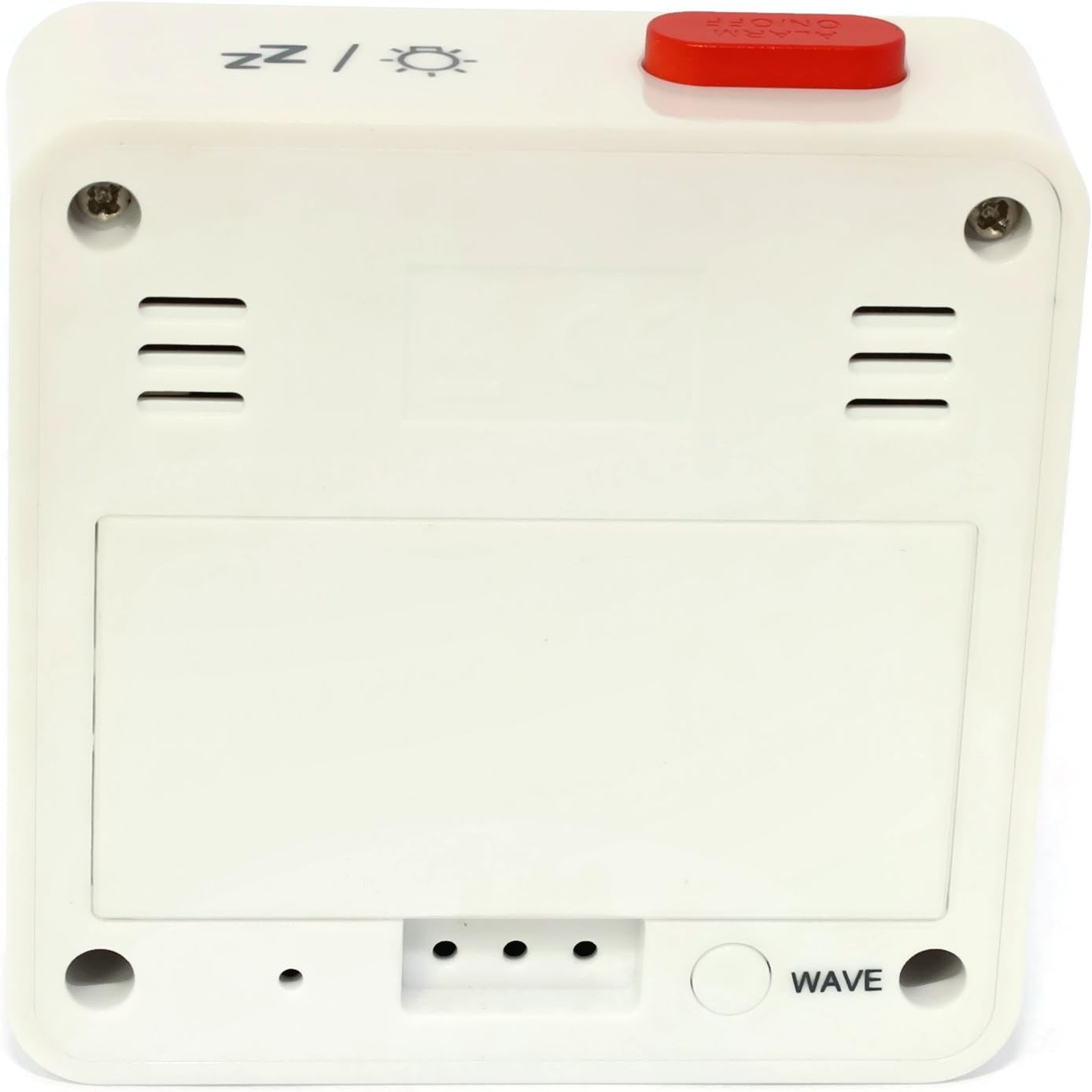
Obrázek 2: Zpět View. This image shows the back of the Atlanta Digital LCD Radio Alarm Clock. The large rectangular cover for the battery compartment is prominent. Below it, a circular "WAVE" button is visible, used for manual radio signal reception. Ventilation slots are present on both sides of the upper back panel.
Ovládací prvky a zobrazovací prvky:
- LCD displej: Shows time, alarm time, temperature, and radio control status.
- Tlačítko TIME: Used to set the current time manually.
- Tlačítko ALARM: Používá se k nastavení a aktivaci/deaktivaci budíku.
- Tlačítka + / -: Used to adjust values (time, alarm) and potentially toggle settings.
- SNOOZE / LIGHT Button (Top): Activates snooze function during an alarm; illuminates the display backlight.
- WAVE Button (Back): Initiates manual radio signal reception for time synchronization.
- Battery Compartment (Back): Pojme potřebné baterie.
Nastavení
1. Instalace baterie
- Open the battery compartment cover located on the back of the clock (refer to Figure 2).
- Insert the required batteries (e.g., 2x AAA, not included) according to the polarity markings (+ and -) inside the compartment.
- Bezpečně zavřete kryt bateriového prostoru.
- The clock will power on and attempt to receive the radio-controlled time signal.
2. Počáteční synchronizace času (rádiové řízení)
Upon battery insertion, the clock will automatically search for the radio time signal. This process may take several minutes. During this time, a signal icon (e.g., ((()))) bude na displeji blikat.
- Pro nejlepší příjem umístěte hodiny blízko okna a mimo dosah elektronických zařízení, která by mohla způsobovat rušení.
- Once the signal is successfully received, the time will be set automatically, and the signal icon will appear solid.
- If the signal is not received after a few minutes, press the VLNA button on the back of the clock to initiate a manual search.
3. Manual Time Setting (If Radio Control is Unavailable)
- Stiskněte a podržte ČAS button for approximately 3 seconds until the hour digits begin to flash.
- Použijte + or - tlačítka pro nastavení hodiny.
- Stiskněte tlačítko ČAS button again to confirm the hour and move to the minute setting.
- Použijte + or - tlačítka pro nastavení minut.
- Stiskněte tlačítko ČAS ještě jednou pro potvrzení a ukončení režimu nastavení času.
Návod k obsluze
1. Nastavení alarmu
- Stiskněte a podržte POPLACH button for approximately 3 seconds until the alarm hour digits begin to flash.
- Použijte + or - tlačítky nastavte požadovanou hodinu buzení.
- Stiskněte tlačítko POPLACH button again to confirm the hour and move to the alarm minute setting.
- Použijte + or - tlačítky pro nastavení požadovaných minut budíku.
- Stiskněte tlačítko POPLACH ještě jednou pro potvrzení a ukončení režimu nastavení budíku.
2. Aktivace/deaktivace alarmu
- Krátce stiskněte POPLACH tlačítko pro zapnutí nebo vypnutí budíku.
- When the alarm is active, an alarm icon (e.g., a bell symbol) will appear on the display.
- Když zazní alarm, stiskněte SNOOZE / SVĚTLO button on top to activate the snooze function. The alarm will sound again after a few minutes.
- Chcete-li alarm úplně vypnout, stiskněte jakékoli jiné tlačítko (např. ČAS, POPLACH, +, -) or let it sound for its full duration.
3. Funkce podsvícení
Stiskněte tlačítko SNOOZE / SVĚTLO button on the top of the clock to illuminate the display for a few seconds, allowing for easy viewza zhoršených světelných podmínek.
4. Zobrazení teploty
The clock continuously displays the ambient temperature. The unit of temperature (Celsius or Fahrenheit) may be switchable by a dedicated button or a combination of existing buttons (refer to specific model variations if applicable, otherwise it defaults to Celsius as shown in the image).
Údržba
Čištění
- Wipe the clock's exterior with a soft, dry, lint-free cloth.
- Nepoužívejte tekuté čisticí prostředky, aerosolové spreje ani abrazivní materiály, protože by mohly poškodit povrchovou úpravu nebo vnitřní součásti.
Výměna baterie
- Pokud displej ztmavne nebo hodiny fungují nepravidelně, je čas vyměnit baterie.
- Postupujte podle kroků pro instalaci baterie uvedených v části „Nastavení“.
- Ensure proper disposal of old batteries.
Odstraňování problémů
| Problém | Možná příčina | Řešení |
|---|---|---|
| Displej je prázdný nebo tmavý. | Baterie jsou vybité nebo jsou nesprávně vloženy. | Vyměňte baterie a dbejte na správnou polaritu. |
| Čas je nesprávný. | Poor radio signal reception or manual time not set. | Move the clock to a location with better reception (near a window). Press the VLNA button for manual synchronization. If still incorrect, set the time manually. |
| Alarm se nespustí. | Budík není aktivovaný nebo je nesprávně nastavený. | Ensure the alarm icon is visible on the display. Recheck alarm time settings. |
| Funkce odložení buzení nefunguje. | Alarm was turned off instead of snoozed. | Ensure you press the SNOOZE / SVĚTLO button when the alarm sounds, not other buttons. |
Specifikace
- Model: 1882-0
- Značka: Atlanta
- Barva: Bílý
- Materiál: Plast
- Typ displeje: Digitální LCD
- Rozměry (D x Š x V): 6.5 x 2.1 x 6.5 cm (přibližně 2.56 x 0.83 x 2.56 palce)
- Hmotnost: 65 gramů (přibližně 2.29 unce)
- Zdroj napájení: Battery powered (e.g., 2x AAA, not included)
- Speciální vlastnosti: Temperature Display, Alarm, Radio-Controlled Time, Backlight, Snooze
- Zamýšlené použití: Krytý
Záruka a podpora
Specific warranty information for your Atlanta product may vary by region and retailer. Please refer to the documentation provided at the time of purchase or visit the official Atlanta webpodrobné záruční podmínky naleznete na webu.
For technical support or inquiries, please contact your retailer or the manufacturer's customer service department. Contact information can typically be found on the product packaging or the official brand webmísto.
Note: Information regarding spare parts availability is not provided by the manufacturer.


