1. Úvod
This instruction manual provides essential information for the safe and efficient use of your JVC KD-X341BT car media player. Please read this manual thoroughly before installation and operation to ensure correct usage and to prevent damage. Keep this manual accessible for future reference.
2. Bezpečnostní informace
- Bezpečnost jízdy: Always operate the unit safely. Avoid complex operations while driving. Ensure the volume level allows you to hear outside sounds.
- Napájení: This unit is designed for a 12V DC car battery system with a negative ground.
- Instalace: Consult a qualified technician for installation to prevent damage to the unit or vehicle. Ensure proper wiring to avoid short circuits.
- Vlhkost a teplo: Nevystavujte jednotku vlhkosti ani extrémním teplotám.
- Čištění: Use a soft, dry cloth for cleaning. Avoid abrasive cleaners.
3. Konec produktuview
3.1 Ovládací prvky na předním panelu
The front panel provides access to all primary functions and controls of the media player.
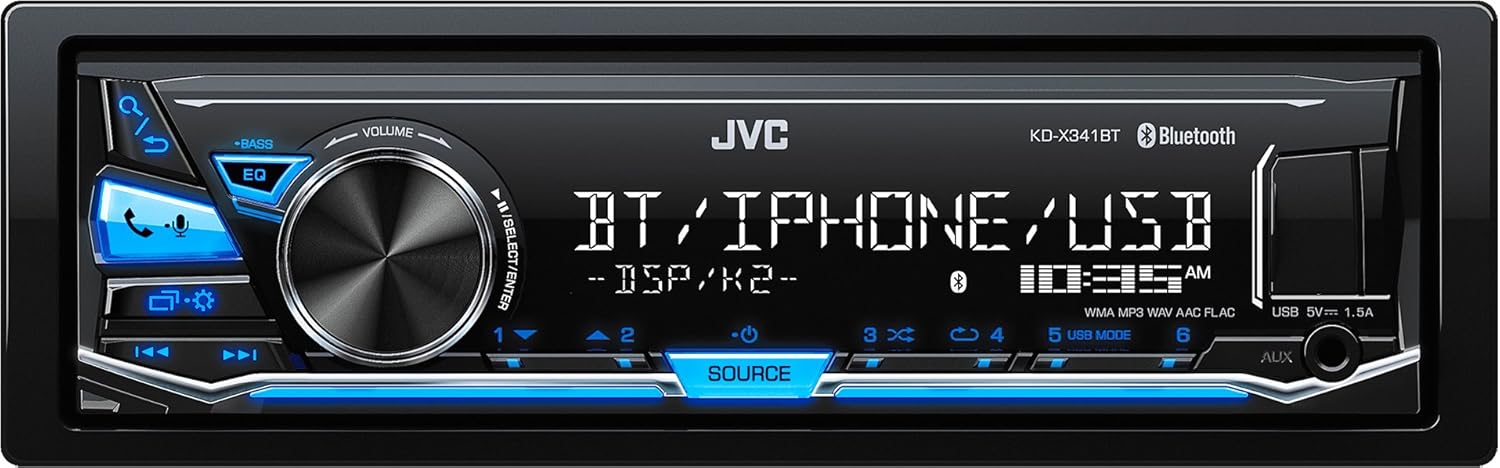
Obrázek 3.1: Přední view of the JVC KD-X341BT car media player, showing the display, volume knob, EQ button, source button, USB port, and auxiliary input.
- Knoflík hlasitosti: Otočením upravíte hlasitost. Stisknutím zobrazíte možnosti nabídky.
- Tlačítko EQ: Přístup k nastavení ekvalizéru.
- Tlačítko zdroje: Selects input sources (Tuner, Bluetooth, USB, AUX).
- USB port: Připojte paměťová zařízení USB pro přehrávání zvuku.
- Vstup AUX: Připojte externí audio zařízení pomocí 3.5mm jacku.
- Tlačítko Bluetooth: Initiates Bluetooth pairing and call functions.
3.2 Připojení zadního panelu
The rear panel houses all necessary connections for power, speakers, and external components.

Obrázek 3.2: Zadní view of the JVC KD-X341BT car media player, showing the wiring harness connector, antenna input, and RCA pre-out connections for front, rear, and subwoofer outputs.
- Konektor kabelového svazku: Connects to the vehicle's power, ground, and speaker wiring.
- Anténní vstup: Připojuje se k anténě rádia ve vozidle.
- RCA předzesilovače: Provides audio output for external amplifiers (Front, Rear/Subwoofer).
- Vstup pro mikrofon: For the external Bluetooth microphone.
4. Instalace
Správná instalace je klíčová pro optimální výkon a bezpečnost. Pokud si nejste jisti některými kroky, poraďte se s profesionálním instalatérem.
4.1 Zapojení kabeláže
- Napájení a uzemnění: Connect the yellow wire (constant 12V) to the vehicle's constant power supply, the red wire (switched 12V) to the ignition switch, and the black wire to a clean chassis ground point.
- Připojení reproduktorů: Connect the speaker wires from the unit's harness to the corresponding vehicle speakers. Ensure correct polarity. The unit supports 4 speaker outputs.
- Anténa: Připojte kabel antény vozidla k anténnímu vstupu na zadní straně jednotky.
- Externí Amplifikátor (volitelné): Pokud používáte externí amplifiers, connect the RCA pre-out cables from the unit to the ampživější vstupy.
- Mikrofon: Connect the supplied external microphone to the dedicated input for hands-free calling. Position the microphone in a location that ensures clear voice pickup.
4.2 Montáž jednotky
This unit is a single DIN size. Use the supplied mounting sleeve and hardware to secure the unit in the vehicle's dashboard opening. Ensure the unit is firmly seated and does not obstruct any vehicle controls.
5. Návod k obsluze
5.1 Základní obsluha
- Zapnutí/vypnutí: Press the SOURCE button to turn the unit on. Press and hold the SOURCE button to turn the unit off.
- Ovládání hlasitosti: Rotate the volume knob to increase or decrease the audio level.
- Výběr zdroje: Press the SOURCE button repeatedly to cycle through available input sources: Tuner (FM/AM), Bluetooth Audio, USB, AUX Input.
5.2 Nastavení zvuku
The KD-X341BT offers advanced audio customization.
- Ekvalizér (EQ): Press the EQ button to access preset equalizer curves (e.g., Rock, Pop, Jazz) or to customize a user-defined setting. The unit features 9-Preset EQ including drvn EQ.
- Časové zarovnání: Adjust the time alignment settings to optimize the sound stage for the listening position. This feature helps synchronize the arrival time of sound from each speaker to the listener.
- Ovládání subwooferu: If a subwoofer is connected via the pre-outs, adjust its output level and low-pass filter settings through the audio menu.
5.3 Provoz Bluetooth
Connect your Bluetooth-enabled smartphone for hands-free calling and audio streaming.
- Párování:
- Ujistěte se, že je na vašem smartphonu povoleno Bluetooth.
- On the KD-X341BT, select the Bluetooth source.
- Hledat available devices on your smartphone. Select "KD-X341BT" from the list.
- V případě potřeby potvrďte párovací kód.
- Hands-free volání: Once paired, you can make and receive calls through the unit. Use the front panel buttons to answer/end calls.
- Streamování zvuku: Play music from your smartphone via Bluetooth. Use the unit's controls for playback (play/pause, skip track).
5.4 Přehrávání z USB
Connect a USB storage device to the front USB port for audio playback.
- Podporované formáty: The unit supports MP3, WMA, and 24-bit FLAC audio files tag informace.
- Navigace: Use the unit's controls to browse folders and tracks on the USB device.
5.5 JVC Remote Control App
Control your KD-X341BT directly from your Android smartphone by installing the JVC Remote Control App. This app allows for convenient control of various functions, including source selection, audio settings, and track navigation.
6. Údržba
- Čištění jednotky: Wipe the front panel with a soft, dry cloth. Do not use harsh chemicals or abrasive materials.
- USB port: Udržujte USB port bez prachu a nečistot.
- Výměna pojistky: If the unit does not power on, check the fuse located on the rear panel (10A). Replace it with a fuse of the same rating if blown.
7. Řešení problémů
| Problém | Možná příčina | Řešení |
|---|---|---|
| Žádná síla | Spálená pojistka; nesprávné zapojení; vybitá baterie vozidla. | Check and replace fuse (10A); verify wiring connections; check vehicle battery. |
| Žádný zvuk | Příliš nízká hlasitost; aktivováno ztlumení; nesprávné zapojení reproduktorů; amplifier not powered (if applicable). | Increase volume; deactivate mute; check speaker connections; ensure external amplifier je napájen. |
| Párování Bluetooth se nezdařilo | Bluetooth v telefonu není povoleno; zařízení není v režimu párování; rušení. | Ensure phone Bluetooth is on; put unit in pairing mode; move closer to unit; restart both devices. |
| Zařízení USB nebylo rozpoznáno | Nepodporováno file format; corrupted USB device; improper connection. | Zajistit files are MP3, WMA, or FLAC; try a different USB device; re-insert USB device. |
8. Specifikace
| Funkce | Detail |
|---|---|
| Model | KD-X341BT |
| Výkon | 50W x 4 (Max) / 50W x 2 + Subwoofer (4 ohms) 50W x 1 |
| Ampživější typ | MOSFET |
| Ekvalizér | 9-Preset EQ (including drvn EQ) with Time Alignment |
| Bluetooth | Built-in, supports hands-free calling and audio streaming |
| USB port | Front USB (1.5A charging) |
| Podporované zvukové formáty | MP3, WMA, 24-bit FLAC with Tag |
| Vstup AUX | Front 3.5mm jack |
| Pre-outy | RCA (Front, Rear/Subwoofer selectable) |
| Rozměry (ŠxVxH) | 18.2 cm x 5.3 cm x 11.4 cm (přibližně) |
| Hmotnost | 1 kg |
| Kompatibilní aplikace | JVC Remote Control App (Android) |
| Podporované internetové služby | Pandora, Spotify (via connected smartphone) |
9. Záruka a podpora
JVC products are manufactured to high-quality standards and are backed by a limited warranty. For specific warranty terms and conditions, please refer to the warranty card included with your product or visit the official JVC website. For technical support, service, or inquiries, please contact your authorized JVC dealer or the JVC customer support center in your region.
Online zdroje: For the latest information, firmware updates, and additional support, please visit the official JVC webmísto: www.jvc.com


