Zavedení
This manual provides essential instructions for the installation, operation, and maintenance of your Yale YMG40 Digital Door Lock. Please read this manual thoroughly before installation and use to ensure proper function and security.
Obsah balení
Před zahájením instalace ověřte, zda jsou všechny komponenty přítomny:
- Yale YMG40 Digital Door Lock (Front and Back Body)
- Sestava zámkového zámku
- 2 mechanické klávesy
- Installation Hardware (screws, strike plate, etc.)
- Uživatelská příručka (tento dokument)
Klíčové vlastnosti
- Push-Pull rukojeť: Designed for convenient operation; push to enter, pull to exit.
- Vícenásobné metody přístupu: Biometric fingerprint recognition, PIN code entry, and mechanical key override.
- Volitelné připojení: Compatible with Z-Wave and Bluetooth modules for smart home integration (modules sold separately).
- Hlasový průvodce: Provides audio prompts for setup and operation.
- Safe Handle Mechanism: Enhances security by preventing unauthorized entry.
- Automatické zamykání: Configurable to automatically lock the door after closing.
- Nouzový přístup: Low battery warning and external power terminal for emergency situations.
Nastavení a instalace
Professional installation is recommended for optimal performance and security. Ensure your door meets the following specifications:
- Tloušťka dveří: 40-75mm (wooden doors).
- Typ dveří: Suitable for both inswing and outswing doors.
Počáteční kroky:
- Připravte dveře: Ensure the door is properly prepped according to the provided template (if applicable) for the mortise lock and lock body.
- Instalace zámkového zámku: Insert the mortise lock into the door edge and secure it.
- Install Lock Bodies: Mount the front and back lock bodies, ensuring cables are correctly routed and connected.
- Vložte baterie: Install the required batteries into the back body.
- Počáteční programování: Follow the voice guide prompts to set up the master PIN code.
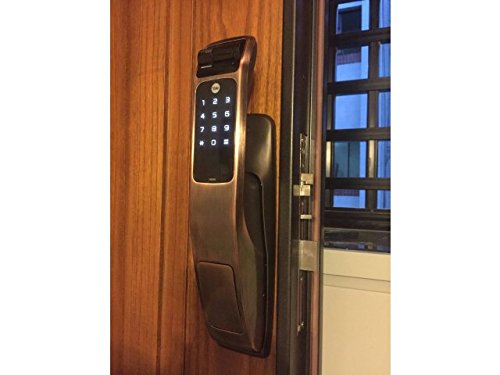
Image: Yale YMG40 Digital Door Lock installed on a wooden door, showing the sleek design and integration.
Návod k obsluze
1. Přístup ke dveřím
a. Fingerprint Access
The lock supports up to 20 different fingerprints. To unlock using a fingerprint:
- Přiložte registrovaný prst na skener otisků prstů.
- The lock will verify the fingerprint and unlock.
- Use the push-pull handle to open the door.
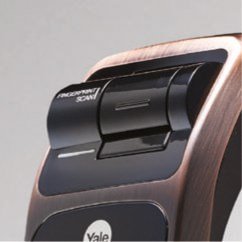
Obrázek: Podrobný view of the fingerprint scan area on the Yale YMG40 lock.
b. PIN Code Access
The lock supports up to 30 different user codes. To unlock using a PIN code:
- Dotykem na klávesnici ji aktivujete.
- Enter your registered PIN code followed by the '*' or '#' button (refer to specific model instructions for exact key).
- The lock will verify the code and unlock.
- Use the push-pull handle to open the door.

Obrázek: Přední strana view of the Yale YMG40 Digital Door Lock, showcasing the illuminated keypad and push-pull handle.
c. Mechanical Key Override
In case of emergency or battery failure, the lock can be opened using the provided mechanical keys.
- Locate the mechanical key slot, typically hidden under a cover on the front body.
- Insert one of the 2 mechanických klíčů and turn to unlock.
- Use the push-pull handle to open the door.

Obrázek: Detailní záběr view of the mechanical key override cylinder on the Yale YMG40 lock.
d. Push-Pull Handle Operation
The ergonomic push-pull handle simplifies door opening:
- Zvenku: After successful authentication (fingerprint, PIN, or key), simply TAM the handle down to open the door.
- Zevnitř: Jednoduše SEM the handle down to open the door.
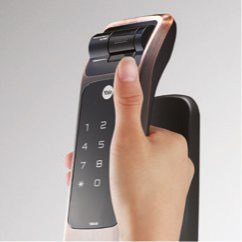
Image: A hand demonstrating the push-pull action of the Yale YMG40 door handle.
2. Automatické zamykání
The YMG40 can be configured to automatically lock the door after it closes. Refer to the full programming guide for instructions on enabling or disabling this feature.
3. Optional Accessories (Z-Wave & Bluetooth)
The Yale YMG40 is compatible with optional Z-Wave and Bluetooth modules, allowing integration with smart home systems and remote control capabilities. These modules are sold separately. Consult the specific module's instructions for pairing and setup.
A remote control accessory is also available, utilizing wireless floating ID technology with a range of up to 50 meters.
Údržba
- Výměna baterie: The lock will provide a low battery warning. Replace all batteries promptly when this warning appears to ensure continuous operation.
- Čištění: Vnější povrch zámku čistěte měkkým, suchým hadříkem. Nepoužívejte abrazivní čisticí prostředky ani rozpouštědla, která by mohla poškodit povrchovou úpravu nebo elektronické součástky.
- Snímač otisku prstu: Keep the fingerprint sensor clean and free of debris for accurate readings.
- Mechanický klíč: Mechanické klíče uložte na bezpečném a přístupném místě mimo objekt pro případ nouze.
Odstraňování problémů
- Zámek nereaguje: Check battery levels. If batteries are depleted, use the mechanical key or connect a 9V battery to the emergency power terminal (if available on your model) to provide temporary power.
- Otisk prstu nebyl rozpoznán: Ujistěte se, že máte prst čistý a suchý. Pokud problémy přetrvávají, zkuste otisk prstu znovu zaregistrovat.
- PIN Code Not Working: Verify the correct PIN is being entered. Ensure the keypad is active before entering the code.
- Dveře se správně nezamykají/neodemykají: Zkontrolujte, zda v zárubni nebo mechanismu západky nejsou nějaké překážky. Ujistěte se, že je zámek správně zarovnán s úchytkou.
- Voice Guide Issues: Ujistěte se, že je hlasitost nastavena správně.
For persistent issues, consult the full product manual or contact Yale customer support.
Specifikace
| Funkce | Detail |
|---|---|
| Model | YMG40 |
| Typ zámku | Mortise Lock, Biometric |
| Metody přístupu | Fingerprint, PIN Code, Mechanical Key |
| Kapacita otisků prstů | Up to 20 different fingerprints |
| Kapacita uživatelského kódu | Up to 30 different user codes |
| Mechanické klíče | 2 klíče součástí balení |
| Front Body Dimensions (D x W x H) | 67.6 mm x 76 mm x 359.1 mm |
| Back Body Dimensions (D x W x H) | 65.2 mm x 76 mm x 359.1 mm |
| Tloušťka dveří | 40-75mm (Wooden Doors) |
| Materiál | Nerez |
| Connectivity (Optional) | Z-Wave, Bluetooth |
| Hmotnost položky | 1 kg |
Podpora a záruka
For technical assistance, warranty information, or service requests, please contact Yale customer support. Refer to your product packaging or the official Yale webkontaktní údaje specifické pro váš region.
Note: Installation charges may be extra and are typically not covered under product warranty.


