1. Úvod
This manual provides essential information for the proper use and maintenance of your WiMiUS Q4 4K Action Camera. Please read it thoroughly before operating the device to ensure optimal performance and longevity. Keep this manual for future reference.
Bezpečnostní opatření
- Nevystavujte fotoaparát extrémním teplotám ani přímému slunečnímu záření po delší dobu.
- Zabraňte pádu fotoaparátu na zem nebo jeho vystavení silným nárazům.
- Uchovávejte fotoaparát mimo dosah silných magnetických polí.
- Před ponořením fotoaparátu do vody se ujistěte, že je vodotěsné pouzdro řádně utěsněno.
- Používejte pouze schválené příslušenství a nabíječky.
2. Konec produktuview
Komponenty fotoaparátu
Familiarize yourself with the main components of your WiMiUS Q4 Action Camera:
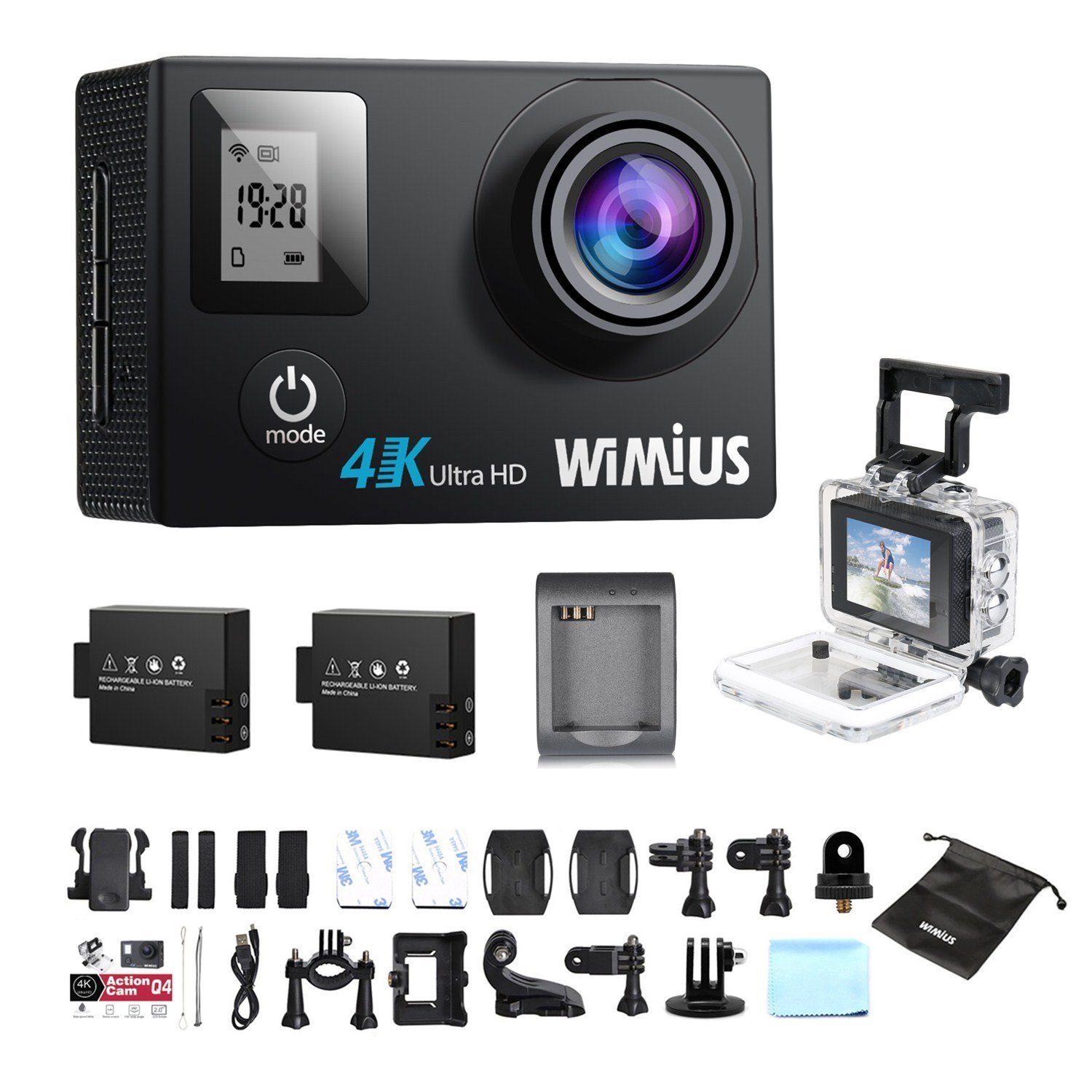
- Čočka: Captures video and photo footage.
- Tlačítko napájení / režimu: Powers the camera on/off and switches between modes.
- Tlačítko spouště/OK: Starts/stops recording, takes photos, or confirms selections.
- Tlačítka nahoru/dolů: Prochází možnosti nabídky.
- Hlavní LCD displej (2.0 palce): Zobrazuje se živě view, přehrávání a rozhraní nabídky.
- Status Screen (0.66 inches): Shows current mode, battery status, and recording time.
- Micro USB port: Pro nabíjení a přenos dat.
- Port Micro HDMI: Pro připojení k externímu displeji.
- Slot pro microSD kartu: Pro vložení paměťové karty.
Zahrnuté příslušenství
Your camera comes with a comprehensive kit of accessories:

- Waterproof Case (up to 40M)
- Rechargeable Li-ion Batteries (x2)
- USB kabel
- Various Mounts and Adapters (e.g., helmet mount, bicycle mount)
- Lepicí podložky
- Čisticí hadřík
- Bands and Straps
3. Nastavení
3.1 Instalace a nabíjení baterie
- Otevřete kryt přihrádky na baterie na spodní straně fotoaparátu.
- Insert a fully charged Li-ion battery, ensuring the correct orientation.
- Bezpečně zavřete kryt bateriového prostoru.
- To charge, connect the camera to a USB power source (e.g., computer, USB wall adapter) using the provided USB cable. The charging indicator light will illuminate.
- Charging typically takes 2-3 hours. The indicator light will turn off or change color when fully charged.

3.2 Instalace karty MicroSD
A MicroSD card (not included) is required for recording. The camera supports up to 64GB Class 10 or UHS-I MicroSD cards.
- Vyhledejte slot pro kartu MicroSD na boku fotoaparátu.
- Vložte kartu MicroSD zlatými kontakty směrem k zadní straně fotoaparátu, dokud nezacvakne.
- Chcete-li kartu vyjmout, jemně ji zatlačte, dokud nevyskočí.
- It is recommended to format the MicroSD card in the camera before first use and periodically thereafter to ensure stable recording.
3.3 Použití vodotěsného pouzdra
The waterproof case allows the camera to be used up to 40 meters underwater.
- Před vložením fotoaparátu do vodotěsného pouzdra se ujistěte, že je suchý.
- Close the case firmly, ensuring the rubber seal is clean and free of debris.
- Perform a dry test by submerging the empty case in water for a few minutes to check for leaks before inserting the camera.
3.4 Montážní příslušenství
Utilize the various mounts and adapters to attach your camera to helmets, bicycles, or other surfaces. Refer to the accessory diagram for specific attachment methods.
4. Návod k obsluze
4.1 Zapnutí/vypnutí
- Zapnutí: Stiskněte a podržte tlačítko Napájení/Režim po dobu 3–5 sekund.
- Vypnout: Stiskněte a podržte tlačítko Napájení/Režim po dobu 3–5 sekund.
4.2 Výběr režimu
Press the Power/Mode button repeatedly to cycle through the main modes:
- Režim nahrávání videa: Označeno ikonou videokamery.
- Režim fotografie: Označeno ikonou fotoaparátu.
- Režim přehrávání: Označeno ikonou přehrávání.
- Nabídka nastavení: Označeno ikonou ozubeného kola.
4.3 Nahrávání videa
- Přepněte do režimu nahrávání videa.
- Press the Shutter/OK button to start recording. A red indicator light will flash, and the recording time will appear on the screen.
- Stiskněte tlačítko Spoušť/OK znovu pro zastavení nahrávání.
Video Settings (via Settings Menu)
- Rezoluce: Select from 4K 30fps, 2.7K 30fps, 1080p 60/30fps, 720p 120/60/30fps.
- Nahrávání ve smyčce: Set to 2min, 3min, 5min, or Off. When enabled, the camera will continuously record, overwriting the oldest files, když je paměťová karta plná.
- Časosběrné video: Set intervals (0.5s, 1s, 5s, 10s, 30s, 60s) or Off. The camera will capture frames at set intervals and compile them into a video.
- Zpomalený pohyb: Available at 1080p/60fps and 720p/120fps.
4.4 Fotografování
- Přepněte do režimu Foto.
- Stisknutím tlačítka Spoušť/OK pořídíte snímek.
Photo Settings (via Settings Menu)
- Rezoluce: Up to 16 Megapixels.
- Série fotek: Capture multiple photos in quick succession (e.g., 3P/1S, 5P/1S, 10P/1S).
4.5 Připojení k Wi-Fi a používání aplikací
The camera features Wi-Fi connectivity for remote control via a smartphone app.
- Enable Wi-Fi on the camera via the Settings Menu. The Wi-Fi name (SSID) and password will be displayed.
- Download the compatible WiMiUS app from your smartphone's app store (e.g., App Store for iOS, Google Play for Android).
- Na smartphonu se připojte k síti Wi-Fi fotoaparátu pomocí zadaného hesla.
- Open the WiMiUS app to control the camera, view živé footage a převod files.
4.6 Menu Navigation and General Settings
Access the Settings Menu by cycling through modes. Use the Up/Down buttons to navigate and the Shutter/OK button to select.
- Jazyk: Select your preferred language (French is available).
- Datum/čas: Nastavte správné datum a čas. Note: The date/time setting may reset to 2016/09/01 00:00:00 when batteries are changed. This is a known behavior; reset manually after each battery change.
- Vehicle Mode: (OUI/NON - Yes/No) This mode typically enables automatic recording when the camera detects power, useful for dashcam functionality.
- Formátovací karta: Erases all data on the MicroSD card.
- Obnovení továrního nastavení: Restores all settings to their default values.
5. Údržba
5.1 Čištění fotoaparátu a objektivu
- K čištění těla fotoaparátu použijte měkký hadřík, který nepouští vlákna.
- For the lens, use a specialized lens cleaning cloth or pen to avoid scratches. Do not use abrasive materials.
- Ensure the camera is off and dry before cleaning.
5.2 Waterproof Case Care
- After each use in water, rinse the waterproof case with fresh water and allow it to air dry.
- Inspect the rubber seal for any dirt, sand, or damage. Clean or replace if necessary to maintain waterproofing.
5.3 Péče o baterii
- Pokud baterie nepoužíváte, skladujte je na chladném a suchém místě.
- Do not expose batteries to high temperatures or direct flame.
- Pokud skladujete baterie delší dobu, nabijte je přibližně na 50 % jejich kapacity.
5.4 Skladování
When not in use, store the camera and accessories in a protective case to prevent damage from dust and impacts.
6. Řešení problémů
This section addresses common issues you might encounter with your WiMiUS Q4 camera.
| Problém | Možná příčina | Řešení |
|---|---|---|
| Fotoaparát se nezapne. | Slabá nebo vybitá baterie. | Charge the battery fully. Ensure battery is correctly inserted. |
| Nelze nahrávat video/fotit. | No MicroSD card, card full, or card error. | Vložte kartu MicroSD. Smažte staré files or replace card. Format the card in the camera. |
| Date/Time resets after battery change. | Standard behavior for this model. | Manually reset the date and time in the settings menu after each battery change. |
| Špatná kvalita obrazu za slabého osvětlení. | Limitations of the camera sensor in low light conditions. | Ensure adequate lighting. Adjust exposure settings if available. |
| Sound is muffled in waterproof case. | Waterproof case seals the microphone. | This is normal. For better audio, use the camera without the waterproof case in dry conditions. |
| Problémy s připojením k Wi-Fi. | Incorrect password, app issues, or signal interference. | Verify Wi-Fi password. Restart camera and smartphone. Ensure app is updated. Try resetting camera Wi-Fi settings. |
| Accessories breaking easily. | Material quality or improper use. | Handle accessories with care. Consider purchasing higher quality third-party mounts if needed for demanding activities. |
Obecné kroky při řešení potíží
- Restartujte fotoaparát: Power off and then on again.
- Check MicroSD Card: Ensure it's correctly inserted and formatted. Try a different card if issues persist.
- Obnovení továrního nastavení: If problems continue, perform a factory reset via the settings menu. Note that this will erase all custom settings.
7. Specifikace
Key technical specifications for the WiMiUS Q4 Action Camera:
- Značka: WiMiUS
- Model: Q4
- Efektivní statické rozlišení: 16 megapixelů
- Rozlišení videa: 4K (30fps), 2.7K (30fps), 1080p (60/30fps), 720p (120/60/30fps)
- Velikost obrazovky: 2.0 inches (main LCD), 0.66 inches (status screen)
- Technologie připojení: Wi-Fi
- Vodotěsná hloubka: Až 40 metrů (s vodotěsným pouzdrem)
- Stabilizace obrazu: Žádný
- Technologie senzoru: CMOS
- Typ objektivu: Široký úhel
- Barva: Gold (Note: Product title indicates 'Noir' (Black), but specifications list 'or' (Gold). This manual refers to the Q4 model generally.)
- Skladování: Supports MicroSD cards up to 64GB (Class 10 or UHS-I recommended)
8. Záruka a podpora
For warranty information and customer support, please refer to the documentation provided at the time of purchase or contact your retailer. Specific details regarding warranty duration and terms are typically included with your product packaging.
Software updates and spare parts availability information are not provided in the product specifications. Please check the manufacturer's official website or contact customer service for the most current information.


