1. Úvod
The Vivitek Qumi Q8-BK is a compact and portable DLP projector designed for both business and personal use. It offers Full HD 1080p resolution, 1000 lumens brightness, and versatile connectivity options including HDMI, USB, and wireless mirroring for Android and iOS devices. This manual provides essential information for setting up, operating, maintaining, and troubleshooting your projector to ensure optimal performance.
2. Bezpečnostní informace
Před použitím projektoru si prosím přečtěte všechny bezpečnostní pokyny. Uschovejte si tento návod k obsluze pro budoucí použití.
- Neblokujte větrací otvory. Zajistěte dostatečné proudění vzduchu kolem projektoru.
- Nedívejte se přímo do objektivu projektoru, když je zapnutýamp svítí. Jasné světlo může způsobit poškození očí.
- Avoid placing the projector in direct sunlight, near heat sources, or in environments with extreme temperatures or humidity.
- Používejte pouze napájecí adaptér dodaný s projektorem.
- Nepokoušejte se projektor rozebírat ani opravovat sami. Veškerý servis svěřte kvalifikovanému personálu.
- Chraňte projektor před vodou nebo jinými kapalinami.
3. Obsah balení
Ověřte, zda jsou v balení přítomny všechny položky:
- Vivitek Qumi Q8-BK Projector
- Napájecí adaptér
- Dálkové ovládání
- HDMI kabel
- Rychlý průvodce
- Přepravní pouzdro
4. Konec produktuview
Familiarize yourself with the projector's components and connection ports.
4.1 Top Panel and Controls
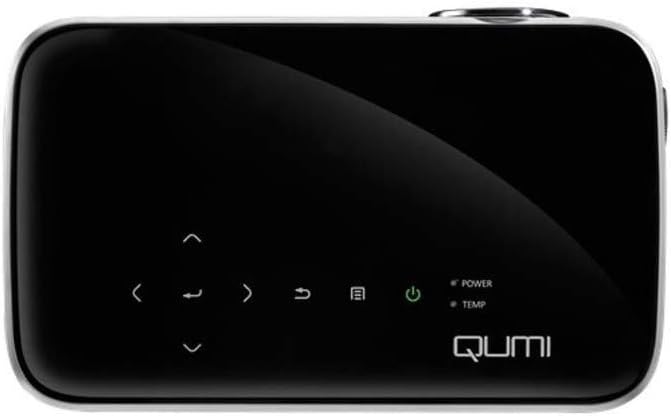
Obrázek 1: Nahoru view of the Vivitek Qumi Q8-BK projector, highlighting the touch-sensitive control panel. This panel includes navigation arrows, menu access, source selection, and power buttons, along with LED indicators for power and temperature.
The top panel features touch-sensitive controls for navigating menus, adjusting settings, and power management. LED indicators show the power status and temperature warnings.
4.2 Side Panel and Ports
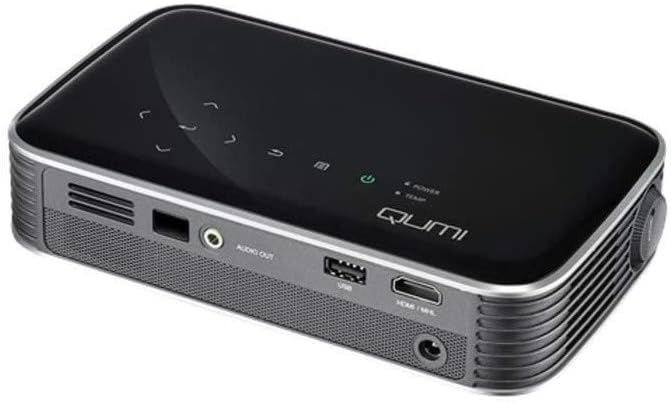
Obrázek 2: Strana view of the Vivitek Qumi Q8-BK projector, displaying its connectivity ports. These include an audio out jack, a USB port, and an HDMI/MHL input, along with ventilation grilles.
The side panel provides essential connectivity options:
- Audio výstup: Připojte externí reproduktory nebo sluchátka.
- USB: Pro připojení paměťových zařízení USB pro přehrávání médií filenebo pro aktualizace firmwaru.
- HDMI/MHL: Connect to HDMI-enabled devices such as laptops, Blu-ray players, or MHL-compatible smartphones/tablets.
- Příkon: Připojte dodaný napájecí adaptér.
5. Nastavení
Follow these steps to set up your Vivitek Qumi Q8-BK projector.
5.1 Zapnutí
- Connect the power adapter to the projector's power input port and then to an electrical outlet.
- Press the power button on the projector's top panel or on the remote control. The power LED indicator will illuminate.
- Allow a few moments for the projector to warm up and display the initial screen.
5.2 Úprava zaostření a korekce lichoběžníkového zkreslení
- Soustředit: Rotate the focus ring located near the lens until the projected image is sharp and clear.
- Korekce lichoběžníkového zkreslení: If the image appears trapezoidal (wider at the top or bottom), use the keystone correction function in the projector's menu to adjust it. This corrects the image geometry to a rectangular shape.
5.3 Připojení vstupních zdrojů
The Qumi Q8-BK supports multiple input sources:
- HDMI/MHL: Connect an HDMI cable from your source device (laptop, game console, Blu-ray player) to the HDMI/MHL port on the projector. For MHL-compatible mobile devices, use an MHL cable.
- USB: Insert a USB flash drive into the USB port to access media fileje na něm uloženo.
- Wireless (Miracast/AirPlay): The projector features built-in Wi-Fi for wireless content sharing from Android and iOS devices. Refer to the "Operating" section for detailed instructions on wireless setup.
6. Provoz
This section covers the basic operation of your projector.
6.1 Navigace v nabídce
Use the navigation buttons on the top panel or the remote control to browse the projector's on-screen menu. Press the "Menu" button to access settings such as image adjustments, source selection, and system configurations.
6.2 Výběr zdroje
Press the "Source" button on the remote or the projector to cycle through available input sources (HDMI, USB, Wireless). Select the desired source from the on-screen menu.
6.3 Wireless Content Sharing (Miracast/AirPlay)
The Qumi Q8-BK supports wireless mirroring for compatible devices:
- Ensure the projector's Wi-Fi is enabled and connected to your network (if required for your device's mirroring function).
- Select the "Wireless" input source on the projector.
- On your Android device, enable "Screen Mirroring," "Smart View," or a similar function. On iOS devices, use "AirPlay Mirroring."
- Select the Qumi Q8-BK from the list of available devices on your mobile device.
- Obrazovka vašeho zařízení by se nyní měla zrcadlit na projektoru.
Note: Performance may vary depending on network conditions and device compatibility. Some streaming services may restrict mirrored content.
6.4 Media Playback from USB
Insert a USB flash drive into the USB port. The projector's media player interface will typically launch automatically, allowing you to browse and play supported video, audio, and image files.
6.5 3D funkce
The Qumi Q8-BK supports 3D content. To view 3D content, you will need compatible 3D glasses (sold separately) and a 3D-enabled source device playing 3D content. Refer to the projector's on-screen menu for 3D settings and modes.
7. Údržba
Správná údržba zajistí dlouhou životnost a optimální výkon vašeho projektoru.
- Čištění objektivu: Jemně otřete čočku projektoru měkkým hadříkem bez žmolků, který je speciálně určen pro optické povrchy. Nepoužívejte abrazivní čisticí prostředky ani nadměrnou sílu.
- Větrání: Regularly check and clean the ventilation grilles to prevent dust buildup, which can lead to overheating. Use a soft brush or compressed air.
- Skladování: When not in use for extended periods, store the projector in its carrying case in a cool, dry, and dust-free environment.
- LED diodaamp: The projector uses an energy-efficient LED lamp with an estimated operational life of up to 30,000 hours, requiring no replacement under normal usage.
8. Řešení problémů
Pokud se s projektorem setkáte s problémy, podívejte se na následující běžné problémy a jejich řešení.
| Problém | Možné řešení |
|---|---|
| Není zobrazen žádný obrázek |
|
| Žádný zvuk |
|
| Problémy s bezdrátovým zrcadlením |
|
| Projektor se přehřívá nebo vypíná |
|
If the problem persists after trying these solutions, please contact Vivitek customer support.
9. Specifikace
Key technical specifications for the Vivitek Qumi Q8-BK projector:
| Funkce | Detail |
|---|---|
| Značka | Vivitek |
| Číslo modelu | Qumi Q8-BK |
| Rozlišení displeje | 1920 x 1080 (Full HD) |
| Jas | Až 1000 světla |
| Kontrastní poměr | 30,000:1 |
| Lamp Typ | LED |
| Lamp Život | Estimated 30,000 hours |
| Technologie připojení | HDMI, USB, Wi-Fi (Miracast/AirPlay) |
| Speciální funkce | HDMI Connectivity, Portable, USB Connectivity, Wireless, Miracast |
| Rozměry produktu | 1.7 x 4.4 x 7.4 palce |
| Hmotnost položky | 1.4 libry |
10. Záruka a podpora
Vivitek products are designed for reliability and performance. For warranty information, please refer to the warranty card included in your product package or visit the official Vivitek website. For technical support, troubleshooting assistance beyond this manual, or service inquiries, please contact Vivitek customer support through their official channels.
Please have your product model number (Qumi Q8-BK) and serial number ready when contacting support.


