1. Úvod
The PAC RP5-GM52-HAR is a specialized replacement harness designed for use with the PAC RP5-GM51 interface (sold separately). This harness facilitates the installation of an aftermarket radio in specific General Motors trucks, while retaining essential factory features. It is engineered for compatibility with 2016-2019 GM trucks equipped with a 7-inch radio display, including models such as the GMC Sierra and Chevrolet Silverado.
2. Nastavení a instalace
2.1 Kompatibilita
- Designed for 2016-2019 General Motors trucks.
- Requires a 7-inch factory radio display.
- Compatible with models including GMC Sierra and Chevrolet Silverado.
- Requires the PAC RP5-GM51 interface (sold separately).
2.2 Obsah balení
- PAC RP5-GM52-HAR RadioPRO Harness
2.3 kroky instalace
This harness is a quick-connect component intended to replace or supplement the harness included with the PAC RP5-GM51 interface. For detailed installation instructions, refer to the comprehensive manual provided with your PAC RP5-GM51 interface. The general procedure involves:
- Před zahájením instalace se ujistěte, že je baterie vozidla odpojena.
- Remove the factory radio from the dashboard.
- Connect the RP5-GM52-HAR harness to the PAC RP5-GM51 interface and the vehicle's factory wiring.
- Connect the aftermarket radio to the RP5-GM51 interface via the harness.
- Secure all connections and ensure proper routing of wires to prevent pinching or damage.
- Reconnect the vehicle's battery and test all functions.
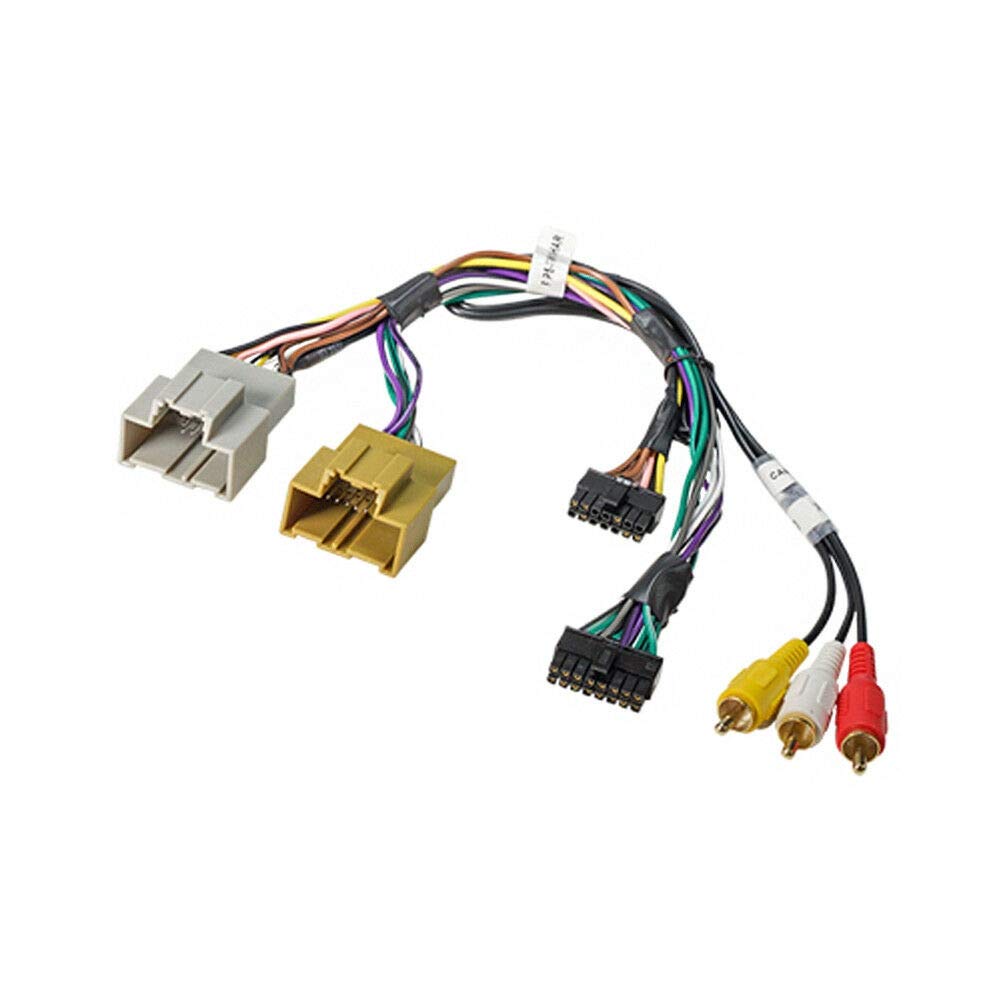
Obrázek 1: The PAC RP5-GM52-HAR RadioPRO Harness. This image displays the harness featuring multiple wiring bundles terminating in different types of connectors, including two large gray and brown automotive connectors, several smaller multi-pin connectors, and three RCA plugs (yellow, white, red) for audio/video connections. The wires are color-coded and bundled together, indicating a complex wiring interface for vehicle integration.
3. Provoz
The RP5-GM52-HAR harness, in conjunction with the RP5-GM51 interface, enables the seamless integration of an aftermarket radio while preserving critical factory functionalities. The harness itself does not have operational controls but facilitates the communication between the vehicle's systems and the new radio.
Key factory features retained include:
- OnStar Telematics system
- Factory WiFi system
- Front and rear park assist
- All warning chimes (chime module included with RP5-GM51)
- OEM Auxiliary Input
- Original steering wheel control functions
- Data controlled RAP (Retained Accessory Power) accessory output
Additionally, the harness provides data-controlled outputs for connection to navigation radios, including speed, reverse, and E-brake status output wires. The vehicle's data-bus remains intact for service and diagnostics.
4. Údržba
The RP5-GM52-HAR harness is designed for durability and requires minimal maintenance. To ensure optimal performance and longevity:
- Periodically inspect all connections to ensure they remain secure and free from corrosion.
- Avoid exposing the harness to excessive moisture or extreme temperatures.
- Do not apply excessive force when connecting or disconnecting the harness.
- Clean any dust or debris from the connectors using a dry, lint-free cloth.
The RP5-GM51 interface, which this harness connects to, is updatable using a PAC-UP USB adapter. Refer to the RP5-GM51 manual for instructions on firmware updates.
5. Řešení problémů
If you encounter issues after installing the RP5-GM52-HAR harness, consider the following troubleshooting steps:
- No Power to Aftermarket Radio: Verify all power connections are secure. Ensure the RP5-GM51 interface is correctly powered and functioning. Check vehicle fuses.
- Žádný zvuk: Confirm all speaker connections are correctly wired. Check the aftermarket radio's settings and ensure the RP5-GM51 is properly configured for audio output.
- Factory Features Not Retained (e.g., Steering Wheel Controls, OnStar): Double-check all connections between the RP5-GM52-HAR, RP5-GM51, and the vehicle's factory wiring. Ensure the RP5-GM51 has been programmed correctly for your specific vehicle. Refer to the RP5-GM51 manual for programming details.
- Přerušovaná funkce: Inspect all connections for looseness or damage. Ensure wires are not pinched or shorting.
- Problémy s kompatibilitou: Confirm your vehicle year, make, model, and factory radio display size (7-inch) are compatible as specified.
For persistent issues, consult the detailed troubleshooting guide in the PAC RP5-GM51 instruction manual or contact PAC customer support.
6. Specifikace
| Model | RP5-GM52-HAR |
| Značka | PAC |
| Výrobce | PAC |
| ASIN | B01LZSVCUD |
| Materiál | Pryž |
| Typ konektoru | Usb, Auxiliary |
| Rozměry balení | 8.27 x 8.19 x 1.26 palce |
| Hmotnost položky | 3.84 unce |
| Datum první dostupnosti | 17. září 2019 |
7. Informace o záruce
Warranty coverage for the PAC RP5-GM52-HAR harness is typically provided by the manufacturer, PAC. Specific warranty terms, conditions, and duration are usually included with the main PAC RP5-GM51 interface or can be found on the official PAC webstránky. Uschovejte si prosím doklad o koupi pro případné reklamace.
8. Podpora
For technical assistance, installation questions, or further support regarding your PAC RP5-GM52-HAR RadioPRO Harness, please contact PAC customer support. You can typically find contact information on the PAC website or in the documentation accompanying your PAC RP5-GM51 interface.
Note: Always refer to the most current documentation and support resources provided by PAC for the most accurate and up-to-date information.


