1. Důležité bezpečnostní pokyny
Please read all safety instructions carefully before using the Vivitek Qumi Q3 Plus-RD projector. Failure to follow these instructions may result in electric shock, fire, or damage to the device.
- Zdroj napájení: Use only the supplied AC power adapter. Ensure the voltage odpovídá požadavkům projektoru.
- Větrání: Neblokujte větrací otvory. Kolem projektoru ponechte dostatečný prostor pro správné proudění vzduchu, abyste zabránili přehřátí.
- vlhkost: Do not expose the projector to rain, moisture, or operate it near water.
- Teplo: Neumísťujte projektor do blízkosti zdrojů tepla, jako jsou radiátory, topná tělesa, kamna nebo jiná zařízení produkující teplo.
- Čištění: Unplug the projector from the power outlet before cleaning. Use a dry cloth for cleaning. Do not use liquid cleaners or aerosol cleaners.
- Servis: Nepokoušejte se tento výrobek opravit sami. Veškerý servis svěřte kvalifikovanému servisnímu personálu.
- Bezpečnost očí: Nedívejte se přímo do objektivu projektoru, když je zapnutýamp svítí. Jasné světlo může způsobit poškození očí.
2. Obsah balení
Verify that all items listed below are included in your Vivitek Qumi Q3 Plus-RD package:
- Vivitek Qumi Q3 Plus-RD Projector
- AC Power Adapter with Cable
- HDMI kabel
- Documentation Kit (Quick Start Guide, Warranty Card)

Image: The AC power adapter and cable for the Vivitek Qumi Q3 Plus-RD projector.
3. Konec produktuview
Familiarize yourself with the components and ports of your Vivitek Qumi Q3 Plus-RD projector.
3.1 Přední View

Obrázek: Přední strana view of the Vivitek Qumi Q3 Plus-RD projector, showing the projection lens and speaker grille.
3.2 Zadní View (Ports and Connections)

Obrázek: Zadní view of the Vivitek Qumi Q3 Plus-RD projector, displaying various input/output ports including AV IN, USB 1, USB 2, HDMI, DC IN power input, microSD card slot, and the power button.
3.3 Strana View

Obrázek: Boční view of the Vivitek Qumi Q3 Plus-RD projector, showing the ventilation grilles and the integrated kickstand for angle adjustment.
3.4 Dálkové ovládání
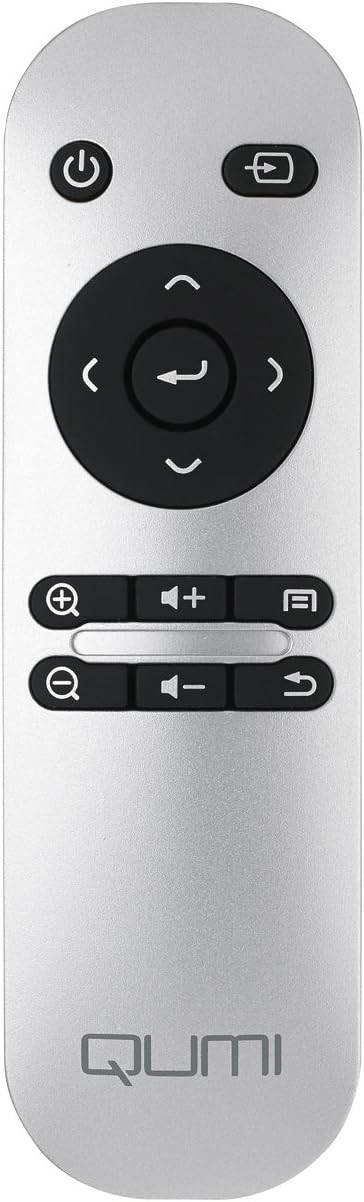
Image: The remote control for the Vivitek Qumi Q3 Plus-RD projector, featuring power, navigation, volume, and focus adjustment buttons.
4. Nastavení
Follow these steps to set up your Vivitek Qumi Q3 Plus-RD projector for first use.
- Připojení napájení: Connect the supplied AC power adapter to the 'DC IN' port on the projector and then plug it into a power outlet. The projector can also operate on its internal battery.
- Umístění: Place the projector on a stable, flat surface. Use the integrated kickstand to adjust the projection angle if needed. Ensure there are no obstructions to the lens or ventilation openings.
- Zapnutí: Press and hold the power button on the projector or the remote control to turn on the device.
- Nastavení zaostření: Once powered on, use the focus buttons on the remote control to adjust the image sharpness. The Qumi Q3 Plus-RD features motorized focus for precise adjustment.
- Korekce lichoběžníkového zkreslení: The projector features digital auto keystone correction. If the image appears trapezoidal, the projector will automatically adjust it. Manual adjustment options may be available in the settings menu.
5. Návod k obsluze
This section details how to operate your Vivitek Qumi Q3 Plus-RD projector.
5.1 Zapnutí/vypnutí
- Zapnutí: Press and hold the power button on the projector or the remote control until the device starts.
- Vypnutí: Press the power button on the projector or the remote control. A shutdown prompt will appear. Select 'Power Off' to shut down the system safely.
5.2 Navigace v operačním systému Android
The Qumi Q3 Plus-RD runs on an Android operating system. Use the remote control's navigation buttons (up, down, left, right, OK) to move through menus and select options. A Bluetooth keyboard/mouse can also be paired for easier navigation.
5.3 Přehrávání médií
- USB disk: Insert a USB flash drive into one of the USB ports. The system will typically detect it and prompt you to open the file prohlížeč nebo přehrávač médií.
- MicroSD karta: Insert a microSD card into the microSD slot. Similar to USB, the system will allow you to access its contents.
- Interní úložiště: The projector has 5.1 GB of available on-board memory for storing files a aplikace.
5.4 Připojení externích zařízení (HDMI)
To connect an external device such as a laptop, Blu-ray player, or gaming console:
- Connect one end of an HDMI cable to the HDMI port on the projector.
- Connect the other end of the HDMI cable to the HDMI output port on your external device.
- On the projector's home screen, navigate to the input selection and choose 'HDMI'.
6. Konektivita
The Vivitek Qumi Q3 Plus-RD offers various connectivity options for seamless integration with your devices.
6.1 Nastavení Wi-Fi
- Na domovské obrazovce přejděte do sekce „Nastavení“.
- Vyberte možnost „Wi-Fi“ a zapněte ji.
- Vyberte požadovanou síť Wi-Fi ze seznamu dostupných sítí.
- Enter the network password if prompted and connect.
6.2 Párování Bluetooth
You can pair Bluetooth devices such as external speakers, headphones, or a keyboard/mouse with your projector.
- Na domovské obrazovce přejděte do sekce „Nastavení“.
- Vyberte možnost „Bluetooth“ a zapněte ji.
- Přepněte své zařízení Bluetooth do režimu párování.
- Select your device from the list of available devices on the projector and confirm pairing.
6.3 Wireless Content Sharing
The projector supports wireless content sharing from Android and iOS devices. Refer to the projector's specific application (e.g., HappyCast or similar pre-installed app) for detailed instructions on mirroring your device's screen.
7. Údržba
Správná údržba zajistí dlouhou životnost a optimální výkon vašeho projektoru.
- Čištění objektivu: Jemně otřete čočku projektoru měkkým hadříkem bez žmolků, který je speciálně určen pro optické povrchy. Nepoužívejte abrazivní materiály ani agresivní chemikálie.
- Větrání: Regularly check that the ventilation openings are clear of dust and debris. Use a soft brush or compressed air to clean them.
- Péče o baterie: For models with an internal battery, avoid fully discharging the battery frequently. If storing the projector for an extended period, charge the battery to approximately 50% to prolong its lifespan.
- Skladování: Projektor skladujte na chladném a suchém místě mimo dosah přímého slunečního záření a extrémních teplot.
8. Řešení problémů
If you encounter issues with your Vivitek Qumi Q3 Plus-RD, refer to the following common problems and solutions.
- No Image Projected:
- Ujistěte se, že je projektor zapnutý a krytka objektivu je sejmuta.
- Check the input source selection to ensure it matches the connected device (e.g., HDMI, USB).
- Verify that the external device is powered on and outputting a signal.
- Žádný zvuk:
- Upravte hlasitost na projektoru a připojeném zdrojovém zařízení.
- Check if external speakers are connected via Bluetooth or AV IN, and ensure they are powered on and functioning.
- Ensure the audio output settings on the source device are correctly configured.
- Dálkové ovládání nereaguje:
- Ensure there are no obstructions between the remote and the projector's IR receiver (located at the rear).
- Replace the remote control battery (typically a coin cell battery).
- Problémy s připojením k Wi-Fi/Bluetooth:
- Ujistěte se, že je v nastavení projektoru povoleno Wi-Fi/Bluetooth.
- Restartujte projektor a zařízení, které se pokoušíte připojit.
- Zkontrolujte, zda nedochází k rušení jinými bezdrátovými zařízeními.
- Obrázek je rozmazaný:
- Use the remote control's focus buttons to adjust the image sharpness.
- Ujistěte se, že projekční plocha je rovná a projektor stabilní.
9. Specifikace
Key technical specifications for the Vivitek Qumi Q3 Plus-RD projector:
| Funkce | Specifikace |
|---|---|
| Číslo modelu | Q3 PLUS-RD |
| Typ zobrazení | DLP |
| Nativní rozlišení displeje | 1280 x 720 (HD 720p) |
| Jas | Až 500 světla |
| Kontrastní poměr | 5,000:1 |
| Technologie připojení | Bluetooth, HDMI, Wi-Fi |
| Speciální funkce | Bluetooth, Portable, Android OS |
| Operační systém | Android V.4.42 |
| CPU | Quad-core CPU at 1.5GHz |
| Interní úložiště | 5.1 GB available |
| Baterie | 1 lithium-polymerová baterie (součástí balení) |
| Rozměry produktu | 6.9 x 4 x 1.1 palce |
| Hmotnost položky | 1 liber |
10. Záruka a podpora
The Vivitek Qumi Q3 Plus-RD projector comes with a standard manufacturer's warranty. For detailed warranty information, please refer to the documentation kit included with your product or visit the official Vivitek webmísto.
For technical support, troubleshooting assistance, or service inquiries, please contact Vivitek customer support through their official channels. Keep your product's model number (Q3 PLUS-RD) and serial number handy when contacting support.


