1. Úvod
Thank you for choosing the LinQ PRO GO (A-S050C) Videocamera. This manual provides essential information for setting up, operating, and maintaining your device. Please read it carefully before use to ensure optimal performance and longevity of your camera.
The LinQ PRO GO (A-S050C) is a versatile action camera designed to capture high-definition videos and photos. It features a 2-inch HD LCD display, a 170-degree wide-angle fisheye lens, and a robust waterproof casing allowing submersion up to 30 meters. With its 12-megapixel sensor and Full HD 1080p video recording at 30fps, it is suitable for various outdoor activities and sports.
2. Obsah balení
Ověřte prosím, zda jsou ve vašem balení obsaženy všechny níže uvedené položky:
- LinQ PRO GO (A-S050C) Videocamera with Waterproof Housing
- USB nabíjecí kabel
- Napájecí adaptér
- Dobíjecí lithiová baterie (900 mAh)
- Various Mounting Accessories (e.g., helmet mounts, bicycle mounts, clips, straps)
- Čisticí hadřík

Obrázek 2.1: LinQ PRO GO (A-S050C) Videocamera in its protective waterproof housing.
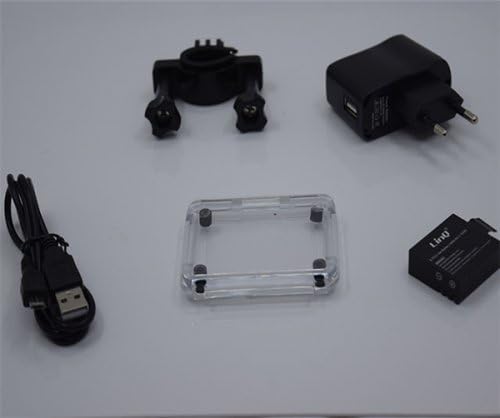
Obrázek 2.2: Essential accessories including the USB cable, power adapter, rechargeable battery, and an additional frame for the waterproof housing.
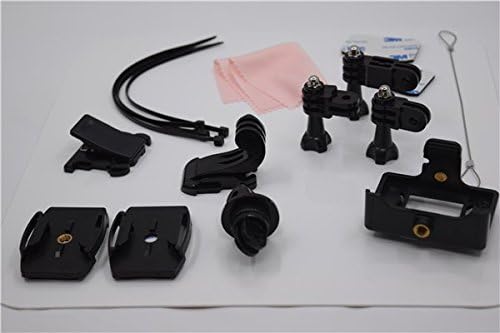
Obrázek 2.3: A selection of mounting accessories, including clips, adhesive mounts, and straps, for attaching the camera to various surfaces and gear.
3. Nastavení
3.1. Nabíjení baterie
- Insert the provided 900mAh lithium battery into the camera's battery compartment.
- Connect the camera to the power adapter using the USB cable.
- Plug the power adapter into a wall outlet. The charging indicator light will illuminate.
- Allow approximately 3 hours for a full charge. The indicator light will change or turn off once charging is complete. A fully charged battery provides approximately 90 minutes of recording at 1080p@30fps.
3.2. Vložení karty Micro SD
The camera supports Micro SD cards up to 32GB. A Class 10 or higher speed rating is recommended for optimal video recording performance.
- Open the Micro SD card slot cover on the side of the camera.
- Vložte kartu Micro SD zlatými kontakty směrem k zadní straně fotoaparátu, dokud nezacvakne.
- Close the card slot cover securely.
- It is recommended to format the Micro SD card using the camera's settings menu before first use.
3.3. Zapnutí/vypnutí
- To power on: Press and hold the Power/Mode button (usually on the front or top) for a few seconds until the screen illuminates.
- Vypnutí: Znovu stiskněte a podržte tlačítko Napájení/Režim, dokud se obrazovka nevypne.
4. Návod k obsluze
4.1. Základní obsluha
- Přepínání režimů: Press the Power/Mode button briefly to cycle through different modes (Video, Photo, Playback, Settings).
- Tlačítko spouště/OK: Press the Shutter/OK button (usually on top) to start/stop recording video or to take a photo. In menu mode, this button confirms selections.
- Navigační tlačítka: Use the Up/Down buttons (if available, often on the side) to navigate through menu options or zoom in/out.
4.2. Nahrávání videa
In Video mode, the camera can record at various resolutions:
- 1920x1080 (1080p) at 30fps
- 1280x720 (720p) at 60fps
- 848x480 (WVGA) at 30fps
- 640x480 (VGA) at 30fps
Press the Shutter/OK button once to start recording. A red indicator light or on-screen icon will typically flash. Press it again to stop recording.
4.3. Fotografování
In Photo mode, the camera supports image resolutions up to 12 megapixels:
- 12 mil
- 10 mil
- 8M
- 5M
Press the Shutter/OK button once to take a photo.
4.4. Pokročilé nastavení
Access the settings menu to adjust various parameters:
- Nastavení videa: Loop recording, time-lapse, motion detection.
- Nastavení fotografie: Single shot, self-timer (5s/10s/20s), continuous shooting.
- Vystavení: Adjust EV compensation for brighter or darker images.
- Vyvážení bílé: Select appropriate white balance for different lighting conditions (Auto, Daylight, Cloudy, Tungsten, Fluorescent).
- ISO: Adjust light sensitivity.
- Ostrost: Control image sharpness.
- Datum/čas: Nastavte správné datum a čas.
- Jazyk: Vyberte preferovaný jazyk.
- Formátovat SD kartu: Erase all data on the Micro SD card.
4.5. Přehrávání
V režimu přehrávání můžete znovuview your captured videos and photos on the 1.5-inch LCD screen. Use the navigation buttons to scroll through files. Press the Shutter/OK button to play videos. Fast forward and rewind functions are supported for videos.
4.6. Connecting to a Computer/TV
- USB připojení: Connect the camera to a computer using the USB cable. The camera will appear as a removable disk, allowing you to transfer files. It can also function as a webvačka.
- Připojení HDMI: Connect the camera to an HDMI-compatible display (e.g., TV) using an HDMI cable (not included) to view your content on a larger screen.
5. Údržba
- Čištění: Use the provided cleaning cloth or a soft, lint-free cloth to clean the camera lens and LCD screen. Do not use harsh chemicals or abrasive materials.
- Vodotěsné pouzdro: Regularly inspect the waterproof housing for any cracks, damage, or debris on the O-ring seal. Ensure the O-ring is clean and properly seated before each use in water. Rinse the housing with fresh water after saltwater use and allow it to air dry.
- Skladování: Fotoaparát skladujte na chladném a suchém místě mimo dosah přímého slunečního záření a extrémních teplot. Pokud fotoaparát nebudete delší dobu používat, vyjměte baterii.
- Péče o baterie: Avoid fully discharging the battery frequently. Recharge the battery periodically even if not in use to maintain its health.
6. Řešení problémů
- Fotoaparát se nezapne: Ujistěte se, že je baterie plně nabitá. Znovu vložte baterii.
- Nelze nahrávat video/fotografovat: Check if a Micro SD card is inserted and properly formatted. Ensure there is sufficient space on the card.
- Poor video/image quality: Ensure the lens is clean. Check the selected resolution settings. Ensure adequate lighting.
- Únik vody v pouzdře: Immediately remove the camera from water. Inspect the waterproof housing for damage, ensure the O-ring is clean and correctly seated, and that all latches are securely closed.
- Kamera se zasekne: Press and hold the Power/Mode button for 10-15 seconds to force a shutdown. If the issue persists, remove and reinsert the battery.
7. Specifikace
| Funkce | Specifikace |
|---|---|
| Číslo modelu | A-S050C (6970334022037) |
| Zobrazit | 2palcový HD LCD displej |
| Čočka | 170-degree Wide-Angle Fisheye, 6-glass lens |
| Čipová sada | Novatek 96650 + AR0330 |
| Rozlišení videa | 1920x1080 (30fps), 1280x720 (60fps), 848x480 (30fps), 640x480 (30fps) |
| Formát videa | MOV (H.264 compression) |
| Rozlišení obrazu | 12M/10M/8M/5M |
| Formát obrázku | JPG |
| Fotografické režimy | Single Shot, Self-timer (5s/10s/20s), Continuous |
| Speciální funkce | Loop Recording, Time-lapse, Motion Detection, Dashcam/Webfunkce vačky |
| Vodotěsná hloubka | Up to 30 meters (with waterproof housing) |
| Skladování | Micro SD card, up to 32GB (Class 10 recommended) |
| Baterie | 900mAh dobíjecí lithiová baterie |
| Životnost baterie | Approx. 90 minutes (1080p@30fps) |
| Konektivita | USB 2.0, HDMI |
| Rozměry | 59.2 mm x 41 mm x 29.8 mm |
| Hmotnost | 60 g |
8. Právní informace
This product is accompanied by a regular fiscal receipt for the cost of the product. If you require an invoice, please submit a request indicating all your details by sending a message through the 'Contact Seller' option. Warranty information should be obtained directly from your point of purchase or the seller.


