Zavedení
This manual provides comprehensive instructions for the setup, operation, and maintenance of your Marathon CL030062WD Slim-Jumbo Atomic Digital Wall Clock. This clock features a large, easy-to-read display, atomic time synchronization, and displays temperature, date, and humidity. Please read this manual thoroughly before use to ensure proper functionality and longevity of your device.

Obrázek: Přední strana view of the Marathon CL030062WD Slim-Jumbo Atomic Digital Wall Clock, showcasing its large digital display for time, temperature, date, and humidity, set within a brown frame.
Nastavení
1. Instalace baterie
The clock requires 4 AA batteries (included). Ensure correct polarity when inserting the batteries.
- Najděte kryt přihrádky na baterie na zadní straně hodin.
- Remove the cover by sliding or lifting it.
- Insert 4 new AA batteries, matching the (+) and (-) terminals as indicated inside the compartment.
- Bezpečně nasaďte kryt prostoru pro baterie.
2. Počáteční zapnutí a synchronizace atomového času
Upon battery installation, the clock will automatically begin searching for the WWVB atomic time signal. This process may take several minutes to up to 24 hours, depending on your location and environmental conditions. For best reception, place the clock near a window and away from electronic devices that may cause interference.

Obrázek: Detailní záběr view of the Marathon CL030062WD clock display, highlighting its self-setting capability, versatile mounting options (table stand and wall-mount), and sleek design with a brushed steel effect frame.
3. Montáž hodin
The clock can be wall-mounted or placed on a flat surface using its built-in stand.
- Montáž na stěnu: Use a screw (not included) appropriate for your wall material. Hang the clock using the keyhole slot on the back.
- Stojan na stůl: Extend the integrated stand on the back of the clock to place it on a desk or shelf.

Image: The Marathon CL030062WD clock displayed on a wall in a modern living room setting, demonstrating its suitability as a wall-mounted timepiece.
Návod k obsluze
The clock features several buttons on the back for manual adjustments if needed.
1. Režimy zobrazení
The clock dynamically displays time, date, day of the week, temperature (in °C or °F), and humidity.

Image: A detailed close-up of the Marathon CL030062WD clock's display, illustrating the clear presentation of AM/PM time, current temperature in Fahrenheit, date (month and day), day of the week, and humidity percentage.
2. Manual Time Setting (if atomic sync fails or is not desired)
While the clock is designed for atomic synchronization, you can manually set the time and date.
- Stiskněte a podržte MODE tlačítko pro vstup do režimu nastavení času.
- Použijte + or - buttons to adjust the flashing digit (e.g., hour, minute).
- Stiskněte MODE again to confirm and move to the next setting (e.g., year, month, day).
- Stiskněte MODE repeatedly until you exit the setting mode.
3. Výběr jednotky teploty (°C/°F)
To switch between Celsius and Fahrenheit, locate the °C/°F button on the back of the clock and press it. The display will update accordingly.
4. Letní čas (DST)
The clock typically adjusts for Daylight Saving Time automatically when synchronized with the atomic signal. If manual adjustment is required, refer to the specific DST setting button or sequence in the manual time setting section.
Údržba
1. Čištění
Povrch hodin otřete měkkým, suchým hadříkem. Nepoužívejte abrazivní čisticí prostředky ani chemikálie, protože by mohly poškodit displej nebo...asing.
2. Výměna baterie
Replace all 4 AA batteries when the display dims or the clock stops functioning correctly. It is recommended to replace all batteries at the same time with new ones of the same type.
3. Skladování
If storing the clock for an extended period, remove the batteries to prevent leakage and potential damage to the device.
Odstraňování problémů
| Problém | Možná příčina | Řešení |
|---|---|---|
| Clock not displaying or dim display | Slabé nebo vybité baterie; nesprávná polarita baterií. | Replace all batteries with new ones, ensuring correct (+) and (-) orientation. |
| Čas je nesprávný nebo se nenastavuje automaticky | Poor atomic signal reception; interference; incorrect time zone setting. | Move the clock closer to a window or to a different location away from electronic interference. Allow up to 24 hours for signal acquisition. Manually set the time if atomic sync is consistently unsuccessful. |
| Údaje o teplotě/vlhkosti jsou nepřesné | Clock recently moved to a new environment; sensor obstruction. | Allow the clock to acclimate to its new environment for at least 30 minutes. Ensure no objects are blocking the sensor vents. |
Specifikace
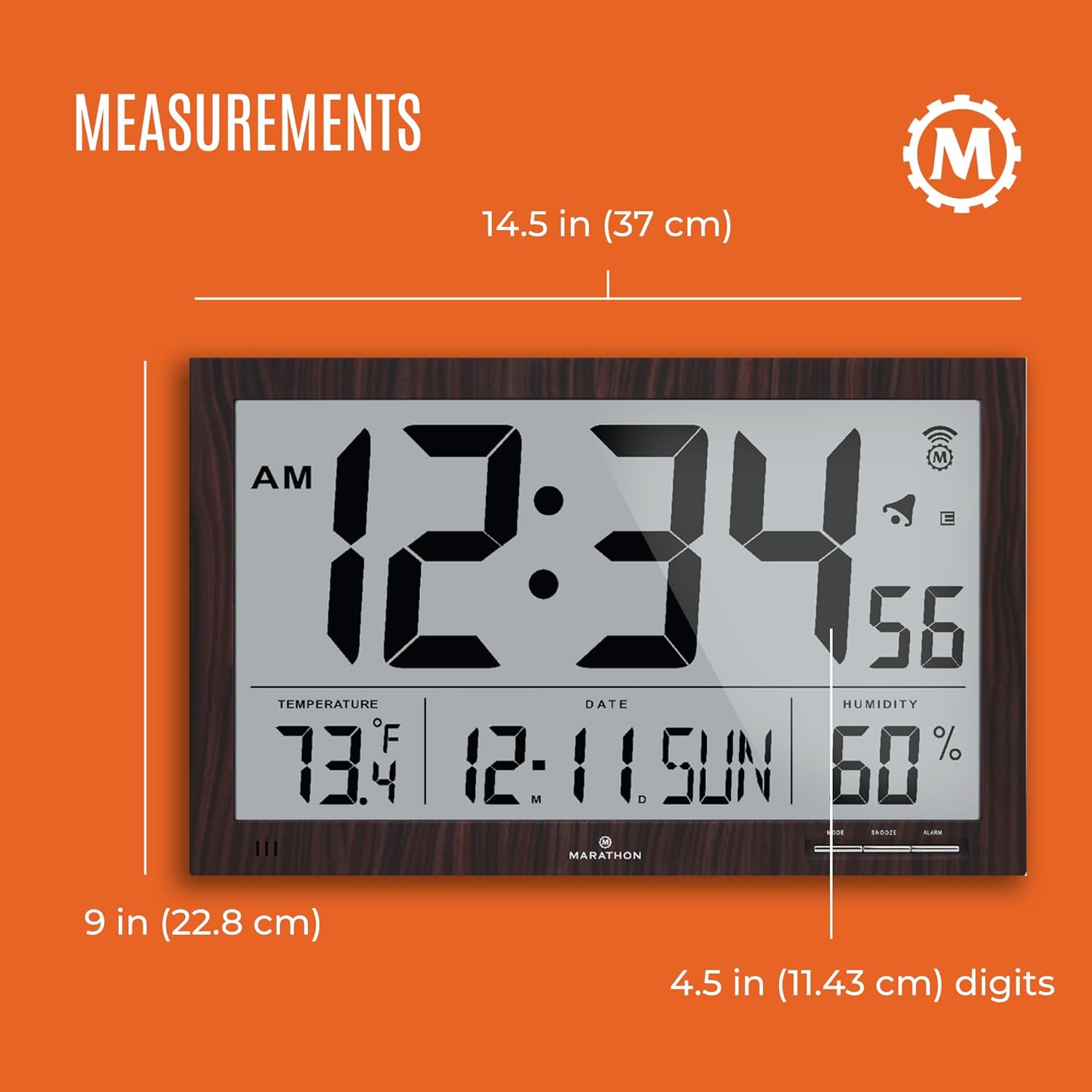
Image: A diagram illustrating the dimensions of the Marathon CL030062WD clock, showing a width of 14.5 inches (37 cm), a height of 9 inches (22.8 cm), and digit height of 4.5 inches (11.43 cm).
- Model: CL030062WD
- Typ displeje: Digitální
- Speciální funkce: Atomic Time Synchronization (WWVB)
- Zdroj napájení: 4 x AA baterie (součástí balení)
- Rozměry (DxŠxV): Approximately 5.6 x 25.1 x 40.1 Centimeters (or 14.5 x 9 inches)
- Hmotnost: 850 gramů
- Typ montáže: Nástěnný držák, Stolní stojan
- Materiál rámu: Plast
- Barva: Hnědý
- Funkce: Time (HH:MM:SS), Date (MM/DD/YY), Day of Week, Indoor Temperature (°C/°F), Indoor Humidity (%)
Záruka a podpora
For warranty information and customer support, please refer to the documentation included with your product packaging or visit the official Marathon brand webUschovejte si účtenku jako doklad o koupi pro případné reklamace.

Image: The Marathon company logo with text indicating its founding in 1939 and its history of manufacturing timing instruments since 1941, signed by Leon Wein and Mitchell Wein.


