1. Úvod
Děkuji za nákupasing the Sony Signature Series Audio Component Amplifier TA-ZH1ES. This high-resolution headphone amplifier is designed to deliver exceptional audio quality, featuring advanced technologies such as Sony's enhanced S-Master HX digital amplifier and DSD Remastering Engine. This manual provides essential information for the proper setup, operation, and maintenance of your device.
2. Bezpečnostní informace
Please read all safety instructions carefully before using the amplifikátor. Uschovejte tento návod pro budoucí použití.
- Zdroj napájení: Connect the unit only to the AC power outlet specified in the specifications.
- Větrání: Zajistěte dostatečné větrání kolem jednotky, abyste zabránili přehřátí. Neblokujte větrací otvory.
- vlhkost: Nevystavujte jednotku dešti nebo vlhkosti, abyste snížili riziko požáru nebo úrazu elektrickým proudem.
- Cizí předměty: Nevkládejte žádné předměty do otvorů jednotky.
- Servis: Veškerý servis svěřte kvalifikovanému servisnímu personálu. Nepokoušejte se jednotku sami otevírat ani opravovat.
- Umístění: Umístěte přístroj na stabilní, rovný povrch mimo dosah přímého slunečního záření, zdrojů tepla a nadměrného prachu či vibrací.
3. Konec produktuview
3.1 Přední panel
The front panel provides various headphone output connections and essential controls for operation.

Obrázek 3.1: Rozložení předního panelu
This image displays the front panel of the TA-ZH1ES amplifier, highlighting the various headphone output jacks and the volume control knob. From left to right, you can see the XLR4 balanced output, multiple 4.4mm and 3.5mm balanced outputs, and 6.3mm and 3.5mm unbalanced outputs. The large rotary knob on the right is for volume control, and a Walkman/Xperia USB input is also visible.
- Vypínač: Zapíná nebo vypíná jednotku.
- Výběr vstupu: Cyklicky prochází dostupné vstupní zdroje.
- Output Selector: Selects the desired output mode.
- Zobrazit: Zobrazuje aktuální nastavení a stav.
- Tlačítko Menu/Zpět: Navigates menu options or returns to the previous screen.
- Tlačítko Enter: Potvrzuje výběr.
- Gain Button: Adjusts the output gain for different headphone impedances.
- Knoflík hlasitosti: Ovládá výstupní hlasitost.
- Sluchátkové výstupy:
- Balanced Connections: 4.4mm, 3.5mm x 2, XLR4
- Unbalanced Connections: 6.3mm, 3.5mm
- Walkman/Xperia USB Input: For connecting compatible portable devices.
3.2 Zadní panel
The rear panel houses various input and output terminals for connecting to other audio components and the power supply.
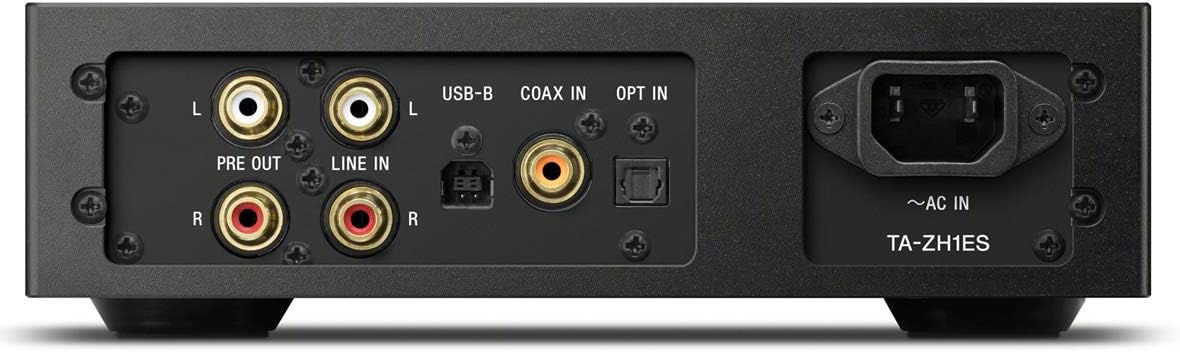
Obrázek 3.2: Rozložení zadního panelu
This image illustrates the rear panel of the TA-ZH1ES amplifier, detailing the various connectivity options. Visible ports include RCA Line In (L/R), RCA Pre Out (L/R), USB-B input, Coaxial input, Optical input, and the AC power inlet. Each port is clearly labeled for easy identification.
- LINE IN (RCA L/R): Analog audio input for connecting external devices.
- PRE OUT (RCA L/R): Analog audio output for connecting to a power amplifier nebo aktivní reproduktory.
- Vstup USB-B: For connecting to a computer or other digital audio sources.
- COAX IN: Koaxiální digitální audio vstup.
- PŘIHLÁSIT SE: Optický digitální audio vstup.
- ~AC IN: Power input for the AC power cord.
4. Nastavení
Follow these steps to set up your TA-ZH1ES ampživější.
4.1 Umístění
Umístěte amplifier on a flat, stable surface with adequate space for ventilation. Avoid placing it near heat sources or in direct sunlight.

Obrázek 4.1: AmpUmístění čističe
This image shows the Sony TA-ZH1ES amplifier positioned on a flat surface, demonstrating a typical setup environment. Ensure the unit has sufficient space around it for proper airflow.
4.2 Připojení zdrojů zvuku
Connect your audio sources to the appropriate input terminals on the rear panel.
- Digital Sources (Computer, CD Player, etc.):
- For a computer, connect a USB-B cable from your computer to the Vstup USB-B.
- For a CD player or other digital audio device, use a coaxial cable for the COAX IN or an optical cable for the PŘIHLÁSIT SE.
- Analog Sources (Turntable with pre-amp, etc.): Connect RCA cables from your analog source to the LINE IN (RCA L/R) terminály.
- Portable Devices (Walkman/Xperia): Connect compatible portable devices to the Walkman/Xperia USB Input on the front panel. This input also supports charging for Walkman devices.
4.3 Připojení sluchátek nebo externího Ampdoživotní
- Sluchátka: Connect your headphones to the appropriate balanced (4.4mm, 3.5mm x 2, XLR4) or unbalanced (6.3mm, 3.5mm) output jacks on the front panel.
- Externí napájení AmpAktivní reproduktory/reproduktory: If using the TA-ZH1ES as a DAC or pre-amplifier, connect RCA cables from the PRE OUT (RCA L/R) terminals on the rear panel to your power amplifier nebo aktivní reproduktory.
4.4 Připojení napájení
Připojte dodaný napájecí kabel k ~AC IN terminal on the rear panel, then plug the other end into a wall outlet.
5. Návod k obsluze
5.1 Základní obsluha
- Zapnutí: Press the Power button on the front panel.
- Vyberte vstup: Use the Input Selector button to choose the desired audio source (e.g., USB-B, COAX, OPT, LINE IN).
- Připojení sluchátek: Plug your headphones into the appropriate jack.
- Upravit hlasitost: Slowly turn the Volume knob clockwise to increase the volume to a comfortable listening level.

Obrázek 5.1: Ovládací prvky na horním panelu
Tento obrázek nabízí pohled shora dolů view of the TA-ZH1ES amplifier, clearly showing the power button, input/output selectors, display screen, menu navigation buttons (Menu/Back, Enter), and the Gain button. These controls are used for basic operation and feature adjustments.
5.2 DSD Remastering Engine
The DSD Remastering Engine converts all PCM audio sources to DSD 11.2MHz, aiming to provide a more natural and analog-like sound experience. This feature can be enabled or disabled through the unit's menu settings.
5.3 DSEE HX
DSEE HX (Digital Sound Enhancement Engine HX) upscales compressed audio files to near high-resolution quality. This feature is particularly effective for improving the sound of lower-resolution files, such as those from streaming services or older recordings. Access DSEE HX settings via the unit's menu.
5.4 Nastavení zesílení
The amplifier features adjustable gain settings to optimize performance with various headphone impedances. Press the Získat button on the front panel to cycle through available gain levels (e.g., Low, Mid, High). Select the setting that provides sufficient volume without distortion for your specific headphones.
6. Údržba
Správná péče zajistí dlouhou životnost a optimální výkon vašeho ampživější.
- Čištění: Wipe the unit with a soft, dry cloth. Do not use abrasive pads, scouring powder, or solvents such as alcohol or benzene.
- Větrání: Periodically check that the ventilation openings are free from dust and obstructions.
- Skladování: If storing the unit for an extended period, disconnect it from the power outlet and store it in a clean, dry place.
7. Řešení problémů
Pokud máte problémy s vaším ampPokud se jedná o problém s ochranou proti přetížení, podívejte se na následující běžné problémy a jejich řešení.
| Problém | Možná příčina / řešení |
|---|---|
| Žádná síla | Ensure the AC power cord is securely connected to both the unit and the wall outlet. Check if the power outlet is functional. |
| Žádný zvuk |
|
| Zkreslený zvuk |
|
| Unit becomes hot | Ensure adequate ventilation around the unit. Do not block the ventilation openings. If overheating persists, discontinue use and contact service. |
Pokud problém přetrvává i po vyzkoušení těchto řešení, kontaktujte zákaznickou podporu společnosti Sony.
8. Specifikace
| Funkce | Detail |
|---|---|
| Číslo modelu | TA-ZH1ES |
| Rozměry produktu (Š x V x H) | 2.56 x 12.36 x 8.27 palce (přibližně 65 x 314 x 210 mm) |
| Hmotnost položky | 1 libry (přibližně 0.45 kg) |
| Impedance sluchátek | 12-600 ohmů |
| Sluchátkové výstupy | Balanced: 4.4mm, 3.5mm x 2, XLR4 Unbalanced: 6.3mm, 3.5mm |
| Digitální vstupy | USB-B, Coaxial, Optical, Walkman/Xperia USB |
| Analogové vstupy | RCA Line In (L/R) |
| Analogové výstupy | RCA Pre Out (L/R) |
| Výrobce | Sony |
| Datum první dostupnosti | 1. září 2016 |
Poznámka: Specifikace se mohou změnit bez předchozího upozornění.
9. Záruka a podpora
Podrobné informace o záruce naleznete v záruční kartě dodané s vaším produktem nebo navštivte oficiální podporu Sony. website for your region. For technical assistance, product registration, or service inquiries, please contact Sony customer support.
Podpora Sony Webmísto: https://www.sony.com/electronics/support