1. Úvod
This manual provides detailed instructions for the setup, operation, maintenance, and troubleshooting of your EXCELVAN E300 Portable Thermal Printer. Please read this manual carefully before using the printer to ensure proper function and longevity of the device.
The EXCELVAN E300 is a compact and efficient thermal printer designed for printing receipts and tickets. It features high-speed printing, a durable print head, and versatile connectivity options including Bluetooth and USB, making it suitable for various point-of-sale (POS) environments.
2. Konec produktuview
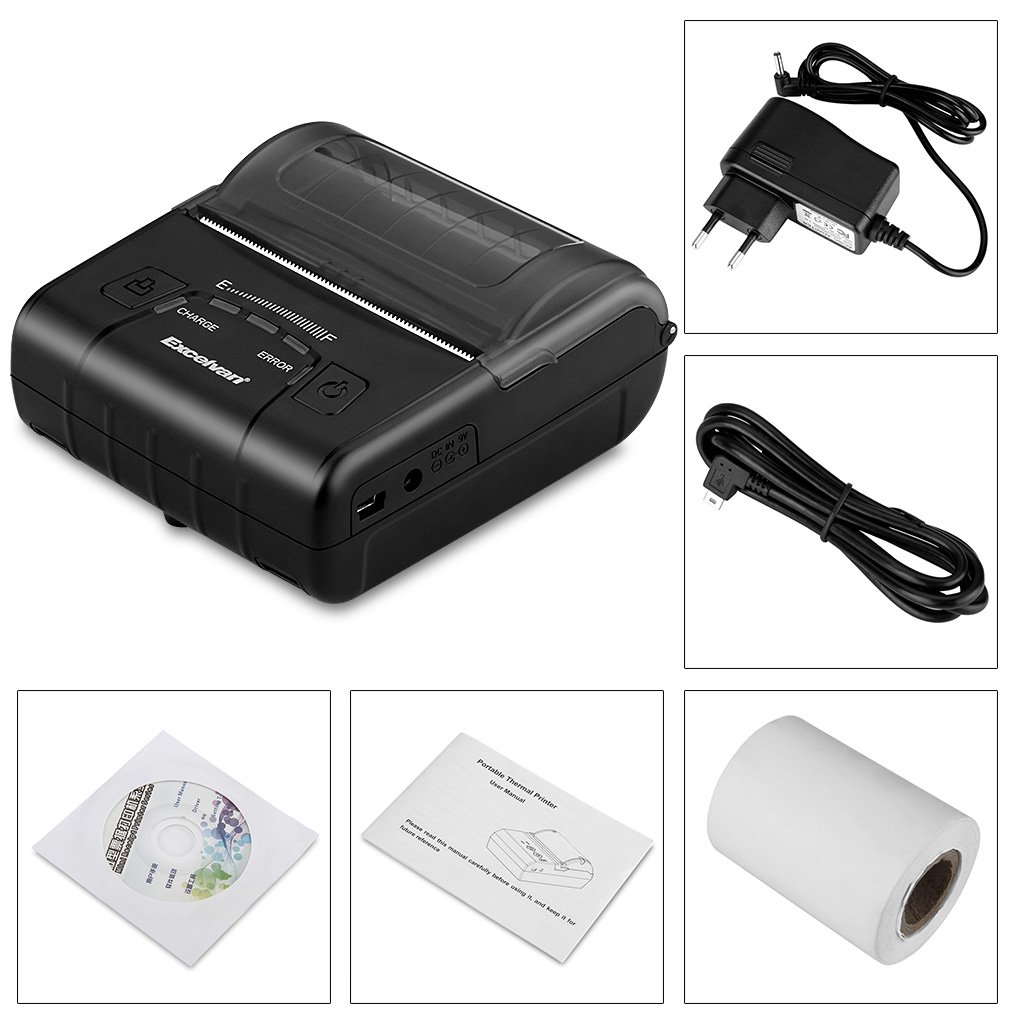
2.1 Obsah balení
Po vybalení se prosím ujistěte, že jsou dodávány všechny níže uvedené položky:
- 1 x 80mm Thermal Printer
- 1 x napájecí adaptér
- 1 x lithiová baterie
- 1 x USB kabel (110 cm)
- 1 x role termopapíru
- 1 x Uživatelská příručka (tento dokument)
- 1 x CD (containing drivers and software)
2.2 Součásti tiskárny
Familiarize yourself with the main components of your EXCELVAN E300 printer:

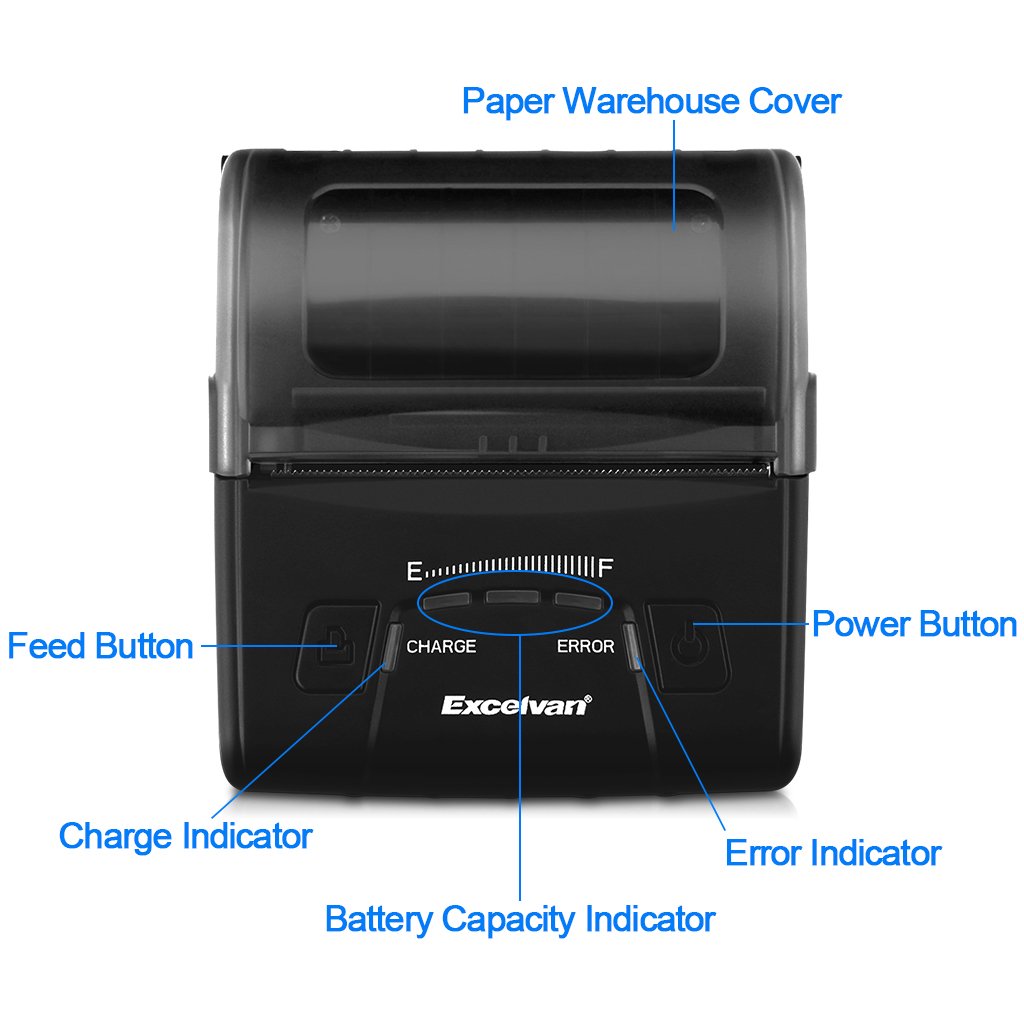
Obrázek 1: Přední view of the EXCELVAN E300 printer with key components labeled.
- Paper Warehouse Cover: Protects the paper roll compartment.
- Tlačítko Feed: Advances the paper.
- Indikátor nabíjení: Lights up when the battery is charging.
- Indikátor kapacity baterie: Zobrazuje aktuální stav baterie.
- Indikátor chyby: Lights up to indicate an error (e.g., paper out, cover open).
- Vypínač: Zapíná/vypíná tiskárnu.
3. Nastavení
3.1 Instalace baterie
- Open the battery compartment cover located on the bottom of the printer.
- Vložte dodanou lithiovou baterii a ujistěte se, že jsou kontakty správně zarovnány.
- Důležité: Remove any insulating tape from the battery contacts before installation or charging.
Obrázek 2: Battery installation and warning to remove insulating tape.
- Bezpečně zavřete kryt bateriového prostoru.
3.2 Nabíjení baterie
Before first use, fully charge the printer battery.
- Connect the power adapter to the printer's DC IN 9V port.
- Zapojte napájecí adaptér do elektrické zásuvky.
- The Charge Indicator light will illuminate during charging. It will turn off or change color (depending on model) when fully charged.
- Poznámka: The USB cable is for data connection to a computer only and does not charge the device.
Obrázek 3: Charging port and USB port. Use the power adapter for charging.
3.3 Vkládání termopapíru
Tiskárna používá role termopapíru o šířce 80 mm.
- Open the Paper Warehouse Cover by gently lifting it.
- Insert the thermal paper roll into the compartment, ensuring the paper feeds from the bottom and the leading edge comes out towards the front of the printer.
- Vytáhněte malé množství papíru za řeznou hranu.
- Close the Paper Warehouse Cover firmly until it clicks into place.
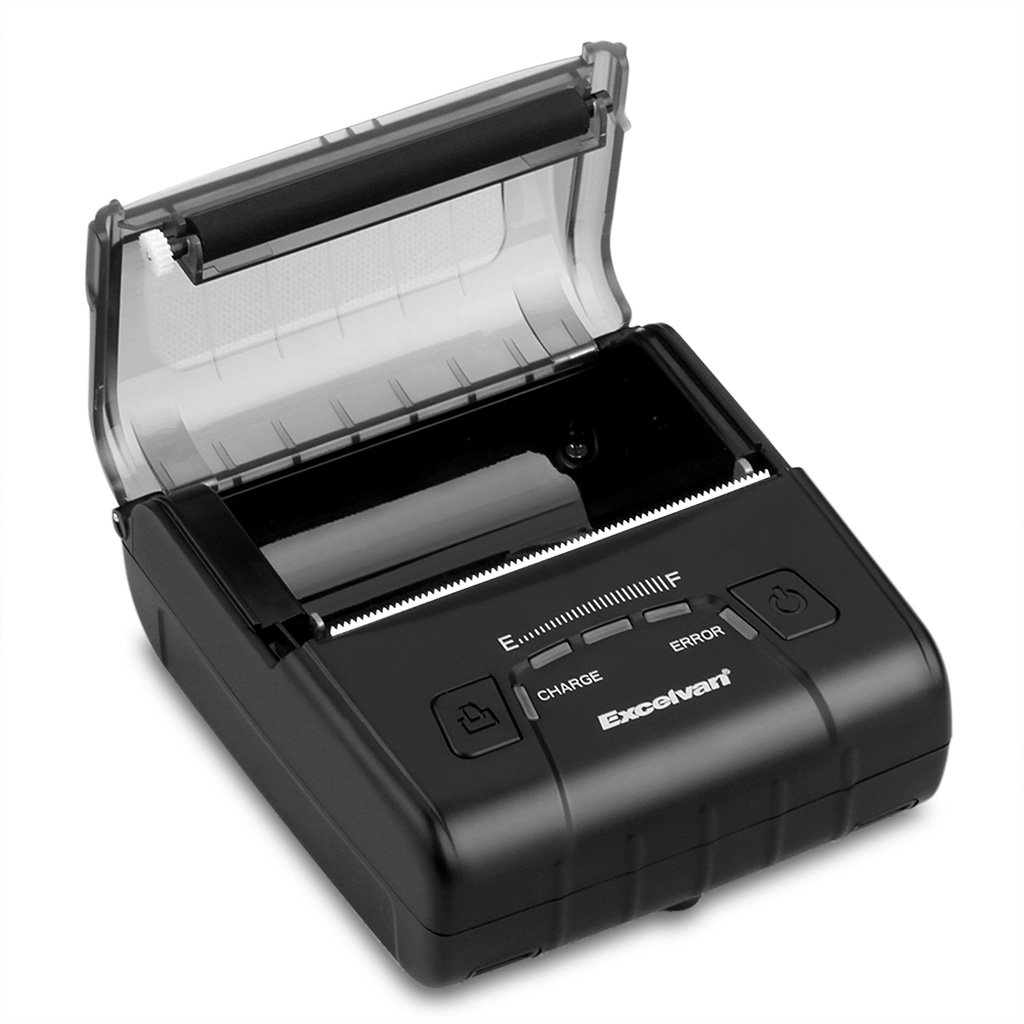
Obrázek 4: Loading thermal paper into the printer.
4. Návod k obsluze
4.1 Zapnutí/vypnutí
- Zapnutí: Press and hold the Power Button until the indicator lights illuminate.
- Vypnutí: Press and hold the Power Button until the indicator lights turn off.
4.2 Instalace ovladače
Install the appropriate drivers for your operating system from the provided CD or download them from the official EXCELVAN webstránky (je -li k dispozici).
- Supported Operating Systems: Android, iOS, Linux, Windows (2000, 2003, XP, 7, 8, 8.1, 10).
4.3 Připojení tiskárny
The EXCELVAN E300 supports both Bluetooth and USB connectivity.
4.3.1 Připojení Bluetooth
- Ujistěte se, že je tiskárna zapnutá.
- Na svém zařízení (chytrý telefon, tablet, počítač) povolte Bluetooth a vyhledejte dostupná zařízení.
- Select "EXCELVAN E300" or a similar name from the list.
- Enter the pairing PIN (usually "0000" or "1234") if prompted.
- Once paired, you can select the printer from your application's print settings.
4.3.2 Připojení USB
- Připojte jeden konec kabelu USB k portu USB tiskárny.
- Připojte druhý konec k volnému portu USB v počítači.
- Ensure the necessary drivers are installed. The printer should appear as an available printing device in your system settings.
4.4 Tisk
Once connected and drivers are installed, you can initiate printing from your application.

Obrázek 5: The printer in operation, producing a receipt.
- Use the Feed Button to advance paper manually if needed.
- The printer supports ESC/POS commands for advanced control.
- Graphic printing, including bitmaps and QR codes, is supported.
5. Údržba
5.1 Čištění tiskové hlavy
Pravidelné čištění tiskové hlavy zajišťuje optimální kvalitu tisku a prodlužuje životnost tiskárny.
- Vypněte tiskárnu a odpojte napájecí adaptér.
- Open the Paper Warehouse Cover.
- Použijte vatový tampon lehceampened with isopropyl alcohol to gently wipe the thermal print head (the dark strip inside the cover).
- Před zavřením krytu a zapnutím tiskárny nechte tiskovou hlavu zcela vyschnout.
5.2 Péče o baterii
- Vyhněte se častému úplnému vybíjení baterie.
- Charge the battery regularly, even if the printer is not in use for extended periods.
- Pokud tiskárnu nepoužíváte, skladujte ji na chladném a suchém místě.
6. Řešení problémů
This section addresses common issues you might encounter with your EXCELVAN E300 printer.
| Problém | Možná příčina | Řešení |
|---|---|---|
| Tiskárna se nezapne. | Slabá baterie nebo žádná energie. | Charge the battery using the power adapter. Ensure the power adapter is correctly connected. |
| No paper output. | Paper out, paper jam, or cover not closed. | Check if the paper roll is empty and replace if necessary. Clear any paper jams. Ensure the Paper Warehouse Cover is securely closed. |
| Error Indicator is lit. | Paper out, cover open, or print head overheating. | Check paper status and cover. If the printer has been printing continuously, allow it to cool down. |
| Špatná kvalita tisku. | Dirty print head, low battery, or incorrect paper. | Clean the print head (see Section 5.1). Ensure the battery is sufficiently charged. Use high-quality thermal paper. |
| Nelze se připojit přes Bluetooth. | Bluetooth není povoleno, nesprávné párování nebo rušení. | Ensure Bluetooth is enabled on both devices. Re-attempt pairing. Move closer to the printer and away from other wireless devices. |
7. Specifikace
Podrobné technické specifikace pro termální tiskárnu EXCELVAN E300:
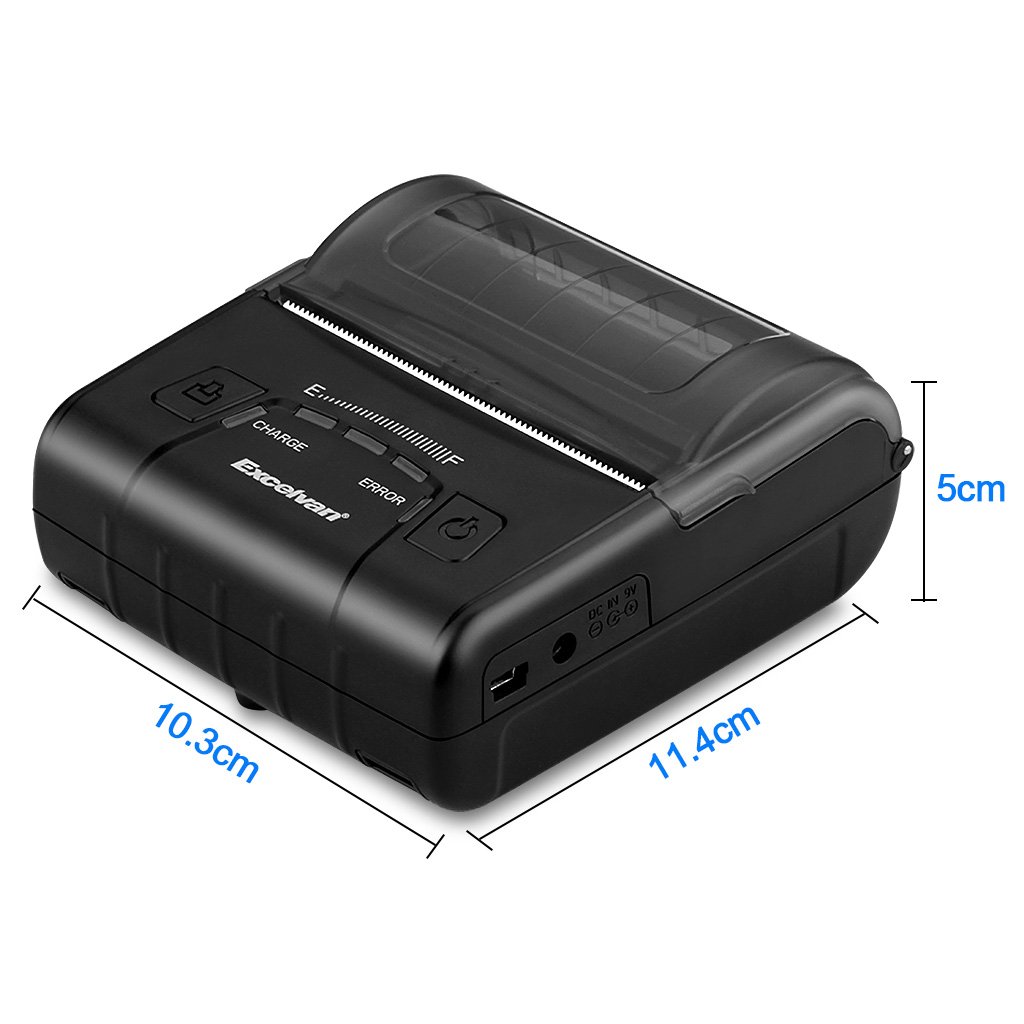
Obrázek 6: EXCELVAN E300 Printer Dimensions.
| Funkce | Specifikace |
|---|---|
| Způsob tisku | Tisk termální linkou |
| Efektivní šířka tisku | 72 mm |
| Rezoluce | 384 bodů / řádek |
| Rychlost tisku | 90 mm/s |
| Rozhraní | USB, Bluetooth |
| Typ papíru | Termální papír |
| Šířka papíru | 79.5 ± 0.5 mm |
| Průměr papíru | ≤ 43 mm (40 mm recommended) |
| Příkazy | Kompatibilní s ESC/POS |
| Napájení | Dobíjecí polymerová lithiová baterie |
| Kapacita baterie | 2500 mAh / 7.4 V |
| Výstup napájecího adaptéru | 9.0 V / 2 A |
| Software ovladače | Android, iOS, Linux, Win2000/2003/XP/7/8/8.1/10 |
| Životnost tiskové hlavy | 50 km (Print Density ≤ 12.5) |
| Provozní teplota | 5 °C ~ 45 °C |
| Provozní vlhkost | 10 % ~ 80 % |
| Rozměry (D x Š x V) | 11 x 5 x 10 cm (přibližně) |
| Hmotnost | 285 gramů |
8. Záruka a podpora
8.1 Informace o záruce
The EXCELVAN E300 printer comes with a standard manufacturer's warranty. Please refer to the warranty card included in your package or contact your retailer for specific terms and conditions regarding warranty coverage and duration.
8.2 Zákaznická podpora
For technical assistance, troubleshooting not covered in this manual, or inquiries about your product, please contact EXCELVAN customer support or your authorized dealer. Contact information can typically be found on the product packaging or the official EXCELVAN webmísto.