1. Úvod
This manual provides essential information for setting up, operating, maintaining, and troubleshooting your Toshiba Satellite S55 laptop. Please read this manual thoroughly to ensure proper use and to maximize the performance and longevity of your device.
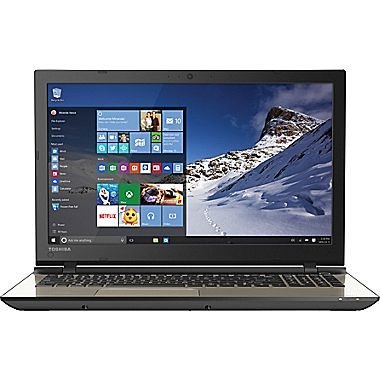
Figure 1.1: Toshiba Satellite S55 Laptop. This image shows the laptop in a closed position, highlighting its sleek design and silver finish.
2. Obsah balení
Ověřte, zda jsou v balení přítomny všechny položky:
- Toshiba Satellite S55 Laptop
- AC adaptér a napájecí kabel
- Dokumentace (Stručná úvodní příručka, Záruční informace)
The laptop includes built-in Harman/Kardon speakers, a backlit keyboard, DVD-SuperMulti drive, MultiMediaCard, SD Memory Card, SDHC Memory Card, SDXC Memory Card slots, and an HDMI port.
3. Nastavení
3.1 Připojení AC adaptéru
- Connect the AC adapter to the power connector on the side of the laptop.
- Zapojte napájecí kabel do zásuvky ve zdi.
- Allow the battery to charge fully before initial use.
3.2 Počáteční zapnutí
- Otevřete víko notebooku.
- Press the power button located above the keyboard on the right side.
- Follow the on-screen instructions to complete the Windows 10 setup process. This includes setting up your user account, network connection, and basic preferences.
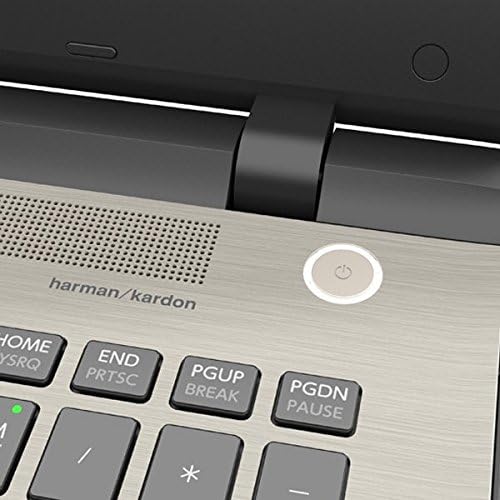
Figure 3.1: Power Button Location. This image provides a close-up view of the power button, located on the top right of the keyboard deck, next to the Harman/Kardon speaker grille.
4. Ovládání notebooku
4.1 Klávesnice a touchpad
The Toshiba Satellite S55 features a frameless TruType LED backlit keyboard with a 10-keypad for comfortable typing in various lighting conditions. The click pad pointing device supports multi-touch gestures for intuitive navigation.
- Podsvícená klávesnice: Use the dedicated function keys to toggle the keyboard backlight on or off.
- Multi-touch Gestures: Refer to Windows 10 settings for customizing touchpad gestures such as scrolling, zooming, and switching applications.
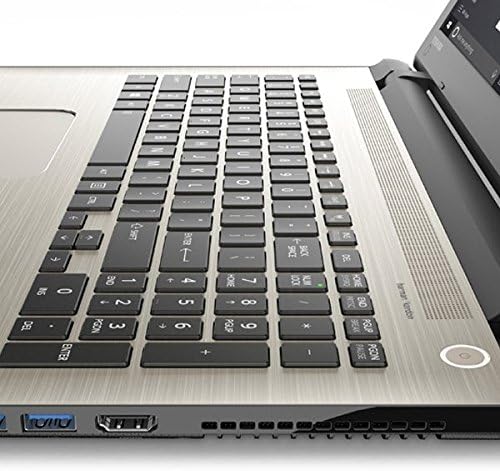
Figure 4.1: Keyboard and Touchpad. This image provides a detailed view of the backlit keyboard, 10-keypad, and the multi-touch click pad.
Optická mechanika 4.2
The laptop includes a DVD-SuperMulti drive (+/-R double layer) supporting up to 11 formats. To open the drive tray, press the eject button located on the drive itself or use the eject function within Windows Explorer.
4.3 Porty a konektivita
The Satellite S55 offers various ports for connecting external devices:
- USB porty: 3.0 Three USB 3.0 ports are available, with one supporting USB Sleep and Charge for powering devices even when the laptop is off or in sleep mode.
- Port HDMI: Connect to external displays or TVs with 4K Ultra HD output capability.
- Port LAN (RJ-45): For wired network connections (10/100/1000 Ethernet).
- Konektor pro sluchátka/mikrofon: A shared port for audio output and input.
- Čtečka paměťových karet: Supports MultiMediaCard, SD Memory Card, SDHC Memory Card, and SDXC Memory Card.
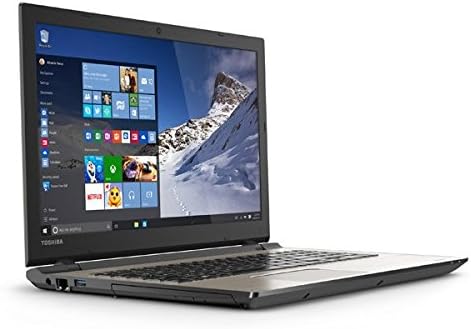
Figure 4.2: Left Side Ports. This image displays the left side of the laptop, showing the power input, LAN port, HDMI port, and USB 3.0 ports.
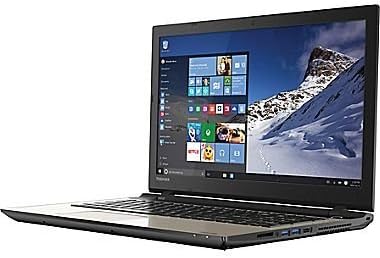
Figure 4.3: Right Side Ports and Optical Drive. This image shows the right side of the laptop, featuring the DVD-SuperMulti drive, additional USB ports, and the headphone/microphone jack.
4.4 Bezdrátová komunikace
The laptop supports Intel Dual Band Wireless-N 7265 2x2 AC (802.11AC) for high-speed Wi-Fi connectivity and Bluetooth (4.1) for connecting wireless peripherals.
- Wi-Fi: Connect to available wireless networks through the Windows 10 network settings.
- Bluetooth: Pair Bluetooth devices such as headphones, mice, or keyboards via Windows 10 Bluetooth settings.
4.5 Webkamera a zvuk
An HD webcam with TruTalk dual microphones is integrated for video conferencing and voice commands. The laptop features harman/kardon stereo speakers with DTS Sound™ for enhanced audio experience.
5. Údržba
5.1 Péče o baterii
The Lithium Ion (45Wh, 4-Cell) battery is not user-replaceable. To prolong battery life (up to 6 hours), avoid extreme temperatures and fully discharge and recharge the battery periodically. For optimal performance, keep the laptop connected to the AC adapter when possible.
5.2 Čištění
- K čištění obrazovky a vnějších povrchů používejte měkký hadřík, který nepouští vlákna.
- Vyhněte se používání agresivních chemikálií nebo abrazivních čisticích prostředků.
- Gently clean keyboard keys and touchpad with a slightly damp tkanina.
5.3 Aktualizace softwaru
Regularly check for and install Windows updates and Toshiba driver updates to ensure system stability, security, and optimal performance.
6. Řešení problémů
6.1 Problémy s napájením
- Notebook se nezapne: Ensure the AC adapter is securely connected and the power outlet is functional. Check if the battery has sufficient charge.
- Baterie se nenabíjí: Zkontrolujte, zda nejsou síťový adaptér a napájecí kabel poškozené. Zkuste jinou zásuvku.
6.2 Problémy se zobrazením
- Prázdná obrazovka: Připojte externí monitor a zkontrolujte, zda je problém s displejem notebooku. Upravte nastavení jasu.
- Incorrect resolution: Adjust display settings in Windows 10 to the recommended 1366x768 resolution.
6.3 Síťové připojení
- Nelze se připojit k Wi-Fi: Ensure Wi-Fi is enabled in Windows settings. Restart your router and the laptop. Verify network password.
- No internet access: Check your internet service provider's status. Ensure your router is functioning correctly.
7. Specifikace
| Funkce | Detail |
|---|---|
| Model | S55 |
| Operační systém | Windows 10 Home 64-bit |
| Procesor | Intel Core i7-5500U Dual-Core (2.0GHz up to 2.9GHz) |
| BERAN | 12GB DDR3L 1600MHz |
| Pevný disk | 1TB (5400rpm) HDD |
| Zobrazit | 15.6" TruBrite LED Backlit (1366x768 HD) |
| Grafika | Mobile Intel HD 6000 Graphics |
| Optická mechanika | DVD-SuperMulti drive |
| Bezdrátový | Intel Dual Band Wireless-N 7265 2x2 AC (802.11AC), Bluetooth 4.1 |
| LAN | 10/100/1000 Ethernet |
| USB porty | 3 x USB 3.0 (1 with USB Sleep and Charge) |
| HDMI | Yes, with 4K Ultra HD output capability |
| Zvuk | harman/kardon stereo speakers, DTS Sound™ |
| Webvačka | HD webcam with TruTalk dual microphones |
| Baterie | Lithium Ion (45Wh, 4-Cell), up to 6 hours |
| Hmotnost | 4.85 lb (2.2 kg) |
| Rozměry (DxŠxV) | 14 x 1 x 12 palce |
| Barva | Brushed Aluminum Finish (Silver) |
8. Záruka a podpora
For warranty information, please refer to the documentation included with your product. For technical support, driver downloads, or service inquiries, please visit the official Toshiba support webnebo kontaktujte jejich oddělení zákaznických služeb.
Další zdroje a kontaktní informace naleznete na Obchod Toshiba na Amazonu.


