1. Úvod
The EASYIO-30P-SF45 is a versatile 30-point controller designed for industrial automation applications. It features a comprehensive set of input/output capabilities, including 4 Analog Outputs (AO), 2 Pulse Outputs, 8 Digital Inputs (DI), 8 Universal Inputs (UI), and 8 Digital Outputs (DO). This controller supports BACnet and Modbus communication protocols, making it suitable for integration into various building management and industrial control systems. It operates on the Sedona framework, providing a flexible and programmable platform for complex control strategies.
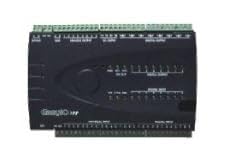
Obrázek 1: Přední strana view of the EASYIO-30P-SF45 Controller, showing various input/output terminal blocks and indicators.
2. Klíčové vlastnosti
- 30 Total I/O Points for comprehensive control.
- 4 Analog Outputs (AO) for proportional control.
- 2 Pulse Outputs for specific control applications.
- 8 Digital Inputs (DI) for on/off status monitoring.
- 8 Universal Inputs (UI) configurable for various sensor types.
- 8 Digital Outputs (DO) for controlling external devices.
- BACnet protocol support for building automation integration.
- Modbus protocol support for industrial communication.
- Sedona Framework compatibility for flexible programming.
3. Nastavení a instalace
3.1. Montáž
The EASYIO-30P-SF45 controller is designed for DIN rail mounting within an electrical enclosure. Ensure adequate ventilation around the unit to prevent overheating. Mount the controller in a location free from excessive vibration, moisture, and direct sunlight.
3.2. Zapojení
All wiring connections are made via removable screw terminal blocks. Refer to the wiring diagrams provided in the full technical datasheet for specific connection details for power, inputs, and outputs. Ensure all power connections are made with the power supply disconnected. Use appropriate wire gauges for all connections to prevent voltage drop and ensure safe operation.
- Napájení: Connect the appropriate DC power supply to the designated power terminals. Verify polarity before applying power.
- Digital Inputs (DI): Connect dry contacts or voltage signals as per application requirements.
- Universal Inputs (UI): Configure these inputs for temperature sensors, voltage, current, or resistance measurements as needed.
- Analog Outputs (AO): Connect to devices requiring 0-10V or 4-20mA control signals.
- Digital Outputs (DO): Connect to relays, contactors, or other digital loads. Observe maximum current ratings.
- Sdělení: Connect BACnet MS/TP or Modbus RTU communication lines to the designated terminals. Ensure proper termination and biasing for RS-485 networks.
4. Návod k obsluze
4.1. Počáteční zapnutí
After completing all wiring, apply power to the controller. Observe the status LEDs on the front panel. A steady power LED indicates successful power-up. The communication LEDs will flash during data transmission.
4.2. Programming and Configuration
The EASYIO-30P-SF45 is programmed using the Sedona Workbench software. Connect to the controller via Ethernet or serial communication. The software allows for:
- Creating and deploying control logic using a drag-and-drop graphical interface.
- Configuring input and output types and ranges.
- Setting up BACnet and Modbus communication parameters, including device instance, baud rate, and slave ID.
- Monitoring real-time point values and system status.
- Performing firmware updates.
Refer to the Sedona Framework documentation and EASYIO programming guides for detailed instructions on developing control applications.
5. Údržba
The EASYIO-30P-SF45 controller is designed for reliable operation with minimal maintenance. However, periodic checks are recommended to ensure optimal performance and longevity.
- Kontrola prostředí: Zajistěte, aby provozní prostředí zůstalo v rámci stanovených limitů teploty a vlhkosti.
- Vizuální kontrola: Pravidelně kontrolujte řídicí jednotku, zda nevykazuje známky fyzického poškození, uvolněných spojů nebo nahromadění prachu.
- Těsnost svorek: Check screw terminals for tightness, especially after initial installation and during routine maintenance. Loose connections can lead to intermittent operation or damage.
- Aktualizace firmwaru: Pravidelně kontrolujte informace od výrobce website for available firmware updates. Applying updates can improve performance, add features, or address security vulnerabilities.
- Čištění: If necessary, gently clean the exterior of the unit with a soft, dry cloth. Do not use liquid cleaners or solvents.
6. Řešení problémů
| Problém | Možná příčina | Řešení |
|---|---|---|
| Ovladač se nezapíná. | Chybí napájení, nesprávné zapojení, vadný zdroj napájení. | Verify power supply connection and voltage. Check wiring for shorts or open circuits. Test power supply. |
| Communication issues (BACnet/Modbus). | Incorrect communication settings (baud rate, device ID), wiring errors, missing termination/biasing. | Check communication parameters in software. Verify RS-485 wiring (A/B, ground). Ensure proper termination resistors and biasing are applied. |
| Inputs/Outputs not responding. | Incorrect wiring, faulty sensor/actuator, programming error, incorrect input/output configuration. | Verify wiring to the specific I/O point. Test the connected sensor/actuator independently. Review the Sedona program logic and I/O configuration. |
| Controller is unresponsive or freezes. | Software error, excessive load, power fluctuations. | Perform a power cycle (turn off, wait 10 seconds, turn on). Check for the latest firmware updates. Ensure power supply is stable. |
If the problem persists after attempting these solutions, contact EASYIO technical support for further assistance.
7. Specifikace
| Atribut | Hodnota |
|---|---|
| Číslo modelu | EASYIO-30P-SF45 |
| Total I/O Points | 30 |
| Analogové výstupy (AO) | 4 |
| Pulzní výstupy | 2 |
| Digitální vstupy (DI) | 8 |
| Univerzální vstupy (UI) | 8 |
| Digitální výstupy (DO) | 8 |
| Komunikační protokoly | BACnet, Modbus |
| Programovací prostředí | Sedona Framework |
| Rozměry balení | 1 x 1 x 1 palce |
| Hmotnost položky | 1.05 libry |
| Výrobce | EASYIO |
| První dostupný termín | 1. ledna 2016 |
8. Záruka a podpora
EASYIO products typically come with a standard manufacturer's warranty. For specific warranty terms and conditions, please refer to the documentation included with your purchase or visit the official EASYIO webUschovejte si doklad o koupi pro případ reklamace.
For technical support, programming assistance, or troubleshooting beyond the scope of this manual, please contact EASYIO customer service or your authorized distributor. Contact information can usually be found on the manufacturer's webmísto.
Note: Unauthorized modifications or repairs may void the product warranty.


