Zavedení
This manual provides comprehensive instructions for the safe and proper installation, operation, and maintenance of your Vogel's MA4000 Flat Screen Wall Mount. Please read all instructions carefully before installation and retain this manual for future reference.
The Vogel's MA4000 is designed to securely mount flat screen televisions ranging from 40 to 80 inches (102-203 cm) with a maximum weight capacity of 80 kg (176 lbs). It features a slim profile and a tilt function to optimize viewúhly a snižují oslnění.
Bezpečnostní informace
VAROVÁNÍ:
- Ujistěte se, že montážní povrch bezpečně unese celkovou hmotnost držáku a televizoru.
- Always use appropriate tools and follow all installation steps precisely.
- Nepřekračujte maximální nosnost 80 kg (176 liber).
- Verify VESA compatibility with your television before installation.
- Pokud si nejste jisti ohledně jakékoli části instalace, poraďte se s kvalifikovaným odborníkem.
Obsah balení
Before beginning installation, please verify that all components are present and undamaged. Refer to the included parts list in your product packaging for a complete inventory.

Popis obrázku: Nad hlavou view of the Vogel's MA4000 Flat Screen Wall Mount, showing the main wall plate and the two vertical TV brackets. The mount is black and designed for flat panel televisions.
The image above displays the primary components of the Vogel's MA4000 wall mount: the wall plate and the two TV interface bars. Additional hardware such as screws, washers, and spacers are included in the retail package.
Specifikace
| Číslo modelu | MA4000 (8554000) |
| Značka | Vogelova |
| Typ montáže | Flat, Tilting |
| Materiál | Nerez |
| Barva | Černý |
| Kompatibilní velikosti TV | 40 - 80 palce (102 - 203 cm) |
| Maximální nosnost | 80 kg (176 lb) |
| Kompatibilita VESA | Min 100x100 mm, Max 600x400 mm |
| Maximální úhel náklonu | 12 stupňů |
| Vzdálenost od zdi | Přibližně 30 mm (1.2 palce) |
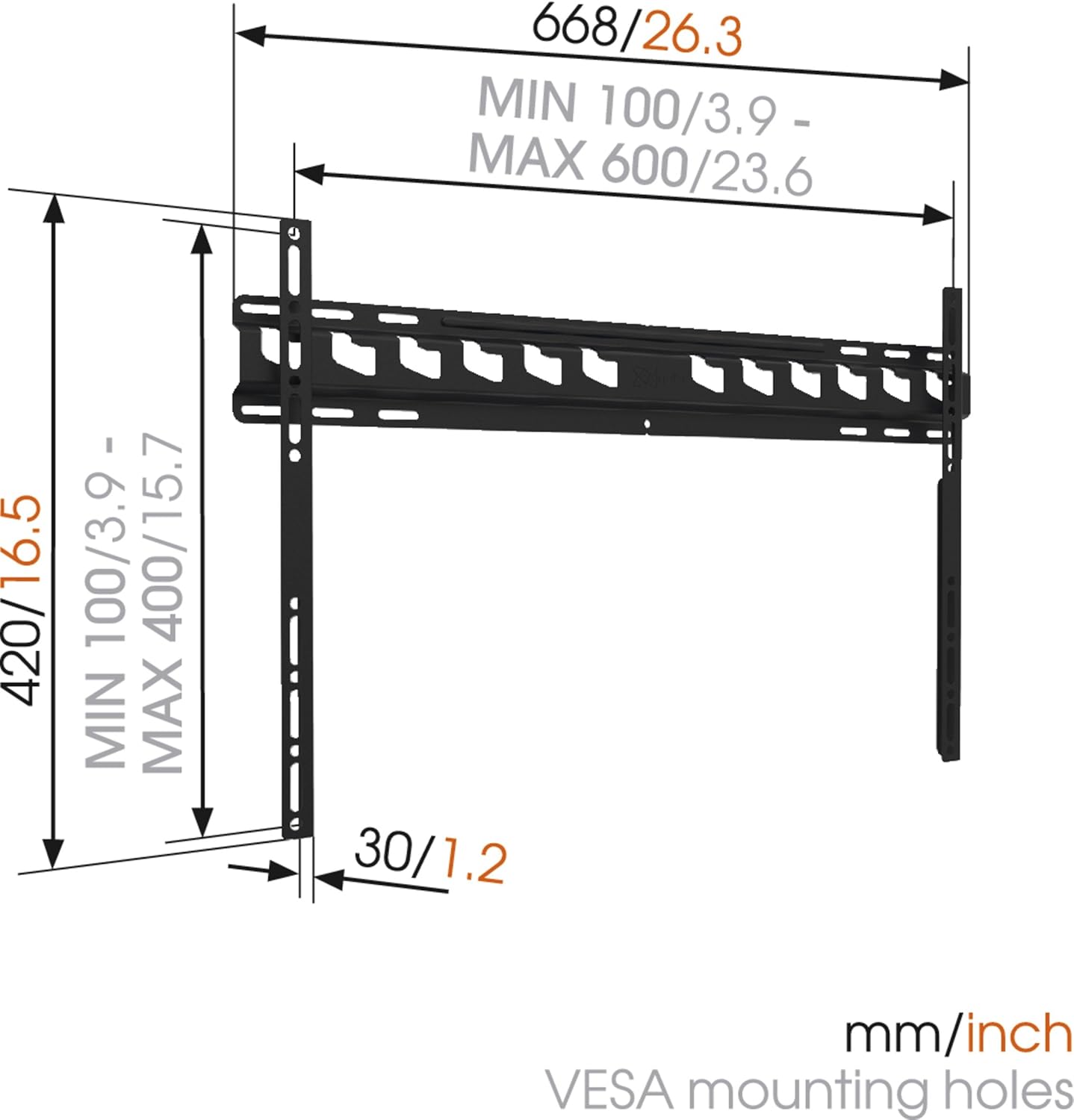
Popis obrázku: A technical diagram illustrating the dimensions of the Vogel's MA4000 wall mount. It shows the overall width (668mm / 26.3 inches), height (420mm / 16.5 inches), and the minimum and maximum VESA mounting hole patterns (100-600mm horizontally, 100-400mm vertically). The distance from the wall is indicated as 30mm (1.2 inches).
Nastavení a instalace
This section outlines the general steps for installing your Vogel's MA4000 wall mount. Always refer to the detailed graphical instructions included with your product for specific drilling templates and hardware usage.
Požadované nástroje (nejsou součástí dodávky):
- Vrtat
- Drill bits appropriate for your wall type (wood, concrete, brick, etc.)
- Vyhledávač trámů (pro dřevěné stěny s trámy)
- Úroveň
- Tužka
- Měřicí páska
- Šroubovák nebo klíč
Kroky instalace:
- Určete místo montáže: Choose a suitable location on your wall, ensuring it is structurally sound and free from electrical wires or plumbing. Use a stud finder if mounting to wood studs.
- Označení vrtaných otvorů: Hold the wall plate against the wall at the desired height and use a level to ensure it is straight. Mark the drilling holes with a pencil.
- Vrtací otvory: Drill pilot holes according to the marked positions and your wall type. Insert wall anchors if required.
- Připevnění nástěnné desky: Připevněte nástěnnou desku ke zdi pomocí dodaných šroubů a podložek. Ujistěte se, že je pevně připevněna a v rovině.
- Připevnění držáků televizoru k televizoru: Attach the two vertical TV interface bars to the back of your television using the appropriate screws, washers, and spacers from the hardware kit. Ensure the brackets are centered and securely fastened to the VESA mounting points.
- Montáž televizoru na nástěnnou desku: Carefully lift the television and hook the TV brackets onto the wall plate. Ensure both brackets are properly seated.
- Zabezpečená televize: Engage the safety locking mechanism (if applicable) to prevent the TV from accidentally dislodging from the wall plate.

Popis obrázku: Vedlejší profesionálfile view of a flat screen television mounted flush against a white wall, demonstrating the slim design and minimal wall distance achieved with the Vogel's MA4000 wall mount. The mount itself is barely visible behind the television.
Operating Instructions (Tilting Function)
The Vogel's MA4000 wall mount allows for a slight tilt to optimize your viewzážitky a snižují oslnění.
- Nastavení sklonu: Gently push or pull the bottom edge of the television to achieve the desired tilt angle. The mount supports a maximum tilt of 12 degrees.
- Securing Tilt: Some models may have a locking mechanism for the tilt. Refer to your product's specific instructions for details on securing the tilt position if available.
Údržba
The Vogel's MA4000 wall mount requires minimal maintenance to ensure long-term performance and safety.
- Pravidelná kontrola: Pravidelně kontrolujte všechny šrouby a spoje, zda jsou pevně utažené. V případě potřeby je dotáhněte.
- Čištění: Držák čistěte měkkým, suchým hadříkem. Nepoužívejte abrazivní čisticí prostředky ani rozpouštědla, která by mohla poškodit povrchovou úpravu.
- Hmotnostní limit: Never exceed the maximum weight capacity of 80 kg (176 lbs).
Odstraňování problémů
| Problém | Možná příčina | Řešení |
|---|---|---|
| TV is not level after mounting. | Nástěnná deska nebyla nainstalována vodorovně. | Remove TV, adjust wall plate, and remount. Ensure a level is used during installation. |
| TV feels unstable on the mount. | Screws are loose; TV not properly seated; safety lock not engaged. | Ensure all screws are tightened. Verify TV brackets are fully engaged with the wall plate. Engage safety lock. Do not exceed weight capacity. |
| Nelze dosáhnout požadovaného úhlu náklonu. | Obstruction; maximum tilt angle reached. | Check for cables or other obstructions. The mount has a maximum tilt of 12 degrees. |
Záruka a podpora
For warranty information and customer support, please refer to the documentation included with your product or visit the official Vogel's webUschovejte si doklad o koupi pro případ reklamace.
Vogel's Official Webmísto: www.vogels.com