1. Úvod
This manual provides instructions for the setup, operation, and maintenance of your Insignia RC-801-0A LCD TV Remote Control. This remote is designed for use with various Insignia LCD TV models, ensuring seamless control over your television's functions.
2. Obsah balení
- 1 x Insignia RC-801-0A Remote Control
Note: Batteries and a user manual are not included in the package.
3. Nastavení
3.1 Instalace baterie
- Najděte přihrádku na baterie na zadní straně dálkového ovladače.
- Posuňte kryt přihrádky na baterie dolů a otevřete jej.
- Vložte dvě (2) baterie typu AAA a ujistěte se, že kladný (+) a záporný (-) pól správně odpovídají označením uvnitř přihrádky.
- Zasuňte kryt přihrádky na baterie zpět na místo, dokud bezpečně nezacvakne.
Important: The remote requires 2 AAA batteries (not included).
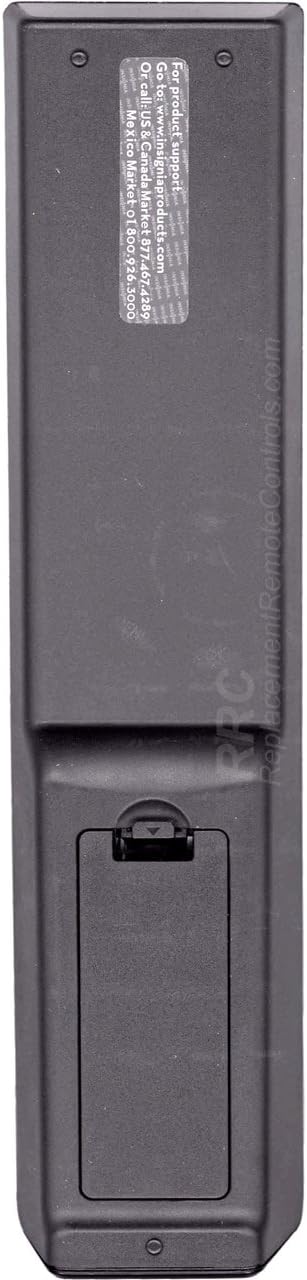
Obrázek 1: Zadní view of the Insignia RC-801-0A remote control, showing the battery compartment at the bottom. The compartment cover is designed to slide open for battery insertion.
3.2 První použití
The Insignia RC-801-0A remote control is pre-programmed for compatible Insignia LCD TV models. No additional programming or setup is typically required. Once batteries are installed, the remote should function immediately with your television.
4. Návod k obsluze
Familiarize yourself with the buttons on your remote control to effectively operate your Insignia LCD TV.

Obrázek 2: Přední view of the Insignia RC-801-0A remote control, displaying all control buttons. Key sections include power, input selection, number pad, volume/channel controls, menu navigation, and media playback buttons.
4.1 Key Button Functions
- Výkon (●): Zapíná nebo vypíná televizor.
- COMP/AV, HDMI, TV: Selects the video input source.
- Numerická klávesnice (0-9): Přímé zadávání čísel kanálů.
- ODVOLÁNÍ: Vrátí se k předchozímu viewed kanál.
- VOL (+/-): Nastavuje úroveň hlasitosti.
- CH (▲/▼): Přepíná televizní kanál nahoru nebo dolů.
- ZTLUMIT: Ztiší zvuk televizoru.
- VSTUP: Cyklicky prochází dostupné vstupní zdroje.
- JÍDELNÍ LÍSTEK: Otevře hlavní nabídku televizoru.
- Navigation Buttons (▲▼◀▶): Prochází možnostmi nabídky.
- ENTER/OK: Potvrzuje výběry v nabídkách.
- VÝSTUP: Closes the current menu or on-screen display.
- PRŮVODCE: Zobrazí elektronického programového průvodce (pokud je k dispozici).
- Media Playback Buttons (◀◀, ▶, ▮▮, ▶▶): Controls playback of connected media devices (e.g., DVD player, USB).
- ZOOM: Adjusts the screen zoom level.
5. Údržba
5.1 Výměna baterie
Replace batteries when the remote's response becomes inconsistent or stops working. Follow the battery installation steps in Section 3.1. Always replace both batteries at the same time with new AAA batteries.
5.2 Čištění
Pro čištění dálkového ovladače jemně otřete jeho povrch měkkým, suchým hadříkem. V případě odolných nečistot lehceampen the cloth with water. Avoid using harsh chemicals or abrasive cleaners, as these can damage the remote's finish or internal components.
6. Řešení problémů
- Dálkové ovládání nereaguje:
- Ujistěte se, že jsou baterie vloženy správně se správnou polaritou.
- Vyměňte staré baterie za nové.
- Check for any obstructions between the remote and the TV's IR sensor.
- Namiřte dálkový ovladač přímo na infračervený senzor televizoru.
- Nefunkční konkrétní tlačítka:
- Clean the remote's surface, especially around the non-functional buttons, to remove any debris.
- If the issue persists after battery replacement and cleaning, the remote may require replacement.
7. Specifikace
| Číslo modelu | RC-801-0A |
| Značka | INSIGNIE |
| Rozměry produktu | 8 x 2 x 1 palce |
| Hmotnost položky | 3.67 unce |
| Zdroj napájení | 2 x AAA baterie (nejsou součástí balení) |
| Kompatibilní zařízení | Insignia LCD Televisions |
| Barva | Černý |
8. Záruka a podpora
8.1 Informace o záruce
This product comes with a Six Months Warranty from the date of purchase. Please retain your proof of purchase for warranty claims. The warranty covers manufacturing defects but does not cover damage caused by misuse, accidents, or unauthorized modifications.
8.2 Zákaznická podpora
For product support or warranty inquiries, please refer to the contact information provided by your retailer or the manufacturer's official website. The back of the remote may contain specific support details (see Figure 3).

Obrázek 3: Zadní view of the Insignia RC-801-0A remote control, showing a sticker with support information. The text indicates to visit www.insigniaproducts.com for product support and provides phone numbers for US/Canada and Mexico.
Specific support details from the remote's back sticker:
- For product support: Go to www.insigniaproducts.com
- Call US & Canada: 1-877-467-4289
- Mexiko: 01-800-926-3000


