1. Úvod
This manual provides instructions for the safe and effective use of your Disney Frozen Bluetooth Speaker. This portable wireless speaker allows you to stream audio from Bluetooth-enabled devices or connect via a 3.5mm audio cable. It features a built-in microphone for speakerphone functionality and a rechargeable battery for portability.
2. Obsah balení
Ujistěte se prosím, že balení obsahuje všechny položky:
- Disney Frozen Bluetooth Speaker
- USB nabíjecí kabel
- 3.5mm audio kabel
3. Vlastnosti produktu
- Wireless audio streaming via Bluetooth
- Wired audio connection via 3.5mm headphone port
- Integrated microphone for speakerphone calls
- Vestavěná dobíjecí baterie
- USB chargeable
4. Ovládací prvky a porty

Obrázek 1: Přední view of the speaker with control buttons on the top panel.
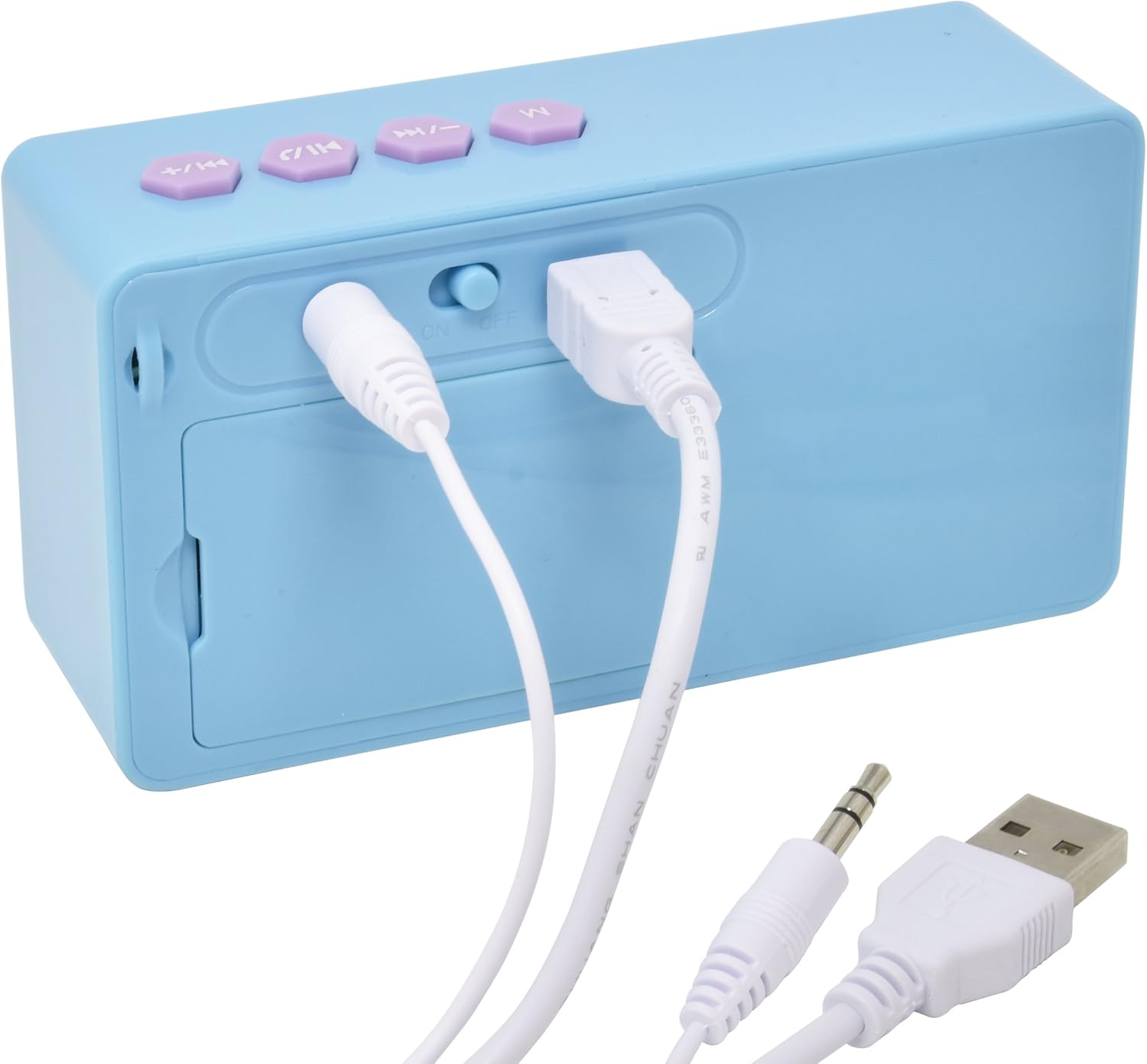
Obrázek 2: Zadní view of the speaker showing the power switch and connection ports.
Ovládací prvky na horním panelu:
- Tlačítko M: Mode selection (Bluetooth/AUX).
- Tlačítko Předchozí skladba / Snížení hlasitosti: Press once for previous track, press and hold to decrease volume.
- Tlačítko Přehrát/Pozastavit/Volat: Press once to play/pause music, press to answer/end calls.
- Tlačítko pro další skladbu / zvýšení hlasitosti: Press once for next track, press and hold to increase volume.
Porty na zadním panelu:
- Přepínač ON/OFF: Zapíná nebo vypíná reproduktor.
- USB nabíjecí port: Připojte kabel USB pro nabíjení.
- 3.5mm AUX vstup: Connect the 3.5mm audio cable for wired playback.
5. Nabíjení reproduktoru
Before first use, fully charge the speaker. The speaker charges quickly when connected to a USB port.
- Locate the USB Charging Port on the rear of the speaker (refer to Image 2).
- Connect the small end of the included USB charging cable to the speaker's USB port.
- Připojte větší konec nabíjecího kabelu USB k napájenému portu USB (např. k počítači, k USB adaptéru do zásuvky).
- Rozsvítí se kontrolka nabíjení. Po dokončení nabíjení může kontrolka změnit barvu nebo zhasnout.
Poznámka: Do not use damaged cables or chargers. Ensure the charging port is dry before connecting the cable.
6. Připojení Bluetooth
Bezdrátové připojení reproduktoru k zařízení s podporou Bluetooth:
- Ujistěte se, že je reproduktor nabitý.
- Posuňte Vypínač ON/OFF on the rear of the speaker to the 'ON' position. The speaker will power on and enter Bluetooth pairing mode, indicated by a flashing LED light and an audible prompt.
- On your Bluetooth-enabled device (smartphone, tablet, computer), go to the Bluetooth settings menu.
- Hledat available devices. The speaker will appear as "Disney Frozen Speaker" or a similar name.
- Select the speaker from the list to pair. Once successfully paired, the LED indicator will stop flashing, and you will hear a confirmation tone.
- Nyní můžete přehrávat zvuk ze zařízení přes reproduktor.
Poznámka: If prompted for a password, enter "0000". The speaker will automatically attempt to reconnect to the last paired device when powered on.
7. Drátové připojení (AUX)
To connect your speaker using the 3.5mm audio cable:
- Ujistěte se, že je reproduktor zapnutý.
- Connect one end of the included 3.5mm audio cable to the 3.5mm AUX vstup port on the rear of the speaker (refer to Image 2).
- Connect the other end of the 3.5mm audio cable to the headphone jack or AUX output of your audio device.
- Stiskněte tlačítko Tlačítko M on the top panel to switch to AUX mode if the speaker does not automatically detect the wired connection.
- Přehrávejte zvuk ze svého zařízení.
Poznámka: When using the AUX connection, playback controls (play/pause, track skip) on the speaker may not function, and you will need to control playback directly from your connected device.
8. Using as a Speakerphone
When connected via Bluetooth to a smartphone, the speaker can be used to handle phone calls.
- Přijetí hovoru: Když přichází hovor, stiskněte tlačítko Play/Pause / Call Button jednou odpovědět.
- Ukončení hovoru: Během hovoru stiskněte Play/Pause / Call Button jednou pro ukončení hovoru.
- Odmítnutí hovoru: Stiskněte a podržte Play/Pause / Call Button přibližně na 2 sekundy pro odmítnutí příchozího hovoru.
Audio will be routed through the speaker, and the built-in microphone will capture your voice.
9. Údržba
- Reproduktor čistěte měkkým, suchým hadříkem. Nepoužívejte abrazivní čisticí prostředky ani rozpouštědla.
- Chraňte reproduktor před vodou, vlhkostí a extrémními teplotami.
- Nepokoušejte se reproduktor rozebírat ani opravovat sami. Ztratíte tak záruku.
- Pokud reproduktor delší dobu nepoužíváte, skladujte jej na chladném a suchém místě.
10. Řešení problémů
| Problém | Možné řešení |
|---|---|
| Reproduktor se nezapne. | Ensure the speaker is charged. Connect to a power source using the USB cable. Check the ON/OFF switch. |
| Nelze spárovat přes Bluetooth. | Ensure the speaker is in pairing mode (flashing LED). Make sure Bluetooth is enabled on your device. Move the speaker closer to your device. Forget the device from your Bluetooth list and try pairing again. |
| Žádný zvuk nebo nízká hlasitost. | Increase the volume on both the speaker and your connected device. Ensure the correct input mode (Bluetooth or AUX) is selected. Check if the audio cable is fully inserted for wired connections. |
| Bluetooth připojení se často přerušuje. | Ensure there are no obstructions between the speaker and your device. Move closer to the speaker. Avoid interference from other wireless devices. |
| Mikrofon nefunguje během hovorů. | Ensure the speaker is connected via Bluetooth and not AUX. Check your phone's audio output settings during a call to ensure it's routed to the Bluetooth speaker. |
11. Specifikace
| Funkce | Detail |
|---|---|
| Číslo modelu | 057-00-3417 |
| Technologie připojení | Bluetooth, USB (pro nabíjení) |
| Speciální funkce | Portable, Built-in Microphone |
| Zdroj napájení | Napájení z baterie (dobíjecí) |
| Maximální výstupní výkon reproduktoru | 3 wattů |
| Rozměry produktu | 6.2 x 6.1 x 2.3 palce |
| Hmotnost položky | 9.1 unce |
| UPC | 092298925264 |
12. Informace o záruce
Na tento produkt se vztahuje a 1 YEAR FACTORY WARRANTY. Please retain your proof of purchase for warranty claims. For support or warranty inquiries, please refer to the contact information provided with your purchase documentation.


