
1. Úvod
This manual provides comprehensive instructions for the installation, setup, operation, and maintenance of your Jandy iQ20-A iAquaLink 2.0 Wireless Network Pool Control Interface System. The iAquaLink 2.0 system allows for remote control and monitoring of your pool and spa equipment via a wireless network connection, using a smartphone, tablet, or computer.
2. Důležité bezpečnostní informace
WARNING: Risk of Electric Shock. Installation must be performed by a qualified professional in accordance with all local and national electrical codes.
- Always disconnect power to the pool control system before performing any service or installation.
- Ensure the unit is installed in a location protected from direct weather exposure, unless specifically rated for outdoor use.
- Nepokoušejte se jednotku opravovat ani upravovat sami. Veškerý servis svěřte kvalifikovanému personálu.
- Udržujte všechna elektrická připojení suchá a bezpečná.
3. Obsah balení
Ověřte, zda jsou v balení přítomny všechny komponenty:
- iQ20-A iAquaLink 2.0 Wireless Network Interface Module
- Bezdrátová anténa
- Montážní hardware
- Stručný průvodce (pokud je součástí dodávky)
4. Instalační příručka
4.1 Kompatibilita systému
The iQ20-A iAquaLink 2.0 module is compatible with the following Jandy AquaLink systems:
- AquaLink RS (Revision R and later)
- AquaLink PDA (Revision 6.0 and later)
- AquaLink Z4 (All revisions)
For older systems, a PCB upgrade may be required. Consult your system's documentation or a qualified technician.
4.2 Fyzická instalace
Select a suitable mounting location near your existing AquaLink control panel. The location should be protected from direct sunlight and moisture. Use the provided mounting hardware to secure the iQ20-A module to a flat surface.

Image: An open Jandy iQ20-A module revealing its internal circuit board with various electronic components and wiring connections. This view is useful for understanding internal layout during installation.
4.3 Zapojení kabeláže
Connect the iQ20-A module to your AquaLink control panel using a standard Jandy 4-wire cable. Ensure the connections are secure and correctly aligned according to the wiring diagram in your AquaLink system's manual. The antenna should be securely attached to the module.
5. Network Setup and Configuration
5.1 Wi-Fi připojení
The iQ20-A module supports wireless Wi-Fi setup. You can configure the Wi-Fi connection using any smartphone, tablet, or laptop. Follow these general steps:
- Power on the iQ20-A module and your AquaLink system.
- On your mobile device or laptop, search for available Wi-Fi networks. The iQ20-A module will broadcast its own temporary Wi-Fi network for initial setup.
- Connect to the iQ20-A's temporary network.
- Otevřete a web browser and navigate to the setup page (refer to your Quick Start Guide for the specific IP address or URL).
- Follow the on-screen prompts to select your home Wi-Fi network (SSID) and enter the password.
- Once connected, the iQ20-A module will restart and connect to your home network.
5.2 Initial Configuration with iAquaLink App
After connecting the module to your home Wi-Fi, download the iAquaLink app from your device's app store. Create an iAquaLink account or log in if you already have one. Follow the app's instructions to add your new iQ20-A device by entering its serial number. This will link your physical pool system to your iAquaLink account for remote control.
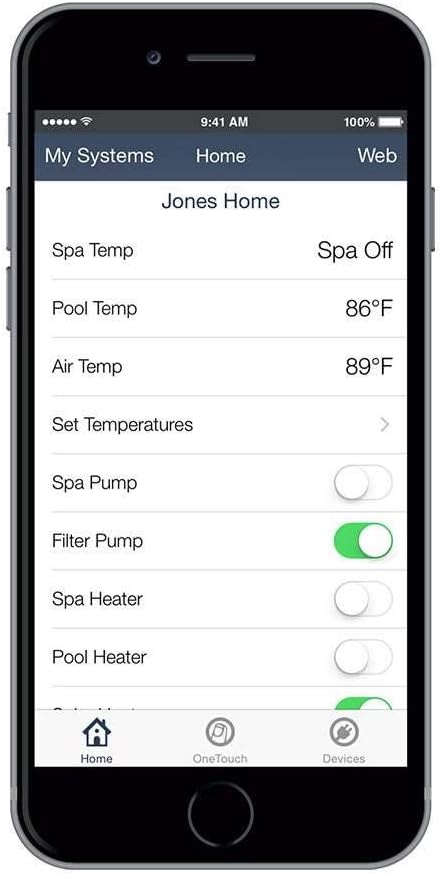
Image: A smartphone screen displaying the iAquaLink app interface. It shows current pool and spa temperatures, and toggle switches for controlling spa pump, filter pump, spa heater, and pool heater.
6. Provoz
6.1 Using the iAquaLink App
The iAquaLink app provides a user-friendly interface to control various aspects of your pool and spa system. Once logged in and your device is connected, you can:
- Turn pool and spa equipment (pumps, heaters, lights) on or off.
- Monitor water temperatures (pool, spa, air).
- Adjust set temperatures for heating.
- Access schedules and programming features (depending on your AquaLink system capabilities).
6.2 Vzdálený přístup
The primary benefit of the iAquaLink 2.0 system is its ability to provide remote access. You can control your pool and spa from anywhere with an internet connection, allowing you to prepare your spa before you arrive home or monitor system status while away.
7. Údržba
The Jandy iQ20-A iAquaLink 2.0 module requires minimal maintenance. To ensure optimal performance and longevity:
- Udržujte jednotku v čistotě a bez prachu a nečistot.
- Ensure all cable connections remain secure.
- Periodically check for any signs of corrosion or damage, especially if installed in a humid environment.
- Ensure the antenna is not obstructed for optimal wireless signal strength.
8. Řešení problémů
If you encounter issues with your iQ20-A system, refer to the following common problems and solutions:
8.1 Stavové kontrolky
The iQ20-A module features three indicator lights: PWR (Power), LAN (Local Area Network), and WEB (Internet Connection). Understanding their status can help diagnose issues.

Obrázek: Detailní záběr view of the Jandy iQ20-A module's side, clearly showing the PWR, LAN, and WEB indicator lights. The lights are typically green when active.
| Světlo | Postavení | Popis |
|---|---|---|
| PWR | Plně zelená | Unit is powered on. |
| LAN | Plně zelená | Connected to local network (router). |
| LAN | Vypnuto | Not connected to local network. Check Wi-Fi settings or cable connection. |
| WEB | Plně zelená | Connected to iAquaLink server (internet). |
| WEB | Vypnuto | No internet connection. Check router, internet service, or firewall settings. |
8.2 Běžné problémy
- No Connection to iAquaLink App: Ensure all three indicator lights (PWR, LAN, WEB) are solid green. If LAN or WEB lights are off, re-check Wi-Fi configuration and internet connectivity.
- Invalid Serial Number: Double-check the serial number entered during app setup. Ensure there are no typos. If the issue persists, contact Jandy support.
- Přerušované připojení: This could be due to weak Wi-Fi signal. Try repositioning the module or antenna, or consider a Wi-Fi extender. Firewall settings on your router might also block communication; ensure necessary ports are open (consult your router's manual or ISP).
- Systém nereaguje: Verify the 4-wire cable connection to your AquaLink control panel. Ensure the AquaLink system itself is powered on and functioning correctly.
9. Technické specifikace
- Model: IQ20-A
- Rozměry: 12.75 x 6 x 2.75 palce
- Hmotnost položky: 1.43 libry
- Konektivita: Wi-Fi
- Kompatibilní zařízení: Smartphone, tablet
- Podporované operační systémy: Windows, iOS, macOS (for app/web rozhraní)
- Příkon: 10V, 200mA (as indicated on unit)
- Environmentální hodnocení: IPX4 (odolnost proti stříkající vodě)
10. Záruka a podpora
For warranty information, please refer to the documentation included with your product or visit the official Jandy website. For technical support, troubleshooting assistance beyond this manual, or to inquire about service, please contact Jandy customer support directly. Have your product model number (IQ20-A) and serial number ready when contacting support.


