1. Úvod
This manual provides detailed instructions for the installation, operation, and maintenance of your Alpine CDE-163BT Advanced Bluetooth CD Receiver. Please read this manual thoroughly before using the unit to ensure proper operation and to prevent damage. Keep this manual for future reference.
The Alpine CDE-163BT is a versatile car stereo receiver featuring advanced Bluetooth connectivity for hands-free calling and audio streaming, CD playback, USB input, and FM/AM tuner capabilities. It is designed to deliver high-quality audio performance and user-friendly control.
2. Nastavení a instalace
2.1 Obsah balení
Před zahájením instalace ověřte, zda jsou přítomny všechny komponenty:
- Alpine CDE-163BT Head Unit
- Kabelový svazek
- Montážní pouzdro a ozdobný kroužek
- Microphone for Bluetooth Hands-Free Calling
- Uživatelská příručka (tento dokument)
- Montážní materiál (šrouby, konzoly)
2.2 Schéma zapojení
Refer to the wiring diagram provided with the unit's installation guide for specific connections. Key connections include:
- Moc: Yellow (constant 12V), Red (switched 12V), Black (ground).
- Řečníci: White/White-Black (Front Left), Gray/Gray-Black (Front Right), Green/Green-Black (Rear Left), Purple/Purple-Black (Rear Right).
- Anténa: Blue (power antenna/amplifier remote turn-on).
- Mikrofon: Connect the supplied microphone to the dedicated input for hands-free calling.
Pozor: Incorrect wiring can cause damage to the unit or vehicle's electrical system. If you are unsure about any wiring connections, consult a qualified professional installer.
2.3 Počáteční zapnutí
Po instalaci zapněte zapalování vozidla. Jednotka by se měla zapnout. Postupujte podle pokynů na obrazovce pro počáteční nastavení, například pro výběr jazyka nebo nastavení hodin.
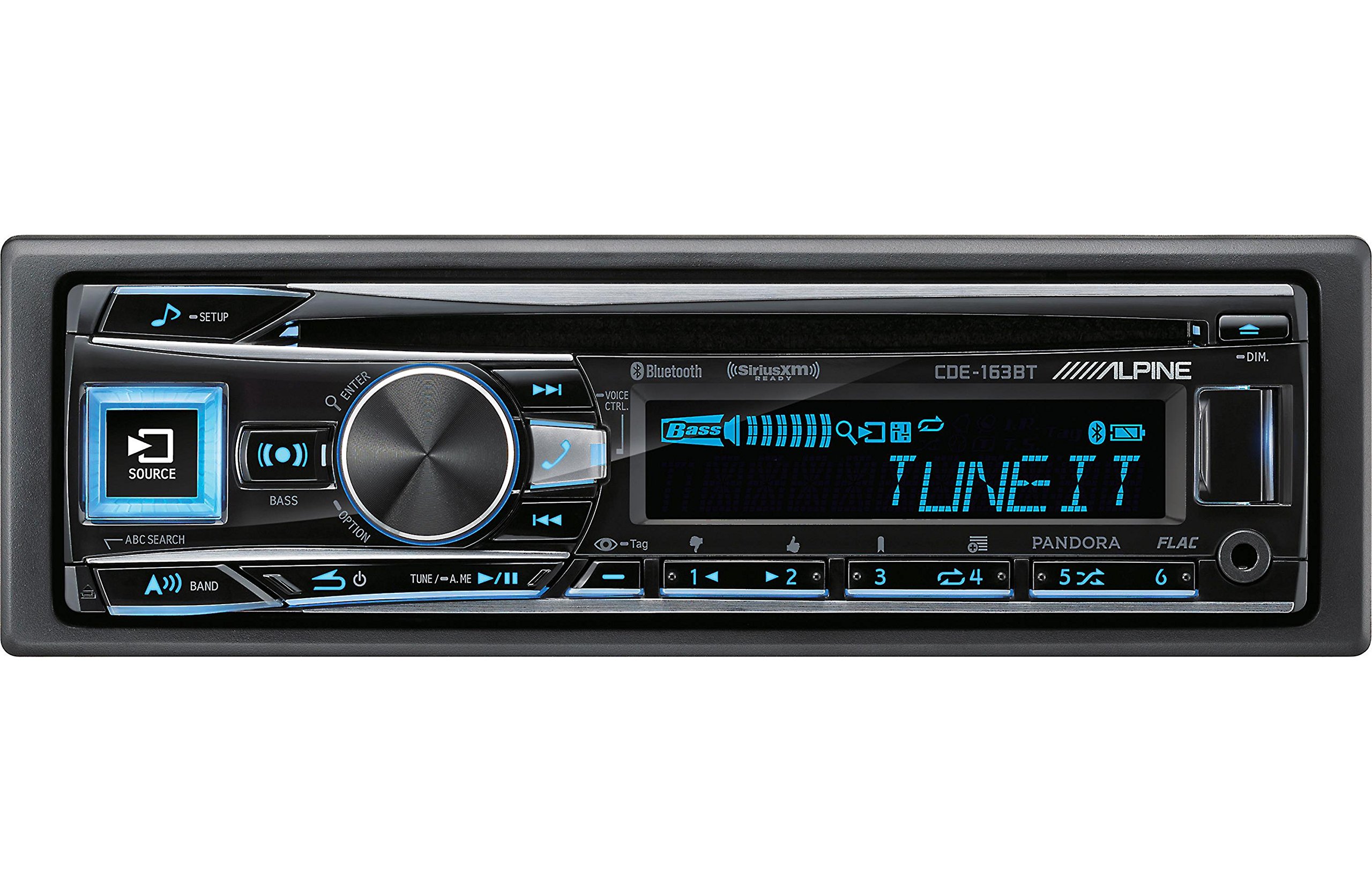
Figure 2.3.1: Front panel of the Alpine CDE-163BT receiver. This image displays the main controls, including the large rotary knob, source button, setup button, and display screen showing "TUNEIT" and "Bass" indicators.
3. Provoz
3.1 Ovládací prvky na předním paneluview
Seznamte se s hlavními ovládacími prvky na předním panelu:
Obrázek 3.1.1: Detailní view of the Alpine CDE-163BT front panel. Key controls include the SOURCE button (left, illuminated), SETUP button (top left), large central rotary knob for volume and selection, BASS/OPTION button, VOICE CTRL button, and various preset/track skip buttons along the bottom.
- Tlačítko SOURCE: Selects the audio source (CD, Tuner, USB, Bluetooth Audio, AUX).
- Tlačítko SETUP: Accesses the main setup menu for system adjustments.
- Rotary Knob (Volume/ENTER): Turns to adjust volume. Press to confirm selections in menus.
- BASS/OPTION Button: Provides quick access to bass settings or other options depending on the current mode.
- Tlačítko HLASOVÉ OVLÁDÁNÍ: Activates voice control features on connected smartphones.
- Tlačítko BAND: Switches between FM1, FM2, FM3, and AM bands in tuner mode.
- TUNE/A.ME/II Buttons: Used for manual tuning, auto memory, and play/pause functions.
- Track Skip/Preset Buttons (1-6): Used for skipping tracks or selecting radio presets.
- Tlačítko DIM: Upravuje jas displeje.
3.2 Zapnutí/vypnutí a výběr zdroje
- Pro otočení jednotky ON, press any button (e.g., SOURCE or the Rotary Knob).
- Pro otočení jednotky VYPNUTO, press and hold the power button (often integrated with the TUNE/A.ME button).
- Stiskněte tlačítko ZDROJ button repeatedly to cycle through available audio sources: CD, Tuner, USB, Bluetooth Audio, AUX.
3.3 Ovládání hlasitosti
Rotate the large central Otočný knoflík ve směru hodinových ručiček pro zvýšení hlasitosti a proti směru hodinových ručiček pro snížení hlasitosti.
3.4 Nastavení zvuku
Stiskněte tlačítko BASS/OPTION button or navigate through the SETUP menu to adjust audio settings such as Bass, Treble, Balance (left/right), and Fader (front/rear). Use the Rotary Knob to adjust values and press it to confirm.
3.5 Radio Operation (FM/AM Tuner)
- Select "Tuner" as the source using the ZDROJ tlačítko.
- Stiskněte tlačítko KAPELA tlačítko pro přepínání mezi pásmy FM1, FM2, FM3 a AM.
- Ruční ladění: Stiskněte tlačítko NALADIT buttons (◀ / ▶) to manually tune frequencies.
- Hledat ladění: Stiskněte a podržte NALADIT tlačítka pro automatické vyhledání další silné stanice.
- Přednastavené stanice: Chcete-li stanici uložit, nalaďte požadovanou frekvenci a poté stiskněte a podržte jedno z očíslovaných tlačítek předvoleb (1–6), dokud neuslyšíte pípnutí. Chcete-li předvolbu vyvolat, jednoduše stiskněte odpovídající očíslované tlačítko.
3.6 Přehrávání CD
- Vložte CD do slotu pro disk. Přístroj se automaticky přepne na zdroj CD a spustí přehrávání.
- Use the ◀ / ▶ buttons to skip tracks.
- Stiskněte tlačítko TUNE/A.ME/II button for Play/Pause.
- Stiskněte tlačítko ABC SEARCH button to search for tracks by name.
3.7 Připojení Bluetooth
The CDE-163BT features built-in Bluetooth for hands-free calling and audio streaming.
3.7.1 Párování zařízení Bluetooth
- Ujistěte se, že je na vašem mobilním zařízení povoleno Bluetooth.
- On the CDE-163BT, go to the SETUP menu and select "Bluetooth Setup".
- Choose "Pairing" or "Device Search".
- On your mobile device, search for available Bluetooth devices and select "Alpine CDE-163BT".
- Confirm the pairing code if prompted. Once paired, the Bluetooth icon on the receiver's display will illuminate.
3.7.2 Volání bez použití rukou
- Při příchozím hovoru se na displeji zobrazí ID volajícího. Stiskněte tlačítko ENTER button (Rotary Knob) to answer.
- Chcete-li hovor ukončit, stiskněte tlačítko ENTER znovu tlačítko.
- Use the supplied microphone for clear communication.
- Stiskněte tlačítko HLASOVÉ OVLÁDÁNÍ tlačítko pro aktivaci hlasového asistenta vašeho smartphonu.
3.7.3 Streamování zvuku přes Bluetooth
- Select "Bluetooth Audio" as the source.
- Start playback on your paired mobile device. Audio will stream through the receiver.
- Use the ◀ / ▶ buttons on the receiver to skip tracks.
3.8 Přehrávání z USB
- Connect a USB storage device (e.g., USB flash drive) to the USB port.
- Select "USB" as the source. The unit will automatically detect and begin playing compatible audio files (including FLAC format).
- Use the ◀ / ▶ buttons to skip tracks.
- The unit supports various audio formats.
3.9 Pandora and SiriusXM Ready
- Pandora: Connect your iPhone or Android smartphone via USB or Bluetooth and launch the Pandora app. Select Pandora as the source on the receiver to control the app.
- SiriusXM: This unit is SiriusXM Ready. An optional SiriusXM Connect Vehicle Tuner and subscription are required for satellite radio reception. Connect the tuner and select SiriusXM as the source.
3.10 Nastavení zobrazení
- Stiskněte tlačítko ZTLUMIT tlačítko pro nastavení jasu displeje.
- Access the SETUP menu to customize display colors for buttons and the screen.
4. Údržba
4.1 Čištění jednotky
Wipe the front panel with a soft, dry cloth. For stubborn stains, dampen the cloth lightly with water. Avoid using harsh chemicals, abrasive cleaners, or solvents as they can damage the finish.
4.2 Péče o disk
Handle CDs by their edges. Keep discs clean and free of scratches. If a disc is dirty, wipe it gently from the center outwards with a soft, lint-free cloth. Do not use solvents or abrasive cleaners on discs.
5. Řešení problémů
If you experience issues with your CDE-163BT, refer to the table below for common problems and solutions.
| Problém | Možná příčina | Řešení |
|---|---|---|
| Žádná síla | Nesprávné zapojení; Spálená pojistka; Vypnuté zapalování vozidla. | Zkontrolujte připojení napájení; Vyměňte pojistku; Zapněte zapalování vozidla. |
| Žádný zvuk | Příliš nízká hlasitost; Aktivováno ztlumení; Nesprávné zapojení reproduktorů; Ampvypnutější. | Increase volume; Deactivate mute; Check speaker connections; Check ampvýkon zvlhčovače. |
| Bluetooth se nepřipojuje | Zařízení není v režimu párování; Bluetooth na telefonu vypnutý; Rušení. | Ensure phone Bluetooth is on and discoverable; Re-attempt pairing; Move closer to unit. |
| CD přeskakuje nebo se nepřehrává | Dirty or scratched disc; Disc inserted incorrectly. | Clean disc; Insert disc correctly; Try a different disc. |
| Zařízení USB nebylo rozpoznáno | Incompatible format; Damaged USB device; Loose connection. | Zajistit files are compatible; Try a different USB device; Reconnect USB device. |
Pokud problém přetrvává i po vyzkoušení těchto řešení, kontaktujte zákaznickou podporu Alpine.
6. Specifikace
Below are the technical specifications for the Alpine CDE-163BT Advanced Bluetooth CD Receiver:
- Číslo modelu: 79380
- Rozměry produktu: 5 x 11 x 10 palce
- Hmotnost položky: 4.05 libry (4.1 libry)
- Technologie bezdrátové komunikace: Bluetooth
- Technologie připojení: Bluetooth
- Speciální vlastnosti: Built-In Bluetooth, FM Tuner
- Další funkce displeje: Bezdrátový
- Barva: ČERNÝ
- Výrobce: Vysokohorský
- Technologie připojení: Bluetooth
- Kompatibilní zařízení: Smartphone
- Typ konektoru: 3.5 mm Jack, USB
- Režim výstupu zvuku: Mono, stereo
- Konfigurace kanálu prostorového zvuku: 4 kanál
- Wattage: 200 wattů
- Datum první dostupnosti: 19. ledna 2016
7. Záruka a zákaznická podpora
7.1 Informace o záruce
Alpine products are manufactured to the highest quality standards. This product is covered by a limited warranty. Please refer to the separate warranty card included with your purchase for specific terms, conditions, and duration of coverage. Retain your proof of purchase for warranty claims.
7.2 Zákaznická podpora
For technical assistance, troubleshooting beyond this manual, or warranty service, please contact Alpine customer support:
- Webmísto: Navštivte oficiální Alpine webweb s zdrojovými zdroji podpory, častými dotazy a kontaktními formuláři.
- Telefon: Viz Alpine website or your warranty card for regional customer service phone numbers.
- Autorizovaná servisní střediska: For repairs, locate an authorized Alpine service center through the official webmísto.
When contacting support, please have your product model number (CDE-163BT) and serial number ready.


