1. Úvod
This manual provides detailed instructions for the installation, operation, and maintenance of your Comelit AHCAM631A Vandal-Dome AHD 960p Camera. Please read this manual thoroughly before installation and use to ensure proper functionality and to prevent damage to the device. Keep this manual for future reference.
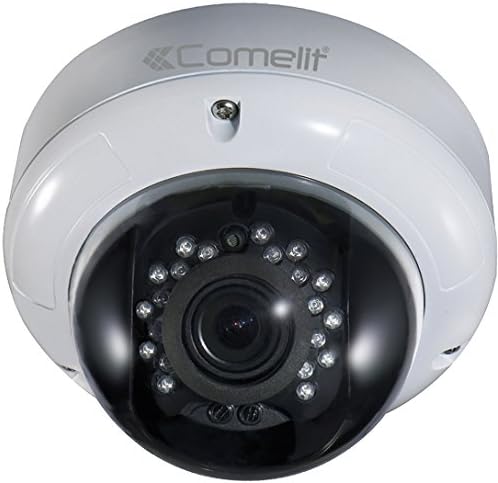
Obrázek 1: Comelit AHCAM631A Vandal-Dome AHD 960p Camera. This image displays the white dome-shaped camera with a dark lens housing, featuring multiple infrared LEDs surrounding the central camera lens.
2. Konec produktuview
2.1 Klíčové vlastnosti
- Video ve vysokém rozlišení: Provides clear 960p resolution for detailed surveillance.
- Vandal-Dome Design: Robust construction designed to resist tampering and impact.
- Infračervené noční vidění: Equipped with IR illumination for clear visibility up to 25 meters in low-light conditions.
- Stupeň odolnosti proti povětrnostním vlivům IP66: Suitable for both indoor and outdoor installations, protected against dust and powerful water jets.
- Varifokální objektiv: Adjustable focal length from 2.8mm to 12mm for flexible viewing úhly.
- AHD Technology: Analog High Definition for reliable video transmission over coaxial cable.
2.2 Obsah balení
Po obdržení zkontrolujte obsah balení. Pokud některé položky chybí nebo jsou poškozené, ihned kontaktujte svého dodavatele.
- Comelit AHCAM631A Vandal-Dome Camera Unit
- Montážní šrouby a hmoždinky
- Instalační šablona (pokud je součástí dodávky)
- Stručný průvodce / Uživatelská příručka
3. Nastavení a instalace
Before beginning installation, ensure that power is disconnected from the installation area. Professional installation is recommended.
3.1 Montáž fotoaparátu
- Vyberte umístění: Choose a suitable indoor or outdoor location for mounting, considering the desired viewing angle and cable routing. The camera is designed for wall mounting.
- Připravte povrch: Use the provided mounting template (if available) to mark drilling points on the wall or ceiling.
- Vrtací otvory: Vyvrtejte pilotní otvory pro montážní šrouby a v případě potřeby vložte hmoždinky.
- Bezpečná kamera: Attach the camera base securely to the mounting surface using the provided screws.
3.2 Zapojení kabeláže
The AHCAM631A camera requires two main connections: video and power.
- Připojení videa: Connect a BNC coaxial cable from the camera's video output to an AHD-compatible Digital Video Recorder (DVR) or monitor. Ensure the connection is secure.
- Připojení napájení: Connect a 12V DC power supply (not included) to the camera's power input. Ensure the power supply meets the camera's power requirements.
3.3 Počáteční zapnutí
Once all connections are made, apply power to the camera. The camera should power on, and video should appear on the connected DVR/monitor. Allow a few moments for the camera to initialize.
4. Návod k obsluze
4.1 Adjusting the Varifocal Lens
The AHCAM631A features a varifocal lens, allowing you to adjust the field of view and focus. This adjustment is typically done manually after installation.
- Access Lens: Carefully open the dome cover to access the lens adjustment screws.
- Upravit přiblížení: Rotate the zoom adjustment ring to achieve the desired field of view (between 2.8mm wide angle and 12mm telephoto).
- Upravit zaostření: Rotate the focus adjustment ring until the image on your monitor is clear and sharp.
- Bezpečný kryt: Once adjustments are complete, securely close the dome cover to maintain its IP66 rating.
4.2 Nabídka na obrazovce (OSD)
Many AHD cameras feature an OSD menu for advanced settings adjustments (e.g., exposure, white balance, DNR). Access to the OSD menu is typically controlled via a joystick on the camera cable or through a UTC (Up The Coax) controller connected to your DVR.
- Refer to your DVR's manual or the camera's specific OSD instructions for detailed navigation and setting adjustments.
- Common settings include: Brightness, Contrast, Sharpness, Backlight Compensation (BLC), Wide Dynamic Range (WDR), Digital Noise Reduction (DNR), and Day/Night mode.
5. Údržba
5.1 Čištění fotoaparátu
Pravidelné čištění pomáhá udržovat optimální kvalitu obrazu.
- Use a soft, clean cloth to wipe the dome cover.
- Pro odolné nečistoty, damphadřík lehce namočte do vody nebo jemného neabrazivního čisticího roztoku.
- Avoid using harsh chemicals, solvents, or abrasive materials, as these can damage the dome's surface.
5.2 Environmentální hlediska
While the camera has an IP66 rating, extreme environmental conditions can affect its lifespan and performance.
- Pokud je instalováno v uzavřeném prostoru, zajistěte řádné větrání.
- Avoid direct exposure to lightning or extreme voltage výkyvy.
- Periodically check cable connections for corrosion or damage, especially in outdoor installations.
6. Řešení problémů
Pokud se s fotoaparátem setkáte s problémy, podívejte se na následující běžné problémy a jejich řešení.
| Problém | Možná příčina | Řešení |
|---|---|---|
| Žádný video výstup | No power; Loose video cable; Incompatible DVR | Check power supply and connections; Ensure BNC cable is securely connected; Verify DVR supports AHD 960p input. |
| Špatná kvalita obrazu / Rozmazaný obraz | Lens out of focus; Dirty dome cover; Incorrect OSD settings | Adjust the varifocal lens focus; Clean the dome cover; Reset OSD settings to default or adjust for optimal image. |
| IR LEDs not illuminating at night | Insufficient power; Faulty IR sensor; OSD setting for Day/Night mode | Ensure adequate power supply; Check OSD settings for Day/Night mode (should be Auto); Contact support if sensor is faulty. |
| Camera not responding | Problém s napájením; Vnitřní chyba | Verify power connection; Try power cycling the camera; If issue persists, contact customer support. |
7. Technické specifikace
| Model | AHCAM631A |
| Rezoluce | 960p AHD |
| Čočka | Varifocal 2.8mm - 12mm |
| Infračervený dosah | Až 25 metrů |
| Hodnocení odolnosti vůči povětrnostním vlivům | IP66 |
| Prostředí použití | Vnitřní / Venkovní |
| Typ montáže | Držák na zeď |
| Barva | Bílý |
| Rozměry (D x Š x V) | 14.5 x 16.8 x 16.8 cm |
| Hmotnost | 900 gramů |
| Napájení | 12V DC (není součástí balení) |
| Doporučené použití | Dohled |
8. Záruka a podpora
8.1 Informace o záruce
Comelit products are manufactured to high standards and are subject to strict quality control. For specific warranty terms and conditions, please refer to the warranty card included with your product or visit the official Comelit webZáruka se obvykle vztahuje na vady materiálu a zpracování při běžném používání.
8.2 Zákaznická podpora
If you require technical assistance, have questions about your product, or need to report a fault, please contact Comelit customer support. Contact details can usually be found on the official Comelit webwebu nebo na obalu vašeho produktu.
- Before contacting support, please have your product model number (AHCAM631A) and a description of the issue ready.
- For the most up-to-date information and support resources, visit the official Comelit webmísto.


