1. Úvod
The Philips DPM-8000 Digital Pocket Memo is a professional voice recorder designed for efficient dictation. It features advanced 3D Mic technology for superior audio quality and integrates with SpeechExec Pro software for streamlined data management. This manual provides essential information for setting up, operating, maintaining, and troubleshooting your device.
2. Obsah balení
Ověřte, zda jsou v balení přítomny všechny níže uvedené položky:
- Philips DPM-8000 Digital Pocket Memo
- Dokovací stanice
- Paměťová karta
- Dobíjecí baterie (lithium-iontová)
- USB kabel
- SpeechExec Pro Dictation Software
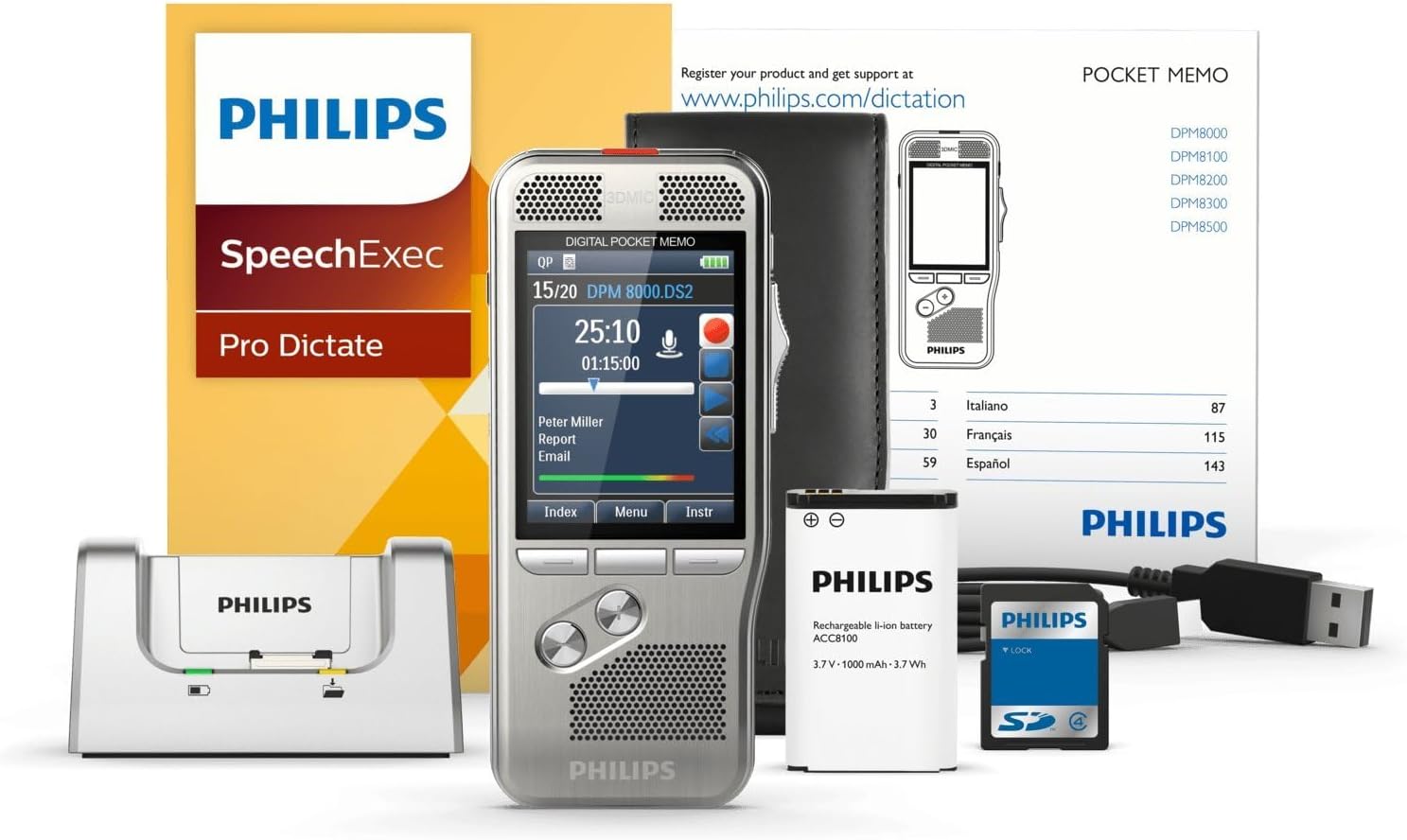
Image: The Philips DPM-8000 Digital Pocket Memo, docking station, battery, USB cable, and software packaging.
3. Nastavení
3.1 Instalace a nabíjení baterie
- Otevřete kryt bateriového prostoru na zadní straně zařízení.
- Insert the supplied Lithium Ion rechargeable battery, ensuring correct polarity.
- Zavřete kryt prostoru pro baterie.
- Connect the USB cable to the docking station and then to a power source or computer.
- Place the Digital Pocket Memo into the docking station to begin charging. The charging indicator will illuminate.

Image: The Philips DPM-8000 Digital Pocket Memo placed in its docking station for charging or data transfer.
3.2 Software Installation (SpeechExec Pro)
The SpeechExec Pro Dictation Software is essential for managing your dictations. Insert the software CD into your computer's optical drive or download the latest version from the official Philips webwebu. Dokončete instalaci podle pokynů na obrazovce.
4. Návod k obsluze
4.1 Základní nahrávání
- To power on the device, slide the power switch to the ON position.
- Stiskněte tlačítko Záznam button (red circle) to start recording. The 3D Mic system will automatically adjust for optimal audio capture.
- Speak clearly into the microphone. The built-in motion sensor helps in automatic microphone selection for best results.
- Stiskněte tlačítko Zastávka button to pause or end the recording.
- The device utilizes light and motion sensors to optimize battery life during operation.

Obrázek: Podrobný view of the Philips DPM-8000, highlighting its display and control buttons.
4.2 Přehrávání
- Select the desired dictation file from the device's menu.
- Stiskněte tlačítko Hrát button to listen to the recording.
- Use the navigation buttons to fast forward, rewind, or adjust volume.
4.3 Transferring Dictations to Computer
To transfer your recorded dictations to your computer for transcription or archiving:
- Ensure the SpeechExec Pro software is running on your computer.
- Place the Digital Pocket Memo into the docking station, or connect it directly via the USB cable.
- The software will automatically detect the device and begin transferring new dictations. Follow any prompts within the SpeechExec Pro application.

Image: An individual dictating into the Philips DPM-8000 while another person transcribes on a computer, illustrating the workflow.
5. Údržba
5.1 Čištění zařízení
- Otřete zařízení měkkým suchým hadříkem.
- Nepoužívejte abrazivní čisticí prostředky ani rozpouštědla, protože by mohly poškodit povrch.
- Udržujte mřížky mikrofonu a reproduktoru čisté od prachu a nečistot.
5.2 Péče o baterii
- Baterii pravidelně nabíjejte, abyste udrželi optimální výkon.
- Nevystavujte zařízení extrémním teplotám, které mohou ovlivnit životnost baterie.
- Pokud zařízení nebudete delší dobu používat, skladujte jej s částečně nabitou baterií.
5.3 Aktualizace softwaru
Periodically check the Philips website for updates to the SpeechExec Pro software and device firmware to ensure optimal performance and access to new features.
6. Řešení problémů
6.1 Běžné problémy a řešení
-
Zařízení se nezapne:
- Ujistěte se, že je baterie správně nainstalována a nabita.
- Connect the device to the docking station or USB cable to check for charging.
-
Špatná kvalita nahrávky:
- Ujistěte se, že mikrofon není nijak zakrytý.
- Check recording settings (e.g., sensitivity, format) in the device menu.
- Nahrávejte v tichém prostředí.
-
Dictations not transferring to computer:
- Verify the USB cable connection between the docking station/device and the computer.
- Ensure SpeechExec Pro software is running and updated.
- Restart both the device and the computer.
-
Krátká výdrž baterie:
- Před použitím se ujistěte, že je baterie plně nabitá.
- Reduce screen brightness or disable unnecessary features.
- Consider replacing the battery if it is old or frequently used.
7. Specifikace
| Značka | Philips |
| Číslo modelu | 8000 DPM |
| Hmotnost položky | 4.1 unce (116 gramů) |
| Rozměry produktu | 4.8 x 2.1 x 0.6 palce (12.2 x 5.3 x 1.5 cm) |
| Baterie | 1 lithium-iontová baterie (vyžadováno) |
| Kapacita paměti | 32 GB |
| Velikost obrazovky | 2.4 palce |
| Čas digitálního záznamu | Až 1168 hodin |
| Hardwarové rozhraní | USB |
| Tvarový faktor mikrofonu | Vestavěný |
| Jack pro sluchátka | 3.5 milimetru |
8. Záruka a podpora
Podrobné informace o záruce naleznete v záruční kartě dodané s vaším produktem nebo na oficiálních webových stránkách společnosti Philips. website. For technical support, software downloads, and frequently asked questions, please visit www.philips.com/dictation.


