1. Úvod
This manual provides essential information for the installation, operation, and maintenance of your Intel S2600CWTR Server Motherboard. Designed for high-performance server applications, this motherboard features the Intel C612 Chipset and supports Intel Xeon E5-2600 series processors with an LGA 2011-v3 socket. Its SSI EEB form factor ensures compatibility with standard server chassis, providing a robust foundation for demanding computing environments.

Obrázek 1: Shora dolů view of the Intel S2600CWTR Server Motherboard, showing dual CPU sockets, multiple RAM slots, and various expansion slots.
2. Klíčové vlastnosti
- Patice CPU: Dual LGA 2011-v3 sockets for Intel Xeon E5-2600 series processors.
- Čipová sada: Intel C612 for robust server performance.
- Technologie RAM: Supports DDR4 memory for high-speed data access.
- Rychlost paměti: Up to 2133 MHz.
- Maximální kapacita paměti: Supports up to 1024 GB of RAM.
- Form Factor: SSI EEB, compatible with standard server chassis.
- Kompatibilita platformy: Optimized for Linux operating systems.
3. Nastavení a instalace
Proper installation is crucial for the stability and performance of your server system. Always ensure the system is powered off and disconnected from the power source before handling components.
3.1. Instalace komponent
- Instalace CPU: Carefully align and install the Intel Xeon E5-2600 series processors into the LGA 2011-v3 sockets. Ensure the CPU is correctly seated before securing the retention mechanism. Apply thermal paste and install compatible CPU coolers.
- Instalace RAM: Insert DDR4 memory modules into the designated DIMM slots. Refer to the motherboard's silkscreen for proper channel population order to optimize memory performance.
- Montáž základní desky: Secure the motherboard into a compatible SSI EEB server chassis using appropriate standoffs and screws.
- Napájení: Connect the main 24-pin ATX power connector and the 8-pin (or dual 8-pin) CPU power connectors from your power supply unit (PSU) to the motherboard.
- Storage and Expansion Cards: Connect SATA drives, NVMe drives (if applicable via adapter), and install any necessary PCIe expansion cards (e.g., RAID controllers, network cards).
- Připojení předního panelu: Connect the chassis's front panel connectors (power button, reset button, USB ports, audio jacks, status LEDs) to the corresponding headers on the motherboard.
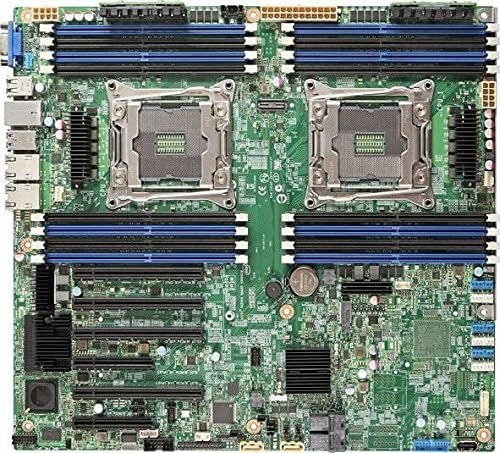
Obrázek 2: Detailní view of the motherboard highlighting CPU sockets, RAM slots, and various connectors for component installation.
3.2. Initial BIOS/UEFI Configuration
After hardware installation, power on the system and access the BIOS/UEFI setup utility (typically by pressing DEL or F2 during boot). Configure boot order, enable necessary features, and set system time and date.
4. Provozní pokyny
4.1. Zapnutí/vypnutí
- Zapnutí: Press the power button on the chassis. The system will initiate the boot sequence.
- Normální vypnutí: Always shut down the operating system gracefully to prevent data corruption.
- Hard Shutdown: In emergencies, press and hold the power button for 5-10 seconds. Use this only when a graceful shutdown is not possible.
4.2. Instalace operačního systému
The Intel S2600CWTR motherboard is compatible with various server operating systems, with specific optimization for Linux. Prepare your installation media (USB drive or DVD) and follow the OS installation prompts. Ensure all necessary drivers are installed after the OS is set up.
4.3. Monitorování systému
Utilize system monitoring tools provided by your operating system or third-party software to keep track of CPU temperature, fan speeds, voltage levels, and other critical parameters to ensure optimal system health.
5. Údržba
Regular maintenance helps prolong the lifespan and ensure the reliability of your server motherboard.
- Odstranění prachu: Periodically clean the interior of the server chassis to remove dust buildup, which can impede airflow and lead to overheating. Use compressed air or a soft brush.
- Aktualizace firmwaru: Check the official Intel support website for the latest BIOS/UEFI firmware updates. Applying updates can improve stability, performance, and compatibility. Follow Intel's instructions carefully during the update process.
- Kontrola součástí: Occasionally inspect all cable connections (power, data, front panel) to ensure they are secure. Check for any signs of physical damage to components.
- Kontrola prostředí: Ensure the server operates in a cool, dry, and well-ventilated environment. Maintain appropriate temperature and humidity levels to prevent component degradation.
6. Řešení problémů
If you encounter issues with your Intel S2600CWTR motherboard, consider the following common troubleshooting steps:
- Bez napájení:
- Verify PSU connections to the motherboard and wall outlet.
- Test the PSU with another system or a PSU tester.
- Ensure the front panel power button is correctly connected.
- Bez displeje:
- Check monitor connections and ensure the monitor is powered on.
- Reseat any installed graphics cards.
- If using integrated graphics, ensure it is enabled in BIOS/UEFI.
- Boot Failures / POST Errors:
- Listen for beep codes (refer to Intel's documentation for specific codes).
- Check for diagnostic LEDs on the motherboard, if present.
- Znovu vložte moduly RAM a rozšiřující karty.
- Vymazání CMOS (umístění propojek naleznete v manuálu k základní desce).
- Ensure CPU(s) are properly seated and cooled.
- Problémy s operačním systémem:
- Ověřte pořadí bootování v BIOSu/UEFI.
- Check storage drive connections.
- Run OS repair tools or reinstall the operating system if necessary.
For more detailed troubleshooting or persistent issues, consult the official Intel support resources available on their webmísto.
7. Technické specifikace
| Funkce | Specifikace |
|---|---|
| Značka | Intel |
| Název modelu | S2600CWTR |
| Číslo modelu položky | DBS2600CWTR |
| Zásuvka CPU | LGA 2011-v3 (Dual) |
| Kompatibilní procesory | Intel Xeon E5-2600 series |
| Typ čipové sady | Intel C612 |
| Technologie paměti RAM | DDR4 |
| Rychlost paměti | 2133 MHz |
| Kapacita paměti (max.) | 1024 GB |
| Kompatibilní zařízení | Server |
| Platforma | Linux |
| Rozměry produktu | 1 x 1 x 1 palce |
| Hmotnost položky | 4.5 unce |
| Výrobce | Intel |
| ASIN | B019PZK1NQ |
| Datum první dostupnosti | 24. prosince 2015 |
Note: Product dimensions and weight listed may be approximate or refer to packaging. For precise physical dimensions, consult official Intel documentation.
8. Záruka a podpora
For information regarding the warranty coverage for your Intel S2600CWTR Server Motherboard, please refer to the warranty documentation included with your purchase or visit the official Podpora Intel webmísto. The Intel support portal provides access to drivers, firmware updates, technical documentation, and customer service contacts.
When contacting support, please have your motherboard's model number (DBS2600CWTR) and serial number readily available.