1. Úvod a konecview
This manual provides essential instructions for the setup, operation, and maintenance of your Bunker Hill Security Motion Detector Alarm Set. This system is designed to enhance security by detecting motion within its monitored area and alerting users with an alarm. It features a main alarm unit with an integrated keypad, a keychain remote for convenient arming and disarming, and a power adapter.
Mezi klíčové vlastnosti patří:
- Infrared motion detection up to 16 feet away within a 60-degree arc.
- Integrated keypad for security code entry.
- Keychain remote for arming and disarming.
- Panic button for immediate alarm activation.
- Intrusion memory function.
- Indikátor slabé baterie.
- Selectable alarm or chime option, suitable for various applications including business doorways.
- Doporučeno pouze pro vnitřní použití.
2. Obsah balení
Zkontrolujte prosím, zda jsou ve vašem balení přítomny všechny níže uvedené položky:
- 1 x Bunker Hill Security Motion Detector Alarm Unit (with integrated keypad and motion sensor)
- 1 x dálkový ovladač Keychain
- 1 x napájecí adaptér
- Mounting Screws (for alarm unit installation)
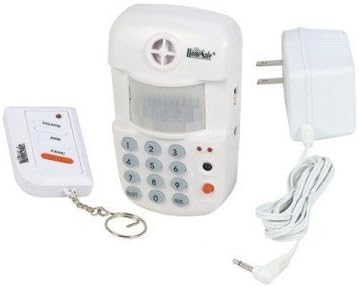
Image 1: Components of the Bunker Hill Security Motion Detector Alarm Set. Shown are the main alarm unit with an integrated keypad and motion sensor, a compact keychain remote control, and a power adapter for the main unit.
3. Bezpečnostní informace
Read all safety instructions before operating the device. Failure to follow these instructions may result in electric shock, fire, or serious injury.
- Pouze pro vnitřní použití: This device is designed for indoor environments. Do not expose it to rain, moisture, or extreme temperatures.
- Zdroj napájení: Používejte pouze dodaný napájecí adaptér. Ujistěte se, že je zásuvka dostatečně voltová.tage matches the adapter's specifications.
- Bezpečnost baterie: If using batteries for backup (not included), ensure correct polarity. Do not mix old and new batteries or different types of batteries. Dispose of used batteries responsibly.
- Umístění: Mount the unit securely to prevent it from falling. Avoid placing it near heat sources, direct sunlight, or areas with high vibration.
- Čištění: Před čištěním odpojte napájení. Použijte měkký, suchý hadřík. Nepoužívejte tekuté čisticí prostředky ani aerosoly.
- Servis: Nepokoušejte se zařízení otevírat ani opravovat sami. Veškerý servis svěřte kvalifikovanému personálu.
4. Nastavení
4.1 Powering the Alarm Unit
- Unpack the main alarm unit and power adapter.
- Connect the power adapter cable to the DC input jack on the alarm unit.
- Plug the power adapter into a standard electrical outlet. The unit will power on.
- If desired, install 9V batteries (not included) for backup power. Open the battery compartment on the back of the unit, insert batteries with correct polarity, and close the compartment.
4.2 Montáž poplašné jednotky
The alarm unit is designed for wall mounting to optimize motion detection coverage.
- Choose a suitable location, typically in a corner or on a wall, where the unit can cover the desired area without obstruction. Ensure it is within range of the keychain remote.
- Mark the positions for the mounting screws on the wall.
- V případě potřeby vyvrtejte vodicí otvory.
- Secure the alarm unit to the wall using the provided mounting screws.
- Ensure the unit is stable and the motion sensor lens is unobstructed.
4.3 Setting the Security Code
The default security code is typically 0000. It is highly recommended to change this code immediately for security purposes.
- With the unit disarmed, enter the current security code (default
0000). - Stiskněte tlačítko
*tlačítko. - Enter your new 4-digit security code.
- Stiskněte tlačítko
#button to confirm. The unit will emit a confirmation tone.
5. Návod k obsluze
5.1 Aktivace systému
You can arm the system using either the keypad on the main unit or the keychain remote.
- Použití klávesnice: Enter your 4-digit security code and press the
ARMbutton. The unit will beep, indicating a delay period (typically 30-60 seconds) before the system is fully armed. Exit the protected area during this delay. - Použití dálkového ovladače: Stiskněte tlačítko
ARMbutton on the keychain remote. The unit will beep, indicating the arming delay period.
5.2 Vypnutí systému
You can disarm the system using either the keypad on the main unit or the keychain remote.
- Použití klávesnice: Upon entering the protected area, the unit will start beeping (entry delay). Enter your 4-digit security code and press the
DISARMbutton within the delay period to prevent the alarm from sounding. - Použití dálkového ovladače: Stiskněte tlačítko
DISARMbutton on the keychain remote. The unit will confirm with a tone.
5.3 Funkce paniky
In an emergency, you can instantly trigger the alarm.
- Použití klávesnice: Stiskněte tlačítko
PANICtlačítko na hlavní jednotce. - Použití dálkového ovladače: Stiskněte tlačítko
PANICbutton on the keychain remote.
The alarm will sound immediately. To stop the panic alarm, disarm the system using your security code or the remote.
5.4 Alarm/Chime Option
The unit can be set to either an alarm sound or a chime sound, useful for monitoring entries without a full alarm.
- Refer to your unit's specific buttons or settings for switching between alarm and chime modes. This is typically a dedicated button or a sequence entered via the keypad.
5.5 Intrusion Memory
If the alarm has been triggered while you were away, the unit's intrusion memory feature will indicate this upon your return. Check the unit for a specific light or indicator that signals a past alarm event. Disarming the system will usually clear this memory.
6. Údržba
6.1 Čištění
To maintain optimal performance, keep the unit clean.
- Před čištěním odpojte napájecí adaptér.
- Vnější povrch jednotky otřete měkkým, suchým hadříkem.
- Do not use abrasive cleaners, solvents, or spray directly onto the unit.
- Ensure the motion sensor lens is free from dust and obstructions.
6.2 Battery Replacement (if applicable)
If your unit uses backup batteries, replace them when the low battery indicator illuminates.
- Odpojte napájecí adaptér.
- Otevřete přihrádku na baterie na zadní straně jednotky.
- Vyjměte staré baterie a řádně je zlikvidujte.
- Vložte nové baterie a dbejte na správnou polaritu.
- Close the battery compartment and reconnect the power adapter.
6.3 Testing the System
Regularly test your alarm system to ensure it is functioning correctly.
- Arm the system and intentionally trigger the motion sensor to verify the alarm sounds.
- Test the keychain remote's arm, disarm, and panic functions.
7. Řešení problémů
| Problém | Možná příčina | Řešení |
|---|---|---|
| Alarm does not arm/disarm. | Incorrect security code entered; Remote battery low; Unit not receiving power. | Verify security code; Replace remote battery; Check power adapter connection and outlet. |
| Falešné poplachy. | Unit placed near heat sources (vents, direct sunlight); Pets or moving objects in detection zone; Loose mounting. | Relocate unit away from heat sources; Adjust placement to avoid pets/objects; Securely mount the unit. |
| Svítí indikátor slabé baterie. | Backup batteries are low. | Replace backup batteries (if installed). |
| Dálkové ovládání nefunguje. | Remote battery low; Out of range. | Replace remote battery; Move closer to the main alarm unit. |
8. Specifikace
| Značka | Bezpečnostní služba Bunker Hill |
| Číslo modelu | 4331032114 |
| Rozsah detekce | Až 16 stop (přibližně 4.8 metrů) |
| Detection Arc | 60 stupňů |
| Zdroj napájení | AC Adapter (included) / 9V Battery Backup (batteries not included) |
| Typ montáže | Držák na zeď |
| Hmotnost položky | Přibližně 12 unce (0.34 kg) |
| Rozměry balení | Přibližně 9.6 x 7.1 x 3.3 palce (24.4 x 18 x 8.4 cm) |
| Doporučené použití | Krytý |
9. Záruka a podpora
For warranty information and customer support, please refer to the documentation provided with your purchase or contact Bunker Hill Security directly. Keep your purchase receipt as proof of purchase.
For technical assistance or inquiries, please visit the manufacturer's official webnebo kontaktujte jejich oddělení zákaznických služeb.


