Zavedení
This manual provides comprehensive instructions for the Mesqool Projection Alarm Clock with FM Radio. Designed for convenience and reliability, this device features a large LED display, adjustable time projection, dual alarms, FM radio with presets, a sleep timer, and a built-in USB charging port. Please read this manual thoroughly to ensure proper operation and to fully utilize all features.

Figure 1: Mesqool Projection Alarm Clock with a phone connected for charging.
Nastavení
1. Připojení napájení
Connect the provided power adapter to the DC input port on the back of the alarm clock and plug it into a standard wall outlet. The clock will power on automatically.
2. Battery Backup Installation (Optional but Recommended)
For retaining time and alarm settings during power outages, install two 1.5V AAA batteries (not included) into the battery compartment on the back of the unit. Ensure correct polarity (+/-) as indicated inside the compartment.

Obrázek 2: Zadní view of the alarm clock showing the battery compartment for backup power.
Návod k obsluze
1. Nastavení času
- Stiskněte tlačítko NASTAVTE ČAS button once. The hour digits will flash.
- Použijte HODINA nastavte hodinu.
- Použijte MIN tlačítko pro nastavení minut.
- Stiskněte NASTAVTE ČAS znovu pro potvrzení a ukončení režimu nastavení času.
- Chcete-li přepnout mezi 12hodinovým a 24hodinovým formátem času, stiskněte tlačítko TU+ button during normal time display.
- To adjust for Daylight Saving Time (DST), press the DST tlačítko.

Figure 3: The clock supports 24-hour, 12-hour, and DST time formats.
2. Nastavení alarmů
Hodiny podporují dva nezávislé budíky (Budík 1 a Budík 2).
- Stiskněte tlačítko ALARM1 or ALARM2 tlačítko. Čas budíku bude blikat.
- Použijte HODINA a MIN tlačítky nastavte požadovaný čas budíku.
- Stiskněte tlačítko ALARM1 or ALARM2 button again to select the alarm sound: Buzzer or FM Radio.
- Press the respective alarm button one more time to confirm and activate the alarm. An alarm icon will appear on the display.
- To turn off an active alarm, press the corresponding ALARM VYPNUT tlačítko.
Nastavení hlasitosti budíku
The alarm volume can be adjusted from Level 1 to 5. Level 5 provides a loud 106dB sound, suitable for heavy sleepers. Use the volume buttons on the side of the unit to adjust the alarm volume.

Figure 4: Visual representation of adjustable alarm volume levels.
Funkce Snooze
Když zazvoní budík, stiskněte velké OK/SNOOZE/SLEEP button to activate the 9-minute snooze function. The alarm will sound again after 9 minutes.

Figure 5: The large button for activating the snooze function.
3. Provoz rádia FM
The FM radio operates within the 87.5–108 MHz frequency range and can store up to 20 preset stations.
- Stiskněte tlačítko RÁDIO tlačítko pro zapnutí FM rádia.
- Použijte HODINA or MIN buttons to tune into the desired radio channel.
- To save a preset station, press and hold the MEM/M+ tlačítko.
- Stiskněte tlačítko OK/SNOOZE/SLEEP button to confirm storing the channel.
- Chcete-li rádio vypnout, stiskněte RÁDIO VYPNUTO tlačítko.
Časovač spánku
While the radio is on, press the OK/SNOOZE/SLEEP button repeatedly to set the sleep timer (10-90 minutes). The radio will automatically turn off after the set time.

Figure 6: Step-by-step guide for FM radio operation and setting presets.
4. Projection Feature
The 180° adjustable projector allows you to display the time onto a wall or ceiling.
- To activate or deactivate the projection, use the PROJEKCE ON/FLIP/OFF přepínač.
- Rotate the projector lens to adjust the projection angle.
- Adjust the focus ring on the projector to achieve a clear image.
- The projected image can be flipped 180° for optimal viewIng.
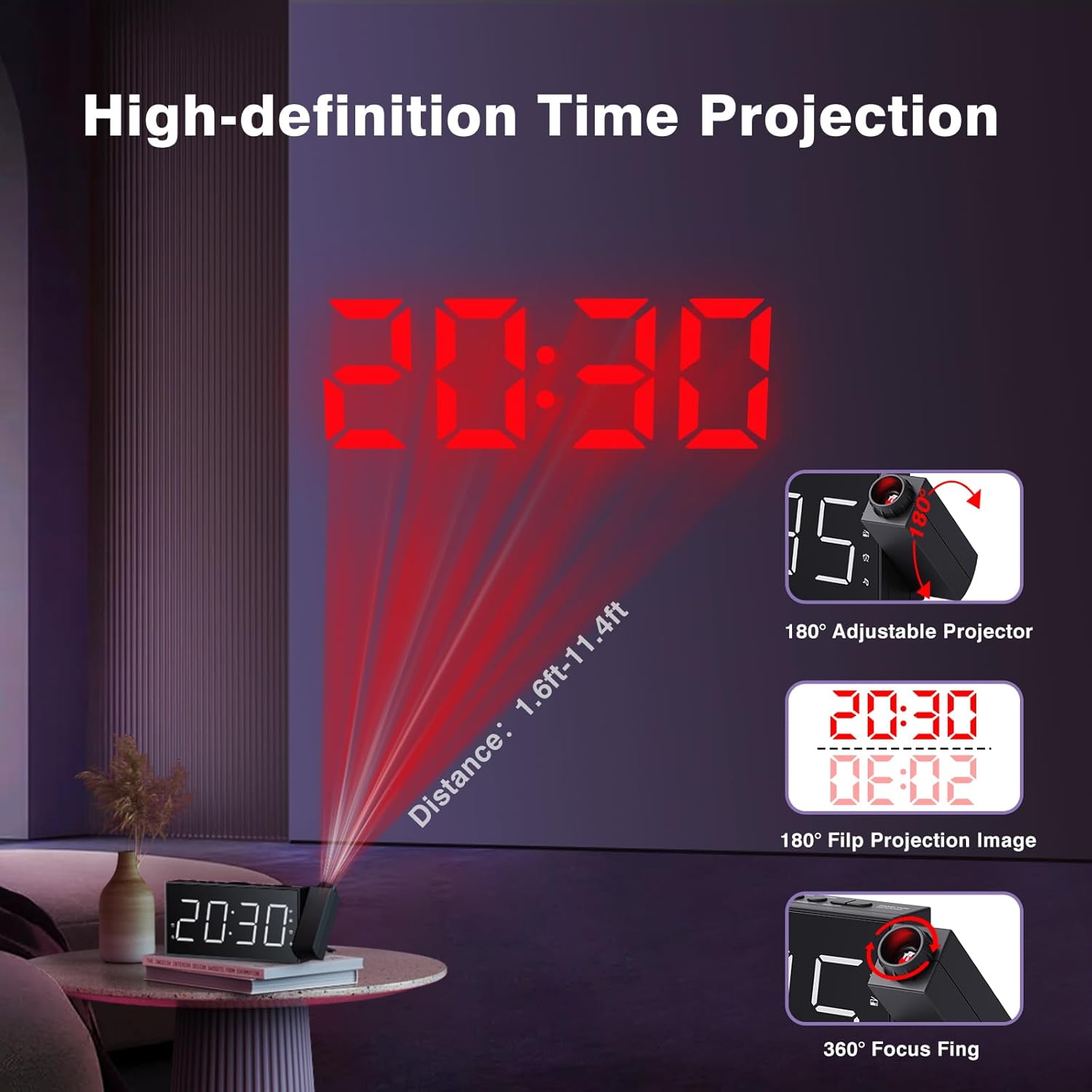
Figure 7: Time projected onto a wall from the alarm clock.

Figure 8: Demonstrating the 180-degree adjustable projection angle.
5. Nastavení jasu displeje
The 7-inch LED display offers 5 dimming levels to suit your preference for day or night viewIng. zmáčkni DIMMER button repeatedly to cycle through the brightness levels.

Figure 9: The clock display showing different brightness levels from 20% to 100%.
6. USB nabíjecí port
A built-in USB charging port is located on the back of the unit, allowing you to charge your mobile devices. Simply connect your device's USB charging cable to the port.

Obrázek 10: Zadní view of the clock highlighting the USB output and DC input ports.
Údržba
To maintain your Mesqool Projection Alarm Clock, regularly wipe the unit with a soft, dry cloth. Avoid using abrasive cleaners or solvents, as these may damage the surface. Ensure the projector lens is clean for optimal clarity.
Odstraňování problémů
| Problém | Možná příčina | Řešení |
|---|---|---|
| Displej hodin je prázdný. | Žádná síla ani sílatage. | Check power adapter connection. Ensure battery backup is installed and functional during outages. |
| Alarm se nespustí. | Alarm not set, volume too low, or alarm deactivated. | Verify alarm settings, increase alarm volume, and ensure alarm is activated (icon visible). |
| Projekce je rozmazaná nebo nejasná. | Focus not adjusted, or projection surface too far/bright. | Adjust the focus ring on the projector. Ensure the projection surface is within optimal distance (1.6ft-11.4ft) and sufficiently dark. |
| FM Radio static or poor reception. | Slabý signál nebo není vysunutá anténa. | Adjust the position of the clock or extend the antenna for better reception. |
| Nabíjení přes USB nefunguje. | Problém s kabelem nebo nekompatibilní zařízení. | Try a different USB cable. Ensure the device is compatible with standard USB charging. |
Specifikace
- Značka: Mesqool
- Model: FBA_MQL-AC-01
- Typ displeje: Digitální LED
- Rozměry produktu: 7.99 cm Š x 3.58 cm V x 1.18 cm H
- Zdroj napájení: Napájení ze střídavého proudu (se záložní baterií)
- Bateriová záloha: 2 x AAA baterie (nejsou součástí balení)
- Frekvence FM rádia: 87.5-108 MHz (20 preset stations)
- Projekce: 180° adjustable, focusable
- Jas displeje: Nastavitelných 5 úrovní
- Hlasitost budíku: 5 levels adjustable (up to 106dB)
- USB výstup: For charging mobile devices
- Materiál: Akrylonitrilbutadienstyren (ABS)
Záruka a podpora
Mesqool provides a one-year warranty for this product, along with a 30-day free return policy. For technical support or warranty claims, please refer to the contact information provided in the original product packaging or visit the official Mesqool webmísto.
An official User Guide (PDF) is also available for download: Stáhněte si uživatelskou příručku


