PRORECK Party 15 Portable PA Speaker System
Uživatelská příručka
Model: PARTY 15
Zavedení
Děkuji za nákupasing the PRORECK Party 15 Portable PA Speaker System. This system is designed to deliver powerful and clear audio for various applications, including parties, DJ events, home studios, and social gatherings. Featuring Bluetooth connectivity, USB/SD card playback, FM radio, and integrated LED lights, the Party 15 offers versatile audio solutions. Please read this manual thoroughly before operating the system to ensure proper use and to maximize its performance and longevity.
Důležité bezpečnostní informace
Při používání tohoto výrobku vždy dodržujte základní bezpečnostní opatření, abyste snížili riziko požáru, úrazu elektrickým proudem a zranění.
- Nevystavujte toto zařízení dešti ani vlhkosti.
- Do not open the speaker enclosure. There are no user-serviceable parts inside. Refer all servicing to qualified service personnel.
- Zajistěte napájení objtage odpovídá zvtage specifikováno na jednotce.
- Chraňte napájecí kabel před šlapáním nebo přiskřípnutím, zejména u zástrček, zásuvek a v místě, kde vychází z přístroje.
- Odpojte toto zařízení během bouřky s blesky nebo když se delší dobu nepoužívá.
- Nezakrývejte žádné větrací otvory. Nainstalujte v souladu s pokyny výrobce.
- Používejte pouze s vozíkem, stojanem, stativem, držákem nebo stolem určeným výrobcem nebo prodávaným se zařízením.
Co je v krabici
Carefully unpack your PRORECK Party 15 system and ensure all items listed below are present and in good condition. If any items are missing or damaged, please contact your retailer immediately.

Image: Complete PRORECK Party 15 system with all included accessories.
- 1x aktivní reproduktor
- 1 x pasivní reproduktor
- 2 x stojany na reproduktory
- 1 x drátový mikrofon
- 1 x Speakon Cable (for connecting active to passive speaker)
- 1 x napájecí kabel
- 1 x Dálkové ovládání

Obrázek: Podrobný view of the wired microphone, remote control, and various cables.
Nastavení
Follow these steps to set up your PRORECK Party 15 speaker system.
1. Sestava stojanu reproduktoru
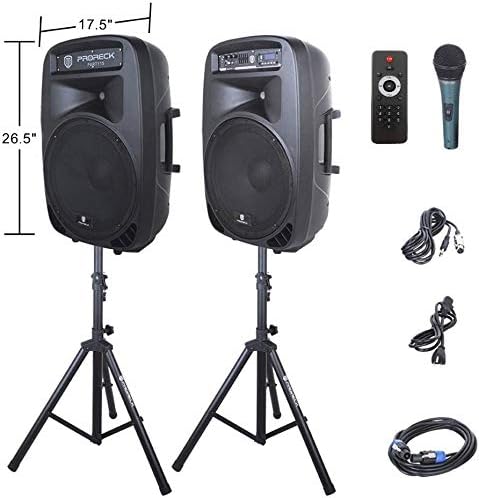
Image: The two included speaker stands.
- Unfold the tripod legs of each speaker stand until they are fully extended and stable.
- Loosen the height adjustment knob on the stand and extend the pole to your desired height. Ensure the safety pin is inserted through the appropriate hole to secure the height.
- Pevně utáhněte knoflík pro nastavení výšky.
2. Umístění reproduktoru
- Carefully lift each speaker and place it onto the top pole of a speaker stand. Ensure the speaker is securely seated.
- Position the active speaker (the one with the control panel) near a power outlet.
- Place the passive speaker within reach of the included Speakon cable from the active speaker.
Image: PRORECK Party 15 speakers set up on their stands.
3. Připojení reproduktorů
- Locate the Speakon output on the rear panel of the active speaker and the Speakon input on the rear panel of the passive speaker.
- Connect one end of the Speakon cable to the active speaker's Speakon output and the other end to the passive speaker's Speakon input. Ensure a secure connection.

Image: Rear panels of the active and passive speakers, highlighting the Speakon connection.
4. Připojení napájení
- Ensure the master volume knob on the active speaker is turned down to its minimum setting.
- Connect the power cable to the active speaker's power input and then plug it into a suitable electrical outlet.
Návod k obsluze
This section details how to operate your PRORECK Party 15 speaker system and utilize its various features.
Konec ovládacího paneluview

Obrázek: Podrobný view of the active speaker's control panel.
The active speaker features a comprehensive control panel with an LCD display, various input options, volume controls, and an equalizer.
1. Zapnutí/vypnutí
- After connecting the power cable, locate the power switch on the rear panel of the active speaker.
- Flip the switch to the "ON" position to power on the system. The LCD display will illuminate.
- Pro vypnutí přepněte přepínač do polohy „VYPNUTO“.
2. Výběr režimu
Stiskněte tlačítko MODE button on the control panel or remote control to cycle through available input modes: Bluetooth, USB, SD Card, FM Radio, and Line Input.
3. Připojení Bluetooth
- Select "Bluetooth" mode using the MODE button. The LCD display will show "BLUE".
- Na zařízení s podporou Bluetooth (chytrý telefon, tablet atd.) vyhledejte dostupná zařízení Bluetooth.
- Select "PRORECK PARTY 15" from the list. Once paired, the speaker will emit a confirmation sound.
- You can now play audio from your device through the speakers.
4. Přehrávání z USB/SD karty
- Vložte USB disk nebo SD kartu s audio soubory ve formátu MP3 filedo příslušného slotu na ovládacím panelu.
- The system will automatically switch to USB or SD mode and begin playing the first compatible audio file. If not, press the MODE tlačítko pro výběr správného vstupu.
- Použijte PLAY/PAUSE, PŘEDCHOZÍa DALŠÍ buttons on the control panel or remote to manage playback.
5. FM rádio
- Select "FM Radio" mode using the MODE tlačítko.
- Stiskněte tlačítko PLAY/PAUSE button to initiate an automatic scan for available FM stations. The system will save detected stations.
- Použijte PŘEDCHOZÍ a DALŠÍ buttons to navigate through the saved stations.
6. Použití mikrofonu
- Connect the wired microphone to the 1/4'' MIC input on the control panel.
- Adjust the "MIC VOL" knob to control the microphone's volume level.
- Ujistěte se, že je hlavní hlasitost nastavena správně, abyste zabránili zpětné vazbě.
7. Funkce dálkového ovládání
Image: The included remote control.
The remote control allows for convenient operation from a distance (up to 20 feet). Functions include:
- REŽIM: Switch between input modes.
- PLAY/PAUSE: Přehrát nebo pozastavit přehrávání zvuku.
- PŘEDCHOZÍ DALŠÍ: Skip tracks or navigate FM stations.
- VOL + / VOL-: Upravte hlavní hlasitost.
- EQ: Procházení předvoleb ekvalizéru.
- Numeric buttons for direct track selection (in USB/SD mode).
8. Nastavení ekvalizéru
The control panel features a 5-band graphic equalizer. Adjust the sliders to fine-tune the audio output to your preference. Experiment with different settings to achieve the desired sound for various music genres or vocal performances.
9. LED světla

Image: PRORECK Party 15 speakers demonstrating various LED light colors.
The PRORECK Party 15 speakers are equipped with built-in LED lights that activate with sound. These lights enhance the party atmosphere. There is a dedicated switch on the rear of the active speaker to turn the LED lights on or off.
Údržba
Proper maintenance ensures the longevity and optimal performance of your speaker system.
- Čištění: Use a soft, dry cloth to clean the exterior of the speakers. Do not use abrasive cleaners, waxes, or solvents.
- Skladování: Pokud reproduktory delší dobu nepoužíváte, skladujte je na chladném a suchém místě, mimo dosah přímého slunečního záření a extrémních teplot.
- Větrání: Ujistěte se, že větrací otvory jsou čisté od prachu a nečistot, aby nedošlo k přehřátí.
- Kabely: Regularly check all cables for signs of wear or damage. Replace any damaged cables immediately.
Odstraňování problémů
If you encounter issues with your PRORECK Party 15 system, refer to the following common problems and solutions.
| Problém | Možná příčina | Řešení |
|---|---|---|
| Žádná síla | Napájecí kabel není připojen; Vypnutý vypínač; Porucha zásuvky. | Ensure power cable is securely connected and plugged into a working outlet. Check power switch on rear panel. |
| Žádný zvuk z reproduktorů | Volume too low; Incorrect input mode; Speakon cable loose/damaged; Audio source issue. | Increase master volume. Select correct input mode. Check Speakon cable connection between active and passive speakers. Verify audio source is playing. |
| Bluetooth není párování | Speaker not in Bluetooth mode; Device too far; Device already paired to another speaker. | Ensure speaker is in Bluetooth mode ("BLUE" on display). Move device closer to speaker. Disconnect device from other Bluetooth connections. |
| Mikrofon nefunguje | Mic volume too low; Microphone not connected properly; Microphone faulty. | Increase "MIC VOL" knob. Ensure microphone is fully inserted into the 1/4'' input. Test with another microphone if available. |
| Zkreslený zvuk | Volume too high; Input signal too strong; Equalizer settings. | Reduce master volume or input source volume. Adjust equalizer settings. |
| LED světla nefungují | LED switch off; Volume too low for activation. | Ensure the LED switch on the rear panel is in the "ON" position. Increase volume to activate sound-reactive lights. |
Specifikace
| Název modelu | PARTY 15 |
| Typ reproduktoru | Basový reproduktor |
| Velikost reproduktoru | 15 palce |
| Maximální výstupní výkon reproduktoru | 2000 Watts P.M.P.O (Peak Music Power Output) |
| Technologie připojení | Drátové, bezdrátové (Bluetooth) |
| Technologie bezdrátové komunikace | Bluetooth |
| Dosah Bluetooth | 10 metru (přibližně 33 stop) |
| Speciální funkce | LED Light, FM Radio, USB Port, SD Card Reader, Digital LCD Display |
| Vstupy | 1/4'' Mic, RCA Line Inputs, USB, SD Card |
| Výstupy | Speakon Output (for passive speaker), RCA Line Output |
| Materiál | Akrylonitrilbutadienstyren (ABS) |
| Rozměry produktu (každý reproduktor) | 19"D x 30"W x 29"H (approximate, likely including handles/feet) |
| Celková hmotnost položky | 81.6 libry |
| Zdroj napájení | Elektrický kabel |
Záruka a podpora
PRORECK products come with a limited warranty. For specific warranty terms and conditions, please refer to the warranty card included with your product or visit the official PRORECK website. For technical support, troubleshooting assistance, or parts inquiries, please contact PRORECK customer service through their official channels.
Výrobce: PRORECK AUDIO


