1. Úvod
This manual provides detailed instructions for the installation, operation, and maintenance of your Zmodo ZM-KW1001-O4-1TB HD Camera System. Please read this manual thoroughly before using the product to ensure proper setup and functionality. Keep this manual for future reference.
2. Konec produktuview
2.1 Klíčové vlastnosti
- 720p HD video for clear and sharp images.
- Smartlink wireless configuration for quick setup.
- Motion detection alerts to notify you of activity.
- IP66 rated outdoor cameras for weather resistance.
- Infrared night vision for surveillance in low-light conditions.
- Integrated 1TB hard drive for local video storage.
2.2 Systémové komponenty
The Zmodo ZM-KW1001-O4-1TB system typically includes the following components:
- Wireless Network Video Recorder (NVR) with 1TB HDD
- HD Wireless Cameras (quantity may vary, typically 4)
- Napájecí adaptéry pro NVR a kamery
- Ethernetový kabel
- Montážní šrouby a kotvy
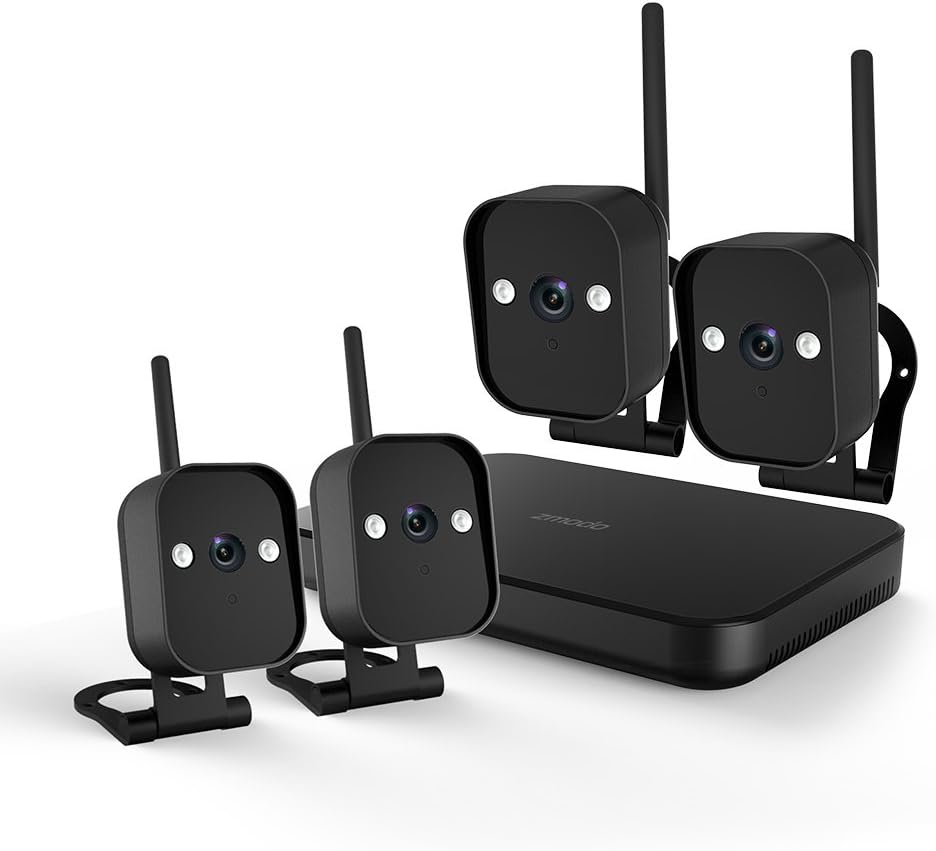
Obrázek 1: Nadview of the Zmodo ZM-KW1001-O4-1TB HD Camera System, showing the NVR unit and four wireless cameras.
3. Pokyny k nastavení
3.1 Vybalení a úvodní kontrola
Carefully unpack all components and verify that all items listed in Section 2.2 are present and undamaged. If any items are missing or damaged, contact customer support.
3.2 Připojení NVR
- Připojte NVR k elektrické zásuvce pomocí dodaného napájecího adaptéru.
- For initial setup and optimal performance, connect the NVR to your router using the supplied Ethernet cable.
- Connect the NVR to a monitor via HDMI or VGA cable (not included) if local viewing je žádoucí.

Obrázek 2: The Zmodo Network Video Recorder (NVR) unit, which stores recordings and manages camera connections.
3.3 Instalace a párování kamery
The cameras are designed for both indoor and outdoor use with an IP66 weather-resistant rating. Ensure cameras are placed within range of the NVR's wireless signal.
- Zapnutí kamer: Connect each camera to its respective power adapter and plug into a power outlet.
- Smartlink Pairing: The cameras should automatically attempt to pair with the NVR. Follow the on-screen prompts on the connected monitor or use the Zmodo app for Smartlink setup. If pairing fails, refer to the troubleshooting section.
- Montáž: Choose suitable locations for your cameras. Use the provided screws and anchors to securely mount the cameras. Ensure a clear line of sight and optimal viewúhel.

Obrázek 3: A Zmodo wireless camera shown with its wall-mounting bracket, suitable for outdoor installation.

Obrázek 4: A Zmodo wireless camera shown with its stand mount, ideal for indoor placement on flat surfaces.
3.4 Mobile App Configuration
- Download the Zmodo app from the App Store (iOS) or Google Play Store (Android).
- Create a new account or log in to an existing one.
- Follow the in-app instructions to add your Zmodo NVR system. This typically involves scanning a QR code on the NVR or manually entering device details.
- Po přidání byste měli být schopni view živé přenosy z vašich kamer.
4. Návod k obsluze
4.1 Živě View
Access the Zmodo app or the NVR's local interface to view live video streams from your cameras. You can typically select individual cameras or view multiple feeds simultaneously.
4.2 Detekce pohybu a upozornění
The system is equipped with motion detection capabilities. When motion is detected, the system can record footage and send alerts to your mobile device.
- Konfigurace: In the Zmodo app or NVR settings, navigate to the motion detection section. You can customize detection zones, sensitivity levels, and alert schedules.
- Upozornění: Ensure push notifications are enabled for the Zmodo app on your mobile device to receive timely alerts.
4.3 Nahrávání a přehrávání
The NVR includes a 1TB hard drive for continuous or motion-activated recording.
- Nastavení nahrávání: Configure recording modes (continuous, scheduled, motion-activated) via the NVR's local interface or the Zmodo app.
- Přehrávání: Na review zaznamenané footage, access the playback feature in the Zmodo app or directly on the NVR. Select the desired date and time to view události.
4.4 Noční vidění
The cameras feature infrared night vision, allowing them to capture clear video in low-light or complete darkness. The system automatically switches to night vision mode when ambient light levels are insufficient.
5. Údržba
- Čištění fotoaparátu: Pravidelně čistěte objektivy fotoaparátu měkkým hadříkemamp hadříkem, abyste zajistili ostrý a kvalitní obraz. Nepoužívejte abrazivní čisticí prostředky.
- Aktualizace firmwaru: Check the Zmodo app or website regularly for firmware updates. Keeping your system updated ensures optimal performance and security.
- Správa pevných disků: 1TB pevný disk automaticky přepíše nejstarší soubory.tage when full. If you need to preserve specific recordings, back them up to an external device before they are overwritten.
- Napájení: Ujistěte se, že všechny napájecí adaptéry jsou bezpečně připojeny a nejsou poškozené.
6. Řešení problémů
- Žádný video kanál:
- Check if the NVR and cameras are powered on.
- Verify network connectivity for the NVR.
- Ujistěte se, že kamery jsou v dosahu bezdrátového signálu NVR.
- Re-pair cameras if they have lost connection.
- Nepřijatá upozornění na pohyb:
- Ověřte, zda je v nastavení aplikace povolena detekce pohybu.
- Check motion detection zones and sensitivity.
- Ensure push notifications are enabled for the Zmodo app on your mobile device.
- Špatná kvalita obrazu:
- Vyčistěte čočku fotoaparátu.
- Ujistěte se, že v zorném poli kamery nejsou žádné překážky view.
- Check for strong interference if using wireless connection.
- Cameras Not Connecting to Wi-Fi:
- Ensure the NVR's Wi-Fi is enabled and functioning.
- Move cameras closer to the NVR to improve signal strength.
- Reset cameras and attempt Smartlink pairing again.
7. Specifikace
| Funkce | Specifikace |
|---|---|
| Číslo modelu | ZM-KW1001-O4-1TB |
| Rozlišení videa | 720p HD |
| Technologie připojení | Bezdrátový |
| Počet kanálů | 4 |
| Kapacita úložiště | 1 TB (terabajt) |
| Speciální funkce | Wireless, Motion Detection, Night Vision, IP66 Weatherproof |
| Kompatibilita operačního systému | Android, iOS |
| Zdroj napájení | Wireless (Power Adapters for components) |
| Barva | Černý |
| Rozměry balení | 26.8 x 20 x 16 cm |
| Hmotnost položky | 1.5 kg |
8. Záruka a podpora
For warranty information and technical support, please refer to the official Zmodo website or contact Zmodo customer service directly. Details regarding warranty periods and service procedures are typically available on the manufacturer's support pages.
Online podpora: Visit the Zmodo official webmísto pro často kladené otázky, průvodce řešením problémů a kontaktní informace.
Kontaktujte podporu: If you require further assistance, please have your product model number (ZM-KW1001-O4-1TB) and purchase details ready when contacting support.


