Zavedení
This manual provides instructions for the HAVIT HV-KB366L RGB Backlit Mechanical Gaming Keyboard. This keyboard features blue mechanical switches, full anti-ghosting, and customizable RGB backlighting, designed for reliable performance.
Pokyny pro nastavení
Připojení klávesnice
- Vyhledejte v počítači volný port USB.
- Connect the USB cable from the HAVIT HV-KB366L keyboard to the USB port on your computer.
- Klávesnice je plug-and-play a váš operační systém by ji měl automaticky rozpoznat.
Kompatibilita systému
- Compatible with Windows 10 and other Windows operating systems.
- Mac OS supports 6-key rollover only.
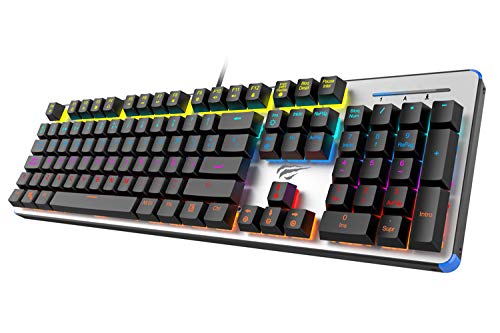
Figure 1: HAVIT HV-KB366L RGB Backlit Mechanical Gaming Keyboard. An overhead view klávesnice, ukázkaasing its full layout with RGB lighting on the keys and a white frame.
Návod k obsluze
Mechanické klíčové spínače
The keyboard is equipped with blue mechanical switches, providing tactile feedback and an audible click with each keystroke. This design is intended for precise input during typing and gaming.
Anti-Ghosting Feature
The full key anti-ghosting mechanism ensures that all key presses are registered accurately, even when multiple keys are pressed simultaneously. This feature is beneficial for fast-paced gaming.
Nastavení podsvícení
- To change the backlight color or mode, press the Fn klávesu současně s Podsvícený key. Repeated presses will cycle through available modes and colors.
- Marquee Mode: In 7-color backlit mode (non-breathing), press the Podsvícený key once to activate marquee mode. Press the Podsvícený key again to deactivate marquee mode and return to 7-color backlit mode.
- Úrovně jasu: The backlight offers 4 levels of brightness adjustment.
- Frekvence dýchání: The breathing effect has 10 adjustable levels.
Údržba
Čištění klávesnice
- Před čištěním odpojte klávesnici od počítače.
- K otření povrchu klávesnice použijte měkký, suchý hadřík.
- Pro odstranění prachu a nečistot mezi klávesami použijte stlačený vzduch.
- Avoid using harsh chemicals or abrasive materials, as these can damage the finish or keycaps.
Trvanlivost
The keyboard features an aluminum top housing with a sanded finish and a metal base, contributing to its overall durability and stable performance.
Odstraňování problémů
Klávesnice nereaguje
- Ujistěte se, že je kabel USB bezpečně připojen k klávesnici i k počítači.
- Zkuste připojit klávesnici k jinému USB portu na počítači.
- Test the keyboard on another computer to determine if the issue is with the keyboard or the computer's USB port.
Podsvícení nefunguje nebo je nesprávné
- Ověřte, zda je klávesnice správně připojena a zda je napájena.
- Stiskněte Fn + Backlit key to cycle through backlight modes and ensure it is not turned off or set to a very low brightness.
- Refer to the "Backlight Adjustment" section for detailed instructions on changing modes and brightness.
Specifikace
| Značka | HAVIT |
| Číslo modelu | HV-KB366L |
| Výrobce | HAVIT |
| Rozměry produktu | 50.5 x 17.6 x 6 centimetrů |
| Hmotnost položky | 1.33 kg |
| Technologie připojení | Kabelové (USB) |
| Popis klávesnice | Herní mechanická klávesnice |
| Speciální funkce | RGB Backlit, Anti-Ghosting |
| Hardwarová platforma | Notebook, PC |
| Operační systém | Windows 10 (and compatible), Mac OS (6-key rollover) |
| svtage | 5 voltů |
| Zahrnuté komponenty | USB kabel |
Záruka a podpora
Informace o záruce
Specific warranty details for the HAVIT HV-KB366L keyboard are not provided in the product data. Please refer to the product packaging or contact HAVIT directly for warranty terms and conditions.
Zákaznická podpora
For technical assistance, troubleshooting, or further inquiries, please contact HAVIT customer support through their official webnebo kontaktní informace poskytnuté při nákupu.


