1. Úvod
This manual provides comprehensive instructions for the setup, operation, and maintenance of the EDUP EP-3701 USB WiFi Disk. The EP-3701 is a portable wireless storage device designed to expand storage and facilitate data sharing for iOS and Android smartphones and tablets without the need for cables or a computer.
Před použitím zařízení si prosím pečlivě přečtěte tento návod, abyste zajistili jeho správnou funkčnost a předešli poškození.
2. Konec produktuview
The EDUP EP-3701 acts as a bridge between your USB storage devices (like USB flash drives or external hard drives) and your mobile devices via a Wi-Fi connection. It creates its own Wi-Fi hotspot, allowing multiple devices to connect and access stored files současně.
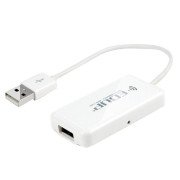
Obrázek 2.1: Přední strana view of the EDUP EP-3701 USB WiFi Disk, showing the USB host port and the integrated USB cable.
3. Klíčové vlastnosti
- Wireless Data Access: Přístup files on connected USB storage devices wirelessly from smartphones, tablets, and computers.
- Podpora více uživatelů: Allows multiple users to connect and stream/access data simultaneously.
- Přenosný design: Compact and lightweight, ideal for travel and on-the-go use.
- Zdroj napájení: Powered via USB, can be connected to a USB wall adapter, power bank, or computer USB port.
- Ovládání aplikace: Dedicated mobile application for easy file management and device configuration.
4. Obsah balení
Ověřte, zda jsou v balení přítomny všechny položky:
- EDUP EP-3701 USB WiFi Disk
- Rychlý průvodce (tento návod)
5. Nastavení
5.1. Zapnutí zařízení
- Connect the integrated USB cable of the EP-3701 to a USB power source (e.g., a 5V/1A USB wall adapter, a power bank, or a computer's USB port).
- The power indicator light on the device will illuminate, indicating it is powered on.
5.2. Connecting USB Storage
- Insert your USB flash drive or external hard drive into the USB host port on the EP-3701.
- Ensure the USB storage device is properly seated.
5.3. Connecting Mobile Device
- On your smartphone or tablet, go to Wi-Fi settings.
- Locate and connect to the Wi-Fi network named "EDUP_XXXXXX" (XXXXXX will be the last six digits of the device's MAC address).
- The default password is "12345678". It is recommended to change this password after initial setup.
- Download and install the "WiFi Disk" application from your device's app store (App Store for iOS, Google Play Store for Android).
- Open the "WiFi Disk" app. The app will automatically detect and connect to the EP-3701.
6. Návod k obsluze
6.1. File Řízení
- Prohlížet Files: Within the "WiFi Disk" app, navigate through the folders and files on the connected USB storage.
- Nahrát Files: Převod files from your mobile device to the USB storage connected to the EP-3701.
- Stáhnout Files: Převod files from the USB storage to your mobile device.
- Streamovat média: Přehrávejte videa, hudbu a view photos directly from the USB storage without downloading.
6.2. Nastavení sítě
The "WiFi Disk" app allows you to configure network settings:
- Change Wi-Fi Name (SSID): Modify the name of the EP-3701's Wi-Fi network.
- Change Wi-Fi Password: Update the password for the Wi-Fi network.
- Internet Passthrough (Bridge Mode): Connect the EP-3701 to an existing Wi-Fi network to provide internet access to connected devices while still allowing access to the USB storage.
7. Údržba
- Čištění: K čištění vnější strany zařízení používejte měkký, suchý hadřík. Nepoužívejte tekuté čisticí prostředky ani aerosoly.
- Skladování: Přístroj skladujte na chladném a suchém místě mimo dosah přímého slunečního záření a extrémních teplot.
- Aktualizace firmwaru: Periodically check the "WiFi Disk" app or the EDUP official webweb s aktualizacemi firmwaru pro zajištění optimálního výkonu a zabezpečení.
- Bezpečné odstranění: Always ensure data transfer is complete before disconnecting the USB storage device or powering off the EP-3701.
8. Řešení problémů
8.1. Zařízení se nezapíná
- Ensure the USB cable is securely connected to a working USB power source.
- Zkuste jiný port USB nebo napájecí adaptér.
8.2. Cannot Connect to Wi-Fi Network
- Verify you are selecting the correct "EDUP_XXXXXX" network.
- Double-check the Wi-Fi password (default is "12345678").
- Restart the EP-3701 device and your mobile device.
8.3. USB Storage Not Detected
- Ensure the USB storage device is properly inserted into the EP-3701's USB host port.
- Check if the USB storage device is formatted in a supported file system (FAT32, NTFS, exFAT).
- Some high-power consumption external hard drives may require an external power source.
- Try a different USB storage device to rule out a faulty drive.
8.4. App Not Functioning Correctly
- Ensure your mobile device is connected to the EP-3701's Wi-Fi network.
- Close and reopen the "WiFi Disk" app.
- Reinstall the "WiFi Disk" app.
- Zkontrolujte aktualizace aplikací v obchodě s aplikacemi ve vašem zařízení.
9. Specifikace
| Funkce | Popis |
|---|---|
| Model | EP-3701 |
| Rozhraní | USB 2.0 (Host), USB 2.0 (Power Input) |
| Bezdrátové Standardní | IEEE 802.11b/g/n |
| Frekvenční pásmo | 2.4 GHz |
| Zabezpečení | WPA / WPA2, WPA-PSK / WPA2-PSK |
| Podporováno File Systémy | FAT32, NTFS, exFAT |
| Vstup napájení | DC 5V/1A (via USB) |
| Rozměry | (Approximate, based on typical USB dongle size) 60mm x 25mm x 10mm |
| Provozní teplota | 0 °C až 40 °C (32 °F až 104 °F) |
10. Záruka a podpora
EDUP products typically come with a limited warranty. Please refer to the warranty card included with your purchase or visit the official EDUP webPodrobné záruční podmínky platné pro váš region naleznete na webových stránkách.
For technical support, product inquiries, or warranty claims, please contact EDUP customer service through their official webwebu nebo kontaktních informací uvedených na obalu produktu.
Webmísto: www.szedup.com


