1. Úvod
This manual provides detailed instructions for the setup, operation, and maintenance of your Marathon Digital Desktop Clock, Model CL030050BK. This compact and versatile digital clock is designed for use on a desk or nightstand, offering time, date, day of the week, and temperature displays, along with a dual alarm function and a button-activated backlight.
2. Konec produktuview

Obrázek 2.1: Přední strana view of the Marathon Digital Desktop Clock CL030050BK, showing its large digital display with time, date, day, and temperature.
2.1 Klíčové vlastnosti
- Large, High-Quality Display: Enhanced contrast for clear legibility.
- Nightowl Super Glow Backlight: Button-activated, gentle blue backlight that illuminates for approximately 10 seconds.
- Funkce duálního alarmu: Separate alarm settings for weekdays (Monday-Friday) and weekends (Saturday-Sunday).
- Tlačítko "Odložit: Conveniently located for temporary alarm suspension.
- Více režimů zobrazení: Time in 12 or 24-hour format, temperature in Fahrenheit or Celsius.
- Multilingual Day of Week: Displays the day of the week in seven languages: English, Dutch, French, Spanish, Italian, Danish, and German.
- Kompaktní a lehký design: Ideal for desktop, nightstand, or travel.
2.2 Obsah balení
- 1 x Marathon Digital Desktop Clock CL030050BK
- 3 x AAA baterie (součástí balení)
- 1 x Uživatelská příručka
3. Nastavení
3.1 Instalace baterie
- Najděte kryt přihrádky na baterie na zadní straně hodin.
- Posuňte kryt dolů a otevřete přihrádku.
- Vložte 3 nové baterie AAA a dbejte na správnou polaritu (+ a -) vyznačenou uvnitř přihrádky.
- Nasaďte zpět kryt přihrádky na baterie jeho posunutím nahoru, dokud nezacvakne.
3.2 Počáteční zapnutí
Upon successful battery installation, the clock display will activate, typically showing a default time and date. It is recommended to perform a reset after battery installation to ensure optimal performance.
3.3 Resetting the Clock
To reset the clock, use a thin, pointed object (like a paperclip) to press the recessed RESETOVAT button located on the back of the unit. This will clear all settings and return the clock to its factory defaults.
4. Návod k obsluze
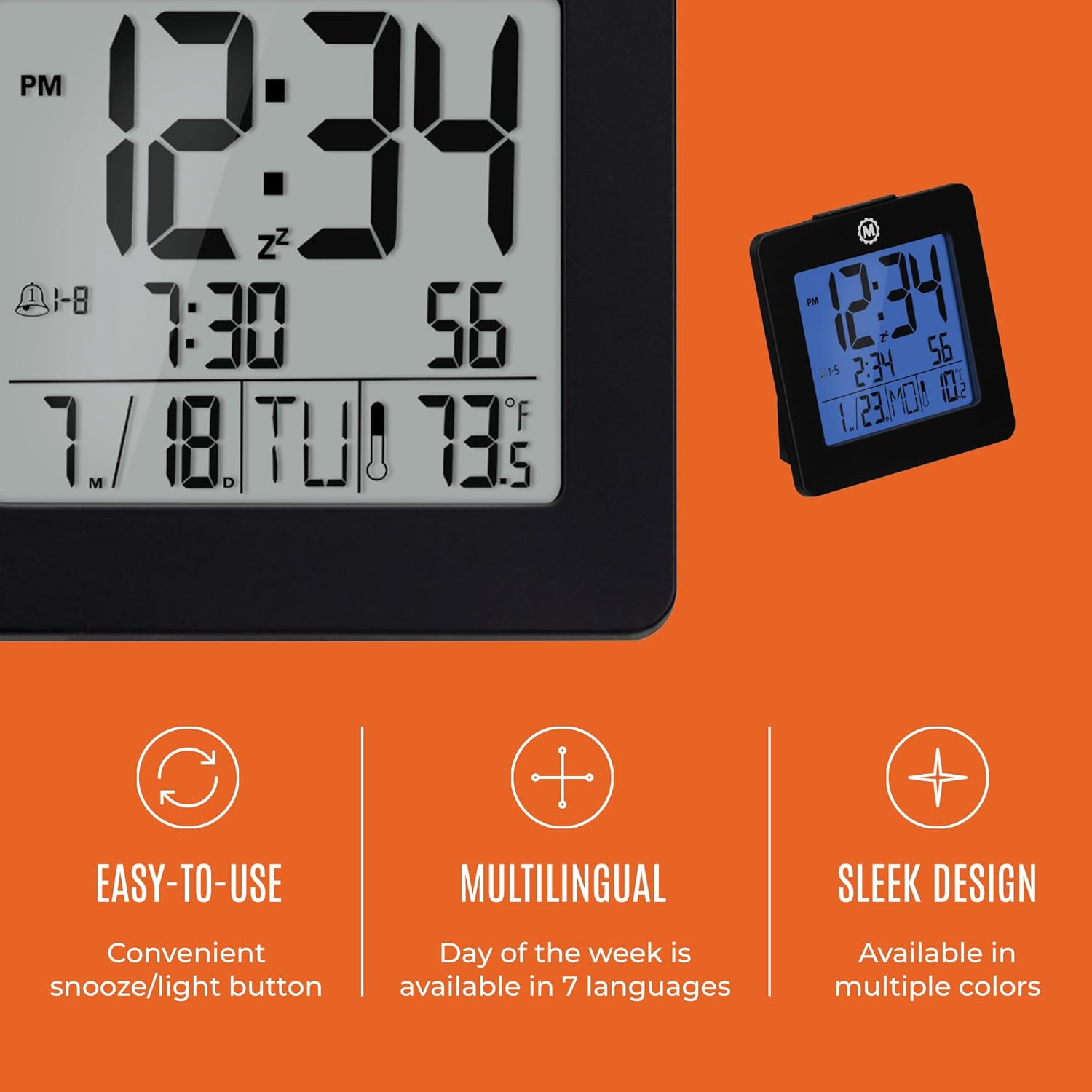
Obrázek 4.1: Přesview of key features and design elements.
4.1 Funkce tlačítek
The clock features several buttons on the back for configuration:
- REŽIM: Toggles between Time, Alarm, and Timer display modes.
- SOUBOR: Enters setting mode for the currently displayed mode (Time, Alarm, Timer).
- UP / 12/24: In setting mode, increases the value. In time display mode, toggles between 12-hour and 24-hour format.
- DOWN / °C/°F: In setting mode, decreases the value. In time display mode, toggles between Celsius and Fahrenheit temperature units.
- LIGHT / SNOOZE: Activates the backlight for 10 seconds. When the alarm sounds, press to activate snooze.
- RESETOVÁNÍ: Resets the clock to factory defaults (requires a pointed object).
4.2 Nastavení času a data
- Stiskněte tlačítko MODE button until the time is displayed.
- Stiskněte a podržte SOUBOR button for approximately 3 seconds until the year flashes.
- Použijte UP or DOLŮ tlačítka pro úpravu roku.
- Stiskněte SOUBOR to confirm and move to the month setting.
- Repeat steps 3 and 4 to set the month, day, 12/24-hour format, hour, and minute.
- After setting the minutes, press SOUBOR to exit time/date setting mode.
4.3 Setting the Day of Week Language
While in time display mode, repeatedly press the UP or DOLŮ button to cycle through the 7 available languages for the day of the week display (English, Dutch, French, Spanish, Italian, Danish, German).
4.4 Setting the Temperature Unit
V režimu zobrazení času stiskněte DOWN / °C/°F button to toggle the temperature display between Celsius (°C) and Fahrenheit (°F).
4.5 Setting the Dual Alarm
- Stiskněte tlačítko MODE button until the alarm time is displayed (indicated by an alarm icon).
- Stiskněte a podržte SOUBOR button for approximately 3 seconds until the alarm hour flashes.
- Použijte UP or DOLŮ tlačítka pro nastavení hodiny budíku.
- Stiskněte SOUBOR to confirm and move to the alarm minute setting.
- Repeat steps 3 and 4 to set the alarm minute.
- After setting the minutes, press SOUBOR to select the alarm type: Weekday (1-5) or Weekend (6-7). Use UP or DOLŮ vybrat si.
- Stiskněte SOUBOR pro potvrzení a ukončení režimu nastavení budíku.
- Chcete-li aktivovat/deaktivovat budík, stiskněte tlačítko UP button while in alarm display mode. An alarm icon will appear/disappear on the screen.
4.6 Using the Snooze and Backlight
Stiskněte velký SVĚTLO / SNOOZE button on the top of the clock to activate the blue backlight. The backlight will remain illuminated for approximately 10 seconds. If the alarm is sounding, pressing this button will activate the snooze function, temporarily silencing the alarm for a short period before it sounds again.
5. Údržba
- Čištění: Hodiny otřete měkkým, suchým hadříkem. Nepoužívejte abrazivní čisticí prostředky ani rozpouštědla.
- Výměna baterie: Replace all 3 AAA batteries when the display becomes dim or the clock functions erratically. Always replace with new batteries of the same type.
- Skladování: Pokud hodiny skladujete delší dobu, vyjměte baterie, abyste zabránili vytečení.
6. Řešení problémů
| Problém | Možná příčina | Řešení |
|---|---|---|
| Displej je prázdný nebo tmavý. | Slabé nebo vybité baterie. | Replace all 3 AAA batteries. |
| Zobrazuje se nesprávný čas/datum. | Settings were not saved or incorrect. | Perform a reset and re-enter time/date settings as per Section 4.2. |
| Alarm se nespustí. | Budík není aktivovaný nebo je nesprávně nastavený. | Ensure the alarm is activated (alarm icon visible) and the alarm time is correctly set (Section 4.5). |
| Podsvícení nefunguje. | Low batteries or button malfunction. | Vyměňte baterie. Pokud problém přetrvává, kontaktujte zákaznickou podporu. |
7. Specifikace
- Číslo modelu: CL030050BK
- Značka: Maratón
- Typ displeje: Digitální
- Barva: Černý
- Rozměry produktu: 3.7 cm Š x 3.7 cm V
- Hmotnost položky: 5.6 unce
- Zdroj napájení: Napájení z baterií (3 baterie AAA jsou součástí balení)
- Materiál: Plast
- Typ montáže: Stolní deska
- Speciální funkce: Button-activated backlight, dual alarm, temperature display, multilingual day of week.
8. Záruka a podpora
8.1 Informace o záruce
This Marathon Digital Desktop Clock CL030050BK comes with a 1-letá záruka od data nákupu. Tato záruka se vztahuje na výrobní vady a vady zpracování při běžném používání. Nevztahuje se na škody způsobené nesprávným použitím, nehodami, neoprávněnými úpravami nebo běžným opotřebením.
8.2 Zákaznická podpora
For technical assistance, troubleshooting, or warranty claims, please visit the official Marathon website or contact their customer service department. Please have your model number and proof of purchase ready when contacting support.


