1. Úvod
This manual provides comprehensive instructions for the installation, operation, and maintenance of your ASUS H170 PRO GAMING Motherboard. Designed to support 6th Generation Intel Core Desktop Processors, this motherboard integrates advanced features such as DDR4 memory support, USB 3.1 Type-A/C, and M.2 connectivity, making it suitable for high-performance computing and gaming. It also features Intel Gigabit Ethernet with LANGuard for robust networking and SupremeFX Audio for superior sound.
Před zahájením instalace si prosím pečlivě přečtěte tuto příručku, abyste zajistili správné nastavení a maximalizovali výkon a životnost vašeho systému.
2. Nastavení
2.1 Kontrolní seznam před instalací
Before you begin, ensure all necessary components are available and compatible. The retail package of your ASUS H170 PRO GAMING Motherboard should include the following items:
- ASUS H170 PRO GAMING Motherboard (ATX form factor)
- 4 x Serial ATA (SATA) cables
- I/O back plate
- Kabelové štítky
- Balení šroubů M.2
- Support DVD with drivers and utilities
- Uživatelská příručka (tento dokument)
Additionally, ensure you have the following compatible components:
- 6th Generation Intel Core Desktop Processor (LGA1151 socket)
- DDR4 RAM modules (2133 MHz recommended)
- Compatible power supply unit (PSU)
- Storage devices (HDD/SSD)
- Graphics card (if not using integrated graphics)
- Computer case
- Monitor, keyboard, and mouse
2.2 Fyzická instalace
Follow these steps carefully to install your motherboard and essential components into your computer case.
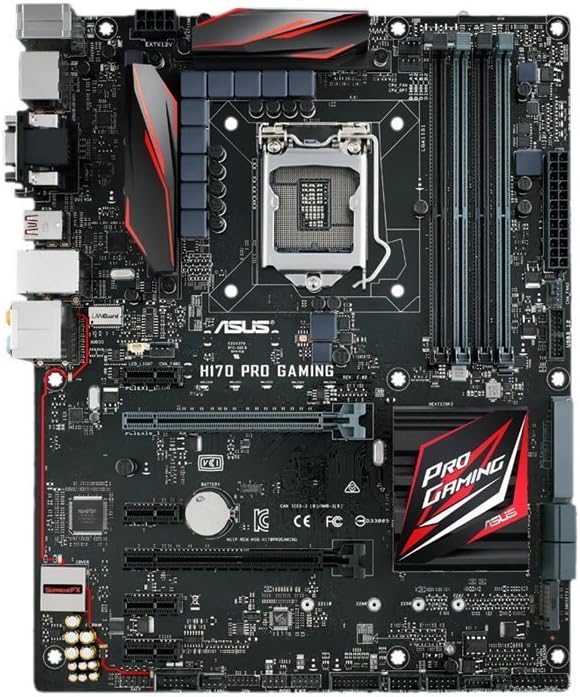
Obrázek 2.2.1: Shora dolů view of the ASUS H170 PRO GAMING Motherboard, showcasing the LGA1151 CPU socket, DDR4 DIMM slots, PCIe slots, and various connectors.
- Připravte si případ: Install the I/O shield into the rear opening of your computer case. Ensure the standoffs inside the case align with the screw holes on the motherboard.
- Instalace základní desky: Carefully place the motherboard into the case, aligning it with the standoffs and the I/O shield. Secure it with screws.
- Nainstalujte procesor:
- Otevřete páčku patice procesoru a sejměte ochranný kryt.
- Zarovnejte procesor s paticí a ujistěte se, že zlatý trojúhelník na procesoru odpovídá trojúhelníku na patici.
- Opatrně vložte procesor do patice. Netlačte na něj silou.
- Zavřete páčku pro zajištění procesoru.
- Naneste teplovodivou pastu a nainstalujte chladič CPU podle pokynů výrobce.
- Instalace modulů RAM:
- Otevřete klipy na slotech DDR4 DIMM.
- Zarovnejte zářez na modulu RAM s výstupkem ve slotu DIMM.
- Press down firmly on both ends of the module until the clips snap into place. For dual-channel operation, refer to the motherboard's silkscreen for recommended slot pairing (e.g., A2/B2).
- Instalace úložných zařízení:
- For SATA drives, connect one end of the SATA cable to a SATA 6Gb/s port on the motherboard and the other end to your HDD/SSD. Connect the SATA power cable from your PSU to the drive.
- For M.2 SSDs, insert the M.2 module into the M.2 slot at an angle, then gently push it down and secure it with the provided M.2 screw.
- Install Expansion Cards (e.g., Graphics Card):
- Align the expansion card with the appropriate PCIe slot (e.g., PCIe x16 for graphics cards).
- Press down firmly until the card is seated correctly and the retention clip locks.
- Kartu připevněte k pouzdru šroubem.
- Připojení napájecích kabelů:
- Connect the 24-pin ATX power connector from your PSU to the motherboard.
- Připojte 8pinový (nebo 4pinový) konektor napájení procesoru k základní desce.
- Connect any additional power cables required for your graphics card or other components.
- Připojení kabelů předního panelu: Connect the power button, reset button, HDD LED, power LED, and USB/audio headers from your case to the corresponding pins on the motherboard. Refer to the motherboard manual for exact pin layouts.
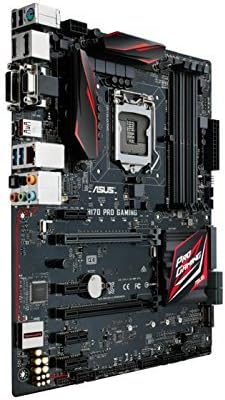
Obrázek 2.2.2: Úhlové view of the ASUS H170 PRO GAMING Motherboard, highlighting the I/O ports and the overall layout within a system.
2.3 Počáteční zapnutí
After completing all physical connections, double-check all cables and component seating. Connect your monitor, keyboard, and mouse. Power on your system. The system should boot to the BIOS/UEFI interface or attempt to boot from a connected storage device.
3. Obsluha základní desky
3.1 Nastavení BIOSu/UEFI
The BIOS (Basic Input/Output System) or UEFI (Unified Extensible Firmware Interface) is the first software that runs when you power on your computer. It initializes hardware components and loads the operating system. To enter the BIOS/UEFI setup utility, press the DEL klíč nebo F2 klávesu během procesu POST (Power-On Self-Test).
- Pořadí spouštění: Configure the boot order to prioritize your operating system installation media (e.g., USB drive, DVD drive) or your primary storage drive.
- Systémové informace: Verify that your CPU, RAM, and storage devices are correctly detected.
- Pokročilá nastavení: Adjust settings related to CPU, memory, storage controllers (SATA mode), and integrated peripherals.
3.2 Instalace ovladače
After installing your operating system, it is crucial to install the necessary drivers for your motherboard's components. These drivers enable proper communication between the hardware and the operating system, ensuring optimal performance and stability.
- Ovladače čipové sady: Install Intel H170 chipset drivers first.
- Ovladače LAN: Install Intel Gigabit Ethernet drivers for network connectivity.
- Ovladače zvuku: Install SupremeFX Audio drivers for sound functionality.
- USB ovladače: Install USB 3.1 drivers for enhanced USB performance.
- Ovladače grafické karty: Install drivers for your dedicated graphics card or Intel integrated graphics.
Drivers can typically be found on the included support DVD or downloaded from the official ASUS support webmísto.
3.3 Konektivita
The H170 PRO GAMING motherboard offers a variety of connectivity options:
- USB porty: Multiple USB 3.1 Type-A and Type-C ports, along with USB 3.0 and USB 2.0 ports, for connecting peripherals.
- Video výstupy: DisplayPort and HDMI for connecting displays (requires compatible Intel CPU with integrated graphics).
- Síť: Intel Gigabit Ethernet port for wired network connection.
- Zvuk: SupremeFX Audio ports for high-quality sound output and input.
- Skladování: SATA 6Gb/s ports and M.2 slot for high-speed storage devices.
4. Údržba
Regular maintenance helps ensure the longevity and optimal performance of your motherboard and overall system.
4.1 Čištění
Dust accumulation can lead to overheating and component failure. Periodically clean your computer's interior:
- Před čištěním vypněte a odpojte počítač ze zásuvky.
- Use compressed air to remove dust from fans, heatsinks, and motherboard components.
- Ensure proper ventilation in your computer case.
4.2 Aktualizace BIOSu/UEFI a ovladačů
Keeping your BIOS/UEFI firmware and drivers updated can improve system stability, performance, and compatibility with new hardware or software.
- Navštivte oficiální podporu ASUS website for the latest BIOS/UEFI versions and drivers for your H170 PRO GAMING motherboard.
- Follow the instructions provided by ASUS for updating BIOS/UEFI firmware carefully, as improper updates can damage the motherboard.
- Regularly check for updated drivers for your chipset, audio, LAN, and other peripherals.
5. Řešení problémů
Tato část obsahuje řešení běžných problémů, se kterými se můžete setkat.
5.1 Běžné problémy a řešení
- Bez napájení/Žádný POST:
- Ujistěte se, že všechny napájecí kabely (24pinový ATX, 8pinový CPU) jsou bezpečně připojeny.
- Ověřte, zda napájecí zdroj (PSU) funguje správně.
- Reseat RAM modules and expansion cards.
- Clear CMOS (Complementary Metal-Oxide-Semiconductor) by removing the CMOS battery for a few minutes or using the clear CMOS jumper (refer to motherboard manual for location).
- Nestabilita/pády systému:
- Zkontrolujte, zda se zařízení nepřehřívá. Ujistěte se, že chladič procesoru je správně nainstalován a že ventilátory skříně fungují.
- Spusťte diagnostické nástroje paměti a zkontrolujte, zda není RAM vadná.
- Update drivers and BIOS/UEFI to the latest versions.
- Ensure all components are compatible and properly seated.
- Bez displeje:
- Ensure monitor is connected to the correct video output (motherboard or graphics card).
- Znovu vložte grafickou kartu.
- Pokud je to možné, vyzkoušejte s jiným monitorem nebo kabelem.
- Problémy s připojením k síti:
- Verify LAN cable connection.
- Ensure Intel Gigabit Ethernet drivers are installed and up to date.
- Zkontrolujte stav routeru/modemu.
- Problémy se zvukem:
- Ensure speakers/headphones are correctly plugged into the audio jacks.
- Install or update SupremeFX Audio drivers.
- Check audio settings in your operating system.
5.2 Vyhledání další pomoci
If you encounter issues not covered in this section, or if the suggested solutions do not resolve your problem, please refer to the official ASUS support resources.
6. Specifikace
Key technical specifications for the ASUS H170 PRO GAMING Motherboard:
| Funkce | Specifikace |
|---|---|
| Zásuvka CPU | LGA 1151 |
| Kompatibilní procesory | 6th Generation Intel Core Desktop Processors |
| Čipová sada | Intel H170 |
| Technologie paměti RAM | DDR4 |
| Rychlost paměti | 2133 MHz |
| USB porty | USB 3.1 Type-A/C, USB 3.0, USB 2.0 |
| Úložná rozhraní | SATA 6Gb/s, M.2 |
| Síť | Intel Gigabit Ethernet with LANGuard |
| Zvuk | SupremeFX Audio |
| Form Factor | ATX |
| Rozměry produktu (DxŠxV) | 10.4 x 2.7 x 12.9 palce |
| Hmotnost položky | 3 libry |
7. Záruka a podpora
7.1 Informace o záruce
ASUS products typically come with a limited manufacturer's warranty. The specific terms and duration of the warranty may vary by region and product. Please refer to the warranty card included with your product or visit the official ASUS webPodrobné informace o záruce a postupech registrace naleznete na webových stránkách. Uschovejte si doklad o koupi pro případ reklamace.
7.2 Zákaznická podpora
For technical assistance, driver downloads, BIOS updates, or further inquiries, please contact ASUS customer support or visit their official support webmísto:
- Oficiální ASUS Webmísto: www.asus.com
- ASUS Support Page: Hledat "ASUS Support" online and navigate to the support section for motherboards.
- ASUS Store on Amazon: Navštivte obchod ASUS pro informace o produktech a zdroje.
When contacting support, have your motherboard's model number (H170 PRO GAMING) and serial number ready.
8. Oficiální produktová videa
No official product videos from the seller were found for this model at this time. For visual guides or demonstrations, please refer to the ASUS official webwebu nebo autorizovaných kanálů.


