1. Úvod
The Crenova PT100A is a 720P HD WIFI Surveillance IP Camera designed for home security and monitoring. It features Pan-Tilt-Zoom (PTZ) capabilities, night vision, two-way audio, and support for wireless alarm sensors, providing comprehensive surveillance and communication functionalities.
This manual provides detailed instructions for setting up, operating, and maintaining your Crenova PT100A camera to ensure optimal performance and security.
2. Klíčové vlastnosti
- One-Key Wi-Fi Configuration: Simple and quick setup via sound.
- HD rozlišení: 720P resolution with a 1.0 MP CMOS sensor for clear images and video.
- Noční vidění: Ceramic infrared light provides optimal visibility in low-light conditions.
- Ovládání PTZ: Pan 355 degrees horizontally and tilt 120 degrees vertically for wide area coverage.
- Bezpečnostní upozornění: Supports up to 64 wireless alarm sensors, with siren, mobile phone calls, and email photo alerts.
- Obousměrný zvuk: Real-time communication with the monitored area.
- Místní úložiště: Supports up to a 128GB TF card for continuous recording.
3. Obsah balení
Prosím, ověřte, zda jsou v balení přítomny všechny položky:
- 1 x Crenova Smart IP Camera (PT100A)
- 1 x USB kabel
- 1 x napájecí adaptér
- 1 x Mounting Basket Panel
- 1 x Uživatelská příručka
4. Konec produktuview

Obrázek 4.1: Diagram of the Crenova PT100A IP Camera with its main components labeled. This includes the lens, ceramic lamp, speaker, antenna, network cable interface, TF card slot, reset button, and power interface.
Seznamte se s komponenty fotoaparátu:
- Čočka: Zachycuje video a obrázky.
- Keramika Lamp: Poskytuje infračervené osvětlení pro noční vidění.
- Reproduktor: Outputs audio for two-way communication and alarm siren.
- Anténa: Pro připojení k Wi-Fi.
- PT (Pan/Tilt) Mechanism: Allows remote adjustment of camera angle.
- Network Cable Interface: For wired Ethernet connection (optional).
- Slot na kartu TF: Insert a MicroSD card for local video storage.
- Resetovací tlačítko: Používá se k obnovení továrního nastavení.
- Napájecí rozhraní: Připojuje se k napájecímu adaptéru.
5. Průvodce nastavením
Follow these steps to set up your Crenova PT100A IP Camera:

Obrázek 5.1: Visual guide for the quick setup process, illustrating connecting power, downloading the app, performing one-key Wi-Fi setup, and adding the camera.
- Připojte napájení: Plug the power adapter into the camera's power interface and then into a wall outlet. The camera will power on and initiate its startup sequence.
- Stáhněte si aplikaci: Hledat the official Crenova camera application on your smartphone's app store (e.g., Apple App Store for iOS or Google Play Store for Android). Download and install the application.
- Zaregistrujte si účet: Otevřete aplikaci a podle pokynů na obrazovce zaregistrujte nový uživatelský účet.
- One-Key Wi-Fi Setup: Within the app, select the option for 'One-Key Wi-Fi Configuration' or 'SmartLink'. Follow the prompts to connect the camera to your Wi-Fi network. Ensure your smartphone is connected to the same 2.4GHz Wi-Fi network you intend to use for the camera. The app will use sound waves to transmit network information to the camera.
- Přidat fotoaparát: Once the Wi-Fi setup is complete, the app will guide you to add the camera to your account. You may need to scan a QR code on the camera or manually enter its ID.
- Umístění: Position the camera in your desired monitoring area. The included mounting basket panel can be used for wall or ceiling installation.
6. Návod k obsluze
6.1. Dálkové ovládání Viewa ovládání PTZ
After successful setup, open the app on your smartphone to view the live feed from your camera. Use the on-screen controls to remotely pan (horizontal rotation) and tilt (vertical rotation) the camera lens.

Obrázek 6.1: Illustration of the camera's Pan-Tilt-Zoom (PTZ) capabilities, demonstrating 355 degrees of horizontal rotation and 120 degrees of vertical rotation for comprehensive area coverage.
- Horizontální rotace: The camera supports 355 degrees of horizontal movement.
- Vertikální rotace: The camera supports 120 degrees of vertical movement.
6.2. Motion Detection and Alarm Alerts
The camera can detect motion and trigger various alarm responses. Configure these settings within the camera app.

Obrázek 6.2: A smartphone displaying a motion detection alarm notification from the camera, indicating an event has occurred.
- Alarm Sensor Support: The camera can integrate with up to 64 wireless alarm sensors.
- Alarm Methods: When an alarm is triggered, the camera can:
- Emit a loud siren.
- Call up to five pre-configured mobile phone numbers.
- Capture photos and send them via email.
6.3. Obousměrný zvuk
Využijte vestavěný mikrofon a reproduktor pro obousměrnou komunikaci v reálném čase.

Obrázek 6.3: The camera depicted alongside an icon representing two-way audio functionality, with sound waves indicating active communication.
- Klepněte na ikonu mikrofonu v aplikaci a mluvte přes reproduktor fotoaparátu.
- Mikrofon kamery bude snímat zvuk ze sledované oblasti.
6.4. Nahrávání videa
The camera supports local video recording to a TF (MicroSD) card.
- Insert a TF card (up to 128GB) into the designated slot on the camera.
- Configure recording settings (e.g., continuous recording, motion-activated recording) within the camera app.
- Footage může být reviewed directly from the app.
7. Specifikace
| Funkce | Specifikace |
|---|---|
| Model | PT100A |
| Obrazový snímač | 1.0 MP HD CMOS Sensor |
| Rezoluce | 720P (1280 x 720) |
| Konektivita | Wi-Fi (Wireless), Wired Ethernet |
| PTZ Angles | Pan 355°, náklon 120° |
| Noční vidění | Ceramic Infrared Light |
| Skladování | Podporuje TF karty až do 128 GB |
| Alarm Sensor Support | Up to 64 wireless channels |
| Zdroj napájení | Cable eléctrico (Power Cable) |
| Rozměry (D x Š x V) | 20.57 x 15.49 x 13.21 cm (přibližně 8.1 x 6.1 x 5.2 palce) |
| Hmotnost | 657.7 g (přibližně 1.45 libry) |
| Certifikace | CE, FCC, ROHS |
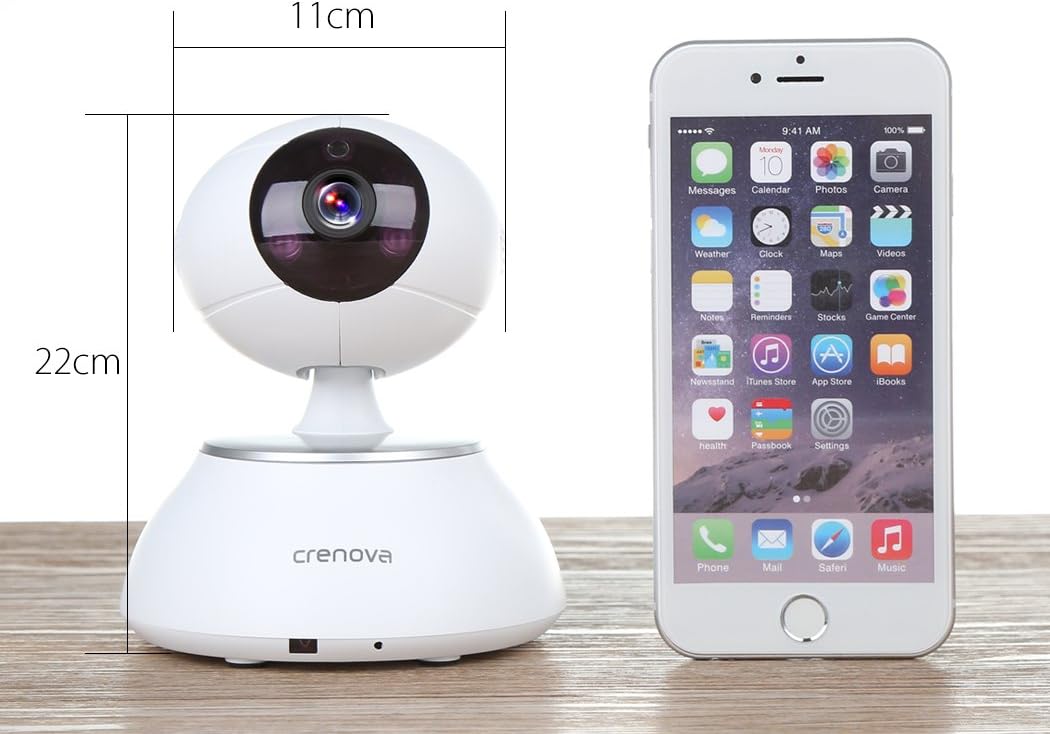
Obrázek 7.1: The Crenova PT100A IP Camera shown next to a smartphone, with its approximate dimensions indicated as 11cm in width and 22cm in height.
8. Údržba
- Čištění: Use a soft, dry cloth to clean the camera's exterior. Do not use liquid cleaners or aerosols directly on the camera.
- Péče o čočky: Gently wipe the lens with a microfiber cloth designed for optics to avoid scratches.
- Umístění: Ujistěte se, že je kamera umístěna na stabilním místě, mimo dosah přímého slunečního záření, extrémních teplot a vysoké vlhkosti.
- Aktualizace firmwaru: Periodically check the camera app for available firmware updates to ensure optimal performance and security.
9. Řešení problémů
- Kamera se nepřipojuje k Wi-Fi:
- Ujistěte se, že vaše Wi-Fi síť je 2.4 GHz. Kamera nemusí podporovat sítě 5 GHz.
- Ověřte, zda je v aplikaci správně zadáno heslo k Wi-Fi.
- Přesuňte kameru blíže k Wi-Fi routeru.
- Reset the camera using the reset button and attempt setup again.
- Špatná kvalita obrazu:
- Zkontrolujte rychlost připojení k internetu. Pomalé připojení může ovlivnit kvalitu streamování.
- Clean the camera lens for any smudges or dust.
- Ensure adequate lighting in the monitored area, especially for optimal night vision performance.
- No Alarm Alerts:
- Verify motion detection and alarm settings are enabled in the app.
- Check app notification settings on your smartphone to ensure alerts are not blocked.
- Ensure wireless alarm sensors (if used) are properly paired and functioning.
- Nefunguje obousměrný zvuk:
- Zkontrolujte oprávnění mikrofonu a reproduktoru pro aplikaci ve vašem smartphonu.
- Ujistěte se, že máte nastavenou hlasitost na smartphonu a v aplikaci.
- Ověřte, zda mikrofon nebo reproduktor kamery neblokují žádné překážky.
10. Záruka a podpora
For warranty information and technical support, please refer to the documentation included with your purchase or contact Crenova customer service directly. Details for contacting support are typically available on the manufacturer's official webna místě nebo v obalu produktu.