Zavedení
The Marathon 100 Hour Dual Digital Timer is a versatile and essential tool designed for precise time management in various settings, including kitchens, offices, labs, and schools. Featuring a large, easy-to-read LCD display and a loud alarm, this timer ensures you never miss an important moment. It offers dual functionality, allowing you to track two separate events simultaneously, with both countdown and count-up capabilities.

Přední view of the Marathon 100 Hour Dual Digital Timer, highlighting its clear dual LCD display and intuitive button layout for T1, T2, M, HR, MIN, SEC, and START/STOP.
Klíčové vlastnosti
- Dual Digital Timer: Simultaneously track two separate events with individual timers (T1 and T2).
- Large, Easy-to-Read LCD Display: High-contrast display ensures clear visibility of time from a distance.
- Hlasitý zvonění alarmu: Audible alarm can be heard across a room, ensuring timely alerts.
- Duální funkce: Each timer can operate as a countdown timer (up to 99 hours, 59 minutes, 59 seconds) or a count-up stopwatch.
- Funkce vestavěné paměti: Easily recall previous timer settings for repetitive tasks.
- Všestranné umístění: Features a magnetic back for attachment to metal surfaces (like refrigerators) and a fold-out stand for tabletop use.
- Baterie v ceně: Dodává se se 2 bateriemi AAA pro okamžité použití.

Image illustrating the timer's dual function (count down or up), inclusion of 2x AAA batteries, and versatile placement options (tabletop stand, wall mount, wall magnet).
Nastavení
1. Instalace baterie
- Vyhledejte přihrádku na baterie na zadní straně časovače.
- Posunutím otevřete kryt baterie.
- Vložte 2 baterie typu AAA a dbejte na správnou polaritu (+/-) vyznačenou uvnitř přihrádky.
- Pevně zavřete kryt baterie.
2. Počáteční zapnutí
Upon battery installation, the timer's LCD display will activate, showing "00:00:00" for both T1 and T2. The timer is now ready for use.
Návod k obsluze
Setting a Countdown Timer (T1 or T2)
- Stiskněte tlačítko T1 or T2 button to select the desired timer. The selected timer's display will flash.
- Stiskněte tlačítko HR button to set the hours.
- Stiskněte tlačítko MIN tlačítko pro nastavení minut.
- Stiskněte tlačítko SEC tlačítko pro nastavení sekund.
- Jakmile je požadovaný čas nastaven, stiskněte tlačítko START/STOP tlačítko pro spuštění odpočítávání.
- During countdown, a green light will flash. When the timer reaches zero, the alarm will sound, and a red light will flash. The timer will then automatically begin counting up to show elapsed time since the alarm.
- To stop the alarm and the count-up, press the START/STOP tlačítko.
Using as a Count-Up Timer (Stopwatch)
- Ensure the selected timer (T1 or T2) is set to "00:00:00". If not, press the M (Memory) button to clear any previous setting, or press HR a MIN simultaneously to reset.
- Stiskněte tlačítko START/STOP tlačítko pro zahájení odpočítávání.
- Stiskněte tlačítko START/STOP button again to pause the count-up.
- Stiskněte tlačítko START/STOP button once more to resume.
- To reset the count-up timer to "00:00:00", press the HR a MIN buttons simultaneously while the timer is paused or running.
Funkce paměti
The timer features a built-in memory function. If you stop a countdown timer within one minute after it reaches zero, it will automatically remember the previous setting. To recall a stored memory, press the M tlačítko.
Nastavení hlasitosti alarmu
On the side of the timer, there is a switch to adjust the alarm volume. Options include: Mute, Low, and High. Select the appropriate volume level for your environment.

The timer displaying active green and red indicator lights for T1 and T2, signifying active or completed timers.
Možnosti umístění
- Magnetická záda: The timer has strong magnets on its back, allowing it to be securely attached to metal surfaces such as refrigerators, ovens, or whiteboards.
- Rozkládací stojan: A convenient fold-out stand is integrated into the back of the timer, enabling it to stand upright on any flat surface like a countertop or desk.
- Klip: The fold-out stand can also function as a clip, allowing you to attach the timer to a belt, pocket, or apron for portability.

A user demonstrating the magnetic attachment feature of the timer on a refrigerator, showcasing its convenience in a kitchen environment.
Údržba
- Čištění: Otřete časovač měkkým, damp hadříkem. Nepoužívejte abrazivní čisticí prostředky ani neponořujte jednotku do vody.
- Výměna baterie: Replace batteries when the display dims or the timer functions become erratic. Always use 2 new AAA alkaline batteries. Dispose of old batteries responsibly.
- Skladování: If storing the timer for an extended period, remove the batteries to prevent leakage and damage.
Odstraňování problémů
| Problém | Možná příčina / řešení |
|---|---|
| Displej je prázdný nebo tmavý. | Batteries are low or incorrectly installed. Replace with new AAA batteries, ensuring correct polarity. |
| Alarm is too quiet or not sounding. | Check the volume switch on the side of the timer and set it to "Low" or "High". Ensure the speaker on the back is not obstructed. |
| Časovač nereaguje na stisknutí tlačítek. | Try removing and reinserting the batteries to perform a soft reset. If the issue persists, replace the batteries. |
| Timer does not reset to zero. | To reset a timer, ensure it is paused (if counting up) or has completed its countdown. Then, press the HR and MIN buttons simultaneously. |
| Magnetic attachment is not strong enough. | Ensure the surface is clean and flat. For heavier items or less magnetic surfaces, consider using additional magnets or the fold-out stand. |
Specifikace
- Číslo modelu: TI030017WH
- Barva: Double Timer White
- Materiál: Plast
- Rozměry produktu: 5 x 4.2 x 1.4 palce
- Hmotnost položky: 3.2 unce (0.2 libry)
- Zdroj napájení: 2 baterie AAA (součástí balení)
- Nastavení maximálního času: 99 hodin, 59 minut, 59 sekund
- Počet nastavení: 2 (Dual Timers)
- UPC: 063442000229
- Výrobce: Maratón
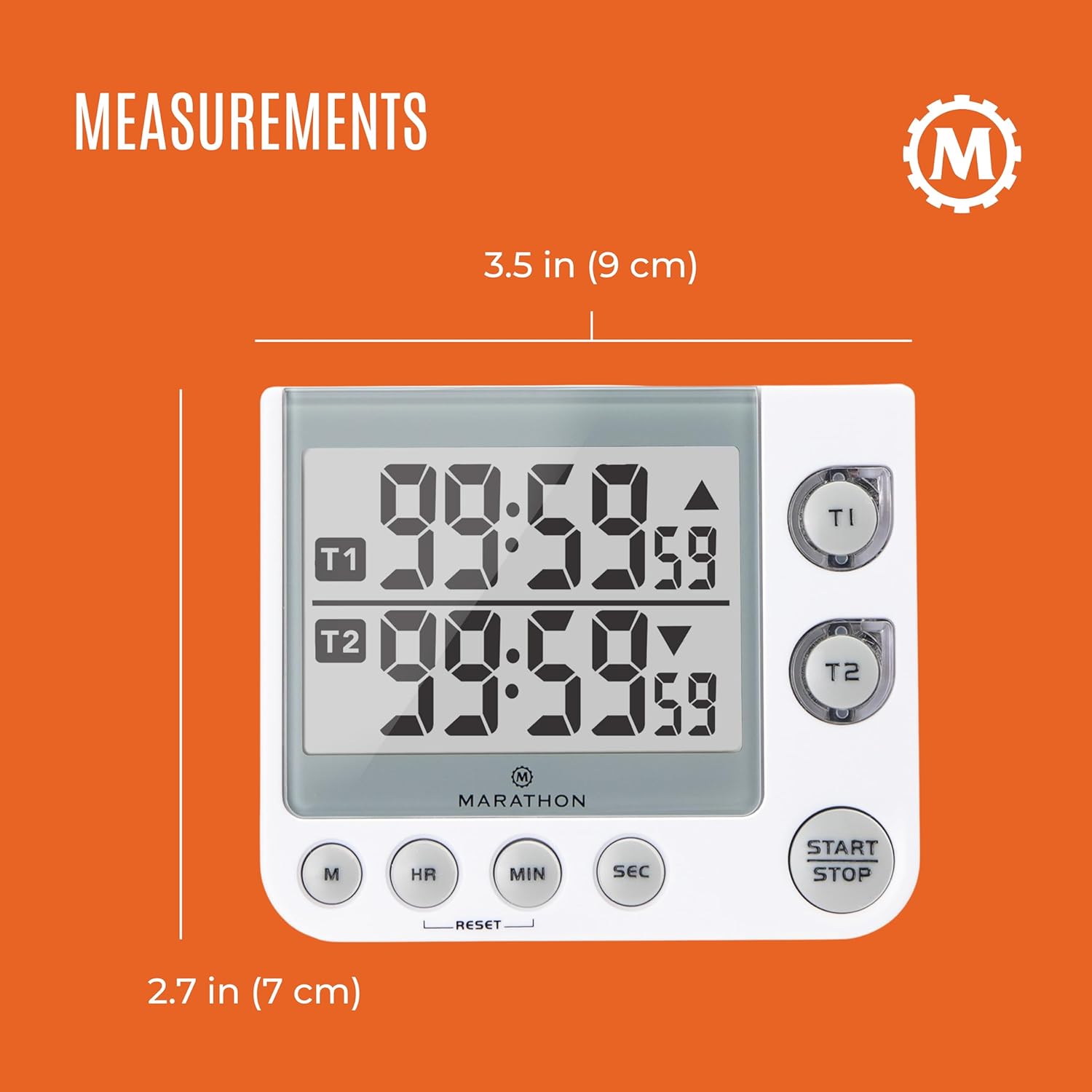
Image displaying the physical measurements of the timer, indicating its compact size for easy placement.
Záruka a podpora
Marathon has been manufacturing precision timing instruments since 1941, combining modern design sensibility with Swiss engineering and craftsmanship to ensure the highest quality products. For specific warranty information or technical support, please refer to the contact details provided with your product packaging or visit the official MARATHON webmísto.
Poznámka: Tato příručka obsahuje obecné pokyny. Specifické funkce a ovládání se mohou mírně lišit. Vždy se řiďte nejnovějšími informacemi od výrobce.


