Zavedení
The Coby CRC-02 8-in-1 Universal Remote is designed to consolidate control of up to eight different home theater devices into a single unit. This remote is compatible with various brands and device types, including televisions (TV), digital video recorders (DVR), video cassette recorders (VCR), digital versatile disc players (DVD), cable boxes (CBL), satellite receivers (SAT), audio amplifiers/receivers (AMP/AUDIO), and auxiliary devices (AUX1, AUX2). This manual provides instructions for setup, operation, maintenance, and troubleshooting to ensure optimal use of your universal remote.
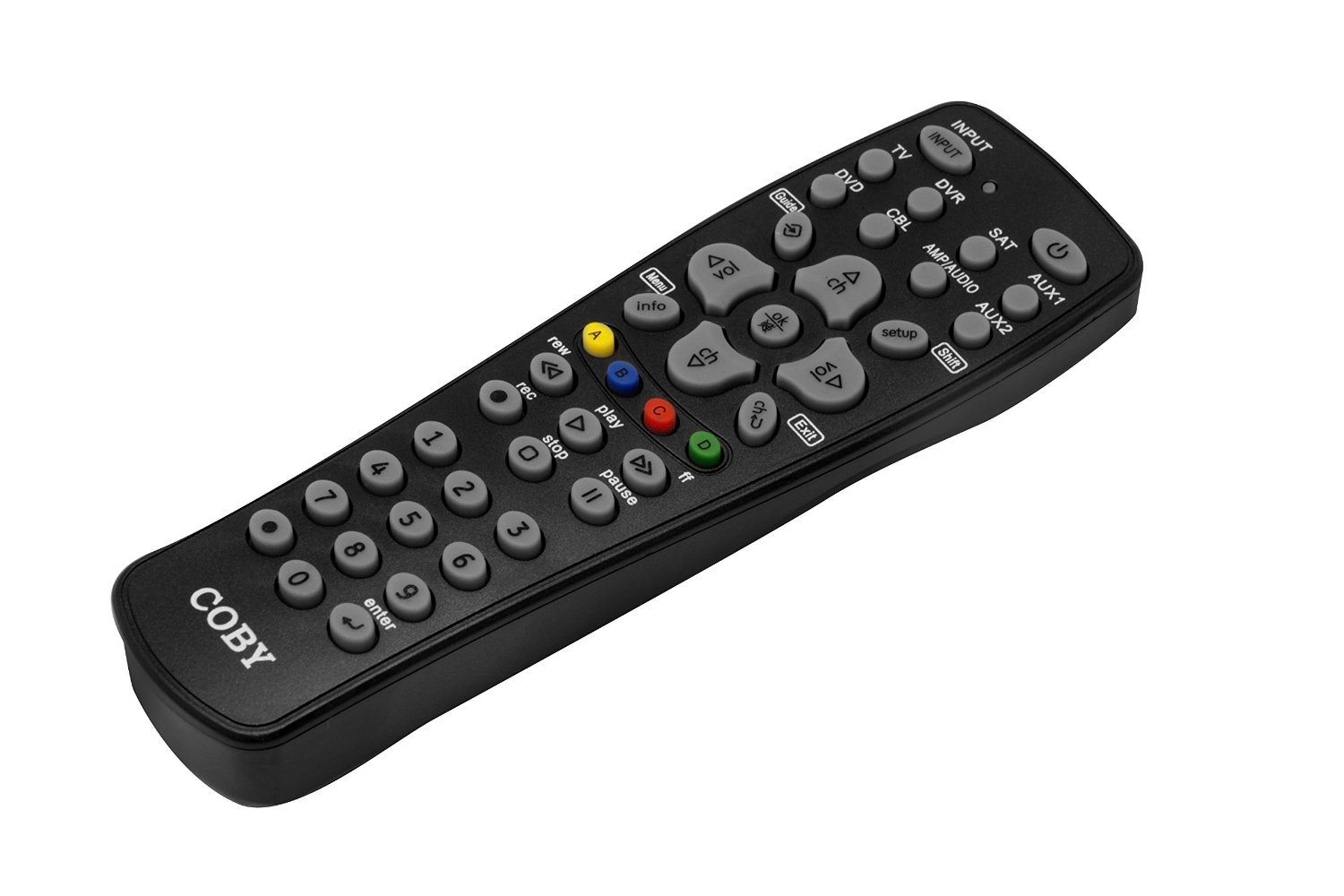
Image: Coby CRC-02 8-in-1 Universal Remote in its packaging, showcasing its design and the types of devices it can control.
Nastavení
1. Instalace baterie
The Coby CRC-02 remote requires two (2) AAA batteries for operation. Ensure batteries are inserted correctly according to polarity markings (+/-) inside the battery compartment.
- Najděte kryt prostoru pro baterie na zadní straně dálkového ovladače.
- Zatlačte na jazýček a sejměte kryt.
- Insert two fresh AAA batteries, matching the positive (+) and negative (-) terminals as indicated.
- Zasuňte kryt přihrádky na baterie zpět na místo, dokud bezpečně nezacvakne.
2. Programming Your Remote (Code Search Method)
The remote features an extensive code library and a simple code search setup to connect with your devices. Follow these steps to program the remote:
- Zapněte zařízení, které chcete ovládat (např. televizor, DVD přehrávač).
- On the Coby CRC-02 remote, press and hold the desired device button (e.g., TV, DVD, SAT) přibližně 3 sekund, dokud se kontrolka nerozsvítí.
- While holding the device button, press and hold the NASTAVENÍ button (often located near the POSUN button, as seen in the image). The indicator light will blink.
- Release both buttons. The indicator light should remain lit.
- Namiřte dálkový ovladač na zařízení a opakovaně stiskněte MOC tlačítko (resp CH+ button) until the device turns off (or changes channel). This indicates a successful code match.
- Once the device responds, immediately press the device button again (e.g., TV) pro uložení kódu. Kontrolka zhasne.
- Test other functions (Volume, Channel, Menu) to ensure full control. If not all functions work, repeat the process to find a more compatible code.
Refer to the code list provided with your remote (if applicable) for direct code entry, which may be faster if your device brand is listed.

Obrázek: Podrobný view of the Coby CRC-02 remote's button layout, including device selection and control buttons.
Návod k obsluze
After programming, operate your devices using the following general guidelines:
- Výběr zařízení: Stiskněte příslušné tlačítko zařízení (TV, DVD, DVR, SAT, CBL, AMP/ZVUK, AUX1, AUX2) pro výběr zařízení, které chcete ovládat. Kontrolka se krátce rozsvítí pro potvrzení výběru.
- Moc: Stiskněte tlačítko MOC tlačítko pro zapnutí nebo vypnutí vybraného zařízení.
- Ovládání hlasitosti: Použijte VOL+ a VOL- tlačítka pro nastavení hlasitosti. ZTLUMIT button silences the audio.
- Ovládání kanálů: Použijte CH+ a CH- tlačítka pro změnu kanálů.
- Číselná klávesnice: Use the numeric buttons (0-9) to directly enter channel numbers or other numerical inputs.
- Navigace v nabídce: The remote features a dedicated MENU key. Use the arrow buttons (up, down, left, right) and ENTER button to navigate menus on your device.
- Vstup/zdroj: The VSTUP button cycles through available input sources on your TV or receiver.
- Ovládání přehrávání: For DVD/VCR/DVR devices, use the HRÁT, PAUZA, ZASTÁVKA, REC (Record), REW (Rewind), and FF (Fast Forward) buttons.
- Guide/Info/Exit: Use these buttons for on-screen program guides, information displays, and exiting menus.
Údržba
- Čištění: To clean the remote, wipe it with a soft, dry cloth. Do not use abrasive cleaners or solvents.
- Výměna baterie: Replace batteries when the remote's performance degrades or the indicator light fails to illuminate. Always replace both batteries simultaneously with new AAA batteries.
- Skladování: Dálkový ovladač skladujte na suchém místě mimo dosah extrémních teplot a přímého slunečního záření.
Odstraňování problémů
- Dálkové ovládání neovládá zařízení:
- Ujistěte se, že dálkový ovladač míří přímo na zařízení a že v jeho blízkosti nejsou žádné překážky.
- Check if the correct device button (e.g., TV, DVD) has been pressed.
- Verify that the batteries are fresh and inserted correctly.
- Re-program the remote for the device using the code search method. The initial code found might not support all functions.
- Kontrolka nesvítí:
- Vyměňte baterie za nové.
- Some functions do not work after programming:
- The current code may not be fully compatible. Repeat the programming process to find an alternative code that offers better functionality.
Specifikace
| Číslo modelu | CRC-02 |
| Rozměry produktu | 11 x 1.38 x 4.75 palce |
| Hmotnost položky | 3.2 unce |
| Jsou vyžadovány baterie | 2 AAA baterie |
| Maximální počet podporovaných zařízení | 8 |
| Kompatibilní zařízení | Home Theater (TV, DVD, VCR, DVR, Cable, Satellite, Audio Receiver, CD Player) |
| Technologie připojení | Infračervený |
Záruka a podpora
For warranty information, technical support, or further assistance, please refer to the documentation included with your purchase or contact the retailer or manufacturer directly. Keep your proof of purchase for warranty claims.


