1. Úvod
This manual provides essential information for setting up, activating, and using your Lebara SIM Only Deal. Please read these instructions carefully to ensure optimal performance and to understand the features of your SIM card.
2. Konec produktuview a funkce
The Lebara SIM Only Deal offers flexible mobile connectivity without long-term contracts or credit checks. It is designed for various SIM card sizes: Standard, Micro, and Nano.
Klíčové vlastnosti:
- Contract-Free Flexibility: Choose between 30-day rolling plans or Pay As You Go (PAYG) options.
- No Credit Checks: Quick and easy sign-up process without credit history concerns.
- Inclusive Allowances: Plans typically include UK minutes, texts, and international minutes.
- Free Lebara to Lebara Calls: Enjoy free calls and texts to other Lebara customers.
- Extensive International Calling: Affordable international calls to over 40 countries.
- Vodafone Network: Utilizes the Vodafone network with 98% UK coverage.

Obrázek 2.1: Přední strana view of the Lebara SIM card packaging. This image displays the branding, a £10 price point, and a 15GB data allowance, along with unlimited UK minutes and texts, and 100 international minutes.
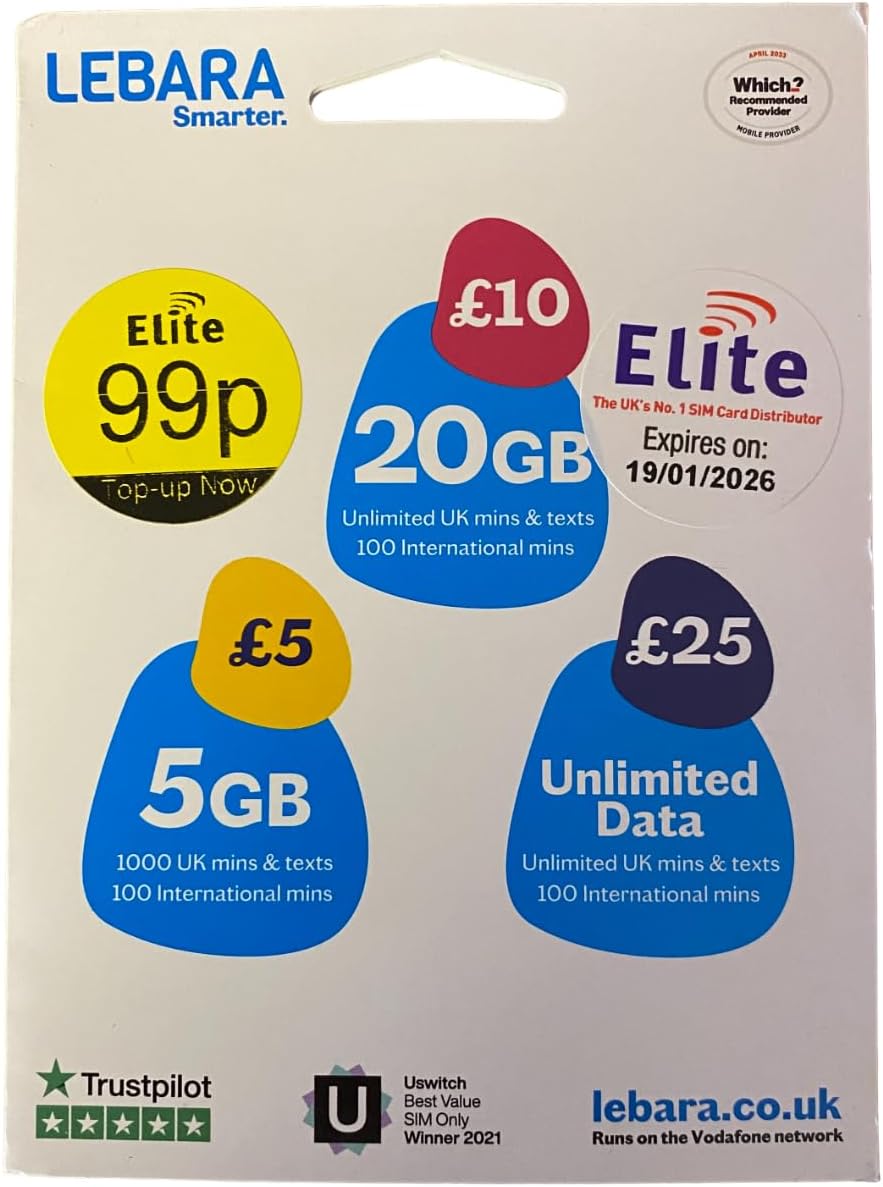
Obrázek 2.2: Zpět view of the Lebara SIM card packaging. This image illustrates different top-up options, including £10 for 20GB, £5 for 5GB, and an unlimited data option, along with the SIM's expiry date and network information.
3. Nastavení a aktivace
3.1. SIM Card Sizes
Your Lebara SIM card is designed to fit all standard mobile devices. It comes as a triple-cut SIM, allowing you to punch out the required size:
- Standard SIM: The largest size.
- Micro SIM: A smaller, intermediate size.
- Nano SIM: The smallest size, commonly used in modern smartphones.
Carefully push out the correct size for your device. Avoid touching the gold contact points on the SIM card.
3.2. Vložení SIM karty
- Turn off your mobile phone.
- Locate the SIM card slot on your device. This is typically on the side, top, or under the battery cover.
- Insert the Lebara SIM card into the slot, ensuring it is correctly oriented as indicated by the slot design.
- Close the SIM card tray or replace the battery cover.
- Zapněte mobilní telefon.
3.3. Aktivace
Your Lebara SIM card typically activates automatically upon first use or after topping up. To activate your SIM and choose a plan:
- Once the SIM is inserted and your phone is on, you should see the Lebara network signal.
- Visit the official Lebara website or download the Lebara app.
- Follow the on-screen instructions to register your SIM and select your preferred plan (30-day rolling or PAYG).
- Top up your account if you choose a PAYG option or to purchase a plan.
- You will receive a confirmation message once your SIM is active and your plan is applied.
For detailed activation steps, refer to the instructions provided with your SIM card packaging or visit the Lebara webmísto.
4. Návod k obsluze
4.1. Making Calls and Sending Texts
- Domestic Calls: Dial the UK number directly.
- Mezinárodní hovory: Dial 00, followed by the country code, then the area code (without the leading zero), and finally the phone number.
- Odesílání textových zpráv: Enter the recipient's number and type your message as usual.
- Free Lebara to Lebara: Calls and texts to other Lebara numbers are free. Ensure the recipient is also on the Lebara network.
4.2. Managing Your Account and Top-Ups
You can manage your Lebara account and top up your balance through several methods:
- online: Visit the Lebara weba přihlaste se ke svému účtu.
- Lebara App: Download the official Lebara app for convenient account management on your smartphone.
- Dialing Short Codes: Dial specific short codes from your Lebara phone (e.g., *#139# for balance check, *#134# for plan details).
- Voucher Top-Up: Purchase Lebara top-up vouchers from retail stores and follow the instructions on the voucher to add credit.
For 30-day rolling plans, ensure you have sufficient credit for automatic renewal or set up a recurring payment method.
5. Údržba
While a SIM card requires minimal maintenance, following these guidelines can help ensure its longevity and proper function:
- Zacházejte opatrně: Avoid bending, scratching, or exposing the SIM card to extreme temperatures or moisture.
- Udržujte v čistotě: If necessary, gently wipe the gold contact points with a soft, dry, lint-free cloth. Do not use liquids or abrasive materials.
- Zabezpečené úložiště: When not in use, store the SIM card in its original packaging or a protective case to prevent damage.
6. Řešení problémů
If you encounter issues with your Lebara SIM Only Deal, consider the following troubleshooting steps:
| Problém | Možná příčina | Řešení |
|---|---|---|
| No Network Signal | SIM not inserted correctly, network outage, out of coverage area. | Reinsert SIM card, restart phone, check Lebara network status, move to an area with better coverage. |
| Cannot Make Calls/Send Texts | Insufficient balance/plan, incorrect dialing format, network issue. | Check balance/plan via Lebara app/website, ensure correct international dialing code, restart phone. |
| Mobile Data Not Working | Data roaming off, APN settings incorrect, no data allowance. | Enable mobile data/data roaming, check APN settings (usually 'uk.lebara.mobi'), check data allowance. |
| SIM Not Activating | Activation process incomplete, network delay. | Ensure all activation steps are followed, wait a few hours, contact Lebara customer support. |
If the problem persists after attempting these solutions, please contact Lebara Customer Support for further assistance.
7. Specifikace
- Značka: Lebara
- Číslo modelu: 5060157641193
- ASIN: B00YXTSUNS
- Rozměry produktu: 0.33 x 0.21 x 0.03 palce
- Hmotnost položky: 0.494 unce
- Poskytovatel služeb: Vodafone (UK Network)
- Buněčná technologie: 2G, 3G, 4G
- Typ SIM: Standard, Micro, Nano (Triple-cut)
- První dostupné datum: 2. května 2018
8. Záruka a podpora
8.1. Informace o záruce
Lebara SIM cards are generally covered by a standard warranty against manufacturing defects. For specific warranty terms and conditions, please refer to the official Lebara website or contact their customer service. Keep your proof of purchase.
8.2. Zákaznická podpora
For any inquiries, technical assistance, or support regarding your Lebara SIM Only Deal, please contact Lebara Customer Support:
- Webmísto: Návštěva www.lebara.co.uk for FAQs, online chat, and contact details.
- Telefon: Dial 5588 from your Lebara mobile (free) or 0870 075 5588 from any other phone (charges may apply).
- E-mail: Refer to the Lebara website for specific email contact forms or addresses.
Please have your SIM card number and account details ready when contacting support.


