Zavedení
This user manual provides comprehensive instructions for the installation, operation, and maintenance of your Sena 10U-SH-02 Motorcycle Bluetooth Communication System. Designed specifically for the Shoei Neotec helmet, this system offers advanced communication capabilities for motorcyclists, ensuring connectivity and convenience on the road. Please read this manual thoroughly before using the product to ensure proper function and safety.
Konec produktuview
The Sena 10U-SH-02 is an integrated Bluetooth communication system engineered to fit seamlessly within the Shoei Neotec helmet. It provides a discreet yet powerful solution for rider-to-rider intercom, phone calls, music streaming, and FM radio reception. The system includes a main unit, speakers, microphone, and a handlebar remote for intuitive control.
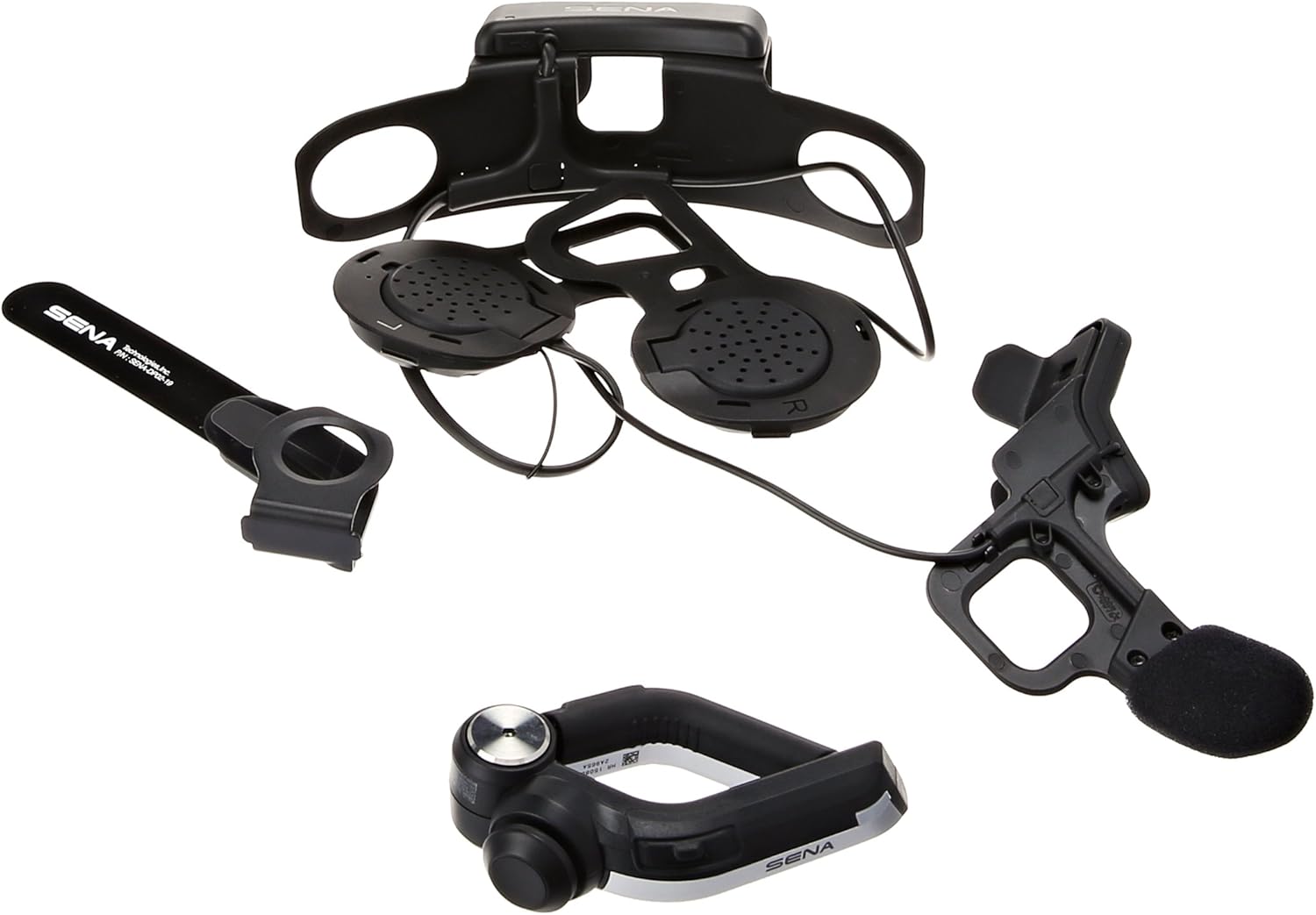
Obrázek 1: Přesview of Sena 10U-SH-02 components.
Vlastnosti
- Technologie Bluetooth 4.0: Zajišťuje stabilní a efektivní bezdrátovou komunikaci.
- Four-Way Intercom: Communicate with up to four riders simultaneously, with a range of up to 1.6 kilometers (1.0 mile).
- Universal Intercom & Group Intercom: Enhanced connectivity options for various riding groups.
- Handlebar Remote: Provides safe and easy operation of system functions without removing hands from the handlebars.
- Sdílení hudby: Share audio with a fellow rider.
- Built-in FM Radio Tuner: Features a station scan and save function.
- Hlasové výzvy: Intuitive audio cues for system status and operations.
- Pokročilé potlačení hluku: Snižuje šum na pozadí pro čistší zvuk.
- Aplikace pro chytré telefony: Exclusive app for iPhone and Android for configuration and control.
- Long Talk Time: Až 10 hodiny hovoru na jedno nabití.
- Firmware s možností upgradu: Ensures the system stays up-to-date with the latest features and improvements.
Co je v krabici
The Sena 10U-SH-02 package includes the following components:
- Sena 10U-SH-02 Main Unit (integrated for Shoei Neotec helmet)
- Dálkový ovladač na řídítka
- USB napájecí a datový kabel
- Uživatelská příručka (tento dokument)

Figure 2: Contents of the Sena 10U-SH-02 package.
Nastavení
1. Installation into Shoei Neotec Helmet
The Sena 10U-SH-02 is designed for a custom fit within the Shoei Neotec helmet. Follow these steps for proper installation:
- Carefully remove the helmet's interior padding to access the ear pockets and internal shell.
- Position the main unit and speakers within the designated ear pockets. Ensure the speakers are aligned with your ears for optimal audio.
- Route the microphone boom towards the front of the helmet, ensuring it is positioned correctly for clear voice pickup.
- Secure all wires and components within the helmet's internal channels to prevent interference and discomfort.
- Reinstall the helmet's interior padding, ensuring no wires are pinched or exposed.

Figure 3: Internal component placement within the helmet.

Obrázek 4: Zadní view of the integrated system in the helmet.
2. Nabíjení jednotky
Before first use, fully charge the Sena 10U-SH-02. The charging time is approximately 3 hours. Use the provided USB power and data cable to connect the unit to a USB power source.
3. Handlebar Remote Installation
Mount the handlebar remote securely on your motorcycle's handlebar in a position that allows for easy and safe access while riding. Ensure it does not interfere with the operation of other controls.
Návod k obsluze
1. Zapnutí/vypnutí
- Zapnutí: Press and hold the main button on the helmet unit or the handlebar remote until you hear a voice prompt.
- Vypnout: Press and hold the main button until you hear a voice prompt indicating power off.
2. Párování Bluetooth
To pair your Sena 10U-SH-02 with your smartphone or other Bluetooth devices:
- With the unit off, press and hold the main button for 5 seconds until the LED flashes red and blue, indicating pairing mode.
- Na smartphonu povolte Bluetooth a vyhledejte nová zařízení.
- Select "Sena 10U-SH-02" from the list of available devices.
- Pokud se zobrazí výzva, zadejte PIN „0000“.
- Once paired, the LED will turn blue.
3. Interkomová komunikace
The 10U-SH-02 supports four-way intercom communication. Refer to the detailed instructions in the Sena Smartphone App for setting up group intercoms.
- Spuštění interkomu: Briefly press the Intercom button on the handlebar remote to initiate communication with a paired intercom friend.
- Ukončení interkomu: Briefly press the Intercom button again to end the conversation.
4. Telefonní hovory
- Přijetí hovoru: Briefly press the Phone button on the handlebar remote.
- Ukončení hovoru: Znovu krátce stiskněte tlačítko Telefon.
- Hlasové vytáčení: Press and hold the Phone button to activate your smartphone's voice assistant (e.g., Siri, Google Assistant).
5. Hudba a FM rádio
- Přehrát/pozastavit hudbu: Briefly press the Play/Pause button on the handlebar remote.
- Další / předchozí skladba: Use the joystick or dedicated buttons on the handlebar remote.
- Zapnutí/vypnutí FM rádia: Stiskněte tlačítko FM.
- Skenovací stanice: Use the scan function via the handlebar remote or smartphone app.

Figure 5: Internal control pad for basic functions.
Údržba
- Čištění: Použijte měkký, damp cloth to clean the exterior of the unit and remote. Do not use harsh chemicals or abrasive cleaners.
- Péče o baterie: To prolong battery life, avoid storing the unit in extreme temperatures. Charge the unit regularly, even if not in frequent use.
- Aktualizace firmwaru: Periodically check the Sena website or smartphone app for available firmware updates to ensure optimal performance and access to new features.
Odstraňování problémů
| Problém | Možná příčina | Řešení |
|---|---|---|
| Jednotka se nezapne. | Slabá baterie. | Nabíjejte jednotku alespoň 3 hodiny. |
| Nelze spárovat se smartphonem. | Unit not in pairing mode; Bluetooth off on phone. | Ensure unit is in pairing mode (red/blue flashing LED). Enable Bluetooth on your phone. |
| Problémy s připojením interkomu. | Mimo dosah; rušení; nesprávné párování. | Move closer to the other rider. Re-pair intercom connections. Avoid strong electromagnetic fields. |
| Kvalita zvuku je špatná. | Microphone/speaker placement; wind noise; low volume. | Adjust microphone and speaker positions. Ensure Advanced Noise Control is active. Increase volume. |
For more detailed troubleshooting, please refer to the Sena webwebu nebo kontaktujte zákaznickou podporu.
Specifikace
| Funkce | Detail |
|---|---|
| Model | 10U-SH-02 |
| Verze Bluetooth | 4.0 |
| Rozsah interkomu | Up to 1.6 km (1.0 mile) in open terrain |
| Doba hovoru | Až 10 hodin |
| Doba nabíjení | 3 hodin |
| Typ baterie | Lithium Polymer |
| Zvukové funkce | Built-in SBC Codec, Advanced Noise Control, Wide volume control |
| FM rádio | Built-in FM radio with RDS AF (Radio Data System Alternate Frequencies), Radio region: worldwide, 10 preset station memory with automatic scan function |
| Rozměry | 6.9 x 11.2 x 4.2 palce (rozměry produktu) |
| Hmotnost | 14.4 unce (hmotnost položky) |
Záruka a podpora
For warranty information and technical support, please visit the official Sena webnebo se obraťte na jejich zákaznický servis. Uschovejte si doklad o koupi pro případ reklamace.
Online zdroje:


