Zavedení
This manual provides detailed instructions for the installation, operation, and maintenance of your VDO TR711U-BU Car Radio. Please read this manual thoroughly before using the product to ensure proper functionality and safety.
Bezpečnostní informace
Vždy dodržujte následující bezpečnostní opatření:
- Pokud je zařízení poškozeno, nepoužívejte jej.
- Zajistěte řádné větrání kolem jednotky.
- Installation should be performed by a qualified professional to avoid damage to the vehicle's electrical system.
- Nerozebírejte jednotku. Veškerý servis svěřte kvalifikovanému personálu.
- Keep the volume at a safe level to remain aware of traffic conditions.
Obsah balení
Po vybalení zkontrolujte, zda jsou přítomny všechny položky:
- VDO TR711U-BU Car Radio Unit
- Uživatelská příručka (tento dokument)
- 2 Montážní háčky
- Montážní rám
- Přední rám
- ISO Antenna Adapter
- DIN-ISO Connector
Nastavení a instalace
The VDO TR711U-BU is designed for easy installation with its low mounting depth. Professional installation is recommended.
Schéma zapojení
The unit uses a standard DIN-ISO connector for power and speaker connections. Ensure correct polarity and secure connections to prevent damage.
| Kolík | Funkce | Color (Typical) |
|---|---|---|
| A4 | +12V konstantní (baterie) | Žluť |
| A7 | +12V Switched (Ignition) | Červený |
| A8 | Země | Černý |
| B1 | Pravý zadní reproduktor (+) | Fialová |
| B2 | Pravý zadní reproduktor (-) | Fialová/Černá |
| B3 | Pravý přední reproduktor (+) | Šedá |
| B4 | Pravý přední reproduktor (-) | Šedá/Černá |
| B5 | Levý přední reproduktor (+) | Bílý |
| B6 | Přední levý reproduktor (-) | Bílá/Černá |
| B7 | Levý zadní reproduktor (+) | Zelený |
| B8 | Levý zadní reproduktor (-) | Zelená/Černá |
Note: Always refer to your vehicle's specific wiring diagram for accurate connections.
Montáž jednotky
- Insert the mounting frame into the vehicle's DIN slot until it clicks into place.
- Connect the wiring harness and antenna cable to the rear of the radio.
- Slide the radio unit into the mounting frame until it locks securely.
- Attach the front frame for a finished look.

Návod k obsluze
Základní ovládací prvky
- Zapnutí/vypnutí: Stiskněte tlačítko VOL/ knoflík pro zapnutí nebo vypnutí jednotky.
- Ovládání hlasitosti: Otočte VOL/ knoflík pro nastavení hlasitosti.
- Výběr zdroje (SRC): Stiskněte tlačítko SRC button to cycle through available sources: Radio, USB, AUX.
- Funkce ztlumení: Krátce stiskněte VOL/ knob to mute/unmute the audio.
Provoz rádia
- Band Selection (BAND/AST): Stiskněte BAND/AST to switch between FM1, FM2, FM3, MW, and LW bands.
- Automatic Store (AST): Stiskněte a podržte BAND/AST pro automatické vyhledávání a ukládání silných stanic.
- Ruční ladění: Použijte ◀◀ a ▶▶ buttons for manual frequency adjustment.
- Hledat ladění: Stiskněte a podržte ◀◀ or ▶▶ to automatically seek the next strong station.
- Přednastavené stanice: Použijte tlačítka 1 na 6 to select stored stations. To store a station, tune to the desired frequency, then press and hold a preset button until you hear a beep.
- Funkce RDS: The unit supports RDS (Radio Data System) features like AF (Alternative Frequencies), TA (Traffic Announcement), EON (Enhanced Other Networks), and PTY (Program Type). These functions operate automatically when available.
USB/MP3/WMA Playback
Insert a USB storage device (up to 8 GB) into the front USB port. The unit will automatically switch to USB mode and begin playback.
- Přehrát/pozastavit: Stiskněte tlačítko 1/▶▶ tlačítko.
- Další / předchozí skladba: Stiskněte ▶▶ or ◀◀ tlačítka.
- Opakování (RPT): Stiskněte 3 / RPT to cycle through repeat modes (e.g., repeat track, repeat folder).
- Random (RND): Stiskněte 4/RND to enable/disable random playback.
- Navigace ve složkách: Použití 5D- a 6D + to navigate between folders on the USB device.
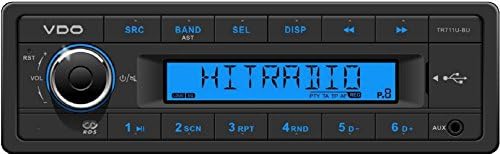
Vstup AUX
Connect an external audio device (e.g., smartphone, MP3 player) to the 3.5mm AUX input jack on the front panel. Select AUX as the source using the SRC tlačítko.
Nastavení zvuku
- Předvolby zvuku: Stiskněte tlačítko SEL button repeatedly to cycle through audio settings (Bass, Treble, Balance, Fader, Loudness, EQ). Rotate the VOL/ knob to adjust the selected setting.
- Hlasitost: Activates a bass and treble boost at low volumes.
- Předvolby EQ: The unit includes 4 sound presets: Classic, Pop, Rock, Jazz. Select these via the SEL tlačítko.
Údržba
- Čištění: K čištění předního panelu jednotky používejte měkký, suchý hadřík. Nepoužívejte abrazivní čisticí prostředky ani rozpouštědla.
- USB port: Udržujte USB port bez prachu a nečistot.
- Trvalá paměť: The unit features permanent storage of settings, meaning your radio presets and audio settings will be retained even if the car battery is disconnected.
Odstraňování problémů
| Problém | Možná příčina | Řešení |
|---|---|---|
| Žádná síla | Nesprávné zapojení; Spálená pojistka; Uvolněné spojení. | Check wiring connections (constant 12V, switched 12V, ground). Check vehicle's fuse box and the unit's fuse. Ensure connections are secure. |
| Žádný zvuk | Volume too low; Mute function active; Incorrect speaker wiring; Speakers damaged. | Increase volume. Press VOL/ to deactivate mute. Check speaker wiring. Test with different speakers if possible. |
| Špatný příjem rádia | Anténa není připojena; Poškozená anténa; Oblast se slabým signálem. | Ensure antenna is securely connected to the ISO antenna adapter. Check antenna for damage. Try tuning to stronger stations. |
| USB device not recognized or slow playback | Unsupported format; USB device too large (>8GB); Corrupted files; USB device not properly inserted. | Zajistit files are MP3/WMA. Use a USB device up to 8GB. Reformat USB device or try a different one. Reinsert USB device firmly. |
| Unit freezes or malfunctions | Dočasná softwarová závada. | Press the RST (Reset) button (usually a small pinhole, refer to diagram if available). This will reset the unit to factory defaults. |
Specifikace
| Funkce | Detail |
|---|---|
| Model | TR711U-BU |
| Značka | VDO (Continental) |
| Provozní svtage | 12 V (10.8 V – 16 V) |
| Max. Síla hudby | Výkon 4 x 41 Wattů |
| Výkon RMS | Výkon 4 x 25 Wattů |
| Tuner | Worldwide FM RDS-tuner / AF / TA / EON / PTY, LW, MW, FM with AST |
| USB Host | Front USB port (2.0), supports USB 1.1/USB 2.0, supports MP3/WMA, supports storage media up to 8 GB |
| Vstup AUX | Přední AUX vstup |
| Zobrazit | LCD display, Blue illumination |
| Předvolby zvuku | 4 (Classic, Pop, Rock, Jazz) |
| Rozměry (ŠxVxH) | 188 x 58.5 x 114.7 mm |
| Permanentní paměť | Yes (settings retained) |
| CD přehrávač | Žádný |
Informace o záruce
Specific warranty terms and conditions for the VDO TR711U-BU are provided by the manufacturer, Continental, or your point of purchase. Please retain your proof of purchase for any warranty claims. Warranty typically covers defects in materials and workmanship under normal use.
Podpora a kontakt
For technical support, service, or further inquiries regarding your VDO TR711U-BU car radio, please contact your authorized VDO dealer or the manufacturer, Continental. You may also refer to the official VDO or Continental automotive electronics website for updated support information.
A datasheet for this product is available at: http://bbg-automotive.de/shop/out/media/datasheet VDO_TR711U_BU.pdf


