1. Úvod
This manual provides detailed instructions for the setup, operation, and maintenance of your MIDIPLUS I61 USB MIDI Keyboard Controller. Please read this manual thoroughly to ensure proper use and to maximize the performance and longevity of your device. The MIDIPLUS I61 is designed to be a versatile and reliable tool for music production and performance.
2. Konec produktuview
Klíčové vlastnosti:
- 61 full-size, dynamic (velocity-sensitive) keys for expressive playing.
- Pitch Bend wheel for real-time pitch modulation.
- Modulation wheel for adding vibrato or other effects.
- LED display for clear visual feedback.
- USB-B interface for MIDI data transmission and power supply.
- Two MIDI OUT interfaces for connecting to external MIDI devices.
- Input for an optional Sustain Pedal.
Identifikace součásti:
Familiarize yourself with the various components of your MIDIPLUS I61 controller.

Obrázek 2.1: Přední strana view of the MIDIPLUS I61 USB MIDI Keyboard Controller, showing the 61 keys, pitch bend and modulation wheels on the left, and the LED display on the right.

Obrázek 2.2: Úhlové view of the MIDIPLUS I61, providing a perspective of the full keyboard and control layout.
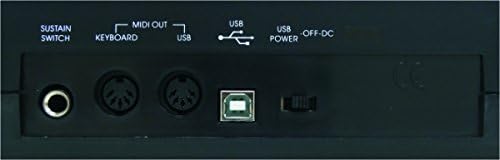
Figure 2.3: Rear panel of the MIDIPLUS I61, illustrating the various connection ports including Sustain Switch, MIDI OUT, USB, and USB Power.
3. Nastavení
3.1 Connecting to a Computer:
- Ujistěte se, že je váš počítač zapnutý.
- Connect one end of the supplied USB cable to the USB-B port on the rear panel of the I61 controller.
- Připojte druhý konec kabelu USB k volnému portu USB v počítači.
- The I61 is a class-compliant device, meaning it typically does not require special drivers for Windows or macOS. Your operating system should automatically recognize and install the necessary drivers.
- The device will be powered via the USB connection.
3.2 Connecting a Sustain Pedal (Optional):
- If you wish to use a sustain pedal, connect a standard 1/4-inch TS (Tip/Sleeve) sustain pedal to the 'SUSTAIN SWITCH' input on the rear panel of the I61.
- The polarity of the sustain pedal is usually detected automatically. If the sustain function operates in reverse, try pressing the pedal once during power-up or consult your DAW's MIDI settings.
3.3 Connecting to External MIDI Devices:
- The I61 features two MIDI OUT ports. Use standard 5-pin MIDI cables to connect these ports to the MIDI IN ports of external synthesizers, sound modules, or other MIDI-compatible hardware.
- Ensure that the MIDI channels are correctly configured on both the I61 (if applicable) and your external devices for proper communication.
4. Návod k obsluze
4.1 Basic Playback:
- Once connected to a computer with a Digital Audio Workstation (DAW) or a sound module, open your preferred software (e.g., Ableton Live, Avid Pro Tools, FL Studio).
- Select the MIDIPLUS I61 as your MIDI input device within your software's preferences or settings.
- Load a virtual instrument or select a sound on your external MIDI device.
- Pressing the keys on the I61 will now trigger sounds. The velocity-sensitive keys respond to how hard you press them, allowing for dynamic expression.
4.2 Using Pitch Bend and Modulation Wheels:
- The Pitch Bend wheel, located on the left side, allows you to temporarily raise or lower the pitch of notes. It is spring-loaded and returns to the center position when released.
- The Modulace wheel, also on the left, typically controls parameters like vibrato, tremolo, or filter cutoff, depending on the instrument or software you are using. It stays in the position you set it to.
4.3 LED Display and Data Entry:
- The LED display provides visual feedback on various settings and parameters.
- The I61 may feature data entry buttons or a data wheel (not explicitly detailed in product description, refer to device for specific controls) to adjust MIDI channels, transpose, or other functions. Consult your DAW's MIDI mapping features for advanced control.
5. Údržba
5.1 Čištění:
- To clean the surface of the controller, use a soft, dry, lint-free cloth.
- Pro odolnou špínu lehceamphadřík vodou. Nepoužívejte abrazivní čisticí prostředky, rozpouštědla nebo vosky, protože by mohly poškodit povrchovou úpravu.
- Zabraňte vniknutí kapalin do zařízení.
5.2 Úložiště:
- Regulátor skladujte na chladném a suchém místě mimo dosah přímého slunečního záření a extrémních teplot.
- When not in use, cover the keyboard to protect it from dust and debris.
6. Řešení problémů
Běžné problémy a řešení:
- Žádný zvuk:
- Ujistěte se, že je kabel USB bezpečně připojen k ovladači i k počítači.
- Verify that the I61 is selected as the MIDI input device in your DAW or software.
- Check that a virtual instrument is loaded and active, or that your external MIDI device is powered on and receiving MIDI data.
- Confirm that the audio output of your computer or sound system is functioning correctly.
- Klávesy nereagují:
- Odpojte a znovu připojte kabel USB.
- Restart your computer and DAW software.
- Ujistěte se, že žádný jiný software nekoliduje s MIDI vstupem.
- Sustain pedál nefunguje správně:
- Check the pedal connection to the 'SUSTAIN SWITCH' input.
- If the sustain is reversed (always on or off), try unplugging and replugging the pedal while the controller is powered on, or check your DAW's MIDI settings for pedal polarity options.
- MIDI OUT Not Controlling External Devices:
- Verify MIDI cable connections between the I61 and the external device.
- Ensure MIDI channels match between the I61 (if configurable) and the receiving device.
- Check the external device's settings to confirm it is set to receive MIDI data.
7. Specifikace
| Číslo modelu | i61 |
| Počet klíčů | 61 |
| Typ klíče | Full-size, Dynamic (Velocity-sensitive) |
| Technologie připojení | USB |
| Rozhraní | USB-B, 2 x MIDI OUT, Sustain Pedal Input |
| Napájení | Napájení ze sběrnice USB |
| Kompatibilní zařízení | Laptops, Computers, certain Tablets and Smartphones |
| Kompatibilní software | Ableton Live, Avid Pro Tools, FL Studio (and other MIDI-compatible DAWs) |
| Hardwarová platforma | PC/Mac |
| Typ materiálu | Plast |
| Barva | Černý |
| Rozměry produktu | 91.01 x 20.9 x 5.99 cm (35.83 x 8.23 x 2.36 palce) |
| Hmotnost produktu | 2.91 kg (6.42 lb) |
8. Záruka a podpora
For information regarding warranty coverage, technical support, or service, please refer to the official Midiplus webnebo se obraťte na autorizovaného prodejce. Uschovejte si účtenku jako doklad o koupi pro případné reklamace.


