1. Úvod
This manual provides detailed instructions for the safe and efficient operation of your Crenova XPE350 Mini Portable Projector. Please read this manual thoroughly before using the projector and retain it for future reference. The Crenova XPE350 is designed for home and backyard theater use, offering a compact and portable solution for displaying media from various sources.
2. Konec produktuview
The Crenova XPE350 is a mini portable projector featuring a 480x320 resolution and 150 lumens brightness. Its compact design makes it suitable for various environments. Below are key components and features.
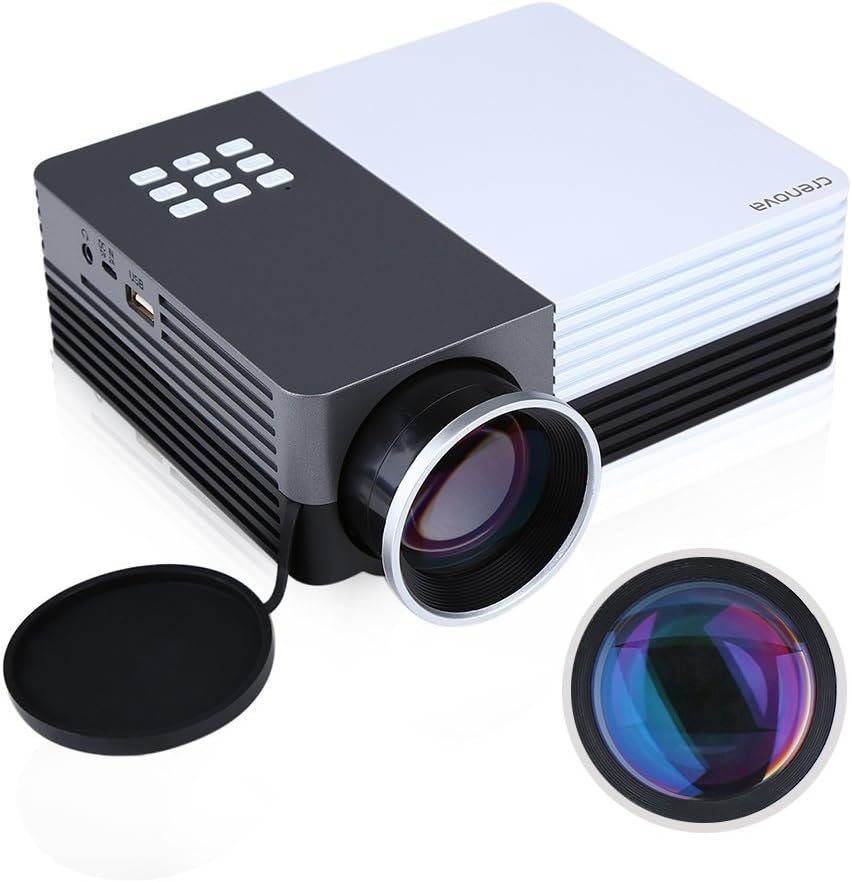
Obrázek 2.1: Crenova XPE350 Mini Portable Projector. This image shows the overall design of the projector, highlighting its compact form factor and front lens.

Obrázek 2.2: The Crenova XPE350 projector held in a hand, demonstrating its compact and portable size. A close-up inset highlights the glass lens, indicating clear image projection.
2.3 Obsah balení
Po vybalení zkontrolujte, zda jsou všechny níže uvedené položky přítomny a v dobrém stavu:
- Crenova XPE350 Mini Portable Projector
- Dálkové ovládání
- Napájecí adaptér
- AV kabel
- Uživatelská příručka (tento dokument)

Obrázek 2.3: Contents of the Crenova XPE350 Projector package. This image displays the projector, remote control, power adapter, AV cable, and the printed user manual.
2.4 Součásti projektoru
Familiarize yourself with the various parts of your projector:
- Čočka: Promítá obraz na plátno.
- Funkční tlačítka: Control basic projector functions.
- Průduchy: Pro odvod tepla. Ujistěte se, že nejsou zakryty.
- Vstupní porty: VGA, HDMI, AV, USB, SD Card Slot.
- Zvukový výstup: Sluchátkový jack.
- Úprava lichoběžníkového zkreslení: Koriguje lichoběžníkové zkreslení obrazu.
- Napájecí rozhraní: Připojuje se k napájecímu adaptéru.

Obrázek 2.4: Detailní záběr view of the projector's function buttons, lens, and ventilation vents. These are essential for basic control and maintaining optimal operating temperature.

Obrázek 2.5: Detailní view of the Crenova XPE350 projector's various input and output ports, including VGA, HDMI, AV, USB, headphone jack, mobile power input, SD card slot, and power interface. Also visible is the keystone adjustment dial.
3. Nastavení
3.1 Připojení napájení
- Connect the AC power adapter to the "Power Interface" port on the projector.
- Zapojte druhý konec napájecího adaptéru do vhodné elektrické zásuvky.
- Kontrolka napájení na projektoru se rozsvítí.
3.2 Připojení vstupních zdrojů
The Crenova XPE350 supports various input sources. Choose the appropriate connection method for your device:

Obrázek 3.1: Diagram illustrating various devices that can be connected to the Crenova XPE350 projector, including laptops, desktop computers, DVD players, game consoles, speakers, mobile hard disks, USB drives, SD cards, digital cameras, tablet PCs, and TV set-top boxes.
- HDMI: For high-definition digital video and audio from devices like laptops, game consoles, or streaming sticks.
- VGA: For connecting to computers with a VGA output.
- AV: For connecting older devices using the included AV cable (e.g., DVD players, some game consoles).
- USB: Pro přehrávání médií filepřímo z USB flash disku.
- SD karta: Pro přehrávání médií filepřímo z paměťové karty SD.
- MHL (Mobile High-Definition Link): Some smartphones and tablets with MHL-out function can connect via HDMI for screen mirroring. Note: Most Android smartphones do not support MHL function.

Obrázek 3.2: Illustration of the MHL (Mobile High-Definition Link) feature, showing how a tablet and smartphone can mirror their screens to the projector. This feature requires the source device to support MHL-out.
3.3 Umístění projektoru
Place the projector on a stable, flat surface. Ensure there is adequate ventilation around the projector to prevent overheating. The distance from the screen will determine the image size.
4. Návod k obsluze
4.1 Zapnutí/vypnutí
- Zapnutí: Press the power button on the projector or the remote control. The projector lamp se rozsvítí.
- Vypnutí: Znovu stiskněte tlačítko napájení. Projektor se vypne.
4.2 Úprava kvality obrazu
- Nastavení zaostření: Rotate the lens ring (refer to Figure 2.4) until the projected image is clear and sharp.
- Korekce lichoběžníkového zkreslení: Use the keystone adjustment dial (refer to Figure 2.5) to correct trapezoidal distortion if the projector is not perfectly perpendicular to the screen.
4.3 Výběr vstupního zdroje
After connecting your desired input device, press the "Source" button on the remote control or the projector's function panel to cycle through available input options (HDMI, VGA, AV, USB, SD Card) and select the correct one.
4.4 Media Playback (USB/SD Card)
Insert a USB flash drive or SD card into the respective port. The projector's interface will typically prompt you to select the media type (e.g., Photo, Music, Movie, Text) for playback. Navigate using the remote control's arrow keys and "OK" button.
5. Údržba
5.1 Čištění objektivu
Jemně otřete čočku projektoru měkkým hadříkem bez žmolků, který je speciálně určen pro optické povrchy. Nepoužívejte abrazivní čisticí prostředky ani nadměrnou sílu, mohlo by dojít k poškrábání čočky.
5.2 Větrání
Ensure the projector's ventilation vents (refer to Figure 2.4) are clear of obstructions to allow for proper airflow. Blocked vents can lead to overheating and reduced lamp život.
5.3 lamp Život
The Crenova XPE350 projector features a long-life lamp, estimated at 20,000 hours under normal operating conditions, thanks to its SmartEco technology.

Obrázek 5.1: Illustration highlighting the Crenova XPE350 projector's long lamp life of 20,000 hours, supported by SmartEco technology, indicating energy efficiency and durability.
6. Řešení problémů
- Bez napájení:
- Ujistěte se, že je napájecí adaptér bezpečně připojen k projektoru i k funkční elektrické zásuvce.
- Zkontrolujte, zda svítí kontrolka napájení.
- Bez obrázku:
- Verify that the correct input source is selected (HDMI, VGA, AV, USB, SD).
- Check all cable connections between the projector and the source device.
- Ujistěte se, že je zdrojové zařízení zapnuté a vydává signál.
- Rozmazaný obrázek:
- Otáčejte zaostřovacím kroužkem na objektivu, dokud nebude obraz ostrý.
- Ujistěte se, že projekční plocha je rovná a projektor je v optimální vzdálenosti.
- Obrázek je lichoběžníkový:
- Use the keystone adjustment dial to correct the image shape.
- Umístěte projektor co nejvíce kolmo k promítací ploše.
- Žádný zvuk:
- Zkontrolujte nastavení hlasitosti na projektoru i zdrojovém zařízení.
- If using external speakers, ensure they are properly connected to the headphone jack and powered on.
- For HDMI connections, ensure the source device is sending audio.
- Dálkové ovládání nefunguje:
- Ujistěte se, že mezi dálkovým ovladačem a infračerveným přijímačem projektoru nejsou žádné překážky.
- Vyměňte baterie v dálkovém ovladači.
7. Specifikace
| Funkce | Specifikace |
|---|---|
| Model | XPE350 |
| Značka | Crenova |
| Rezoluce | 480x320 |
| Jas | 150 XNUMX lumenů |
| Lamp Život | 20,000 hours (SmartEco) |
| Speciální funkce | Přenosný |
| Form Factor | Přenosný |
| Typ montáže | Stolní držák |
| Hmotnost položky | 2.45 libry |
| Rozměry balení | 11.2 x 7.1 x 4.4 palce |
| Barva | 150 Lumens-Black |
8. Záruka a podpora
For warranty information or technical support, please refer to the documentation included with your purchase or contact Crenova customer service. Keep your purchase receipt as proof of purchase for warranty claims.
For further assistance, please visit the official Crenova webwebu nebo kontaktujte jejich kanály podpory.


