1. Úvod
This manual provides detailed instructions for the setup, operation, and maintenance of your Intermec EasyCoder PX4i Thermal Transfer Printer. The PX4i is a robust and flexible industrial printer designed for high-volume label printing, offering monochrome output at a resolution of 203 dpi and speeds up to 12 inches per second. Please read this manual thoroughly before using the printer to ensure safe and efficient operation.
2. Vlastnosti produktu
- Vysokorychlostní tisk: Capable of printing at speeds up to 12 inches per second.
- Vysoké rozlišení: Delivers clear monochrome prints at 203 dpi.
- Flexibilní manipulace s médii: Supports various media types including black mark, continuous label, fanfold, gap, general identification label, notch, roll fed, tag, and ticket.
- Ethernetové připojení: Integrated Ethernet for network integration.
- Programovatelné: Designed for optimized printing operations and streamlined deployment.
- Odolný design: Industrial-grade construction for demanding environments.
3. Obsah balení
Verify that all items listed below are included in your printer package. If any items are missing or damaged, contact your supplier immediately.
- Intermec EasyCoder PX4i Thermal Transfer Printer
- Napájecí kabel
- Labels (Included Components)
- User Documentation (This manual)
4. Bezpečnostní informace
Vždy dodržujte následující bezpečnostní opatření, abyste předešli zranění a poškození tiskárny:
- Ujistěte se, že je tiskárna umístěna na stabilním a rovném povrchu.
- Připojte tiskárnu k uzemněné elektrické zásuvce.
- Nepoužívejte tiskárnu ve vlhkém nebo mokrém prostředí.
- Během provozu držte ruce a volný oděv v dostatečné vzdálenosti od pohyblivých částí.
- Před prováděním jakékoli údržby nebo čištění odpojte napájení.
- Používejte pouze schválené náhradní díly a příslušenství.
5. Nastavení
5.1 Vybalení
- Opatrně vyjměte tiskárnu z obalu.
- Odstraňte veškerý balicí materiál, pásky a ochranné fólie.
- Uschovejte si originální obal pro budoucí přepravu nebo skladování.
5.2 Připojení napájení
- Ujistěte se, že je vypínač tiskárny v poloze VYPNUTO.
- Připojte napájecí kabel k napájecí zásuvce tiskárny.
- Zapojte druhý konec napájecího kabelu do uzemněné elektrické zásuvky.
5.3 Loading Media (Labels)
The PX4i printer supports various label types. Follow these general steps to load your labels:

Obrázek: Přední strana view of the Intermec EasyCoder PX4i printer, showing a label being fed out of the front slot. The control panel with an LCD screen and numeric keypad is visible on the top front.
- Otevřete kryt média tiskárny.
- Place the roll of labels onto the media supply spindle, ensuring it unwinds correctly.
- Feed the leading edge of the labels through the media guides and under the printhead assembly.
- Adjust the media guides to fit the width of your labels snugly but without binding.
- Close the media cover. The printer may automatically calibrate to the new media.
5.4 Připojení k počítači/síti
The PX4i offers Ethernet connectivity for network integration.
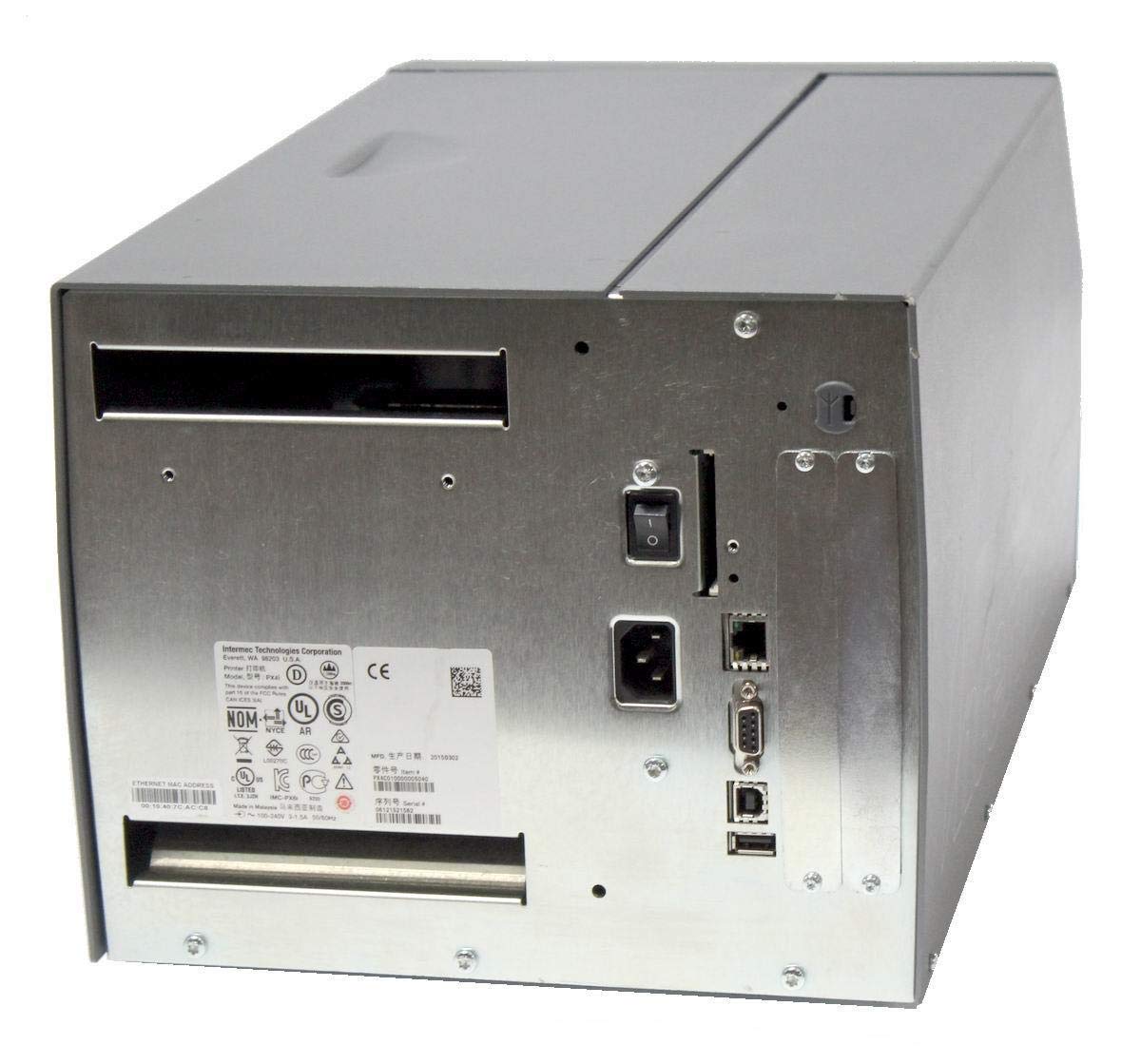
Obrázek: Zadní view of the Intermec EasyCoder PX4i printer, displaying the power inlet, power switch, Ethernet port, serial ports, and USB ports. The metallic casing is clearly visible.
- Locate the Ethernet port on the rear of the printer.
- Connect a standard Ethernet cable from the printer to your network router or switch.
- For direct connection to a computer, use an appropriate USB or serial cable if supported by your system and printer configuration.
- Refer to the printer's network configuration guide for setting up IP addresses and other network parameters.
6. Provoz
6.1 Ovládací panel Overview
The front control panel provides access to printer functions and status information.
Image: Close-up of the Intermec EasyCoder PX4i control panel, featuring an LCD display, navigation buttons (up, down, left, right, enter), and a numeric keypad with function keys like Pause, Feed, and Clear.
- LCD displej: Shows printer status, menu options, and error messages.
- Navigační tlačítka: Používá se k procházení nabídek a výběru možností.
- Numerická klávesnice: For entering data or selecting numbered options.
- Tlačítko Pozastavit: Temporarily stops printing.
- Tlačítko Feed: Advances one label.
- Tlačítko nastavení: Accesses printer configuration menus.
6.2 Základní tisk
- Ujistěte se, že je tiskárna zapnutá a připojená k počítači nebo síti.
- Open the document or application from which you wish to print labels.
- Select the Intermec PX4i printer from your printer list.
- Configure print settings such as label size, orientation, and quantity as needed.
- Initiate the print job. The printer will begin feeding and printing labels.
6.3 Adjusting Print Settings
Advanced print settings can be adjusted through the printer's control panel or via the printer driver on your computer. These settings include print darkness, print speed, label gap sensing, and more. Consult your printer driver documentation for software-based adjustments.
7. Údržba
Pravidelná údržba zajišťuje optimální výkon a prodlužuje životnost vaší tiskárny.
7.1 Cleaning the Printhead
The printhead should be cleaned regularly, especially if print quality degrades.
- Vypněte tiskárnu a odpojte napájecí kabel.
- Otevřete sestavu tiskové hlavy.
- Using a lint-free cloth or a printhead cleaning pen moistened with isopropyl alcohol, gently wipe the printhead surface from center to edge.
- Allow the printhead to dry completely before closing the assembly and reconnecting power.
7.2 Replacing Media and Ribbon
When the label roll or thermal transfer ribbon (if used) runs out, replace it promptly.
- Turn off the printer and open the media cover.
- Remove the empty label roll and/or used ribbon core.
- Install a new roll of labels and/or a new ribbon, following the loading instructions in Section 5.3.
- Ensure media and ribbon are properly tensioned and aligned.
- Zavřete kryt média.
8. Řešení problémů
This section addresses common issues you might encounter with your PX4i printer.
- Tiskárna se nezapíná: Check power cord connection, power outlet, and printer's power switch.
- Žádný tiskový výstup: Verify printer is online, connected to the computer/network, and has media loaded. Check for error messages on the LCD.
- Špatná kvalita tisku: Clean the printhead (Section 7.1). Adjust print darkness settings. Ensure correct media and ribbon are used.
- Štítky se nepodávají správně: Check media loading (Section 5.3) and ensure media guides are properly adjusted. Calibrate media sensors if necessary.
- Chybové zprávy: Refer to the printer's LCD display for specific error codes and consult the full Intermec PX4i technical manual for detailed explanations and solutions.
9. Specifikace
| Funkce | Popis |
|---|---|
| Název modelu | PX4i |
| Číslo modelu položky | PX4C010000000020 |
| Technologie tisku | Thermal Transfer |
| Print Color | Monochromatický |
| Maximální rychlost tisku | 12 in/s (Monochrome) |
| Maximální rozlišení tisku | 203 dpi |
| Technologie připojení | Ethernet |
| Maximální velikost média | 12 palců |
| Zahrnuté komponenty | Štítky |
| Typ ovladače | Stiskněte tlačítko |
| Výrobce | INTERMEC INDUSTRIAL PRINTERS |
| Rozměry balení | 23.25 x 15.5 x 15.25 palce; 36.2 libry |
10. Záruka a podpora
The Intermec EasyCoder PX4i Thermal Transfer Printer comes with a standard manufacturer's warranty. For specific warranty terms and conditions, please refer to the warranty card included with your product or visit the official Intermec (Honeywell) support website. For technical assistance, troubleshooting beyond this manual, or to inquire about service, please contact Intermec customer support or your authorized dealer.
Online zdroje: For the latest drivers, firmware updates, and additional documentation, please visit the official Intermec support portal.


