1. Úvod
This manual provides detailed instructions for the installation, operation, and maintenance of the DSC HS2032 PowerSeries Neo Security Control Panel. The HS2032NKCP01 model is an advanced security solution designed for robust protection, featuring 8 to 32 zone panel configuration and 128-bit AES encryption. Please read this manual thoroughly before attempting to install or operate the system.
2. Bezpečnostní informace
Always adhere to local electrical codes and safety regulations during installation. Disconnect all power sources before servicing the unit. Only qualified personnel should perform installation and maintenance. Ensure proper grounding and avoid exposing the unit to moisture or extreme temperatures. This device is intended for indoor use only.
3. Konec produktuview
The DSC HS2032 PowerSeries Neo Security Control Panel offers a comprehensive set of features for advanced security management. Key features include:
- 8 to 32 Zone Panel Configuration
- PowerG - Robust, Industry Leading Commercial Grade Wireless Technology
- Simple Partition Management Using Global Keypads
- Intuitive, Quick Installation Process
- User-Friendly Interfaces
- Visual Alarm Verification Capabilities
- 2-Way Audio Alarm Verification Via Phone or Cellular
- Alternate Communications Via Cellular and IP
- Local and Remote Downloading
- Cost Efficiencies Through Advanced System Software
- 128 Bit AES Encryption for Enhanced Security
- Remote Firmware Upgrade Functionality
Komponenty produktu

Figure 3.1: The DSC HS2032 PowerSeries Neo Security Control Panel, showing the main cabinet and the integrated circuit board.
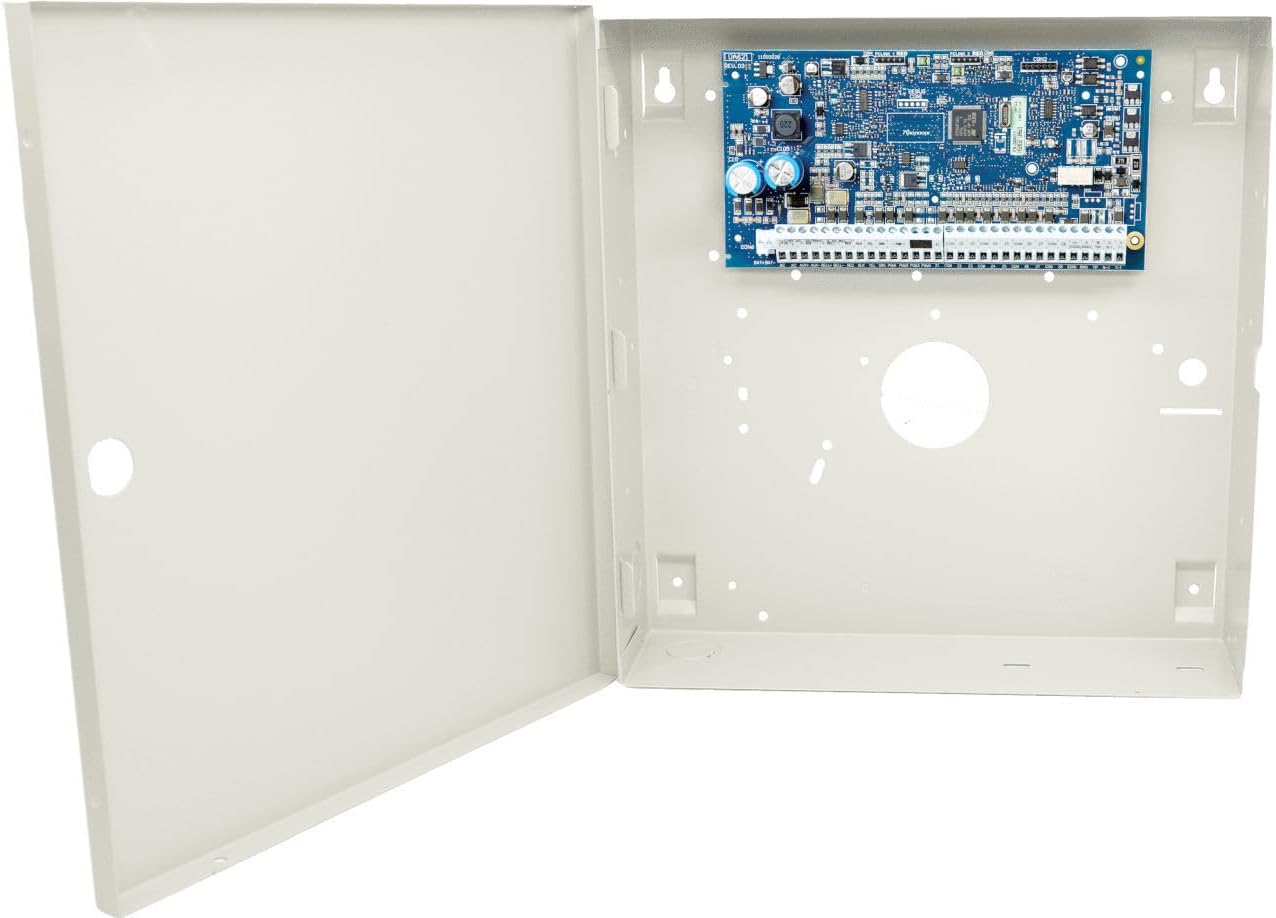
Figure 3.2: The security control panel with its cabinet door open, revealing the internal circuit board and mounting points.

Figure 3.3: A detailed close-up of the DSC HS2032 circuit board, highlighting various components and connection terminals.
4. Nastavení
The HS2032 PowerSeries Neo panel is designed for quick and intuitive installation. Follow these general steps for initial setup:
- Montáž skříně: Securely mount the control panel cabinet to a wall in a dry, secure location, away from direct sunlight and heat sources. Use appropriate fasteners for the wall material.
- Připojení kabeláže: Connect all necessary wiring, including power, zones, keypads, and communication modules, to the designated terminals on the circuit board. Refer to the wiring diagram provided with the product for specific terminal assignments.
- Připojení napájení: Connect the main AC power and the backup battery. Ensure the battery is properly charged.
- Počáteční programování: Access the system's programming menu via a connected keypad to configure zones, user codes, communication settings, and other system parameters.
- Test systému: Perform a full system test to verify all zones, keypads, and communication paths are functioning correctly.
5. Návod k obsluze
The HS2032 system features user-friendly interfaces for daily operation. Basic operations include:
- Aktivace/deaktivace: Use your assigned user code on the keypad to arm or disarm the system. Different arming modes (e.g., Stay, Away) may be available.
- Zone Bypassing: Temporarily bypass specific zones if they are not in use or if access is required in a protected area.
- Ověření alarmu: Utilize the visual alarm verification and 2-way audio features (if configured) to confirm alarm events.
- Záznam událostíview: Access the system's event log to review past activities and alarms.
- Partition Management: If your system is configured with multiple partitions, use the keypad to manage each partition independently.
6. Údržba
Regular maintenance ensures the optimal performance and longevity of your security system:
- Kontrola baterie: Periodically check the backup battery's condition. Replace it every 3-5 years or as recommended by the manufacturer.
- Testování senzoru: Test all connected sensors (e.g., motion detectors, door/window contacts) annually to ensure they are functioning correctly.
- Čištění: Keep the control panel and keypads clean and free of dust. Use a soft, dry cloth. Do not use abrasive cleaners or solvents.
- Remote Firmware Upgrades: The system supports remote firmware upgrades. Ensure your system's software is kept up-to-date for enhanced features and security patches. Consult your installer or service provider for firmware updates.
7. Řešení problémů
This section addresses common issues you might encounter with your DSC HS2032 PowerSeries Neo Security Control Panel.
| Problém | Možná příčina | Řešení |
|---|---|---|
| System not arming | Open zone, system trouble, incorrect user code. | Check keypad for open zones or trouble conditions. Ensure correct user code is entered. |
| Keypad displays 'Trouble' | Low battery, AC power failure, communication error, zone fault. | Press '*' then '2' on the keypad to view trouble conditions. Address the specific issue (e.g., restore AC power, replace battery). |
| Falešné poplachy | Improper sensor placement, sensitivity settings, environmental factors. | Review sensor placement and sensitivity. Ensure pets or moving objects are not triggering sensors. |
| No communication with monitoring station | Telephone line issue, cellular module fault, IP connection problem. | Verify telephone line is active. Check cellular signal strength or IP network connection. Contact your monitoring provider. |
If you are unable to resolve an issue using these steps, please contact your security system installer or a qualified service technician.
8. Specifikace
| Funkce | Detail |
|---|---|
| Značka | DSC |
| Číslo modelu | HS2032NKCP01 |
| Výrobce | Dsc |
| Konfigurace zóny | 8 to 32 Zones |
| Šifrování | 128 bit AES |
| Hmotnost položky | 5 libry |
| Typ zobrazení | LCD (via compatible keypad) |
| Provozní teplota | 20 Degrees Celsius (typical, refer to full specifications for range) |
9. Záruka a podpora
Warranty information for the DSC HS2032 PowerSeries Neo Security Control Panel is typically provided at the point of purchase or included with the product packaging. For specific warranty details, please refer to the documentation accompanying your device or contact your authorized DSC dealer.
For technical support, service, or further assistance, please contact your security system installer or visit the official DSC webweb s podpůrnými zdroji a kontaktními informacemi.


