Zavedení
This manual provides detailed instructions for the setup, operation, and maintenance of your Accutime DC Comics BAT3031 Digital Display Batman LCD Alarm Clock. Please read this manual thoroughly before using the product to ensure proper function and longevity.
Bezpečnostní informace
- Bezpečnost baterie: This device requires 2 AA batteries (not included). Ensure batteries are inserted with correct polarity (+/-). Do not mix old and new batteries, or different types of batteries. Remove batteries if the device will not be used for an extended period. Dispose of used batteries responsibly.
- Voděodolnost: This alarm clock is není voděodolnýAbyste předešli poškození, vyhněte se vystavení vodě nebo vysoké vlhkosti.
- Umístění: Place the clock on a stable, flat surface away from direct sunlight, heat sources, and strong magnetic fields.
- Čištění: K čištění používejte měkký, suchý hadřík. Nepoužívejte abrazivní čisticí prostředky nebo rozpouštědla.
Obsah balení
- 1 x Accutime DC Comics BAT3031 Digital Display Batman LCD Alarm Clock
- 1 x Uživatelská příručka (tento dokument)
Nastavení
1. Instalace baterie
The Batman LCD Alarm Clock operates on 2 AA batteries. These are not included and must be purchased separately.
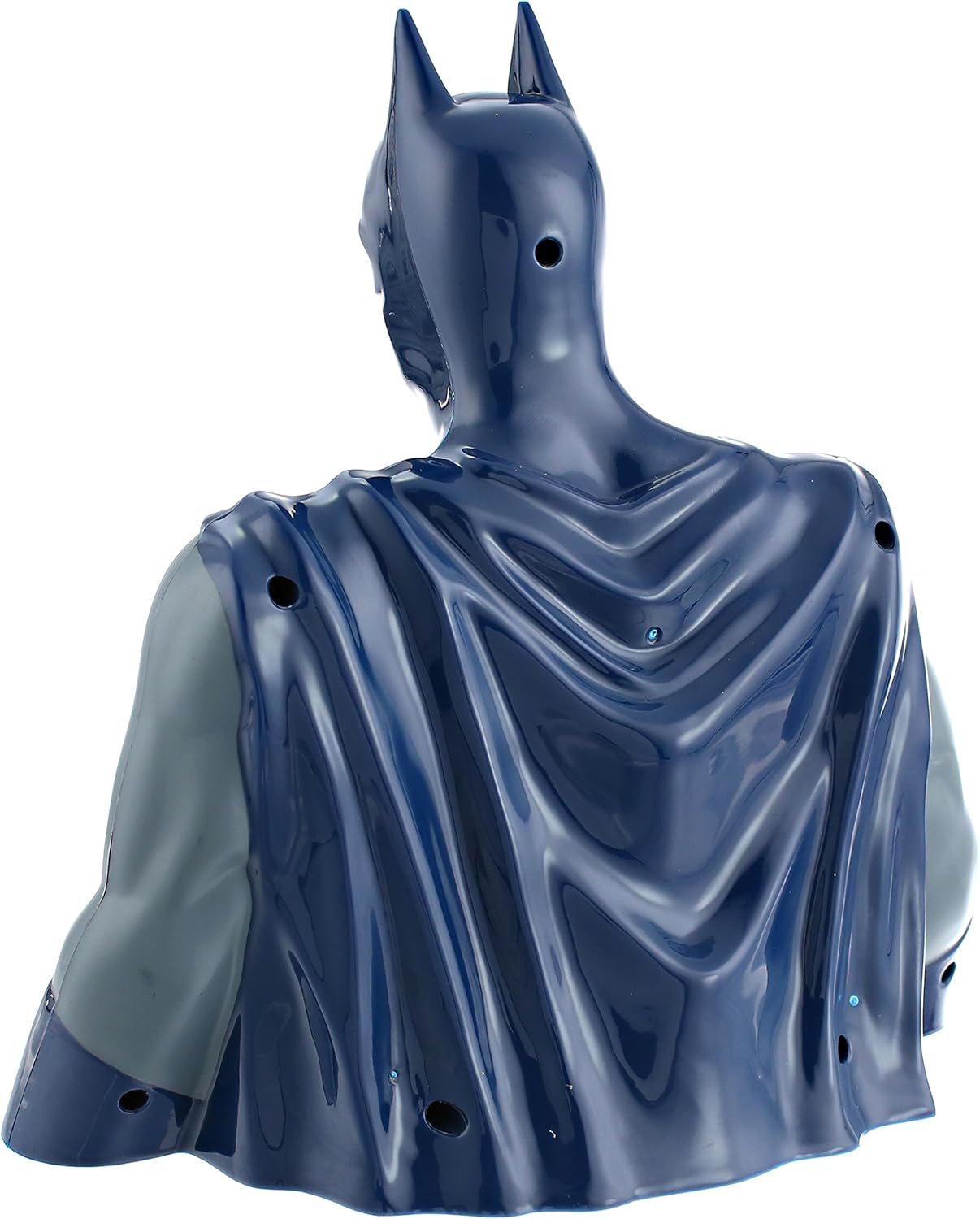
- Locate the battery compartment cover on the back or bottom of the Batman figure.
- Opatrně sejměte kryt.
- Insert 2 new AA batteries, ensuring the positive (+) and negative (-) terminals match the markings inside the compartment.
- Bezpečně nasaďte kryt prostoru pro baterie.

Obrázek: Zpět view of the Batman LCD Alarm Clock, illustrating the location of the battery compartment and control buttons.
Návod k obsluze
1. Nastavení času
The time setting buttons are typically located on the back or bottom of the clock. Refer to the image above for general button placement.
- Press the 'MODE' or 'SET' button to enter time setting mode. The hour digits will likely flash.
- Use the 'HOUR' or 'ADJUST' button to set the correct hour. Pay attention to AM/PM indicators if present.
- Press 'MODE' or 'SET' again to move to minute setting. The minute digits will flash.
- Use the 'MINUTE' or 'ADJUST' button to set the correct minutes.
- Press 'MODE' or 'SET' one last time to confirm and exit time setting mode.
2. Nastavení alarmu
The alarm setting buttons are usually near the time setting controls.
- Press the 'ALARM SET' or 'MODE' button repeatedly until the alarm time is displayed or the alarm setting mode is activated. The alarm hour digits will flash.
- Use the 'HOUR' or 'ADJUST' button to set the desired alarm hour.
- Press 'ALARM SET' or 'MODE' again to move to minute setting. The alarm minute digits will flash.
- Use the 'MINUTE' or 'ADJUST' button to set the desired alarm minutes.
- Press 'ALARM SET' or 'MODE' to confirm and exit alarm setting mode.
- Ensure the alarm is activated. There is usually an 'ALARM ON/OFF' switch or button.
3. Funkce alarmu
- When the alarm sounds, it will typically beep for approximately one minute before automatically turning off.
- This alarm clock does ne feature a snooze function.
- To manually turn off the alarm before the one-minute duration, locate and flip the alarm switch (usually on the bottom of the unit).
4. Funkce podsvícení
To activate the LCD display backlight, gently press down on the head of the Batman figure. The light will illuminate for a short period.
Obrázek: Přední strana view of the Batman LCD Alarm Clock, showing the digital display on the character's chest.
Video: A brief demonstration of the Accutime DC Comics BAT3031 Digital Display Batman LCD Alarm Clock, showcasing its design and digital display.
Údržba
- Čištění: Wipe the clock with a soft, dry cloth. Do not use liquid cleaners or sprays directly on the unit.
- Výměna baterie: Replace batteries when the display dims or the alarm function becomes unreliable. Always replace both AA batteries at the same time.
- Skladování: Pokud hodiny skladujete delší dobu, vyjměte baterie, abyste zabránili vytečení a poškození.
Odstraňování problémů
| Problém | Možná příčina | Řešení |
|---|---|---|
| Displej je tmavý nebo prázdný. | Slabé nebo vybité baterie. | Replace with new AA batteries. Ensure correct polarity. |
| Alarm se nespustí. | Budík není aktivovaný nebo je nesprávně nastavený. | Check if the alarm is turned ON. Verify the alarm time is set correctly. Replace batteries if needed. |
| Alarm stops after one minute. | This is a design feature. | The alarm is designed to sound for approximately one minute and then automatically turn off. There is no snooze function. |
| Tlačítka nereagují. | Baterie jsou slabé nebo nesprávně vložené. | Replace batteries and ensure they are installed with correct polarity. |
Specifikace
| Funkce | Detail |
|---|---|
| Číslo modelu | BAT3031 |
| Typ zobrazení | Digitální LCD |
| Zdroj napájení | 2 x AA baterie (nejsou součástí balení) |
| Typ pohybu | Analog-quartz |
| Materiál | Akrylonitrilbutadienstyren (ABS) |
| Voděodolnost | Žádný |
| Přibližné rozměry | 11.85 x 9.13 x 4.88 palce |
| Přibližná hmotnost | 15.52 unce |
Záruka a podpora
For warranty information or technical support, please contact Accutime customer service. Details can typically be found on the product packaging or the official Accutime webstránky. Uschovejte si prosím doklad o koupi pro případ reklamace.