1. Úvod
Děkuji za nákupasing the EONON A0119J Backup Camera. This device is designed to enhance safety and convenience when reversing your vehicle by providing a clear view of the area behind your car. This manual provides essential information for proper installation, operation, and maintenance of your backup camera. Please read it thoroughly before use and retain it for future reference.

Image 1.1: The EONON A0119J Backup Camera unit. This compact camera is designed for discreet installation on your vehicle.
2. Bezpečnostní informace
Dodržujte prosím následující bezpečnostní opatření, abyste předešli poškození produktu nebo zranění sebe či ostatních:
- This product is designed for 12V vehicle electrical systems only. Do not connect to other voltage systémy.
- Installation should be performed by a qualified professional if you are unfamiliar with automotive electrical systems.
- Ensure the vehicle's power is off before beginning installation to prevent electrical shock or damage.
- Always use caution when reversing, even with the backup camera. The camera is an aid and does not replace direct observation.
- Keep cables away from hot surfaces, moving parts, and sharp edges.
- Do not attempt to disassemble or modify the camera unit. This will void the warranty.
3. Obsah balení
Ověřte, zda jsou v balení přítomny všechny položky:
- EONON A0119J Backup Camera Unit
- Napájecí kabel (1 m)
- Video Cable (6m)
- Montážní šrouby (2 kusy)
- Instruction Manual (Japanese, refer to this document for English)

Image 3.1: Illustration of the package contents and a basic wiring diagram for the EONON A0119J Backup Camera.
4. Nastavení a instalace
The EONON A0119J backup camera is designed for easy installation. However, professional installation is recommended if you are not experienced with car electronics.
4.1. Montáž kamery
- Choose a suitable location on the rear of your vehicle, typically above the license plate or near the trunk handle, ensuring a clear view.
- Secure the camera unit using the provided mounting screws. The camera's small size (20mm x 18mm x 24mm) allows for discreet placement.

Image 4.1: The compact size of the EONON A0119J camera, shown next to a coin for scale, facilitating discreet installation.
4.2. Připojení vodičů
Refer to the wiring diagram (Image 3.1) and the following steps:
- Připojení napájení:
- Připojte red wire (ACC cable) of the power cable to the positive (+) terminal of your car's reverse light.
- Připojte black wire (Ground) to a suitable ground point on the vehicle chassis.
- Video Signal Connection:
- Připojte yellow RCA output terminal of the camera to the video input terminal of your car navigation system or monitor.
- If your monitor has a reverse trigger input, connect the red trigger wire from the video cable to this input. If your monitor does not have a reverse trigger input, this wire can be left unconnected.
- Vedení kabelů: Route all cables securely, avoiding sharp edges, moving parts, and heat sources. The video cable is approximately 6 meters long. If additional length is required, a backup camera extension cable must be purchased separately. Secure any unused cables to prevent interference.
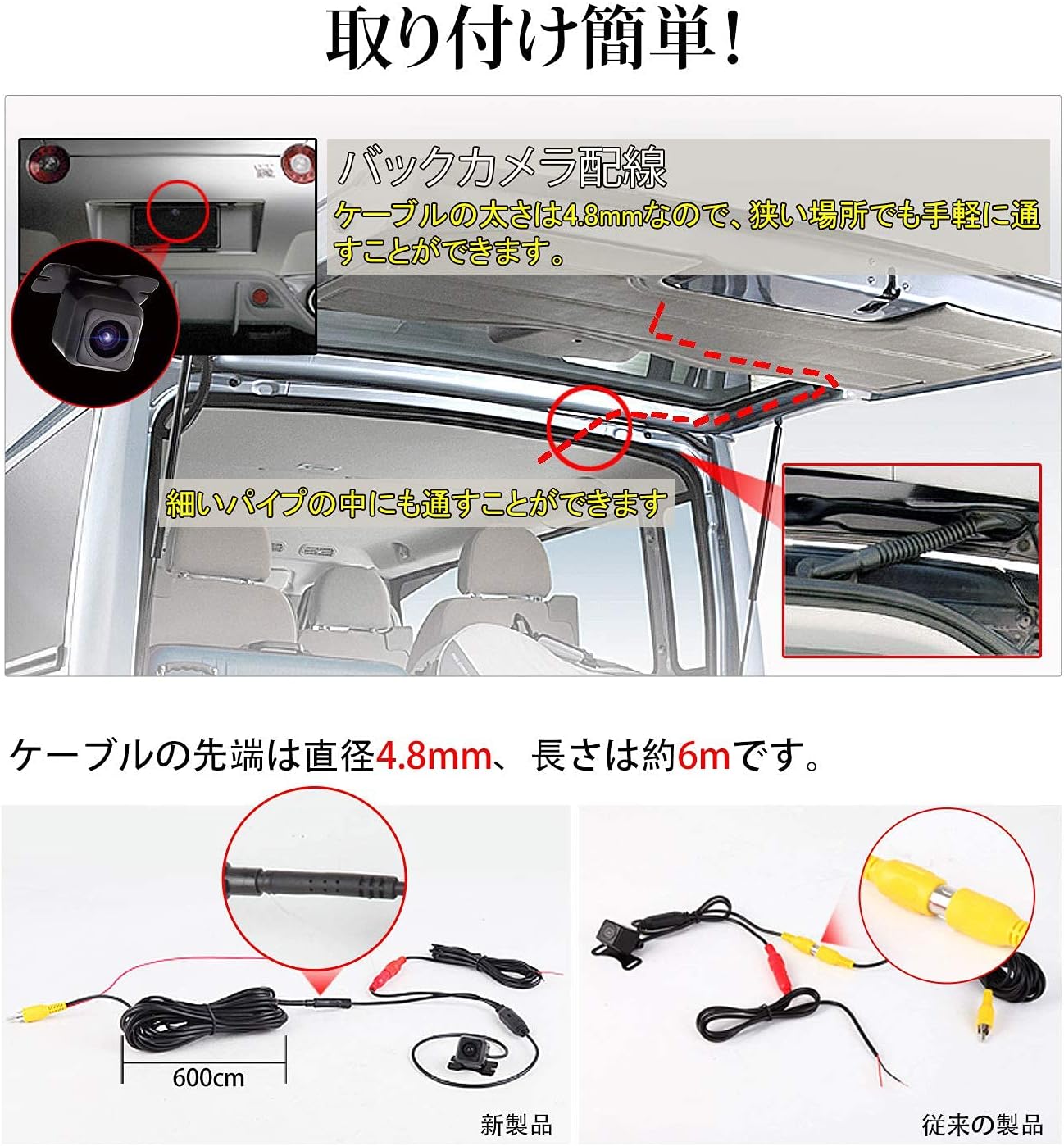
Obrázek 4.2: Příkladample of routing the camera cable through the vehicle. The slim cable (4.8mm diameter) allows for passage through narrow spaces.
5. Návod k obsluze
The EONON A0119J Backup Camera operates automatically when the vehicle is put into reverse gear, provided it is correctly installed.
5.1. Automatic Activation
When you shift your vehicle into reverse, the camera will automatically power on and transmit video to your connected monitor or car navigation system.
5.2. Guideline Display
The camera features an integrated guideline display on the video feed to assist with parking and judging distance. These guidelines are fixed and cannot be disabled.

Image 5.1: The camera's guideline display function, showing colored lines to assist with parking maneuvers.
5.3. Mirror Image Function
The camera outputs a mirror image by default, which is standard for rear-view applications. Depending on your car navigation system or monitor, it may be possible to switch to a normal (non-mirror) image if desired.
5.4. Wide Angle View
Fotoaparát nabízí širokoúhlý záběr view (120° horizontal, 170° wide angle) to minimize blind spots behind the vehicle, helping to prevent collisions with objects or structures.

Image 5.2: An illustration demonstrating the wide 170-degree viewing angle of the camera, significantly reducing rear blind spots.
6. Údržba
To ensure optimal performance and longevity of your EONON A0119J Backup Camera, follow these maintenance guidelines:
- Čištění: Pravidelně čistěte objektiv fotoaparátu měkkým hadříkemamp hadříkem odstraňte nečistoty, prach nebo skvrny od vody, které by mohly ucpat view. Avoid abrasive cleaners or solvents.
- Inspekce: Periodically check the camera's mounting and wiring connections to ensure they are secure and free from damage.
- Vodotěsný / prachotěsný: The camera is rated IP68 for dust and water resistance, meaning it is protected against dust ingress and can withstand immersion in water up to 1.5 meters for 30 minutes. However, avoid high-pressure washing directly on the camera.

Image 6.1: The EONON A0119J camera demonstrating its IP68 waterproof and dustproof capabilities, ensuring durability in various weather conditions.
7. Řešení problémů
If you encounter issues with your EONON A0119J Backup Camera, refer to the following common problems and solutions:
| Problém | Možná příčina | Řešení |
|---|---|---|
| Při couvání se nezobrazuje žádný obraz na monitoru. |
|
|
| Obraz je rozmazaný nebo nejasný. |
|
|
| Image is reversed (not mirror image). | Monitor setting or specific car navigation system behavior. | The camera outputs a mirror image by default. Check your monitor or car navigation system settings for an option to flip the image if a normal view je žádoucí. |
| Guidelines are not displayed. | The camera's guidelines are fixed and always displayed. If not visible, check video connection or camera functionality. | Ensure the video signal is correctly transmitted. If the guidelines are still absent, the camera unit may be faulty. |
| Cable length is insufficient. | Vehicle size requires longer cables. | Purchase a separate backup camera extension cable. The included video cable is 6 meters. |
8. Specifikace
| Funkce | Specifikace |
|---|---|
| Číslo modelu | A0119J |
| Značka | EONON |
| Barva | Černý |
| Kompatibilní zařízení | Car navigation systems |
| Typ instalace | Záložní kamera |
| svtage | 12 voltů |
| Technologie optických senzorů | CMD |
| Celkový počet pixelů | 360,000 pixelů |
| Minimální osvětlení | 0.1 Lux |
| Typ objektivu | Široký úhel |
| Actual Angle of View | 120° (Horizontal), 170° (Wide Angle) |
| Optical Sensor Size | 1/3 palce |
| Product Dimensions (Camera Unit) | 24 mm (D) x 20 mm (Š) x 18 mm (V) |
| Hodnocení voděodolnosti/prahotěsnosti | IP68 |
| Mirror Image Output | Supported (Default) |
| Guideline Display | Supported (Fixed, cannot be disabled) |
9. Záruka a podpora
9.1. Informace o záruce
The EONON A0119J Backup Camera typically comes with a 1-year manufacturer's warranty from the date of purchase. Please retain your proof of purchase for warranty claims. The warranty covers defects in materials and workmanship under normal use. It does not cover damage caused by improper installation, misuse, accidents, modifications, or unauthorized repairs.
9.2. Zákaznická podpora
For technical assistance, troubleshooting not covered in this manual, or warranty inquiries, please contact EONON customer support through the retailer where you purchased the product or visit the official EONON webstránky pro kontaktní informace.


