1. Konec produktuview
The Zinc Nitro Scooter is designed for exciting and dynamic riding experiences. It features a durable aluminum construction and incorporates interactive elements to enhance play.
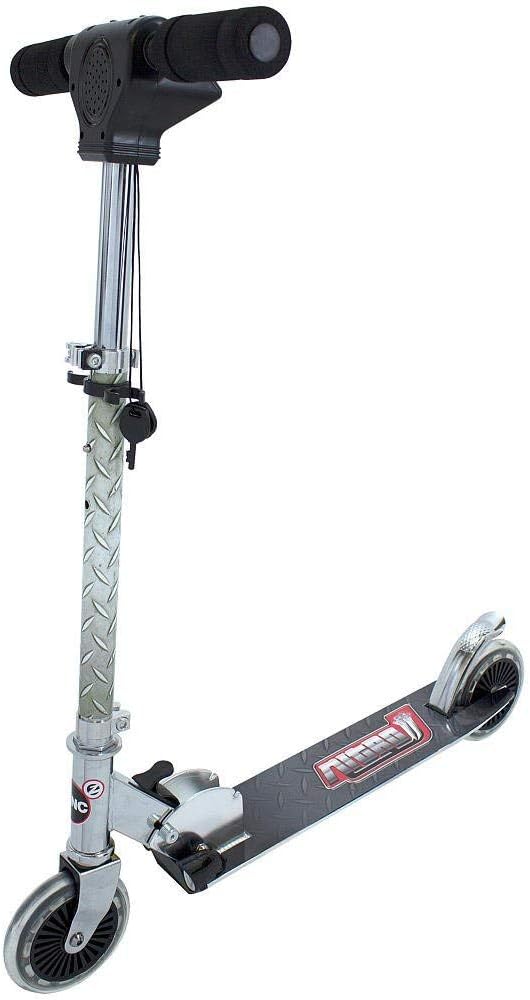
Obrázek 1: Hlavní view of the Zinc Nitro Scooter, showcasinjeho elegantní design a robustní konstrukce.
Klíčové vlastnosti:
- Přední a zadní světla: For enhanced visibility and exciting effects, especially in low-light conditions.
- Rear Screeching Brakes: Provides quick and effective stopping power with an engaging sound effect.
- Accelerating Engine Sounds: Realistic engine sounds activated by twisting the throttle, making riding more immersive.
- Odolná konstrukce: Made from aluminum for lightweight strength.
- Skládací design: Umožňuje snadné skladování a přepravu.
- Big Wheels: Equipped with awesome big wheels for a smooth ride.
2. Bezpečnostní informace
Always prioritize safety when operating the Zinc Nitro Scooter. Failure to follow these guidelines may result in injury.
Obecné bezpečnostní pokyny:
- Doporučený věk: Suitable for ages 5 to 9 years.
- Hmotnostní limit: Nepřekračujte maximální hmotnostní limit 45 liber (přibližně 20.4 kg).
- Ochranné pomůcky: Při jízdě vždy noste helmu, chrániče kolen, chrániče loktů a chrániče zápěstí.
- Dozor: Doporučuje se dohled dospělé osoby, zejména u mladších jezdců.
- Jízdní povrch: Ride on smooth, dry, paved surfaces away from traffic. Avoid uneven terrain, sand, gravel, or wet surfaces.
- brzdění: Familiarize yourself with the braking system before riding at speed.
- Údržba: Regularly inspect the scooter for loose parts, damage, or wear before each use.
- Bezpečnost baterie: The scooter requires 3 x AAA batteries for lights and sounds. Ensure correct battery installation and replace them when needed. Do not mix old and new batteries or different types of batteries.
3. Nastavení a montáž
The Zinc Nitro Scooter comes largely pre-assembled. Follow these steps to prepare it for use.
Rozložení koloběžky:
- Vyhledejte skládací mechanismus poblíž základny představce řídítek.
- Opatrně uvolněte zajišťovací mechanismus.
- Lift the handlebar stem until it clicks securely into the upright position. Ensure all locking mechanisms are fully engaged before riding.
Seřízení řídítek:
The handlebar height is adjustable to suit different rider heights.
- Otevřete rychloupínací třamp na představci řídítek.
- Adjust the handlebar to a comfortable height, typically around waist level for the rider.
- Bezpečně zavřete rychloupínací uzávěramp. Ensure the handlebar is firmly locked in place and does not wobble.
Battery Installation (for Lights and Sounds):
The scooter requires 3 x AAA batteries for its electronic features.
- Locate the battery compartment, typically on the handlebar unit.
- Pomocí malého šroubováku otevřete kryt přihrádky na baterie.
- Vložte 3 nové baterie typu AAA a dbejte na správnou polaritu (+/-).
- Nasaďte kryt prostoru pro baterie a zajistěte jej šroubem.
4. Návod k obsluze
Learn how to safely and effectively operate your Zinc Nitro Scooter.
Startování skútru:
- Položte jednu nohu pevně na desku koloběžky.
- Use your other foot to push off the ground, gaining initial momentum.
- Jakmile se pohnete, položte obě nohy na podlahu, jednu za druhou.
Using Lights and Sounds:
- Přední a zadní světla: The scooter is equipped with lights at the front and rear for visibility. These lights activate when the scooter is in motion or when the electronic features are engaged.
- Zvuky motoru: Twist the throttle grip on the handlebar to activate realistic engine acceleration sounds.
- Key Activated Features: Some electronic features, including lights and sounds, are activated by a key mechanism on the handlebar unit. Ensure the key is turned to the "ON" position.

Figure 2: Detail of the front lights, which illuminate for visibility and effect.
brzdění:
- The Zinc Nitro Scooter features a rear screeching brake. To engage the brake, gently press your foot down on the rear fender brake located above the rear wheel.
- Apply steady pressure to slow down or stop. The brake will produce a screeching sound for added effect.

Obrázek 3: View of the rear fender brake, designed for quick stopping.
Ukázkové video:
Video 1: Official demonstration of the Zinc Nitro Scooter, highlighting its key features including lights, engine sounds, and braking system. This video provides a visual guide to operating the scooter.
5. Údržba
Regular maintenance will ensure the longevity and safe operation of your Zinc Nitro Scooter.
- Čištění: Otřete skútr čisticím prostředkemamp hadříkem po každém použití. Nepoužívejte agresivní chemikálie ani abrazivní čisticí prostředky.
- Zkontrolujte spojovací prvky: Regularly check all nuts, bolts, and screws to ensure they are tight. It is crucial to tighten all components regularly, especially after initial use and before each ride.
- Kontrola kol: Inspect the wheels for wear and tear. Replace worn wheels promptly.
- Mazání ložisek: Periodically check and lubricate wheel bearings if necessary to ensure smooth rolling.
- Funkce brzdy: Test the brake before each ride to ensure it is functioning correctly and provides adequate stopping power.
- Skladování: Skladujte koloběžku na suchém a chladném místě mimo dosah přímého slunečního záření a vlhkosti.
6. Řešení problémů
This section addresses common issues you might encounter with your Zinc Nitro Scooter.
| Problém | Možná příčina | Řešení |
|---|---|---|
| Nefungují světla ani zvuky. |
|
|
| Scooter feels wobbly or loose. |
|
|
| Brzda není účinná. |
|
|
7. Specifikace
| Atribut | Detail |
|---|---|
| Značka | Zinek |
| Název modelu | zinc Nitro Scooter |
| Číslo modelu | NITRO2 |
| Barva | STŘÍBRO |
| Věkové rozmezí (popis) | Kid (5 - 9 years) |
| Hmotnostní limit | 45 libry |
| Rozměry produktu (D x Š x V) | 23 cm D x 17.3 cm Š x 34 cm V |
| Počet kol | 2 |
| Typ řídítek | Nastavitelný |
| Velikost kola | 15 centimetrů |
| Typ kola | Inline |
| Typ odpružení | Přední odpružení |
| Styl brzdy | Front Braking (Note: Product description mentions rear screeching brakes, this might be a discrepancy or a general term for scooter brakes) |
| Materiál | Hliník |
| Jsou vyžadovány baterie | 3 x AAA baterie |
| Datum první dostupnosti | 27. října 2014 |
8. Záruka a podpora
For detailed warranty information and customer support, please refer to the documentation included with your purchase or visit the official Zinc webUschovejte si doklad o koupi pro případné reklamace.
If you require assistance with troubleshooting or replacement parts not covered in this manual, please contact Zinc customer service directly.


