1. Úvod
Thank you for choosing the WiMiUS Q1 4K WiFi Waterproof Action Camera. This manual provides essential information for setting up, operating, and maintaining your device. Please read it carefully before use to ensure optimal performance and longevity of your camera.

Image 1.1: WiMiUS Q1 4K WiFi Waterproof Action Camera. This image displays the camera in its retail packaging, highlighting its 4K Full HD capabilities, 40m waterproof rating, WiFi connectivity, 170-degree wide angle, and 2.0-inch LCD screen.
2. Obsah balení
Ověřte prosím, zda jsou ve vašem balení obsaženy všechny níže uvedené položky:
- 1 x WiMiUS Q1 4K Action Camera
- 2 x 900mAh dobíjecí baterie
- 1 x dok pro nabíjení baterií
- Various mounting accessories (e.g., waterproof case, helmet mounts, bicycle mount, adhesive mounts, clips, bandages, tethers, USB cable, cleaning cloth)
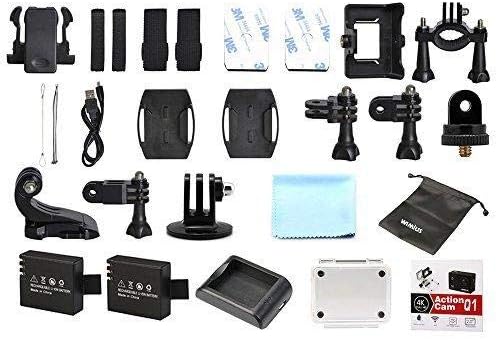
Image 2.1: WiMiUS Q1 Action Camera Accessories. This image shows the comprehensive set of accessories included with the camera, such as various mounts, straps, a charging dock, two batteries, a USB cable, and a cleaning cloth.
3. Fotoaparát skončilview
Familiarize yourself with the camera's buttons and ports:

Image 3.1: WiMiUS Q1 Camera Labeled Parts. This diagram illustrates the various components of the camera, including the Power/Mode button, OK button, UP/WiFi button, Down button, Speaker, Microphone, Micro SD card slot, USB port, HDMI port, Charging Indicator, Operation Indicator, and WiFi Indicator.
- Tlačítko napájení / režimu: Stisknutím a podržením zapnete/vypnete napájení. Krátkým stisknutím přepnete režimy.
- Tlačítko OK: Confirm selection, start/stop recording, or take a photo.
- UP/WiFi Button: Navigate up in menus. Press and hold to activate/deactivate WiFi.
- Tlačítko dolů: Navigate down in menus.
- Reproduktor: Audio výstup.
- Mikrofon: Audio input for recording.
- Slot Micro SD: Insert Micro SD card (up to 64GB, not included).
- USB port: Pro nabíjení a přenos dat.
- Port HDMI: Pro připojení k externímu displeji.
- Indikátor nabíjení: Zobrazuje stav nabíjení.
- Provozní indikátor: Shows camera's operational status.
- Indikátor WiFi: Zobrazuje stav připojení k WiFi.
4. Nastavení
4.1. Instalace baterie
- Otevřete kryt přihrádky na baterie na spodní straně fotoaparátu.
- Vložte plně nabitou baterii s kapacitou 900 mAh a dbejte na správnou orientaci.
- Bezpečně zavřete kryt bateriového prostoru.
4.2. Instalace Micro SD karty
A Micro SD card (not included) is required for storing photos and videos. The camera supports cards up to 64GB.
- Vyhledejte slot pro kartu Micro SD na boku fotoaparátu.
- Insert the Micro SD card with the contacts facing the camera's front until it clicks into place.
- Chcete-li kartu vyjmout, jemně ji zatlačte, dokud nevyskočí.
4.3. Nabíjení baterie
Use the provided charging dock and USB cable to charge the batteries. A full charge takes approximately 3 hours.
- Vložte baterii do nabíjecí stanice.
- Connect the charging dock to a USB power source (5V 1A) using the USB cable.
- The charging indicator on the dock will show the charging status.
4.4. Použití vodotěsného pouzdra
The waterproof case allows the camera to be used underwater up to 40 meters. Ensure the case is properly sealed before submerging.
- Place the camera inside the waterproof case.
- Pevně zavřete západku, abyste zajistili vodotěsné utěsnění.
- Before first use, test the empty waterproof case in water to confirm no leaks.
5. Návod k obsluze
5.1. Zapnutí/vypnutí
- Zapnutí: Stiskněte a podržte Napájení/režim tlačítko na 3 sekund.
- Vypnout: Stiskněte a podržte Napájení/režim tlačítko na 3 sekund.
5.2. Přepínání režimů
Krátce stiskněte Napájení/režim button to cycle through different modes: Video Recording, Photo Shooting, Playback, and Settings.
5.3. Nahrávání videa
- Přepněte do režimu nahrávání videa.
- Stiskněte tlačítko OK button to start recording. The operation indicator will flash.
- Stiskněte tlačítko OK button again to stop recording. The operation indicator will stop flashing.
Rozlišení videa: 4K@30FPS, 2.7K@30FPS, 1080P@60FPS, 720P@120FPS.
Special Video Modes:
- Časosběr: Intervals of 0.5S, 1S, 2S, 5S, 10S, 30S, 60S.
- Nahrávání ve smyčce: 2min, 3min, 5min segments.
- Zpomalený pohyb: 1080P@60FPS, 720P@120FPS.
5.4. Fotografování
- Přepněte do režimu fotografování.
- Stiskněte tlačítko OK tlačítko pro pořízení fotografie.
Rozlišení fotografií: 16M, 14M, 12M, 8M, 5M.
Fotografické režimy: Single, Self-Timer (3S/5S/10S), Continuous Shot (3P/S, 5P/S, 10P/S, 20P/S).
5.5. Připojení Wi-Fi
Connect your camera to a smartphone or tablet via Wi-Fi for remote control and file převod.
- Download the official WiMiUS app from your device's app store.
- Na fotoaparátu stiskněte a podržte tlačítko UP/WiFi button to activate Wi-Fi. The Wi-Fi indicator will light up.
- On your smartphone/tablet, go to Wi-Fi settings and connect to the camera's Wi-Fi network (SSID usually starts with 'WiMiUS' or similar).
- Open the WiMiUS app to control the camera remotely.
5.6. Přehrávání
Na review your recorded videos and photos:
- Switch to Playback mode using the Napájení/režim tlačítko.
- Použijte UP a Dolů buttons to navigate through your files.
- Stiskněte tlačítko OK tlačítko na view vybraný file.
6. Údržba
6.1. Čištění
- Use a soft, lint-free cloth to clean the camera lens and LCD screen.
- Na odolné šmouhy lehceampOpláchněte hadřík vodou. Vyhněte se agresivním chemikáliím.
- Před zavřením jakýchkoli portů nebo přihrádek se ujistěte, že je fotoaparát suchý.
6.2. Skladování
- Fotoaparát skladujte na chladném a suchém místě mimo dosah přímého slunečního záření a extrémních teplot.
- Pokud fotoaparát nebudete delší dobu používat, vyjměte baterie.
7. Řešení problémů
- Kamera se nezapíná: Ujistěte se, že je baterie plně nabitá a správně vložená. Zkuste použít druhou baterii.
- Chyba SD karty: Ensure the Micro SD card is correctly inserted and formatted (FAT32 recommended). Try a different compatible Micro SD card.
- Špatná kvalita videa/fotografií: Check lens for smudges. Ensure adequate lighting. Verify resolution settings.
- Problémy s připojením Wi-Fi: Ensure Wi-Fi is enabled on the camera and your mobile device. Restart both devices. Check for app updates.
- Zamrznutí kamery: Vyjměte a znovu vložte baterii pro resetování fotoaparátu.
8. Specifikace
| Model | WiMiUS Q1 |
| LCD obrazovka | 2.0'' LTPS |
| Čočka | 170-degree A+ High Resolution Wide Angle |
| Rozlišení videa | 4K@30FPS, 2.7K@30FPS, 1080P@60FPS, 720P@120FPS |
| Formát videa | MOV (H.264) |
| Rozlišení fotografie | 16M/14M/12M/8M/5M |
| Skladování | Micro SD Card, up to 64GB (Class 10 or higher recommended) |
| Baterie | 2 x 900mAh Rechargeable Li-ion |
| Doba nabíjení | Přibližně 3 hodiny |
| Konektivita | USB 2.0, Wi-Fi |
| Kompatibilita systému | Windows XP/Vista/Win7 or above, Mac OS |
| Speciální funkce | Time Lapse, Loop Recording, Slow Motion, Waterproof (with case) |
| Optický zoom | 10x |
| Typ snímače | CMOS |
9. Záruka a podpora
For warranty information and technical support, please refer to the documentation provided with your purchase or visit the official WiMiUS webUschovejte si doklad o koupi pro případ reklamace.


