Zavedení
This manual provides detailed instructions for the safe and effective use of your KODAK PIXPRO AZ365 Digital Camera. Please read this manual thoroughly before operating the camera and keep it for future reference. The KODAK PIXPRO AZ365 features a 16-megapixel sensor, 36x optical zoom, 24mm wide-angle lens, optical image stabilization, and 720p HD video recording capabilities.
Co je v krabici
Ověřte, zda balení fotoaparátu obsahuje všechny níže uvedené položky:
- Digitální fotoaparát KODAK PIXPRO AZ365
- Alkalické baterie AA (4)
- USB kabel
- Popruh na krk
- Krytka objektivu
- Servisní karta
- Rychlý průvodce
- Záruční list
Fotoaparát skončilview
Familiarize yourself with the main components of your KODAK PIXPRO AZ365 camera.

Obrázek 1: Přední strana View (Flash Raised) - This image shows the front of the KODAK PIXPRO AZ365 camera in red, with the built-in flash unit in the raised position. The lens is retracted, and the KODAK logo is visible above the lens barrel.
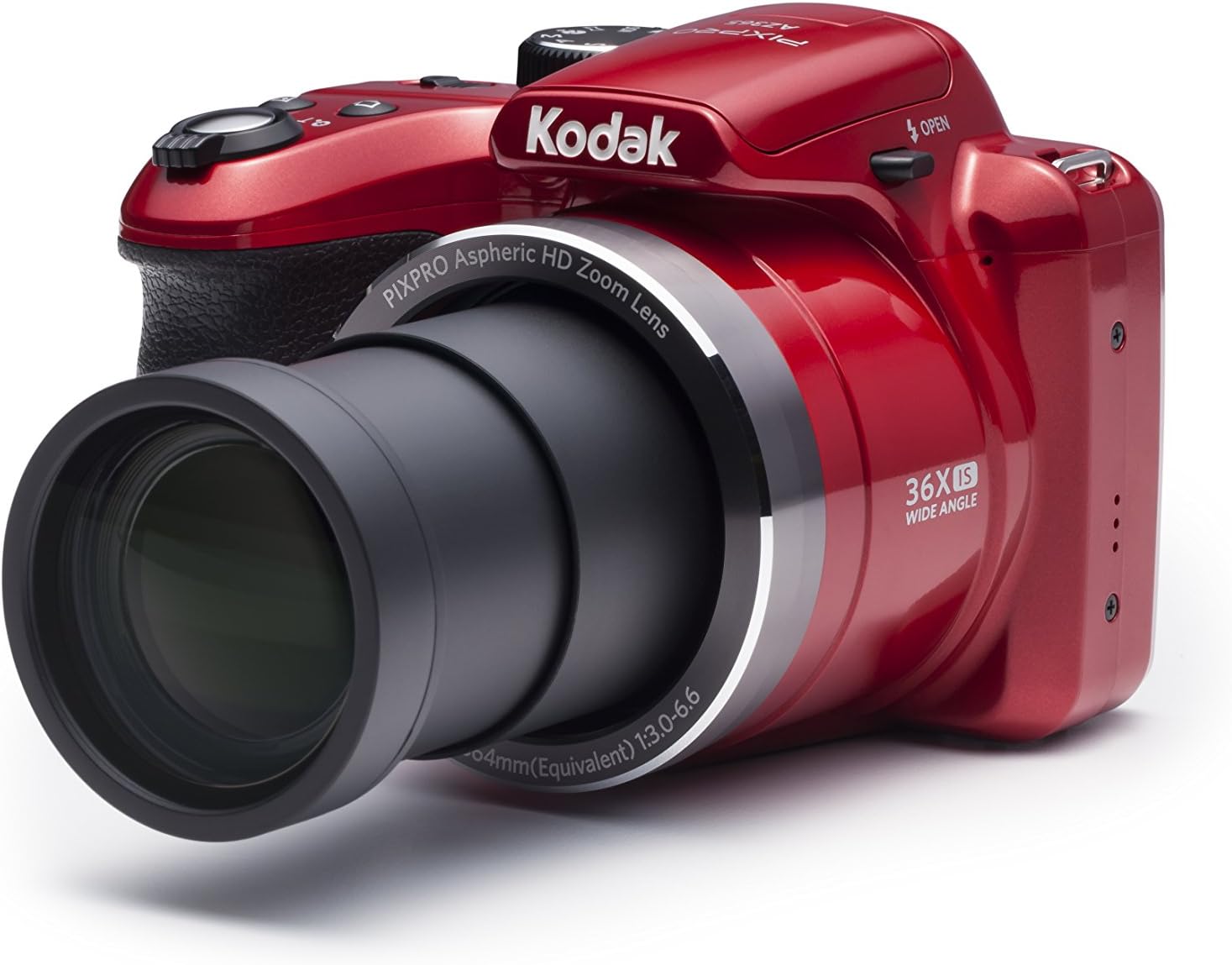
Obrázek 2: Přední strana View (Vysunutý objektiv) - This image displays the KODAK PIXPRO AZ365 camera from the front, with its 36x optical zoom lens fully extended. The camera body is red, and the lens barrel indicates "PIXPRO Aspheric HD Zoom Lens" and "36X IS WIDE ANGLE".

Obrázek 3: Nahoře View - Tento obrázek nabízí pohled shora dolů view of the KODAK PIXPRO AZ365 camera. Key controls visible include the power on/off switch, the shutter button with zoom lever, and the mode dial with settings like P, S, A, M, Auto, SCN, Movie, and Panorama.

Obrázek 4: Zadní View - This image shows the back of the KODAK PIXPRO AZ365 camera, highlighting the 3-inch LCD screen. To the right of the screen are various control buttons, including menu, info, playback, display, and a directional pad with AF, SET, and flash controls.
Nastavení
1. Instalace baterií
- Otevřete kryt přihrádky na baterie, který se nachází na spodní straně fotoaparátu.
- Insert four (4) AA Alkaline batteries, ensuring correct polarity (+/-) as indicated inside the compartment.
- Bezpečně zavřete kryt bateriového prostoru.
Poznámka: For optimal performance, use new, high-quality alkaline batteries. Battery life can vary significantly based on usage and battery type.
2. Vložení paměťové karty
- Vyhledejte slot pro paměťovou kartu, obvykle poblíž prostoru pro baterii.
- Insert an SDXC memory card with the metal contacts facing the correct direction until it clicks into place.
- Chcete-li kartu vyjmout, jemně na ni zatlačte, dokud nevyskočí.
Poznámka: The camera supports SDXC memory cards. An 8MB internal memory is available, but an SDXC card is recommended for storing photos and videos.
3. Připevnění popruhu na krk
Thread the neck strap through the strap eyelets on the camera body to prevent accidental drops.
Obsluha fotoaparátu
Zapnutí/vypnutí
Posuňte ON/OFF switch located on the top of the camera to power it on or off. The lens will extend upon power-on.
Fotografování
- Turn the mode dial to your desired shooting mode (e.g., Auto for general use).
- Komponujte snímek pomocí 3palcového LCD displeje.
- Use the zoom lever around the shutter button to adjust the optical zoom (36x) or digital zoom (4x).
- Stiskněte tlačítko spouště do poloviny pro zaostření. Fotoaparát automaticky detekuje zaostřovací body.
- Úplným stisknutím tlačítka spouště pořiďte snímek.
Používání blesku
The camera features a built-in flash. Press the flash button on the directional pad to cycle through flash modes:
- Auto Flash: Fotoaparát automaticky určí, zda je potřeba blesk.
- Redukce červených očí: Odpálí předblesk pro redukci efektu červených očí.
- Doplňkový blesk: Blesk se aktivuje bez ohledu na okolní osvětlení.
- Pomalá synchronizace: Combines flash with a slow shutter speed for balanced exposure in low light.
- Red-Eye Reduction + Slow Synchro: Combines both effects.
Režimy fotografování
The mode dial allows you to select various shooting modes for different scenarios:
- Auto: Camera automatically sets optimal settings for most situations.
- Program (P): Fotoaparát nastavuje clonu a rychlost závěrky, ale můžete upravit i další nastavení.
- Priorita závěrky (S): Vy nastavíte rychlost závěrky, fotoaparát nastaví clonu.
- Priorita clony (A): Vy nastavíte clonu, fotoaparát nastaví rychlost závěrky.
- Manuál (M): Ovládáte clonu i rychlost závěrky.
- Scéna (SCN): Access various scene modes like Landscape, Portrait, Sports, Macro, etc.
- Film: Pro nahrávání videa.
- Panorama: Pořizujte širokoúhlé panoramatické snímky.
Nahrávání videa
The KODAK PIXPRO AZ365 can record high-definition video.
- Otočte volič režimů do polohy Film režimu.
- Press the dedicated video recording button (usually marked with a red dot) to start recording.
- Dalším stisknutím tlačítka nahrávání zastavíte.
Videos are recorded in 720p resolution in MOV (H.264) format.
Přehrávání
Na view vaše pořízené fotografie a videa:
- Stiskněte tlačítko Přehrávání button (usually marked with a triangle icon).
- Pro procházení obrázků a videí použijte směrový ovladač.
- Stiskněte tlačítko SOUBOR tlačítko pro přehrávání videí.
- Chcete-li odstranit a file, select it and press the delete button (often marked with a trash can icon) and confirm.
Údržba
Čištění fotoaparátu
- K čištění těla fotoaparátu použijte měkký hadřík, který nepouští vlákna.
- Pro čištění objektivu a LCD obrazovky použijte speciální hadřík a roztok na čištění objektivů. Vyhněte se agresivním chemikáliím.
- K odstranění prachu z povrchu objektivu použijte ofukovací kartáč.
Péče o baterie
- Pokud fotoaparát nebudete delší dobu používat, vyjměte baterie.
- Baterie skladujte na chladném a suchém místě.
- Použité baterie zlikvidujte v souladu s místními předpisy.
Skladování
Store the camera in a dry, dust-free environment, away from extreme temperatures and direct sunlight. Use the provided lens cover to protect the lens.
Odstraňování problémů
| Problém | Možná příčina / řešení |
|---|---|
| Fotoaparát se nezapne. |
|
| Špatná životnost baterie. |
|
| Obrázky jsou rozmazané. |
|
| Chyba paměťové karty. |
|
Specifikace
| Funkce | Detail |
|---|---|
| Název modelu | AZ365 |
| Efektivní rozlišení | 16.1 MP |
| Technologie fotosenzoru | CCD |
| Optický zoom | 36x |
| Digitální zoom | 4x |
| Minimální ohnisková vzdálenost | 24 Millimeters (Wide Angle) |
| Maximální ohnisková vzdálenost | 864 milimetrů |
| Stabilizace obrazu | Optická (OIS) |
| Rozlišení videa | 720p HD |
| Formát záznamu videa | MOV (H.264) |
| Velikost obrazovky | 3 palce |
| Typ zobrazení | LCD |
| Podporováno File Formát | JPEG |
| Typ paměti Flash | SDXC |
| Typ baterie | AA Alkaline (4) |
| Hmotnost položky | 15.36 unce |
| Barva | Červený |
Záruka a podpora
Your KODAK PIXPRO AZ365 Digital Camera comes with a limited warranty. Please refer to the included Warranty Card for detailed terms and conditions, including warranty period and coverage.
For technical support, service, or inquiries regarding your product, please contact KODAK customer service. Contact information can typically be found on the Warranty Card or the official KODAK PIXPRO webmísto.