1. Úvod
The Intermatic DT121K is an indoor 7-day digital plug-in timer designed for automated control of electrical devices. It offers flexible programming options, including 24-hour or 7-day schedules, and can manage up to 7 on/off events. Key features include an astronomic function for automatic sunrise/sunset adjustments, automatic daylight saving time correction, and a random mode to enhance home security by varying light activation times. This timer is equipped with a single 2-prong receptacle and is suitable for various indoor applications, such as controlling Christmas tree lights or seasonal decorations.
2. Bezpečnostní informace
- Read all instructions before use to ensure proper operation and to prevent damage to the timer or connected devices.
- This timer is designed for indoor use only. Do not expose to water or moisture.
- Do not exceed the electrical ratings of the timer (15A, 125VAC, 60Hz, 1/2 HP Motor Load, 1000W Tungsten, 500VA Electronic Ballast, 120VAC 8.3A Standard Ballast). Overloading can cause overheating and potential fire hazards.
- Ensure the timer is securely plugged into a properly grounded outlet.
- Nepokoušejte se časovač rozebírat ani opravovat. Veškerý servis svěřte kvalifikovanému personálu.
- Uchovávejte mimo dosah dětí.
3. Konec produktuview a funkce
The DT121K timer features an intuitive interface with a digital display and control buttons for easy programming. Its compact design allows it to plug directly into a standard wall outlet.

Obrázek 3.1: Přední strana view of the DT121K timer, showing the digital display and control buttons (PROGRAM, TIME, RESUME, MODE, +, -).
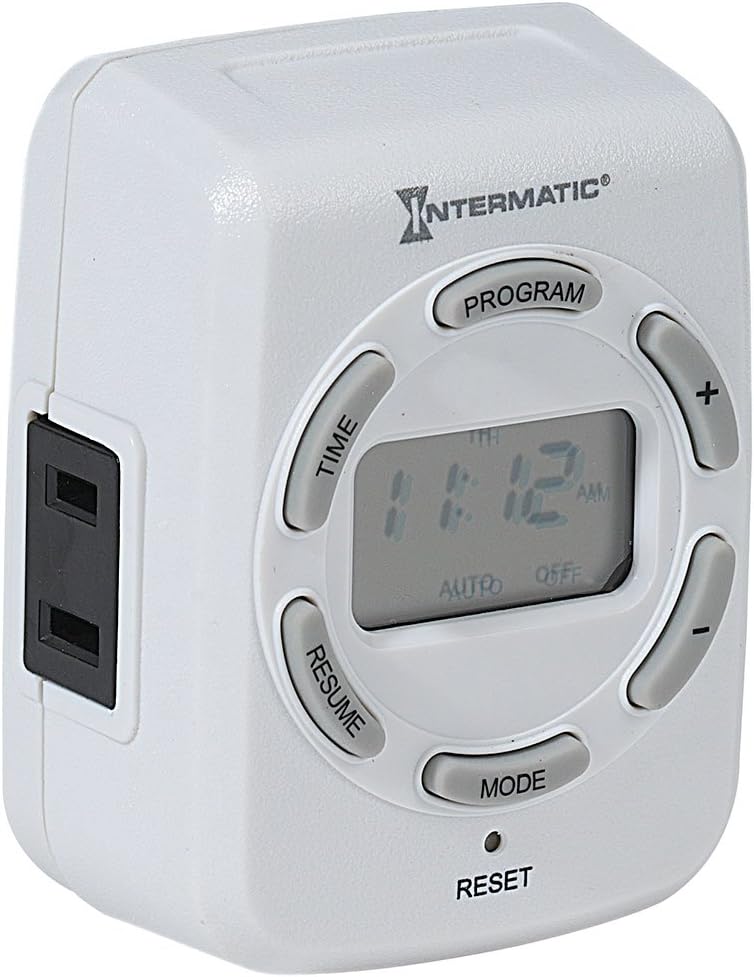
Obrázek 3.2: Strana view of the DT121K timer, highlighting the single 2-prong receptacle for connecting devices.
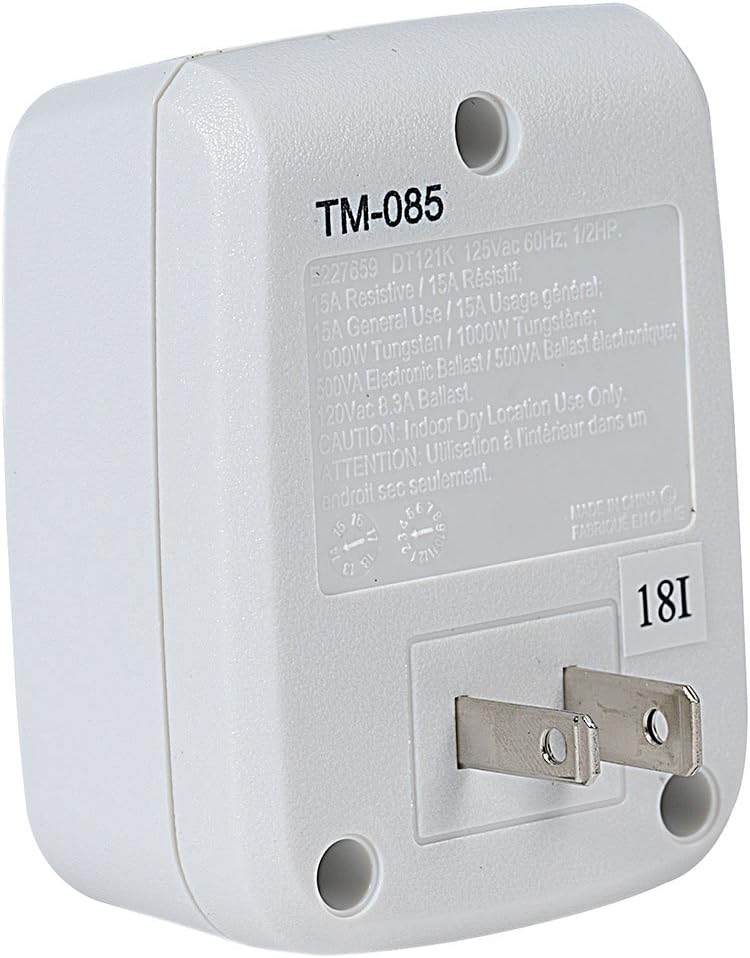
Obrázek 3.3: Zadní view of the DT121K timer, displaying the 2-prong plug for wall outlet insertion and the product specification label.
Klíčové vlastnosti:
- 7-Day/24-Hour Programming: Allows for flexible scheduling of connected devices throughout the week.
- 7 ON/OFF Events: Program up to seven distinct on and off times per day or week.
- Astronomic Feature: Automatically adjusts ON/OFF times based on daily sunrise and sunset changes, ideal for outdoor lighting simulation.
- Automatické nastavení letního času: Simplifies time management by automatically adjusting for DST changes.
- Náhodná funkce: Varies programmed ON/OFF times by a few minutes to create a "lived-in" appearance, enhancing security.
- Zálohování dobíjecí baterie: Maintains programmed settings and current time during power outages.
- Single 2-Prong Receptacle: Provides a convenient outlet for controlling a single device.
4. Nastavení
4.1 První zapnutí a nabíjení
- Plug the DT121K timer into a standard 125VAC wall outlet.
- Allow the timer to charge for at least 30 minutes before initial programming. The internal rechargeable battery will charge automatically when plugged in.
- If the display is blank or dim, press the RESETOVAT button (located at the bottom of the timer, may require a pointed object like a pen tip) to clear all settings and restart the timer.
4.2 Nastavení aktuálního času a dne
- Stiskněte a podržte ČAS tlačítko, dokud displej nezačne blikat.
- Použijte + a - buttons to adjust the current hour. Pay attention to AM/PM indicators.
- Stiskněte tlačítko ČAS znovu stiskněte tlačítko pro přechod na minuty a poté použijte + a - upravit.
- Stiskněte tlačítko ČAS button again to select the current day of the week (MO, TU, WE, TH, FR, SA, SU). Use + a - vybrat.
- Stiskněte tlačítko ČAS button one last time to save the settings and exit time setting mode.
5. Návod k obsluze
5.1 Programování událostí ZAP/VYP
The timer allows for up to 7 ON and 7 OFF programmed events. Each event can be set for specific days or groups of days.
- Stiskněte tlačítko NAPROGRAMOVAT button. The display will show "1 ON" and the time will flash.
- Použijte + a - tlačítky nastavte požadovaný čas zapnutí pro program 1.
- Stiskněte tlačítko NAPROGRAMOVAT button again. The display will show "1 OFF" and the time will flash.
- Použijte + a - tlačítky nastavte požadovaný čas vypnutí pro Program 1.
- Stiskněte tlačítko NAPROGRAMOVAT button again to select the days for Program 1. Use + a - to cycle through day options (e.g., MO-SU, MO-FR, SA-SU, individual days).
- Repeat steps 1-5 for additional ON/OFF programs (up to 7).
- Chcete-li opustit režim programování, stiskněte tlačítko RESUMÉ button or wait approximately 30 seconds for the timer to automatically return to normal operation.
5.2 Using Astronomic (Dusk-to-Dawn) Feature
The astronomic feature allows the timer to turn ON at sunset and OFF at sunrise, or at a set time relative to them.
- When setting an ON or OFF program, cycle through the time options using the + or - buttons until "DUSK" or "DAWN" appears on the display.
- You can also set an offset (e.g., DUSK + 30 minutes, DAWN - 15 minutes) by continuing to press + or - after DUSK/DAWN appears.
- Save the program as usual by pressing NAPROGRAMOVAT.
5.3 Activating Random Mode
The random mode varies the programmed ON/OFF times by a few minutes (typically +/- 30 minutes) to simulate occupancy.
- Stiskněte tlačítko MODE button repeatedly until "RDM" (Random) appears on the display.
- The timer will now operate in random mode, slightly adjusting your programmed ON/OFF times.
- To deactivate random mode, press MODE until "RDM" disappears.
5.4 Ruční ovládání
To temporarily override the current program without deleting it:
- Stiskněte tlačítko MODE button to cycle through ON, OFF, and AUTO modes.
- Selecting ON will keep the connected device on until the next programmed OFF event or until manually changed.
- Selecting OFF will keep the connected device off until the next programmed ON event or until manually changed.
- Selecting AUTO returns the timer to its programmed schedule.
6. Údržba
- Clean the timer with a soft, dry cloth. Do not use abrasive cleaners or solvents.
- Před čištěním se ujistěte, že je časovač odpojený ze zásuvky.
- The internal battery is rechargeable and designed for long life. No user maintenance is required for the battery.
7. Řešení problémů
| Problém | Možná příčina | Řešení |
|---|---|---|
| Displej je prázdný nebo tmavý. | Battery not charged or needs reset. | Plug timer into an active outlet for at least 30 minutes. Press the RESETOVAT tlačítko. |
| Device does not turn ON/OFF at programmed times. | Incorrect programming, timer in manual override mode, or power outage. | Verify programmed ON/OFF times and days. Ensure timer is in AUTO mode. Check power to the outlet. |
| Náhodný režim nefunguje. | Náhodný režim není aktivován. | Stiskněte tlačítko MODE button until "RDM" appears on the display. |
| Čas je po výpadku proudu nesprávnýtage. | Battery backup depleted or not fully charged. | Ensure timer is regularly plugged in to keep the battery charged. Reset and reprogram time if necessary. |
8. Specifikace
- Model: DT121K
- Vstupní objemtage: 125 V stř., 60 Hz
- Maximální zatížení: 15 Amps Resistive, 1000W Tungsten, 500VA Electronic Ballast, 1/2 HP Motor Load
- Počet programů: Až 7 událostí ZAP/VYP
- Typ zásuvky: 2-kolíkové
- Baterie: Dobíjecí lithium-iontová baterie (součástí balení)
- Rozměry: 6.75 x 5 x 2.5 palce
- Hmotnost: 4.6 unce
- Materiál: Pryskyřice, Plast
- Barva: Black (Note: Product images show white, but specification lists black. Please refer to product packaging for exact color.)
- certifikace: Seznam UL
- UPC: 078275143388
9. Záruka a podpora
For warranty information and technical support, please refer to the official Intermatic webnebo se obraťte přímo na jejich zákaznický servis. Uschovejte si účtenku jako doklad o koupi pro případné reklamace.
Intermatic Customer Support:
- Webmísto: www.intermatic.com
- Contact information can typically be found in the "Support" or "Contact Us" section of their webmísto.


